
MeisterTask
MeisterTask is a work management platform for projects, tasks and documentation, available on Android, iOS, macOS, web and Windows.
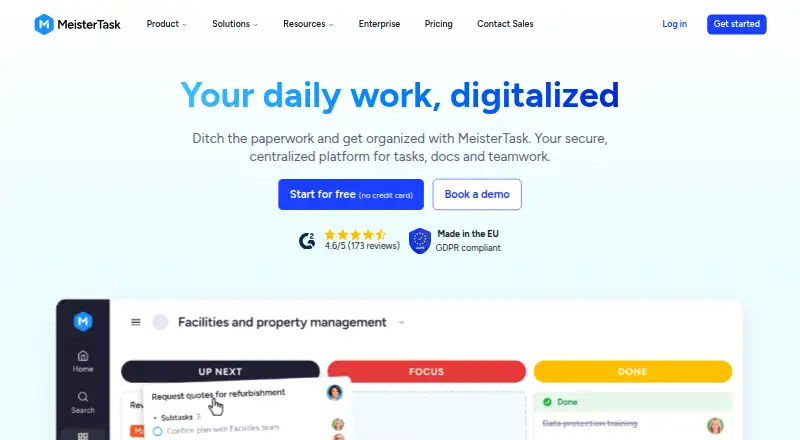
What MeisterTask is
MeisterTask is a work management platform for projects, tasks and documentation, available on Android, iOS, macOS, web and Windows. Each project uses a customizable Kanban-style board to show task status, while an overview helps track deadlines, risks and progress across projects. Automations can take care of repeat actions, such as assigning an owner when a task enters a board section. Reports can be filtered by task owner, status and due date. Integrations include Slack, Google Calendar, iCal, Gmail, Outlook, Google Drive, Dropbox, OneDrive and Zapier. Basic users can connect two integrations; Pro and Business users have unlimited integrations, and ChatGPT and Claude apps do not count toward Basic's cap. The Free plan is free and includes up to 3 projects, while Pro is $12.50 a month and Business is $24 a month. Meister says its servers are in an ISO 27001-certified data center in Germany and describes security and access controls for workspaces.
Good
- Customizable boards show task status.
- Project overview tracks deadlines, risks and progress.
- Automations can assign task owners.
- Reports filter by owner, status and due date.
- Available on Android, iOS, macOS, web and Windows.
Watch out
- Basic is limited to two integrations.
- Free includes up to 3 projects.
- Pro is $12.50 a month.
- Business is $24 a month.
Who it suits
The Free plan is aimed at individuals, while Pro is described for small teams. Business may suit teams centralizing workflows, and Enterprise is for organizations needing advanced security and support.
Verdict
MeisterTask combines task boards, project oversight, reporting and automation, with plan options for individuals through organizations. Check the project and integration caps against your needs before choosing a plan.
Plans and prices
From MeisterTask's own pricing page, checked 4 Oct 2026.
| Plan | Price | What it gives you |
|---|---|---|
| Free | Free | Unlimited tasks · Up to 3 projects · Up to 5 notes · 5 Content Manager seats · Unlimited team members · 20 Meister AI credits · €0 Forever |
| Pro | $12.50 a month | Unlimited projects · Unlimited notes · External sharing · Integrations · Private projects · Recurring tasks & automations · 75 Meister AI credits · €12 50 Per User/Month |
| Business | €24 a month | Timeline views · Team overview · Subtasks · Roles and permissions · Custom reports · 350 Meister AI credits · Unlimited version history · Priority email & phone support · €24 Per User/Month |
| Enterprise | Priced on request | Workload planner · Portfolios · SSO · Compliance exports · Dedicated CS manager · Personalized onboarding · Custom |
The facts
Each one read from MeisterTask's own pages, with the date it was checked.
What it does
- Audience
- The pricing page describes Free for individuals, Pro for small teams, Business for teams centralizing workflows and Enterprise for organizations needing advanced security and support.checked 4 Oct 2026
- Automation
- Automations can handle repetitive actions such as assigning an owner when a task is added to a board section.checked 4 Oct 2026
- Automation rules
- Yeschecked 20 Sep 2026
- Backups
- Meister says it makes daily incremental backups and full backups every 30 days.checked 4 Oct 2026
- Boards
- Each project has a customizable Kanban-style board that shows the status of every task.checked 4 Oct 2026
- Guest access
- Yeschecked 20 Sep 2026
- Hosting
- Meister says its servers are located in an ISO 27001-certified data center in Germany.checked 4 Oct 2026
- Integration limit
- Basic users are limited to two integrations, while Pro and Business users have unlimited integrations; ChatGPT and Claude apps do not count toward Basic's limit.checked 4 Oct 2026
- Integrations
- Integrations include Slack, Google Calendar, iCal, Gmail, Outlook, Google Drive, Dropbox, OneDrive and Zapier.checked 4 Oct 2026
- Privacy controls
- Admins can use SAML single sign-on, two-factor authentication and role-based access controls to manage workspace access.checked 4 Oct 2026
- Product
- MeisterTask is a work management platform for projects, tasks and documentation.checked 4 Oct 2026
- Project oversight
- The product provides a projects overview for tracking deadlines, risks and progress across projects.checked 4 Oct 2026
- Reliability and support
- Meister states it offers up to 99.5% uptime, priority support and a dedicated Success Manager for Enterprise customers.checked 4 Oct 2026
- Reporting
- Reports can track and analyze project performance and be filtered by task owner, status and due date.checked 4 Oct 2026
- Security
- Meister says it is certified to ISO 27001:2022 and uses security-by-design practices, third-party testing and strict internal access management.checked 4 Oct 2026
- Time tracking
- Yeschecked 20 Sep 2026
The company
- Founded
- 2006checked 28 Sep 2026
- Headquarters
- Vienna, Austriachecked 28 Sep 2026
Money
- Free plan
- Yeschecked 20 Sep 2026
- Plan limits
- The pricing comparison lists Basic at up to 3 projects and 7 days of version history, while Pro has 30 days and Business and Enterprise have unlimited version history.checked 4 Oct 2026
The full review of MeisterTask
MeisterTask is a work management platform built around project boards, task tracking and documentation. It suits people who want Kanban workflows with project-wide oversight, while the free plan’s three-project cap makes it a better fit for individuals with a focused workload than for growing teams. Its stronger case is the combination of automation, reporting and cross-project visibility; check the project and integration limits before committing.
Overview
Each project gets a customizable Kanban-style board showing task status, while a projects overview brings deadlines, risks and progress together. That pairing makes MeisterTask more useful than a board-only tracker when work spans several projects. The free plan, however, stops at three projects, so anyone managing a broader portfolio will need to upgrade.
Key features
- Boards and automation: Customizable boards make task stages visible, and rules can take care of repetitive steps such as assigning an owner when a task enters a section. That can reduce routine administration for teams with consistent workflows.
- Project oversight and reports: The overview tracks deadlines, risks and progress across projects. Reports can be filtered by owner, status and due date, helping teams examine performance without relying only on board-level snapshots.
- Integrations: Connections include Slack, Google Calendar, iCal, Gmail, Outlook, Google Drive, Dropbox, OneDrive and Zapier. Basic allows two integrations; Pro and Business allow unlimited integrations. ChatGPT and Claude apps do not count toward Basic’s limit.
- Security and reliability: Meister says its servers are in an ISO 27001-certified data center in Germany and that it is certified to ISO 27001:2022. Admin controls include SAML single sign-on, two-factor authentication and role-based access. Meister also states up to 99.5% uptime, daily incremental backups and full backups every 30 days. Enterprise adds a dedicated Success Manager, and Meister says it receives priority support.
Pricing
MeisterTask is freemium, with a free trial also available. The paid prices below are per user per month; the displayed USD amounts accompany euro billing terms.
- Free — free (billed €0 Forever): Unlimited tasks, up to 3 projects, up to 5 notes, 5 Content Manager seats, unlimited team members and 20 Meister AI credits. It works for an individual or small workload that fits within the project cap, but 7 days of version history and the two-integration limit are restrictive for ongoing team workflows.
- Pro — $12.50 a month (billed €12 50 Per User/Month): Unlimited projects and notes, external sharing, integrations, private projects, recurring tasks and automations, and 75 Meister AI credits. Its 30 days of version history and expanded workflow options suit small teams that have outgrown Free; it does not include Business’s team views, subtasks or custom reports.
- Business — $24 a month (billed €24 Per User/Month): Timeline views, team overview, subtasks, roles and permissions, custom reports, 350 Meister AI credits, unlimited version history and priority email and phone support. This is the more appropriate tier for teams centralizing workflows and needing finer coordination and reporting.
- Enterprise — custom pricing: Workload planner, portfolios, SSO, compliance exports and a dedicated customer success manager make this tier the fit for organizations needing advanced security and support.
Version history rises from 7 days on Basic to 30 days on Pro, then becomes unlimited on Business and Enterprise. That distinction matters to teams that need to revisit older changes. Free lists 5 Content Manager seats alongside unlimited team members, so the cap on those seats is worth considering when deciding whether the no-cost tier can support a workspace.
Platforms
MeisterTask is available on Android, iOS, macOS, web and Windows, covering mobile, desktop and browser use.
Who it's for
Choose MeisterTask if your work benefits from visual task stages but also needs cross-project deadlines, risks and performance reporting. Free is aimed at individuals; Pro suits small teams, while Business is for teams centralizing workflows. Organizations that need SSO, compliance exports and dedicated support should look at Enterprise. It is less compelling for a solo user whose work exceeds three projects but does not justify a paid plan.
Pros and cons
- Pros: Project boards and a cross-project overview combine day-to-day task status with broader progress tracking.
- Pros: Automations, filtered reports and a broad set of named integrations support repeatable workflows and oversight.
- Pros: Free includes unlimited tasks and team members, making it possible to start without a subscription.
- Cons: Free is capped at three projects, five notes and two integrations, which can become a practical ceiling even with unlimited tasks.
- Cons: Useful team coordination features such as timeline views, subtasks and custom reports begin at Business, priced at $24 a month per user.
- Cons: Version history is only 7 days on Basic and 30 on Pro, so longer change history requires Business or Enterprise.
Alternatives
- Kanban Software, Task Management Software and Project Management Software directories can help compare category options.
- WeKan is worth considering if you want a free option with broad platform coverage, or cloud service with admin access for $50 a year.
- Doska is a fit if open-source MIT licensing and no features behind a paywall matter more than a free trial.
- Jotform is an alternative for readers considering a freemium product with a free Starter plan.
- Planio is another freemium alternative, with a Bronze tier capped at one project, two users, ten customers and 1 GB storage.
- SwiftKanban suits readers comparing a free team tier capped at three users and two boards.
- KanbanFlow is an alternative with a free Kanban board plan and a Premium plan at $5 a month.
- Trello is another freemium option; its Free plan allows up to 10 collaborators and 10 boards per Workspace.
- Kanban Tool offers a free tier limited to two boards and two users, with no file attachments.
Verdict
MeisterTask is a strong choice for individuals and teams that want Kanban boards connected to project oversight, automation and filtered reporting. Its main advantage is bringing task-level work and broader project progress into one system; its main drawback is that Free’s three-project cap and Business-priced coordination features can push expanding teams into a paid tier quickly. Pick it when those combined views and workflows matter, and look elsewhere if a narrow board workflow or a larger free project allowance is the priority.
Alternatives to MeisterTask
- 1

Trello
Free planAndroidiOSWebAPI8.4From $5 a month - 2

Taskade AI Agents
Free planAndroidiOSWebAPI8.3From $10 a month - 3

Asana
Free planAndroidiOSmacOSWindows8.1From $10.99 a month - 4

ClickUp
Free planAndroidiOSmacOSWindows8.1From $9 a month - 5

Any.do
Free planAndroidiOSWebmacOS8.0Free plan - 6

Routine
Free planAndroidiOSWebLinux8.0From $5 a month