
Trello
Trello is a cloud-based work management tool for organizing tasks, planning projects, collaborating and tracking progress.
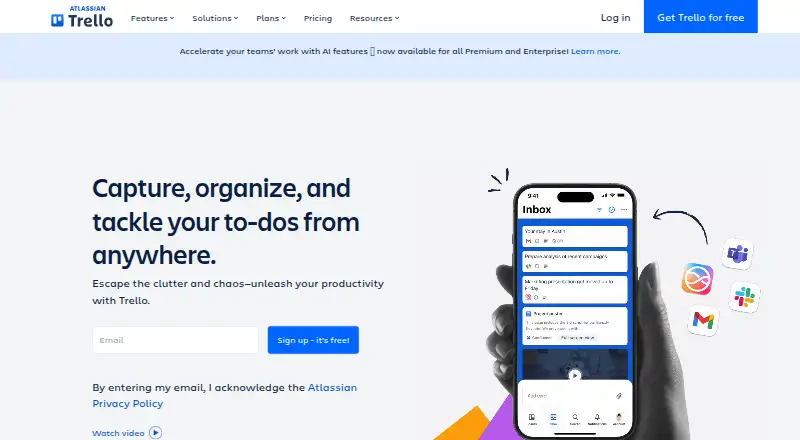
What Trello is
Trello is a cloud-based work management tool for organizing tasks, planning projects, collaborating and tracking progress. Teams structure work with boards, lists and cards. Inbox is for capturing details, while Planner syncs calendars and helps allocate focused time. Built-in automation can handle tasks and workflows. Power-Ups connect boards with more than 200 apps and integrations, including Slack, Google Drive, Jira, Salesforce and Microsoft Teams; developers can use the API to build their own Power-Ups. Trello is available on the web and mobile apps, with desktop access also offered. The free plan allows up to 10 collaborators and 10 boards per Workspace, with 10MB per file and 250 Workspace command runs each month. A Workspace can enroll in a free 14-day Premium trial. Trello lists SOC 2 Type 2, FedRAMP authorization and ISO/IEC 27001 and 27018, along with encryption in transit and at rest.
Good
- Boards, lists and cards organize projects visually.
- Inbox captures details; Planner syncs calendars.
- Built-in automation handles tasks and workflows.
- Power-Ups connect boards to more than 200 apps.
- Free 14-day Premium trial is available for a Workspace.
Watch out
- Free plan is limited to 10 collaborators per Workspace.
- Free plan allows up to 10 boards per Workspace.
- Free plan limits files to 10MB each.
- Trello is cloud-only.
Who it suits
Trello suits individuals and small teams organizing tasks visually, as well as teams managing multiple projects. Its Enterprise plan is positioned for enterprise teams and administrators.
Verdict
Trello gives teams a visual structure for organizing work, with automation and app connections alongside its boards, lists and cards. Review the Workspace limits on the free plan and the annual billing condition for the $5 per-user monthly starting price.
Plans and prices
From Trello's own pricing page, checked 15 Oct 2026.
| Plan | Price | What it gives you |
|---|---|---|
| Free | Free | Up to 10 collaborators per Workspace |
| Standard | $5 a month | Unlimited boards · custom fields · AI features · advanced Planner · advanced checklists · per user/month if billed annually; $6 billed monthly |
| Premium | $10 a month | Unlimited boards and automations · Timeline, Table, Calendar and Dashboard views · data export · 250MB/file storage · priority support · per user/month if billed annually; $12.50 billed monthly |
| Enterprise | $17.50 a month | Unlimited Workspaces · organization-wide permissions · Atlassian Guard Standard · 24/7 Enterprise Admin support · per user/month billed annually ($210 annual price per user) |
The facts
Each one read from Trello's own pages, with the date it was checked.
What it does
- API
- Trello exposes a REST API covering boards, lists, cards, actions, webhooks, search and other resources.checked 15 Oct 2026
- Audience
- Trello positions its plans for individuals, small teams, teams managing multiple projects, and enterprise teams and administrators.checked 28 Sep 2026
- Automation
- Trello provides automation for repetitive board and workflow actions.checked 15 Oct 2026
- Automation rules
- Yeschecked 20 Sep 2026
- Boards and cards
- Users organize work on customizable Kanban boards and cards that can contain due dates, comments, checklists, descriptions and files.checked 15 Oct 2026
- Cloud model
- Trello is a cloud-only product and offers access through web, desktop, and mobile apps.checked 28 Sep 2026
- Core structure
- Trello organizes work with boards, lists, and cards that teams use to track projects and tasks.checked 28 Sep 2026
- Desktop offline limitation
- The macOS and Windows desktop applications require an active internet connection and do not support offline synchronization.checked 15 Oct 2026
- Documentation
- Atlassian provides REST API reference pages, guides, examples, client.js documentation, Power-Up tutorials and a developer community.checked 15 Oct 2026
- Guest access
- Yeschecked 20 Sep 2026
- Identity and backups
- Trello states that SAML 2.0 SSO is available to Enterprise and Guard customers and that encrypted full backups run every 24 hours.checked 15 Oct 2026
- Identity security
- SAML 2.0 single sign-on is available for Enterprise and Atlassian Guard customers.checked 28 Sep 2026
- Inbox
- Trello Inbox captures tasks and messages from email, Slack and other sources into cards for later organization.checked 15 Oct 2026
The company
- Company founded and headquarters
- Independent company records identify Trello as founded in 2011 and headquartered in New York, New York.checked 15 Oct 2026
- Company history
- Trello launched from Fog Creek in 2011, became Trello, Inc. in 2014, raised a $10.3 million Series A and was acquired by Atlassian in early 2017.checked 15 Oct 2026
- Company legal name
- Crunchbase lists the legal name as Trello, Inc., a subsidiary of Atlassian.checked 15 Oct 2026
- Company size
- LinkedIn lists Trello at 201–500 employees.checked 15 Oct 2026
- Founded
- 2011checked 23 Sep 2026
- Funding and ownership
- Crunchbase lists one Series A round with Spark Capital and Index Ventures and records Atlassian as the acquirer.checked 15 Oct 2026
Where it runs
- Developer platform
- Trello says developers can build their own Power-Ups with its API.checked 28 Sep 2026
Money
- Free plan
- Yeschecked 20 Sep 2026
- Free-plan limits
- The Free plan allows up to 10 collaborators and 10 boards per Workspace, with 10MB/file storage and 250 Workspace command runs per month.checked 28 Sep 2026
- Free-plan user limit
- 10checked 20 Sep 2026
- Inbox and Planner
- Trello includes Inbox for capturing details and Planner for syncing calendars and allocating focused time slots.checked 28 Sep 2026
The full review of Trello
Trello is a visual work-management app built around boards, lists and cards. It suits individuals and teams who want to organize projects in a visible workflow, especially when automation and connected apps matter. Its free plan is useful for smaller workspaces, but its collaborator and board caps can make upgrading necessary as work expands.
Overview
Trello gives each project or workflow a board, divides it into lists, and tracks individual tasks on cards. That format makes progress easy to scan and can suit work that moves through recognizable stages. Inbox adds a place to capture details, while Planner syncs calendars and helps allocate focused time slots.
It is cloud-only, with access through web, desktop and mobile apps; supported platforms include Android, iOS and an API. Developers can use the API to build Power-Ups. Trello was founded in 2011.
Key features
Boards, lists and cards
The visual structure is Trello’s central strength: teams can organize projects and tasks without losing sight of their progress. It is a natural fit for workflows that benefit from visible stages, though the format may be less compelling for people who do not want to manage work through boards.
Automation and integrations
Built-in automation handles recurring tasks and workflow steps. The Free plan’s 250 Workspace command runs per month may be enough for light use, but teams automating more heavily will need a plan with a larger allowance: Standard raises the cap to 1,000, and Premium removes it.
Power-Ups connect boards to more than 200 apps, including Slack, Google Drive, Jira, Salesforce and Microsoft Teams. That breadth can keep connected tools in reach of a board; developers can also build their own Power-Ups through the API.
Security
Trello lists SOC 2 Type 2, FedRAMP authorization, ISO/IEC 27001 and ISO/IEC 27018 certifications, encryption in transit and at rest, and encrypted full backups every 24 hours. SAML 2.0 single sign-on is available to Enterprise and Atlassian Guard customers, making that identity control a higher-tier consideration.
Pricing
Trello uses a freemium model. Every user can enroll a Workspace in a free 14-day Premium trial; the paid prices below are per user.
| Plan | Price | What it includes |
|---|---|---|
| Free | free | Up to 10 collaborators and 10 boards per Workspace, 10MB/file, and 250 Workspace command runs/month. |
| Standard | $5 a month billed per user/month if billed annually; $6 billed monthly | Unlimited boards, 250MB/file, and 1,000 Workspace command runs/month. |
| Premium | $10 a month billed per user/month if billed annually; $12.50 billed monthly | Unlimited Workspace command runs, 250MB/file, unlimited boards and automations. |
| Enterprise | $17.50 a month billed per user/month billed annually ($210.00 annual price per user) | Unlimited Workspaces, organization-wide permissions, multi-board guests, and 24/7 Enterprise Admin support. |
Free is a practical starting point for individuals and small groups that can stay within the Workspace limits. Standard removes the board cap and increases file storage, but keeps command runs capped, so it suits growing teams with moderate automation needs. Premium is the stronger fit for multiple projects or automation-heavy work: it removes the command-run limit and allows unlimited boards and automations. Enterprise adds organization-wide controls, multi-board guests and round-the-clock admin support for larger teams. Standard, Premium and Enterprise cost less per month with annual billing; monthly billing is higher on Standard and Premium.
Platforms
Trello is cloud-only and offers web, desktop and mobile access. Its supported platforms include Android, iOS, web and API. It is not a self-hosted product.
Who it's for
Choose Trello if your work is easier to coordinate when projects, tasks and progress are visible on boards, and you want automation or connections to other apps alongside that structure. The free plan can serve a small Workspace, but the 10-collaborator and 10-board limits are meaningful constraints for expanding teams. People who need more Workspace capacity, file storage or automation should compare the paid tiers before settling in.
Pros and cons
- Pros: Boards, lists and cards make project progress visible, which suits teams coordinating work through stages.
- Pros: More than 200 Power-Up integrations and built-in automation can reduce manual handoffs; Premium removes its command-run cap.
- Pros: The Free plan includes 10 collaborators and 10 boards per Workspace, giving small groups room to start without paying.
- Cons: Free restricts file attachments to 10MB each and automation to 250 command runs per month, which can pinch as projects grow.
- Cons: Standard still limits Workspace command runs to 1,000 monthly, so frequent automation points toward Premium.
- Cons: Annual billing is required for the advertised $5.00 and $10.00 per-user monthly prices on Standard and Premium; monthly billing costs more.
Alternatives
For a narrower kanban setup, Kanban Tool offers a free plan limited to two boards and two users, with no file attachments; it is worth considering if those tighter limits suit your needs. KanbanFlow has a free plan with no time limit, a Kanban board and standard support, making it another option for readers seeking a basic free board.
SwiftKanban offers a free Team plan for three users and two boards, a fit to consider if that smaller allowance works for your group. MeisterTask has a free plan with unlimited tasks and up to three projects, so consider it if that project cap matches your needs.
WeKan offers a free app and a cloud plan priced at $50 a year, with admin access and unlimited everything. Planio has a Bronze plan with custom pricing, one project, two users, 10 customers and 1 GB storage.
Teamhood has a free Personal plan for 10 users with 100 MB storage; its Team plan is $9.50 a month for three or more users billed yearly. Kanbo offers a free plan for three projects and three team members with 500 MB storage and AI-powered features, with no time limit.
Browse Kanban Software, Task Management Software, Game Project Management Software or Project Management Software for more options by category.
Verdict
Trello is a strong choice for individuals and teams who want a visual way to organize work, with automation and a broad set of app connections close at hand. Its free plan offers a useful starting workspace, but growing teams should weigh the collaborator, board, storage and command-run limits. Look elsewhere if you need a different work structure or prefer not to pay more for capacity and automation as your needs increase.
Alternatives to Trello
- 1

Taskade AI Agents
Free planAndroidiOSWebAPI8.3From $10 a month - 2

Asana
Free planAndroidiOSmacOSWindows8.1From $10.99 a month - 3

ClickUp
Free planAndroidiOSmacOSWindows8.1From $9 a month - 4

Any.do
Free planAndroidiOSWebmacOS8.0Free plan - 5

Routine
Free planAndroidiOSWebLinux8.0From $5 a month - 6
MeisterTask
Free planAndroidiOSWebmacOS7.9Free plan