WeKan
WeKan is a free, open-source Kanban tool for organizing tasks and projects visually.
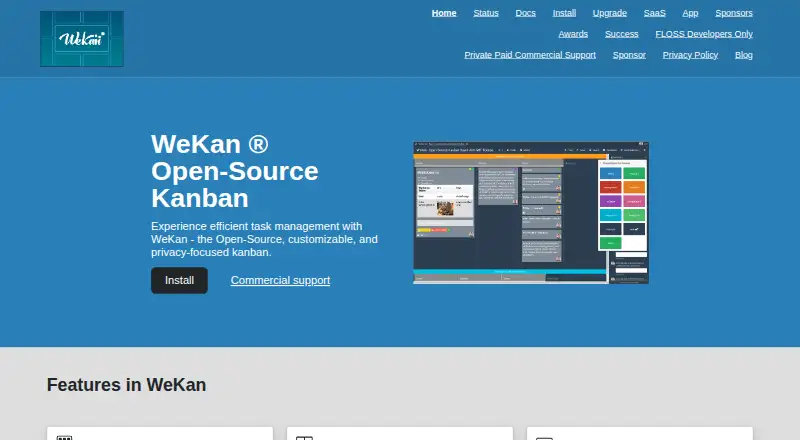
What WeKan is
WeKan is a free, open-source Kanban tool for organizing tasks and projects visually. Boards can use swimlanes, lists, tables, calendars, Gantt views, or statistics. Cards support descriptions, labels, members, dates, checklists, subtasks, custom fields, attachments, comments, dependencies, templates, and archiving. Automation includes trigger-to-action rules, board buttons that run rules, and outgoing webhooks. Teams can import data from Trello, WeKan JSON, CSV or TSV, Excel, Jira, and Kanboard. Sign-in options include passwords, LDAP, CAS, OIDC/OAuth2, and Sandstorm; boards can be private or public, with nine per-board roles and organization or team membership restrictions. WeKan can be self-hosted through Windows, Mac, or Linux bundles, Snap, Docker, Sandstorm, or Kubernetes, and also offers WeKan Cloud. Attachments and avatars can use several storage destinations, including filesystem, S3/MinIO, Azure Blob Storage, and Google Cloud Storage. It has a REST API and Python client. The maker says only the newest version is supported and recommends daily backups because data loss can occur and undo is not yet available.
Good
- Offers six board views, including Gantt and calendar.
- Cards support checklists, subtasks, dependencies, and custom fields.
- Automation includes rules, board buttons, and webhooks.
- Imports Trello, Jira, Excel, CSV, and other formats.
- Available as self-hosted software or WeKan Cloud.
Watch out
- Only the newest version is supported.
- The maker recommends daily backups because data loss is possible.
- Undo is not yet available.
Who it suits
WeKan suits individuals and teams that want visual task organization with board-level controls and configurable hosting. It may also suit teams migrating from supported tools or formats.
Verdict
WeKan offers flexible boards, card details, automation, imports, and self-hosting options at no charge for its app. Its version-support policy and lack of undo make regular backups important.
Plans and prices
From WeKan's own pricing page, checked 30 Sep 2026.
| Plan | Price | What it gives you |
|---|---|---|
| WeKan app | Free | No admin access |
| WeKan Cloud | $50 a year | Admin access · unlimited everything · custom domain available · 50 euro/year |
| Commercial support | Priced on request | Prepaid features, fixes, support, or hosting · Hourly |
| Commercial support | $5,000 a year | 50 support hours · private support chat · 3 years |
The facts
Each one read from WeKan's own pages, with the date it was checked.
What it does
- Access controls
- WeKan has nine per-board roles, private and public boards, and organization or team restrictions for board membership.checked 30 Sep 2026
- API
- WeKan provides a REST API and a Python client.checked 30 Sep 2026
- Automation
- Automation supports trigger-to-action rules, board buttons that run rules, and outgoing webhooks at global and per-board levels.checked 30 Sep 2026
- Board views
- Board views include swimlanes, lists, table, calendar, Gantt, and stats.checked 30 Sep 2026
- Cards
- Cards support descriptions, labels, members, dates, checklists, subtasks, custom fields, attachments, comments, dependencies, templates, and archiving.checked 30 Sep 2026
- Hosting location
- WeKan Cloud servers are located in Finland.checked 30 Sep 2026
- Integrations
- WeKan can import Trello, WeKan JSON, CSV/TSV, Excel, Jira, and Kanboard data.checked 30 Sep 2026
- Intended users
- Commercial support and services are specified for business-to-business customers, including companies, sole proprietors, and organizations.checked 30 Sep 2026
- Limits
- The maker says only the newest WeKan version is supported and recommends daily backups because data can be lost and there is no undo yet.checked 30 Sep 2026
- Privacy
- WeKan's privacy policy says service data is not given to third parties and users can export or delete their data.checked 30 Sep 2026
- Purpose
- WeKan is an open-source Kanban tool for organizing tasks and projects visually.checked 30 Sep 2026
- Security
- WeKan documents account lockout after repeated failed sign-ins, content sanitization, security and event logs, and private vulnerability disclosure.checked 30 Sep 2026
- Self-hosting
- WeKan offers self-hosted installations through Windows/Mac/Linux bundles, Snap, Docker, Sandstorm, and Kubernetes options.checked 30 Sep 2026
- Sign-in
- Sign-in options include password, LDAP, CAS, OIDC/OAuth2, and Sandstorm.checked 30 Sep 2026
- Storage
- Attachments and avatars can be stored on filesystem, GridFS, S3/MinIO, Azure Blob Storage, or Google Cloud Storage.checked 30 Sep 2026
- Support
- Commercial support is available by email, and yearly support plans include prepaid hours and a private support chat channel.checked 30 Sep 2026
The full review of WeKan
Overview
WeKan is an open-source Kanban app for organizing projects with boards, cards, and workflow rules. It suits teams that want extensive board controls, multiple ways to host their work, and the option to manage storage and access themselves. Its depth is a stronger fit for structured team workflows than for someone seeking the simplest possible task list.
Board views include swimlanes and lists alongside table, calendar, Gantt, and statistics views. Work-in-progress limits can help teams make constraints on active work explicit. The range of views is useful when one board needs to serve different ways of reviewing work, though teams should be prepared to choose and maintain a setup that fits their process.
For more options in the category, see Kanban Software.
Key features
Cards support descriptions, labels, members, dates, checklists, subtasks, custom fields, attachments, comments, dependencies, templates, and archiving. That breadth lets teams keep task details and related work together, rather than splitting every requirement across separate tools. Custom fields and dependencies are particularly useful for workflows that need more structure than a title and due date.
Automation supports trigger-to-action rules, buttons on boards that run rules on demand, and outgoing webhooks at global or per-board levels. This gives teams ways to automate repeated actions and connect board events to other systems. Imports from Trello, WeKan JSON, CSV or TSV, Excel, Jira, and Kanboard make it easier to bring existing work into a WeKan board.
Access controls include nine per-board roles, private and public boards, and organization or team restrictions on board membership. Sign-in options include passwords, LDAP, CAS, OIDC/OAuth2, and Sandstorm. WeKan documents account lockout after repeated failed sign-ins, content sanitization, security and event logs, and private vulnerability disclosure. Its privacy policy says service data is not given to third parties and users can export or delete their data.
Deployments can store attachments and avatars on a filesystem, GridFS, S3/MinIO, Azure Blob Storage, or Google Cloud Storage. Self-hosting options include Windows, Mac, and Linux bundles, Snap, Docker, Sandstorm, and Kubernetes. WeKan also provides a REST API and Python client. These choices offer meaningful control, but also make WeKan more compelling for organizations equipped to manage a deployment than for buyers who want hosting decisions out of their hands.
WeKan Cloud servers are located in Finland. The maker supports only the newest WeKan version and recommends daily backups because data can be lost and there is no undo yet. That makes backups and keeping installations current important operational responsibilities, especially for self-hosted users.
Pricing
WeKan is free to use through the WeKan app plan, listed as free, but the plan has no admin access. It is a fit for users who can work without administrative control; the free price does not include the deployment control or administration implied by a managed team setup.
WeKan Cloud costs $50 a year, billed 50 euro/year. It includes admin access, unlimited everything, and a custom domain is available. This is the more appropriate choice for teams that want a cloud service with administration rather than managing their own installation. WeKan offers commercial support at from $100 (priced on request), billed hourly, for prepaid features, fixes, support, or hosting. Yearly support plans include prepaid hours and a private support chat channel; commercial support and services are intended for business-to-business customers, including companies, sole proprietors, and organizations.
Platforms
WeKan supports Android, iOS, Linux, macOS, Windows, web, API, and self-hosted use. Mobile apps are available for iOS and Android. The combination of web and desktop platforms, mobile access, and multiple self-hosting routes gives teams flexibility in how they access and deploy it.
Who it's for
WeKan is best suited to teams that need detailed card records, multiple board views, automation, granular board roles, or control over hosting and storage. Its import formats and API also make it a reasonable candidate for teams migrating existing work or connecting workflows. Readers who prioritize the least operational overhead should weigh the version-support policy and backup responsibility carefully.
Pros and cons
Pros
- Flexible board and card structure: Multiple views, custom fields, subtasks, dependencies, and WIP limits support workflows more involved than a basic task board.
- Automation and migration options: Rules, board buttons, webhooks, and imports from six named sources help teams reduce repetitive work and move existing data.
- Deployment and access control: Several self-hosting paths, storage backends, sign-in methods, and per-board roles give organizations choices over how they operate the system.
Cons
- No undo yet: The maker recommends daily backups because data can be lost, so routine backup practices matter.
- Only the newest version is supported: Teams must keep installations current to remain within the supported version policy.
- The free app plan has no admin access: Users who need administrative control should consider WeKan Cloud or self-hosting instead.
Alternatives
Trello is worth considering for a free plan capped at 10 collaborators and 10 boards per Workspace, with a 10MB file limit and 250 Workspace command runs.
KanbanFlow offers a free plan with no time limit and a Kanban board; its Premium plan is $5 a month, with a 10% discount for annual payment.
SwiftKanban may suit a small team comfortable with a free plan capped at 3 users and 2 boards, alongside standard templates and basic metrics.
Planio has a Bronze plan with 1 project, 2 users, 10 customers, and 1 GB of storage; it is another option for readers comparing project limits and storage.
MeisterTask is an alternative with a free plan that allows unlimited tasks and up to 3 projects.
Kanbo offers a free plan capped at 3 projects, 3 team members, and 500 MB storage, with AI-powered features.
Teamhood has a free Personal plan with 10 users and 100 MB storage, for readers comparing a user-based free tier.
Jotform is another alternative.
Verdict
Choose WeKan if your team needs flexible Kanban boards, detailed cards, automation, and meaningful control over hosting or access. Its strongest case is the combination of workflow depth and deployment choice. Look elsewhere if you need a free plan with admin access or cannot commit to current-version support and regular backups.
Getting started
- Visit https://wekan.fi/.
- Choose the free WeKan App or WeKan Cloud at $50 a year.
- For self-hosting, select a Windows, Mac, or Linux bundle, Snap, Docker, Sandstorm, or Kubernetes option.
- Open WeKan on web, Android, iOS, Linux, macOS, or Windows.
- Sign in using password, LDAP, CAS, OIDC/OAuth2, or Sandstorm.
Limits worth knowing
The free WeKan App plan has no admin access. The maker supports only the newest WeKan version and recommends daily backups because data loss can occur and undo is not yet available.
Questions
Is WeKan free?
The WeKan App plan is free at no cost. It has no admin access.
How much does WeKan Cloud cost?
WeKan Cloud costs $50 a year, billed 50 euro/year. The plan includes admin access, unlimited everything, and a custom domain option.
Can I self-host WeKan?
Yes. Self-hosted installation options include Windows, Mac, and Linux bundles, Snap, Docker, Sandstorm, and Kubernetes.
What platforms does WeKan support?
WeKan is available on Android, iOS, Linux, macOS, web, and Windows, as well as through self-hosted installations and an API.
What data can WeKan import?
WeKan can import Trello, WeKan JSON, CSV/TSV, Excel, Jira, and Kanboard data.
What does commercial support cost?
Yearly support plans include prepaid hours and a private support chat channel.
Alternatives to WeKan
- 1

Trello
Free planAndroidiOSWebAPI8.4From $5 a month - 2

Jotform
Free planAndroidiOSWeb8.2From $39 a month - 3

KanbanFlow
Free planAndroidiOSWebAPI8.1From $5 a month - 4

MeisterTask
Free planAndroidiOSWebmacOS7.9Free plan - 5
Flow-e
Free planWebLinuxmacOSWindows7.8From $5 a month - 6

PLANKA
Free planAndroidiOSWebAPI7.7From €36 a month