
Any.do
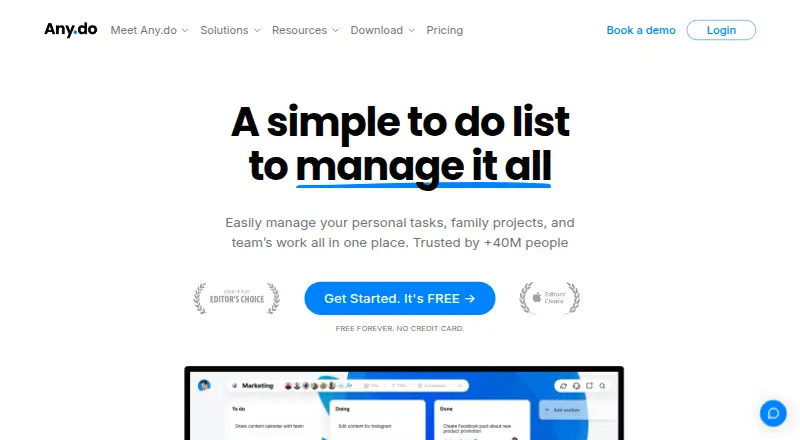
Any.do is a task and planning app for keeping to-dos, lists, reminders, and calendar items together across Android, iOS, macOS, Windows, and the web.
What Any.do is
Any.do is a task and planning app for keeping to-dos, lists, reminders, and calendar items together across Android, iOS, macOS, Windows, and the web. Its free Personal plan includes tasks, lists, reminders, a calendar, a daily planner, and device sync, with unlimited personal tasks and lists and unlimited subtasks and Grocery Lists. Tasks can recur, and reminders can be scheduled by time, location, or recurrence. Offline access is listed for web and mobile. Premium adds recurring tasks, WhatsApp reminders, AI features, color tags, and location reminders. Family provides a shared space for up to four members and shared projects. Teams offers collaborative workspaces, project boards, and team members, with admins able to manage access, permissions, and private boards. The app lists connections to more than 6,000 apps, including Gmail, Slack, Jira, Trello, and Google Drive. Premium and Teams have free trials; Teams offers a 14-day trial. Premium is $7.99 a month or $4.99 a month billed annually. Family is $9.99 a month or $8.33 a month billed annually for four members. Teams is $7.99 a month per member or $4.99 a month per member billed annually.
Good
- Free plan includes tasks, lists, reminders, and calendar
- Unlimited free tasks, subtasks, and Grocery Lists
- Time-, location-, and recurring reminders
- Offline access on web and mobile
- Teams workspaces support unlimited members
Watch out
- Family sharing is limited to four members
- Paid monthly Premium costs $7.99 a month
- Paid monthly Teams costs $7.99 a month per member
Who it suits
Any.do suits people who want tasks, reminders, lists, and a calendar in one app, with free personal use. Family and Teams plans are options for shared projects and workspaces.
Verdict
Any.do combines personal planning with family and team collaboration options. Its free plan covers core planning features, while the paid plans add features and shared workspace options.
Plans and prices
From Any.do's own pricing page, checked 28 Sep 2026.
| Plan | Price | What it gives you |
|---|---|---|
| Personal | Free | Free forever; no credit card. · Unlimited personal tasks · Unlimited personal lists · Free forever; no credit card |
| Premium | — | Recurring tasks · WhatsApp reminders · AI-powered features · Color tags · Location reminders |
| Family | — | 4 members · Up to 4 shared projects |
| Teams | — | Unlimited project boards · Unlimited team members · +100 workflow templates |
| Premium annual | $4.99 a month | Cancel anytime; no commitments. · billed annually |
| Teams annual | $4.99 a month | Per member; invite your team for free during trial. · billed annually |
| Premium monthly | $7.99 a month | Cancel anytime; no commitments. · billed monthly |
| Teams monthly | $7.99 a month | Per member; invite your team for free during trial. · billed monthly |
| Family annual | $8.33 a month | For 4 members; no additional member cost. · billed annually |
| Family monthly | $9.99 a month | For 4 members; no additional member cost. · billed monthly |
The facts
Each one read from Any.do's own pages, with the date it was checked.
What it does
- Admin controls
- Workspace and board admins control access, permissions, and private boards.checked 28 Sep 2026
- Calendar sync
- Yeschecked 21 Sep 2026
- Family sharing
- Family includes a shared space, up to four members, groceries, and shared projects.checked 28 Sep 2026
- Integration count
- Any.do works with over 6,000 apps for work automation.checked 28 Sep 2026
- Named integrations
- Listed integrations include WhatsApp, Gmail, Slack, Zapier, Siri, Jira, Trello, and Google Drive.checked 28 Sep 2026
- Offline access
- web_and_mobilechecked 21 Sep 2026
- Recurring reminders
- Reminders support time-based, location-based, and recurring alerts.checked 28 Sep 2026
- Recurring tasks
- Yeschecked 21 Sep 2026
- Refund policy
- Purchases may be refunded subject to the terms of service.checked 28 Sep 2026
- Secure login
- The pricing page states that login is secured.checked 28 Sep 2026
- Subtasks
- Yeschecked 21 Sep 2026
- Support availability
- Teams users get 24/7 support from AI agents and the customer support team.checked 28 Sep 2026
- Task reminders
- Yeschecked 21 Sep 2026
- User count
- Any.do says it is trusted by more than 40 million people, families, and teams.checked 28 Sep 2026
Where it runs
- Apps and extensions
- Apps and extensions are offered for iOS, Android, Windows, Mac, Chrome, Edge, Firefox, Safari, and Gmail.checked 28 Sep 2026
- Supported platforms
- Available on Android, iPhone, iPad, Mac, Web, Windows, browsers, watches, Siri, Huawei, and Desktop.checked 28 Sep 2026
Money
- Free features
- The free plan includes tasks, lists, reminders, calendar, daily planner, and device sync.checked 28 Sep 2026
- Free limits
- The basic free version offers unlimited tasks, subtasks, and Grocery Lists.checked 28 Sep 2026
- Free plan
- Yeschecked 21 Sep 2026
- Free tier
- Personal plan is free forever and requires no credit card.checked 28 Sep 2026
- Premium trial
- Premium plans offer free trial periods before users commit to payment.checked 28 Sep 2026
- Teams trial
- Any.do Teams offers a full 14-day trial with no hidden charges.checked 28 Sep 2026
The company
- Team member limit
- Any.do says Teams workspaces can include as many members as needed.checked 28 Sep 2026
- Team sharing
- Teams includes collaborative workspaces, unlimited project boards, and unlimited team members.checked 28 Sep 2026
The full review of Any.do
Overview
Any.do brings tasks, lists, reminders, and calendar planning into one app. Its free Personal plan includes tasks, lists, reminders, a calendar, a daily planner, and device sync. The free tier allows unlimited tasks, subtasks, and Grocery Lists, and is described as free forever with no credit card required.
Alongside individual use, Any.do offers Family and Teams plans. Family provides a shared space for up to four members, groceries, and shared projects. Teams adds collaborative workspaces, unlimited project boards, and unlimited team members. Workspace and board admins can control access and permissions, including private boards.
Any.do says more than 40 million people, families, and teams trust the service. Its pricing information says login is secured. Premium plans include trial periods; the Teams trial lasts 14 days and is described as having no hidden charges. Purchases may be refunded under the terms of service.
Key features
Tasks, lists, and planning
Tasks, subtasks, and lists form the core of Any.do. The free plan also includes a daily planner and calendar, with device sync for keeping information available across supported devices. Recurring tasks are supported, although the listed free-plan features do not specify that recurring tasks are included at no cost.
Reminders and calendar
Any.do supports task reminders and calendar sync. Alerts can be time-based, location-based, or recurring, giving users options for reminders tied to a time, a place, or a repeating schedule. The Premium feature list includes recurring tasks, WhatsApp reminders, and location reminders; the available plan details do not list a price for Premium apart from the annual and monthly options below.
Family and team collaboration
Family is designed for sharing within a household, with a shared space for up to four members, groceries, and shared projects. Teams focuses on collaborative workspaces and offers unlimited project boards and team members. Admin controls let workspace and board administrators manage permissions, access, and private boards. Teams users also receive 24/7 support from AI agents and the customer support team.
Integrations and extensions
Any.do says it works with more than 6,000 apps for work automation. Named integrations include WhatsApp, Gmail, Slack, Zapier, Siri, Jira, Trello, and Google Drive. Apps and extensions are offered for iOS, Android, Windows, Mac, Chrome, Edge, Firefox, Safari, and Gmail.
Pricing
Any.do uses a freemium model. The Personal plan is free forever, requires no credit card, and includes unlimited personal tasks and lists. Premium plans offer trial periods before payment, and Teams has a full 14-day trial. Paid prices listed are:
| Plan | Price | Terms |
|---|---|---|
| Premium annual | $4.99 a month | Billed annually; cancel anytime, no commitments. |
| Premium monthly | $7.99 a month | Billed monthly; cancel anytime, no commitments. |
| Family annual | $8.33 a month | Billed annually; for 4 members, no additional member cost. |
| Family monthly | $9.99 a month | Billed monthly; for 4 members, no additional member cost. |
| Teams annual | $4.99 a month | Billed annually per member; invite your team for free during trial. |
| Teams monthly | $7.99 a month | Billed monthly per member; invite your team for free during trial. |
Premium includes recurring tasks, WhatsApp reminders, AI-powered features, color tags, and location reminders. Family includes four members and up to four shared projects. Teams includes unlimited project boards, unlimited team members, and more than 100 workflow templates. Purchases may be refunded subject to the terms of service.
Platforms
Any.do supports web, Windows, macOS, iOS, Android, and Chrome extensions. Its apps and extensions are also offered for Edge, Firefox, Safari, and Gmail. Offline access is listed for web and mobile.
Who it's for
Any.do may suit individuals looking for a free place to organize tasks, lists, reminders, and calendar planning, particularly if unlimited tasks and subtasks matter. Its Family plan is aimed at sharing groceries and projects among up to four people. Teams is intended for collaborative workspaces that need shared boards, flexible team size, and admin-managed access. People who need location-based alerts, recurring tasks, WhatsApp reminders, or AI-powered features should check the paid plan details and trial before committing.
Pros and cons
Pros
- The free Personal plan is free forever, requires no credit card, and includes unlimited tasks, subtasks, and Grocery Lists.
- Tasks, reminders, calendar, daily planner, and device sync are included in the free feature set.
- Family supports shared groceries and projects for up to four members.
- Teams offers unlimited project boards and team members, plus admin controls for access and permissions.
- Users can try paid plans before committing; Teams has a 14-day trial.
Cons
- The listed feature details do not clarify whether recurring tasks are available on the free plan.
- Pricing is not listed for Premium, Family, or Teams in general; only specific annual and monthly prices are provided.
- The free-plan description does not specify whether location-based or WhatsApp reminders are included.
Alternatives
For other options, see TickTick, Todoist, Microsoft To Do, or Routine. Readers comparing tools across broader categories can explore To-do list apps, Task Management Software, Time Management Apps, and AI Personal Assistants.
Verdict
Any.do combines a substantial free task and planning feature set with separate options for household and team collaboration. The free plan is straightforward about its no-cost status and limits: it is free forever, needs no card, and includes unlimited tasks, subtasks, and Grocery Lists. Paid plans add capabilities such as recurring tasks, location reminders, shared family projects, and team administration, but buyers should compare the specific listed billing terms and confirm which features match their needs. Its range of supported platforms and integrations makes it a flexible option for people who want their planning tools available across devices and connected services.
Getting started
- Visit https://www.any.do/.
- Choose the free Personal plan, which requires no credit card, or start a Premium or Teams trial.
- Use the apps or extensions offered for iOS, Android, Windows, Mac, Chrome, Edge, Firefox, Safari, or Gmail.
- Add tasks, lists, reminders, calendar items, or Grocery Lists.
- For shared work, choose Family for up to four members or Teams for collaborative workspaces.
Questions
Is Any.do free?
Yes. Personal is free forever and requires no credit card. It includes tasks, lists, reminders, a calendar, a daily planner, and device sync.
What platforms does Any.do support?
Apps and extensions are offered for iOS, Android, Windows, Mac, Chrome, Edge, Firefox, Safari, and Gmail. Offline access is listed for web and mobile.
How much does Premium cost?
Premium costs $7.99 a month when billed monthly or $4.99 a month when billed annually. Premium plans offer a free trial period.
What does Family include?
Family includes a shared space for up to four members, groceries, and shared projects. It costs $9.99 a month monthly or $8.33 a month annually.
What does Teams include?
Teams includes collaborative workspaces, unlimited project boards, and unlimited team members. It offers a full 14-day trial; monthly billing is $7.99 a month per member, and annual billing is $4.99 a month per member.
Which integrations are named?
Listed integrations include WhatsApp, Gmail, Slack, Zapier, Siri, Jira, Trello, and Google Drive. Any.do says it works with over 6,000 apps for work automation.
Alternatives to Any.do
- 1
Pomodoist
Free planOpen sourceAndroidiOSWebAPI9.2Free plan - 2

TickTick
Free planAndroidiOSWebLinux8.7From $49.99 a year - 3

Routine
Free planAndroidiOSWebLinux8.7From $5 a month - 4

Nozbe
Free planAndroidiOSWebmacOS8.6From $6 a month - 5

Vikunja
Free planAndroidiOSWebAPI8.5From €4 a month - 6

Tweek
Free planAndroidiOSWebmacOS8.5From $49.99 a year