
TickTick
TickTick is a task and reminder app with recurring tasks, subtasks, calendar sync, and reminders.
What TickTick is
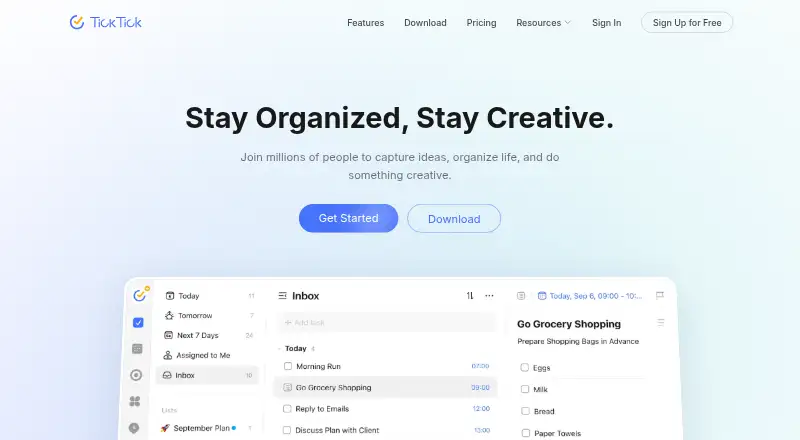
TickTick is a task and reminder app with recurring tasks, subtasks, calendar sync, and reminders. Calendar views cover yearly, monthly, weekly, daily, and agenda layouts, while Repeat Reminder supports weekly, monthly, yearly, or custom schedules. Lists can be shared, tasks assigned, and people can collaborate with friends or colleagues. Other tools include Pomodoro, habit tracking, countdowns, Kanban, timeline, and Eisenhower Matrix features, plus more than 40 themes. TickTick integrates with Notion and supports MCP, CLI, and OpenClaw workflows. It is available on Android, iOS, Linux, macOS, Windows, and the web, and lists a Chrome extension. The free plan has nine lists, up to 99 tasks per list, one attachment per day, and two shared members. Premium costs $49.99 per year and raises those limits to 299 lists and 999 tasks per list, with more attachment capacity and shared members. Premium features become unavailable when the subscription expires, but stored data is retained.
Good
- Recurring reminders support custom schedules.
- Calendar offers five view types.
- Lists can be shared and tasks assigned.
- Includes Pomodoro, habit tracking, and Kanban.
- Available on web, desktop, and mobile.
Watch out
- Free plan is limited to nine lists.
- Free plan allows 99 tasks per list.
- Free plan has one attachment per day.
- Premium costs $49.99 per year.
Who it suits
TickTick suits people who want task planning, recurring reminders, and calendar views across several platforms. Its sharing and assignment features may also suit friends or colleagues coordinating tasks.
Verdict
TickTick combines task organization, reminders, calendar planning, and collaboration in one app. Check the free-plan limits against your needs before choosing Premium.
Plans and prices
From TickTick's own pricing page, checked 27 Sep 2026.
| Plan | Price | What it gives you |
|---|---|---|
| Free | Free | Includes basic task, reminder, sync, and list features. · 9 lists · 99 tasks per list · 1 attachment per day · 19 checklist items per task · 2 task reminders · 2 shared members · billed monthly |
| Premium | $49.99 a year | Unlocks premium features and higher limits. · 299 lists · 999 tasks per list · 199 attachments per day · 199 checklist items per task · 5 task reminders · 29 shared members · Annual plan |
The facts
Each one read from TickTick's own pages, with the date it was checked.
What it does
- Active task limit
- 99checked 21 Sep 2026
- Calendar sync
- Yeschecked 21 Sep 2026
- Calendar Views
- Calendar views include yearly, monthly, weekly, daily, and agenda views.checked 27 Sep 2026
- Data Retention
- Data is retained after Premium expires, while Premium features become unavailable.checked 27 Sep 2026
- Notable Features
- Features include Pomodoro, habit tracking, countdowns, Kanban, timeline, and Eisenhower Matrix.checked 27 Sep 2026
- Premium Lists Limit
- Premium includes 299 lists.checked 27 Sep 2026
- Premium Tasks Limit
- Premium allows 999 tasks per list.checked 27 Sep 2026
- Recurring Reminders
- Repeat Reminder supports weekly, monthly, yearly, or custom recurring rules.checked 27 Sep 2026
- Recurring tasks
- Yeschecked 21 Sep 2026
- Refund Window
- Refunds can be requested within 14 days for Google Play, PayPal, or Stripe purchases.checked 27 Sep 2026
- Subtasks
- Yeschecked 21 Sep 2026
- Support Channels
- Support is available through the Help Center and [email protected].checked 27 Sep 2026
- Task reminders
- Yeschecked 21 Sep 2026
Where it runs
- App Integrations
- TickTick integrates with Notion and supports MCP, CLI, and OpenClaw workflows.checked 27 Sep 2026
- Apple Refunds
- Apple App Store refunds must be requested through Apple Support.checked 27 Sep 2026
- Supported platforms
- web,windows,macos,linux,ios,android,chrome_extensionchecked 21 Sep 2026
The company
- Company Identity
- The site identifies the company as TickTick Team.checked 27 Sep 2026
- Founded
- 2013checked 23 Sep 2026
- Headquarters
- Hong Kongchecked 23 Sep 2026
Money
- Free Attachments
- The free plan includes 1 attachment per day.checked 27 Sep 2026
- Free Lists Limit
- The free plan includes 9 lists.checked 27 Sep 2026
- Free Member Limit
- The free plan supports 2 members.checked 27 Sep 2026
- Free plan
- Yeschecked 21 Sep 2026
- Free Tasks Limit
- The free plan allows 99 tasks per list.checked 27 Sep 2026
The full review of TickTick
Overview
TickTick is a task and planning app from TickTick, a company founded in 2013 and headquartered in Hong Kong. It is best suited to people who want reminders and calendar-based planning alongside their task lists, with optional tools for focus, habits, and shared work.
Its breadth is a strength, but the free plan has concrete caps on lists, tasks, reminders, and collaboration. Those limits make it worth checking how you organize work before relying on the free tier long term.
Key features
Tasks, reminders, and calendars
TickTick supports recurring tasks, subtasks, task reminders, and calendar sync. Repeat Reminder rules can run weekly, monthly, yearly, or on custom schedules, which suits routines that need more than a one-off due date. Calendar views span yearly, monthly, weekly, daily, and agenda formats, giving users several ways to plan around dates. The app also offers Kanban, timeline, and Eisenhower Matrix views for organizing work by workflow or priority.
Lists can be shared, tasks assigned, and friends or colleagues brought into collaborative work. The member cap is a meaningful constraint for teams: the free plan allows two shared members, while Premium raises that to 29. TickTick also integrates with Notion and supports MCP, CLI, and OpenClaw workflows, useful for users who want to connect task management with those tools.
Focus and personal organization
Pomodoro, habit tracking, and countdowns extend TickTick beyond a conventional task list. More than 40 themes allow visual customization. Together, these features make it a flexible choice for people combining projects, routines, and focus sessions in one place; users looking only for a basic checklist may not need that range.
Pricing
TickTick uses a freemium model. The Free plan costs nothing and includes basic task, reminder, sync, and list features. Its caps are 9 lists, 99 tasks per list, one attachment per day, 19 checklist items per task, two task reminders, and two shared members. That is a usable starting point, but multiple reminders, larger checklists, or wider collaboration can push frequent users toward Premium.
Premium costs $49.99 a year on the Annual plan. It raises the limits to 299 lists, 999 tasks per list, 199 attachments per day, 199 checklist items per task, five task reminders, and 29 shared members, and unlocks premium features. It is the more practical fit for heavy list users and larger shared groups, though the annual commitment is a step up from the free tier. When Premium expires, data is retained but Premium features become unavailable.
Refunds can be requested within 14 days for purchases through Google Play, PayPal, or Stripe. Apple App Store refunds must be requested through Apple Support. Support is available through the Help Center and [email protected].
Platforms
TickTick supports Android, iOS, Linux, macOS, web, Windows, and a Chrome extension. That broad coverage suits people who switch between phone, computer, and browser, rather than keeping task planning on a single device.
Who it's for
TickTick is a strong fit for individuals who plan recurring work, want multiple calendar views, and value focus or habit tools alongside tasks. It can also suit small groups sharing lists and assigning work, particularly if the free two-member allowance is enough. Larger teams or users with high attachment and reminder needs should account for the Premium limits and price.
It is less compelling for someone who wants only a simple list and has no use for its planning breadth, or for a free user whose workflow exceeds nine lists or two shared members.
Pros and cons
- Broad planning toolkit: calendar views, recurring reminders, Kanban, timeline, and the Eisenhower Matrix serve different planning styles in one app.
- Useful personal extras: Pomodoro, habit tracking, countdowns, and more than 40 themes add options beyond task capture.
- Wide device support: Android, iOS, Linux, macOS, web, Windows, and Chrome extension support makes cross-device use possible.
- Free limits can bind: nine lists, two shared members, two reminders per task, and one attachment per day may be restrictive for growing workflows.
- Premium is annual: the listed price is $49.99 a year, so users who only need occasional higher limits may prefer to stay within Free's caps.
Alternatives
Any.do is worth considering if unlimited personal tasks and lists on its free plan matter more than TickTick's wider planning toolkit.
Nozbe is an alternative for readers looking for a free plan capped at three users and three active projects.
Routine may suit readers interested in its free plan's three integrations, three custom databases, and 250 AI credits.
Super Productivity is the clearest fit for someone who wants all features and platforms on a free plan with no premium tier.
SingularityApp is another freemium option, with a free Basic plan capped at 10 projects, five sections per project, three habits, and one reminder per task.
Todoist is an alternative whose Beginner free plan is centered on five personal projects, three filter views, and one week of activity history.
Superlist is an option for readers who want unlimited tasks and notes on a free plan, with five private and shared lists and five people in shared lists.
Tasks.org is an alternative for readers seeking a free plan with unlimited tasks, lists, tags, and reminders.
Explore the To-do list apps, Time Management Apps, and Task Management Software collections for more options.
Verdict
Choose TickTick if you want tasks, reminders, calendar planning, and personal focus tools in one app, with enough platform coverage to use it across devices. Its main trade-off is the gap between the free caps and Premium's annual price; look elsewhere if your work needs larger free limits or a simpler, narrower task list.
Getting started
- Go to https://ticktick.com/.
- Choose the free plan or Premium at $49.99/yr.
- Use TickTick on Android, iOS, Linux, macOS, Windows or the web.
- Alternatively, use the Chrome extension.
Limits worth knowing
The free plan includes 9 lists, 99 tasks per list, 1 attachment per day, 19 checklist items per task, 2 task reminders and 2 shared members. Premium raises these limits to 299 lists, 999 tasks per list, 199 attachments per day, 199 checklist items per task, 5 task reminders and 29 shared members.
Questions
How much does TickTick cost?
TickTick has a free plan. Premium costs $49.99/yr.
What is included in the free plan?
It includes 9 lists, 99 tasks per list, 1 attachment per day and 2 shared members, among other limits.
Which platforms does TickTick support?
It is available on Android, iOS, Linux, macOS, Windows and the web, and also lists a Chrome extension.
Can I share tasks with other people?
Yes. Users can share lists and assign tasks to friends and colleagues.
What integrations does TickTick support?
It integrates with Notion and supports MCP, CLI and OpenClaw workflows.
Alternatives to TickTick
- 1
Pomodoist
Free planOpen sourceAndroidiOSWebAPI9.2Free plan - 2

Any.do
Free planAndroidiOSWebmacOS8.8Free plan - 3

Routine
Free planAndroidiOSWebLinux8.7From $5 a month - 4

Nozbe
Free planAndroidiOSWebmacOS8.6From $6 a month - 5

Vikunja
Free planAndroidiOSWebAPI8.5From €4 a month - 6

Tweek
Free planAndroidiOSWebmacOS8.5From $49.99 a year