
Todoist
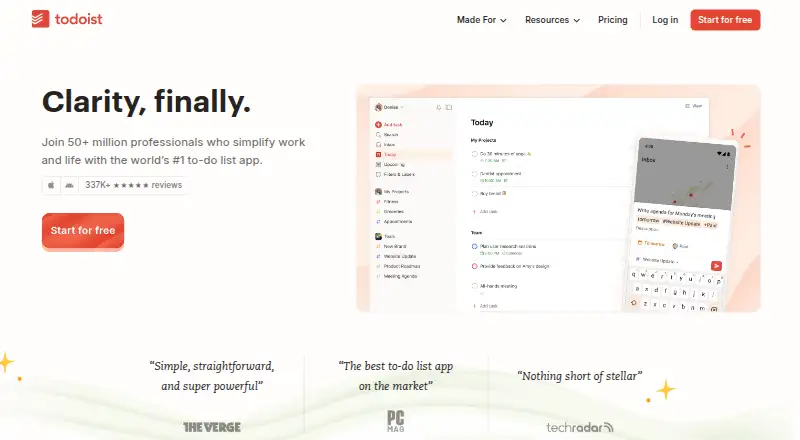
Todoist is a task manager for organizing personal work and team projects across web, desktop, and mobile.
What Todoist is
Todoist is a task manager for organizing personal work and team projects across web, desktop, and mobile. It supports recurring tasks, reminders, subtasks, calendar sync, and offline access on web and mobile. The free Beginner plan includes Quick Add, list and board layouts, reminders, three filter views, and up to five personal projects; it keeps one week of activity history. Pro raises the personal-project limit to 300 and includes up to 150 filter views. Business supports as many as 500 team projects and adds a shared workspace, team roles and permissions, and centralized billing. Todoist can connect with email and calendars, and offers more than 90 integrations and over 50 templates. It lists SOC 2 Type II certification and provides a Help Center. Platforms listed include Android, iOS, Linux, macOS, web, Windows, and a Chrome extension. A free plan is available; prices for Pro and Business are not listed.
Good
- Supports recurring tasks, reminders, and subtasks.
- Provides offline access on web and mobile.
- Business includes shared workspace and team permissions.
- Offers more than 90 integrations and over 50 templates.
Watch out
- Beginner is limited to five personal projects.
- Beginner history covers only one week.
- Pro and Business prices are not listed.
Who it suits
Todoist suits people organizing personal tasks and teams that need shared projects, roles, or centralized billing. The free Beginner plan is for users who can work within five personal projects and one week of history.
Verdict
Todoist covers personal task lists as well as team projects, with collaboration controls in Business. Its free plan has clear project and history limits, and no prices are listed for the paid plans.
Plans and prices
From Todoist's own pricing page, checked 27 Sep 2026.
| Plan | Price | What it gives you |
|---|---|---|
| Beginner | Free | Free plan for organizing your life with 5 personal projects. · 5 personal projects · 3 filter views · 1 week activity history |
| Pro | — | Per user/month; includes everything in Beginner, plus advanced features. · 300 personal projects · 150 filter views · Billed yearly or billed monthly |
| Business | Priced on request | Create a team for free, then pay plus local tax. · Up to 500 team projects · 1,000 team members · 1,000 team guests · Billed yearly or billed monthly |
The facts
Each one read from Todoist's own pages, with the date it was checked.
Where it runs
- App availability
- Todoist provides downloadable apps, but the page does not list specific platforms.checked 27 Sep 2026
- Supported platforms
- web,windows,macos,linux,ios,android,chrome_extensionchecked 22 Sep 2026
What it does
- Available integrations
- Todoist offers 90+ integrations.checked 27 Sep 2026
- Calendar integration
- Todoist can integrate email, calendar, and more.checked 27 Sep 2026
- Calendar sync
- Yeschecked 22 Sep 2026
- Offline access
- web_and_mobilechecked 22 Sep 2026
- Pro project limit
- The Pro plan includes 300 personal projects.checked 27 Sep 2026
- Recurring tasks
- Todoist supports setting recurring tasks and recurring due dates.checked 27 Sep 2026
- Security certification
- Todoist has enterprise-grade security with SOC2 Type II certification.checked 27 Sep 2026
- Subtasks
- Yeschecked 22 Sep 2026
- Support resource
- Todoist provides a Help Center.checked 27 Sep 2026
- Task reminders
- Task reminders are included in the Beginner plan and listed in plan comparisons.checked 27 Sep 2026
- Template library
- Todoist provides more than 50 templates.checked 27 Sep 2026
- User base
- Todoist says more than 50 million people rely on it to manage work and life.checked 27 Sep 2026
The company
- Company history
- Todoist says it has been building the product for 19 years and 242 days.checked 27 Sep 2026
- Shared team workspace
- Business includes a shared team workspace for collaboration.checked 27 Sep 2026
- Team administration
- Business includes team roles, permissions, and centralized team billing.checked 27 Sep 2026
- Team project limit
- Business supports up to 500 team projects.checked 27 Sep 2026
Money
- Free history limit
- The Beginner plan includes 1 week of activity history.checked 27 Sep 2026
- Free plan
- Yeschecked 22 Sep 2026
- Free plan features
- Beginner includes Quick Add, task reminders, flexible list and board layouts, and 3 filter views.checked 27 Sep 2026
- Free project limit
- The Beginner plan includes 5 personal projects.checked 27 Sep 2026
The full review of Todoist
Overview
Todoist is a task manager for keeping personal responsibilities and shared work in one place. It suits people who want recurring tasks, reminders and flexible ways to organize projects, with collaboration tools for teams on Business. Its strongest case is range: it works across major desktop and mobile platforms and offers a substantial integration ecosystem.
Its free Beginner plan is useful for a modest personal system, but five projects and one week of activity history put firm boundaries around it. Pro expands personal capacity considerably, while Business adds team administration and a shared workspace. Both paid plans use custom pricing, so comparing their costs before committing is essential.
Key features
- Task structure and follow-up: Recurring tasks, subtasks and reminders help people manage repeatable work and break larger responsibilities into smaller actions. These are useful basics for personal planning, though the available facts do not establish more advanced task-management capabilities.
- Flexible organization: Beginner includes Quick Add, list and board layouts, and three filter views. That is a practical starting set for separating work and scanning tasks in different ways, but three filters may feel restrictive for people with many distinct workflows.
- Integrations and templates: Todoist offers more than 90 integrations, including email and calendar connections, and more than 50 templates. That breadth can make it easier to connect existing tools or start from a prepared structure; the value depends on whether those integrations and templates match a user's needs.
- Offline use and security: Offline access is supported on web and mobile, and Todoist has SOC2 Type II certification alongside enterprise-grade security. These matter to people who need to keep working without a connection or assess a service for organizational use.
- Support: A Help Center gives users a place to find assistance. Todoist also says more than 50 million people rely on it and that it has been building the product for 19 years and 242 days.
Pricing
Todoist uses a freemium model. The Beginner plan is free and includes five personal projects, three filter views and one week of activity history, as well as Quick Add, reminders and list and board layouts. It is a sensible fit for a straightforward personal task system, but project and history caps may push active planners toward Pro.
Pro includes everything in Beginner and raises the allowance to 300 personal projects and 150 filter views. It fits individuals who need substantially more room to organize projects or tailor filtered views. Pro is billed yearly or monthly per user, with custom pricing.
Business is designed for teams: it supports up to 500 team projects, 1,000 team members and 1,000 guests. It adds a shared team workspace, roles and permissions, and centralized team billing. Teams can create a team for free and then pay plus local tax; pricing is custom. Business is the relevant choice when shared administration matters, but the team and guest ceilings still define its scale.
Paid-plan prices are not provided, so readers should compare current custom pricing against their project needs before choosing between Pro and Business.
Platforms
Todoist supports web, Windows, macOS, Linux, iOS and Android, and also lists a Chrome extension. That breadth makes it a reasonable option for people switching between desktop and mobile devices. Offline access is available on web and mobile.
Who it's for
Todoist is best suited to individuals who want a structured task list with recurring tasks, reminders, subtasks and room to expand beyond a handful of projects. Beginner can cover light personal use; Pro is better suited to users who need hundreds of personal projects or many more filter views.
Teams that need a shared workspace, role-based permissions and centralized billing should consider Business. Those looking for a free plan without project or history constraints, or who need a paid plan with a clearly stated price, may prefer to compare other options.
Pros and cons
- Pro: Broad platform support, including Linux and a Chrome extension, gives users multiple ways to reach their task system.
- Pro: Recurring tasks, reminders, subtasks, calendar sync and offline access cover useful day-to-day planning needs.
- Pro: Business combines team projects with workspace, permissions and billing controls rather than stopping at shared lists.
- Con: Beginner's five-project cap and one-week history limit can constrain people who want a longer-running or more segmented personal system.
- Con: Custom pricing for Pro and Business makes it harder to judge the cost of scaling up before requesting a quote or checking current terms.
- Con: Business allows up to 500 team projects, which may not suit organizations that need a larger project structure.
Alternatives
TickTick is another freemium option across Android, iOS, Linux, macOS, web and Windows. Its free plan includes basic task, reminder, sync and list features, with limits of nine lists, 99 tasks per list and one attachment.
Any.do is worth considering if a free-forever personal plan with unlimited personal tasks and lists is the priority; its free plan requires no credit card.
Nozbe may suit small groups looking for a free plan that supports up to three users, three active projects and one workspace.
Remember The Milk offers a Basic plan with two shared-list collaborators, while its Pro plan costs $49.99 a year.
Routine has a free plan with three integrations, three custom databases and 250 AI credits, as well as a Personal plan priced at $5 a month.
Super Productivity is a free alternative that includes all features across all platforms and has no premium tiers.
Vikunja is an option for people seeking unlimited lists, tasks and reminders with 10GB of attachment storage on a Personal plan priced at €4 a month.
SingularityApp is another freemium task-management option.
For broader comparisons, explore To-do list apps, Task Management Software, Time Management Apps and AI Personal Assistants.
Verdict
Todoist is a strong choice for individuals who want recurring tasks, reminders and flexible project organization, and for teams that need a shared workspace with administrative controls. The free tier provides a useful entry point, but its five-project and one-week history limits are real constraints. Choose Todoist for its breadth and capacity to grow into team use; look elsewhere if transparent paid pricing or a less restricted free plan is central to your decision.
Alternatives to Todoist
- 1
Pomodoist
Free planOpen sourceAndroidiOSWebAPI9.2Free plan - 2

Any.do
Free planAndroidiOSWebmacOS8.8Free plan - 3

TickTick
Free planAndroidiOSWebLinux8.7From $49.99 a year - 4

Routine
Free planAndroidiOSWebLinux8.7From $5 a month - 5

Nozbe
Free planAndroidiOSWebmacOS8.6From $6 a month - 6

Vikunja
Free planAndroidiOSWebAPI8.5From €4 a month