
Routine
Routine combines task planning, calendars, focus sessions, and meeting notes across macOS, Windows, Linux, web, iOS, and Android.
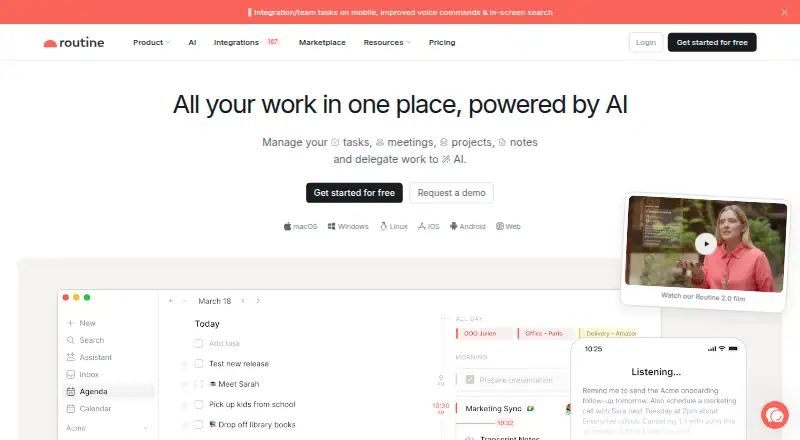
What Routine is
Routine combines task planning, calendars, focus sessions, and meeting notes across macOS, Windows, Linux, web, iOS, and Android. It supports recurring tasks and calendar syncing, with a hybrid planning method and offline mode for working with or without an internet connection. Integrations can connect services such as Slack, Dropbox, and Gmail. Routine’s meeting feature records meetings and creates summaries, transcripts, and original audio. The Free plan includes three integrations, three custom databases, and 250 AI credits. Personal costs $5 per month and includes 10 integrations, 10 custom databases, and 500 AI credits. Professional costs $10 per month and includes unlimited integrations and custom databases, plus 7,000 AI credits. Business is $15 per seat/month and includes organization workspaces, access control, versioning, consolidated billing, and priority support. Enterprise pricing is not listed; its listed features include compliance, audit logs, analytics, user provisioning, and a success manager. Routine specifies 256-bit AES and SSL/TLS data encryption. Support varies by plan, from community support to priority and dedicated support.
Good
- Works across desktop, web, iOS, and Android
- Offline mode is included
- Supports recurring tasks and calendar syncing
- Meeting recordings include summaries and transcripts
- Free plan available
Watch out
- Free plan limited to three integrations and databases
- Free plan includes 250 AI credits
- Enterprise pricing is not listed
Who it suits
Routine suits people who want tasks, calendars, focus sessions, and meeting records in one planning app across desktop and mobile platforms. Teams may find the Business plan’s administration tools relevant, while the Free plan has limited integrations, databases, and AI credits.
Verdict
Routine combines personal planning features with meeting records and team administration options. Check the Free plan limits and paid-plan costs against your integration and AI-credit needs.
Plans and prices
From Routine's own pricing page, checked 28 Sep 2026.
| Plan | Price | What it gives you |
|---|---|---|
| Free | Free | Free forever · 3 integrations · 3 custom databases · 250 AI credits · Free forever |
| Personal | $5 a month | Cancel anytime · 10 integrations · 10 custom databases · 500 AI credits · $5 per month |
| Professional | $10 a month | Cancel anytime · Unlimited integrations · Unlimited custom databases · 7,000 AI credits · $10 per month |
| Business | $15 a month | Cancel anytime · 10,000 AI credits/seat · $15 per seat/month |
| Enterprise | Priced on request | Contact us and book a demo · Unlimited history · Compliance · Audit logs · Analytics · User provisioning · Success manager |
The facts
Each one read from Routine's own pages, with the date it was checked.
What it does
- Calendar sync
- Yeschecked 22 Sep 2026
- Connected services
- Routine can connect services such as Slack, Dropbox, and Gmail through integrations.checked 28 Sep 2026
- Data encryption
- Data is protected with 256-bit AES and SSL/TLS encryption.checked 28 Sep 2026
- Enterprise controls
- Enterprise adds compliance, audit logs, analytics, user provisioning, and a success manager.checked 28 Sep 2026
- First-year offer
- The page states that Routine is free for the first year for freelancers.checked 28 Sep 2026
- Focus sessions
- Yeschecked 22 Sep 2026
- HIPAA protection
- The Enterprise security section lists HIPAA protection for data.checked 28 Sep 2026
- Integration capacity
- Connections are limited to 3 on Free, 10 on Personal, and unlimited on higher plans.checked 28 Sep 2026
- Meeting notes
- Routine records meetings and generates summaries, transcripts, and original audio.checked 28 Sep 2026
- Offline mode
- Offline mode is included, allowing work with or without an Internet connection.checked 28 Sep 2026
- Personal discount
- The Personal plan is advertised with a 38% discount.checked 28 Sep 2026
- Professional discount
- The Professional plan is advertised with a 17% discount.checked 28 Sep 2026
- Recurring tasks
- Yeschecked 22 Sep 2026
- Support options
- Support varies by plan from community support to priority and dedicated support.checked 28 Sep 2026
The company
- Company identity
- The footer identifies Routine as a company and shows a 2026 copyright.checked 28 Sep 2026
- Founded
- 2020checked 23 Sep 2026
- Headquarters
- Paris, Francechecked 23 Sep 2026
- Team administration
- Business includes organization workspaces, access control, versioning, consolidated billing, and priority support.checked 28 Sep 2026
Money
- Free plan
- Yeschecked 22 Sep 2026
- Free plan limits
- The Free plan includes 3 integrations, 3 custom databases, and 250 AI credits.checked 28 Sep 2026
- Planning method
- hybridchecked 22 Sep 2026
Where it runs
- Mobile platforms
- bothchecked 22 Sep 2026
- Supported platforms
- Routine supports macOS, Windows, Linux, Web, iOS, and Android.checked 28 Sep 2026
The full review of Routine
Overview
Routine is a planning app for people who want tasks, calendars, focus sessions, and meeting records in one workflow. It suits freelancers and teams who need that breadth, but the right tier depends on how many integrations and AI credits they use.
Its hybrid approach spans recurring tasks, reminders, calendar sync, and meeting capture. Offline access is useful when a connection drops; team controls become more substantial on higher plans.
Key features
Planning and meeting capture
Recurring tasks, reminders, synced calendars, and focus sessions give Routine more range than a task list alone. Meeting recording adds summaries, transcripts, and original audio, which can keep meeting outputs alongside daily planning. That combination is compelling for users who want both, but readers seeking only a narrow scheduling tool may not need the extra scope.
Integrations, offline access, and security
Routine connects to services including Slack, Dropbox, and Gmail. The connection ceiling matters: Free allows three, Personal ten, and Professional and higher plans are unlimited. Offline mode supports work with or without an internet connection. Data is protected with 256-bit AES and SSL/TLS encryption; Enterprise also includes HIPAA protection.
Team controls
Business adds organization workspaces, access control, versioning, consolidated billing, and priority support, making it a better fit than an individual tier for administered team use. Enterprise adds compliance, audit logs, analytics, user provisioning, unlimited history, and a success manager for organizations needing stronger oversight.
Pricing
Routine has a free tier and paid monthly plans. Free costs nothing, billed free forever, and includes three integrations, three custom databases, and 250 AI credits. It is a practical starting point, but tight ceilings may constrain users who connect several services or rely on AI features.
Personal costs $5 a month and includes ten integrations, ten custom databases, and 500 AI credits. It raises the Free caps for individuals, though AI credits remain limited. The plan is advertised with a 38% discount. Professional costs $10 a month, offers unlimited integrations and custom databases, and provides 7,000 AI credits; its advertised discount is 17%. It is the stronger fit for heavier individual use.
Business costs $15 per seat/month and includes 10,000 AI credits per seat, alongside its team administration features and unlimited integration capacity. Per-seat billing makes team size a direct cost consideration. Enterprise has custom pricing and adds its expanded security and governance controls. Support ranges from community support to priority and dedicated support by plan. The page also states that Routine is free for the first year for freelancers.
Platforms
Routine supports macOS, Windows, Linux, Web, iOS, and Android. Mobile users can use either major mobile platform, while desktop users have options across the main operating systems.
Who it's for
Routine is best suited to people who want task and calendar planning alongside captured meeting records, especially freelancers who can make use of the first-year offer. Teams that need workspaces, access controls, consolidated billing, or compliance tools should weigh Business and Enterprise rather than treating the individual tiers as team plans. Users who need only a small number of connections may find Free or Personal sufficient; those needing unlimited connections face Professional pricing or above.
Pros and cons
- Broad planning in one app: Recurring tasks, reminders, calendar sync, focus sessions, and meeting records cover several connected parts of a workday.
- Offline access: Work can continue without an internet connection.
- Clear upgrade path for integrations: Professional and higher plans remove the integration cap.
- Free-tier limits: Three integrations, three custom databases, and 250 AI credits may feel restrictive for sustained use.
- Team pricing scales by seat: Business is $15 per seat/month, so team size affects the bill.
- Enterprise requires a sales step: Custom pricing and a demo booking make costs less immediate to assess.
Alternatives
Choose FlowSavvy if its Basic allowances of one scheduling-hours profile, three repeating auto-scheduled tasks, five task lists, and a two-week auto-scheduling range fit your needs; it also has a free plan and supports Android, iOS, and Web. Reclaim AI is worth considering for a free starting tier with one user, a one-week scheduling range, one Calendar Sync, one Scheduling Link, and five AI Agents; it supports Web and browser extensions.
General Bots Calendar is a free alternative for users who want a calendar app across Web, Windows, macOS, or Linux. Sunsama may suit readers seeking a paid app with a free trial and Android, iOS, Linux, macOS, and Windows support. Open Sunsama is a free option across Web, desktop systems, iOS, and Android.
Amie offers a free tier and iOS support. DayWise is an Android alternative whose free tier covers manual scheduling and core task management, with paid AI scheduling and auto-rescheduling. Trevor AI has a free plan for one calendar account and a paid plan at $5 a month, billed annually, for multiple calendar accounts and recurring scheduled tasks.
Explore the AI Calendar Assistants, Daily Planner Apps, AI Personal Assistants, Task Management Software, Time Blocking Apps, and Time Management Apps lists for more options.
Verdict
Routine is a strong choice for freelancers and teams who want planning and meeting capture together, with offline access and a path from personal use to administered workspaces. Its main appeal is that breadth; look elsewhere if you need a simpler, cheaper tool or if Free's integration and AI-credit caps are too low and the paid tiers do not fit your budget.
Getting started
- Visit https://routine.co/.
- Choose Free, Personal, Professional, or Business; contact Routine and book a demo for Enterprise.
- Install or access Routine on macOS, Windows, Linux, web, iOS, or Android.
- Connect supported services such as Slack, Dropbox, or Gmail through integrations.
Limits worth knowing
Free includes 3 integrations, 3 custom databases, and 250 AI credits. Personal includes 10 integrations, 10 custom databases, and 500 AI credits; Professional lists unlimited integrations and custom databases and 7,000 AI credits.
Questions
Is Routine free?
Yes. The Free plan is billed Free forever and includes 3 integrations, 3 custom databases, and 250 AI credits.
Which platforms does Routine support?
Routine supports macOS, Windows, Linux, web, iOS, and Android.
Does Routine work offline?
Yes. Offline mode allows work with or without an internet connection.
What services can Routine connect?
Routine can connect services such as Slack, Dropbox, and Gmail through integrations. Connection limits are 3 on Free, 10 on Personal, and unlimited on higher plans.
What does Routine's meeting feature do?
It records meetings and generates summaries, transcripts, and original audio.
Alternatives to Routine
- 1

Power Planner
Free planOpen sourceAndroidiOSWebAPI9.0$4.99 one-time - 2
TimeFinder
Free planAndroidiOSWebmacOS8.9$119.99 one-time - 3

Amie
Free planiOSWebAPIExtension8.8From $20 a month - 4

Sunsama
AndroidiOSLinuxmacOS8.5 - 5

Tweek
Free planAndroidiOSWebmacOS8.5From $49.99 a year - 6
Amazing Marvin
AndroidiOSWebLinux8.4From $8 a month