
FlowSavvy
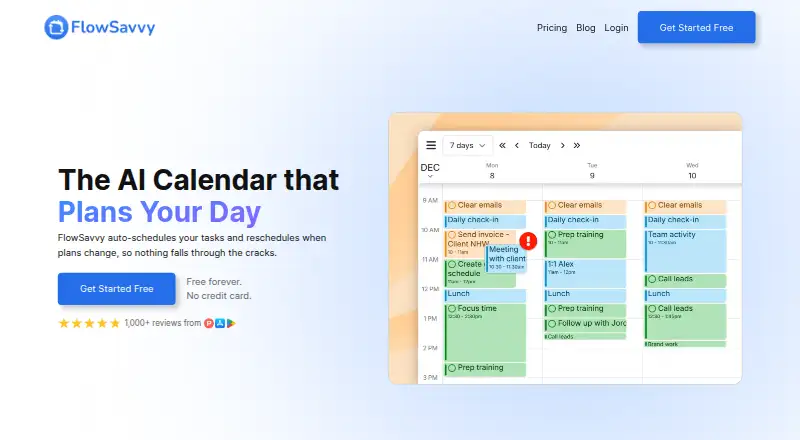
FlowSavvy is a task planner that automatically places tasks in a calendar and reschedules them when plans change.
What FlowSavvy is
FlowSavvy is a task planner that automatically places tasks in a calendar and reschedules them when plans change. It syncs with Google Calendar, Outlook Calendar, and iCloud, while leaving calendar events untouched; only tasks marked for auto-scheduling are changed. You can adjust scheduled tasks by dragging them to a preferred time, then set scheduling hours, priorities, due dates, and task dependencies. Recurring tasks are supported, and integrations include Todoist, Claude, MCP, an API, and Zapier. The public API is available only on Pro. FlowSavvy offers Android, iOS, and web access, and can be installed as a standalone desktop app through supported browsers. It requires an internet connection and does not offer month or year calendar views. The free plan has limits on scheduling profiles, recurring tasks, task lists, and scheduling range.
Good
- Automatically reschedules tasks when plans change
- Syncs with Google, Outlook, and iCloud calendars
- Supports recurring tasks and task dependencies
- Available on Android, iOS, and web
Watch out
- Requires an internet connection; no offline mode
- Month and year calendar views are unavailable
- Public API is available only on Pro
Who it suits
FlowSavvy suits busy individuals who want tasks automatically arranged around their plans. It is aimed at individual use rather than team or enterprise needs.
Verdict
FlowSavvy centers on automatic task scheduling, with calendar sync and controls for priorities, deadlines, and dependencies. Check its free-plan limits and calendar-view restrictions against your planning needs.
Plans and prices
From FlowSavvy's own pricing page, checked 1 Oct 2026.
| Plan | Price | What it gives you |
|---|---|---|
| Pro | $14 a month | 8-week auto-scheduling · unlimited scheduling-hours profiles · unlimited repeating auto-scheduled tasks · unlimited task lists · priorities · task dependencies · API/MCP/Zapier · per month, billed monthly |
| Basic | Free | unlimited auto-reschedules · 2-week auto-scheduling · 1 scheduling-hours set · 3 repeating auto-scheduled tasks · 5 task lists · free forever |
| Pro | $120 a year | 8-week auto-scheduling · unlimited scheduling-hours profiles · unlimited repeating auto-scheduled tasks · unlimited task lists · priorities · task dependencies · API/MCP/Zapier · $120.00 per year (= $10.00/month, billed annually) |
The facts
Each one read from FlowSavvy's own pages, with the date it was checked.
What it does
- API availability
- FlowSavvy offers a public API for custom automations, and the API is available only on the Pro plan.checked 1 Oct 2026
- Audience
- FlowSavvy says it works best for busy individuals who want powerful auto-scheduling without team or enterprise features.checked 1 Oct 2026
- Calendar sync
- FlowSavvy syncs with Google, Outlook.com, and iCloud calendars.checked 1 Oct 2026
- Calendar-view limitation
- FlowSavvy does not currently provide month or year views.checked 1 Oct 2026
- Events behavior
- FlowSavvy says it never touches calendar events and only auto-schedules tasks with Auto-Schedule enabled.checked 1 Oct 2026
- Integrations
- Supported integrations include Google Calendar, Outlook Calendar, iCloud Calendar, Todoist, Claude, MCP, API, and Zapier.checked 1 Oct 2026
- Offline limitation
- FlowSavvy requires an internet connection and does not have an offline mode.checked 1 Oct 2026
- Paid from
- 10checked 22 Sep 2026
- Privacy
- FlowSavvy says it is not in the business of selling customers' personal information and collects only data necessary to provide its services.checked 1 Oct 2026
- Recurring tasks
- FlowSavvy intelligently schedules time for habits and recurring tasks.checked 1 Oct 2026
- Scheduling controls
- Users can drag and drop auto-scheduled tasks to lock them in place and configure scheduling hours, dependencies, priorities, and due dates.checked 1 Oct 2026
- Security
- FlowSavvy says it uses encryption in transit and at rest, strict access controls, and regularly updated systems, and does not sell information or use it to train AI models.checked 1 Oct 2026
- Support
- Pro includes 24/7 AI assistant support plus email and chat support, while the Free plan includes help articles.checked 1 Oct 2026
- What it does
- FlowSavvy auto-schedules tasks into a calendar and reschedules them when plans change.checked 1 Oct 2026
Where it runs
- Desktop app
- FlowSavvy is a Progressive Web App that can be installed as a standalone desktop app in supported browsers.checked 1 Oct 2026
- Mobile platforms
- bothchecked 22 Sep 2026
Money
- Free plan
- Yeschecked 22 Sep 2026
- Planning method
- hybridchecked 22 Sep 2026
The full review of FlowSavvy
FlowSavvy is a task planner that schedules work around your calendar and adjusts the plan when things change. It is best for busy individuals who want flexible task scheduling rather than team or enterprise tools. Choose it for its mix of automation and control, but look elsewhere if you need offline access or month and year calendar views.
Overview
FlowSavvy uses a hybrid approach: it automatically places tasks into a calendar, then reschedules them as plans change. Auto-Schedule must be enabled for a task to move, and FlowSavvy says it never changes calendar events. That separation is useful for people who want tasks to flex around appointments without giving the scheduler authority over those appointments.
Users can set scheduling hours, priorities, due dates and dependencies, and drag scheduled tasks into place to lock them. This gives the automation boundaries, rather than leaving every task at its mercy. Calendar sync supports Google Calendar, Outlook Calendar and iCloud Calendar; other integrations include Todoist, Claude, MCP, the API and Zapier. The public API is limited to Pro.
Key features
Scheduling that can adapt
Automatic placement and rescheduling are FlowSavvy’s central strength: when plans shift, the schedule can shift with them. Scheduling-hour profiles define when work may be placed, while priorities, due dates and dependencies help express what matters. Dragging a task to lock it offers a practical counterweight for commitments that should stay put. These controls are especially relevant to individuals juggling changing workloads; the product is not positioned around team or enterprise needs.
Calendar connections, with a narrower view
Sync with Google Calendar, Outlook Calendar or iCloud Calendar to coordinate tasks with calendar time. FlowSavvy does not offer month or year views, however, so people who plan by scanning a long-range calendar may find its calendar experience limiting. It also requires an internet connection and has no offline mode, which rules it out for work that must continue without connectivity.
Pricing
FlowSavvy is freemium, with a free plan, a 7-day trial and paid pricing from $10/user/mo (annual). The Pro plan is $14 a month, billed monthly. Pro extends auto-scheduling to an 8-week range and includes unlimited scheduling-hours profiles, repeating auto-scheduled tasks and task lists, plus priorities, dependencies and API/MCP/Zapier. It also includes 24/7 AI assistant support and email and chat support. For individuals who need the longer planning range, advanced controls or custom automation, Pro is the clearest fit; the monthly price is distinct from the annual starting rate.
Basic has custom pricing. It allows one scheduling-hours profile, three repeating auto-scheduled tasks, five task lists and a two-week auto-scheduling range. Those caps make it a constrained option for someone whose planning routine fits within them, but a poor fit for people relying on many recurring tasks or longer-range scheduling. The Free plan includes help articles rather than Pro’s support channels.
Platforms
FlowSavvy is available on Android, iOS and the web. It is a Progressive Web App that can be installed as a standalone desktop app in supported browsers, but it requires an internet connection and has no offline mode.
Who it's for
FlowSavvy is a sensible choice for busy individuals who want tasks automatically fitted around a changing calendar, with enough controls to protect work hours and fixed tasks. It is less suitable for teams seeking enterprise features, people who need offline planning, or anyone who depends on month and year calendar views.
Pros and cons
- Pros: Tasks can be rescheduled as plans change, while drag-to-lock and configurable hours let users keep control of important slots.
- Pros: Calendar sync covers Google Calendar, Outlook Calendar and iCloud Calendar, with Todoist and automation connections including API and Zapier.
- Pros: Pro removes Basic’s repeating-task and list caps and adds an eight-week scheduling range, priorities and dependencies.
- Cons: Basic is limited to three repeating tasks, five lists, one hours profile and a two-week range, which can constrain a busy planner.
- Cons: No offline mode and no month or year views limit where and how users can plan.
- Cons: API access and email, chat and AI assistant support require Pro; Free users get help articles.
Alternatives
Consider Routine if its free plan’s three integrations, three custom databases and 250 AI credits suit your workflow, or if you want its wider platform coverage, including Linux, macOS and Windows. Tiimo is another option with a free plan, but its free plan excludes the web app and is limited to selected planning tools.
Reclaim AI may suit someone looking for a free entry point with a one-week scheduling range, one calendar sync, one scheduling link and five AI Agents. TimeFinder is a cross-platform alternative with a free plan covering core features and a premium lifetime option.
Choose Ellie Planner if unlimited tasks and Brain Dump on its free plan are the priority; its Pro plan is $9.99 a month. Week Plan offers a free Lite plan with basic planner features and High Impact Tasks, while Ultimate is $8.67 a month billed annually.
Amazing Marvin is a paid alternative with a free trial and a Marvin Pro plan at $8 a month billed monthly, including 100+ features and unlimited tasks and projects. Sunsama has no free plan and offers a Pro plan at $17 a year billed yearly. For broader browsing, see Daily Planner Apps, AI Calendar Assistants, Time Blocking Apps, Time Management Apps and Calendar apps.
Verdict
Choose FlowSavvy if you are an individual whose task load changes often and you want a calendar scheduler that can adapt without touching your events. Its combination of automatic rescheduling and user-set limits is the main reason to pick it. Look elsewhere if offline access or month and year calendar views matter, or if Basic’s tight quotas do not match your workload.
Getting started
- Open https://flowsavvy.app/.
- Choose the Free plan or review the paid options.
- Use the Android, iOS, or web version.
- Connect a supported calendar such as Google Calendar, Outlook Calendar, or iCloud Calendar.
- Enable Auto-Schedule for tasks you want scheduled automatically.
- Install the Progressive Web App as a standalone desktop app in a supported browser if desired.
Limits worth knowing
The Free plan includes 1 scheduling-hours profile, 3 repeating auto-scheduled tasks, 5 task lists, and a 2-week auto-scheduling range. Pro is listed at $14 a month billed monthly and extends scheduling to 8 weeks, with unlimited scheduling-hours profiles, repeating auto-scheduled tasks, and task lists; priorities, dependencies, and API/MCP/Zapier are also included on Pro.
Questions
Is FlowSavvy free?
Yes. It has a Free plan, and a 7-day trial is listed.
How much does FlowSavvy cost?
Pro is separately listed at $14 a month, billed monthly.
Which platforms does it support?
FlowSavvy works on Android, iOS, and the web. It can be installed as a standalone desktop app in supported browsers.
Which calendars and services does it integrate with?
Calendar sync includes Google Calendar, Outlook Calendar, and iCloud Calendar. Other listed integrations include Todoist, Claude, MCP, an API, and Zapier.
Is the public API available on the Free plan?
No. The public API is available only on Pro.
Does FlowSavvy work offline?
No. It requires an internet connection and does not have an offline mode.
Alternatives to FlowSavvy
- 1

Power Planner
Free planOpen sourceAndroidiOSWebAPI9.0$4.99 one-time - 2
TimeFinder
Free planAndroidiOSWebmacOS8.9$119.99 one-time - 3

Routine
Free planAndroidiOSWebLinux8.8From $5 a month - 4

Amie
Free planiOSWebAPIExtension8.8From $20 a month - 5

Sunsama
AndroidiOSLinuxmacOS8.5 - 6

Tweek
Free planAndroidiOSWebmacOS8.5From $49.99 a year