
Tiimo
Tiimo is a visual daily planner for people who benefit from structure, reminders, and flexibility, including neurodivergent users.
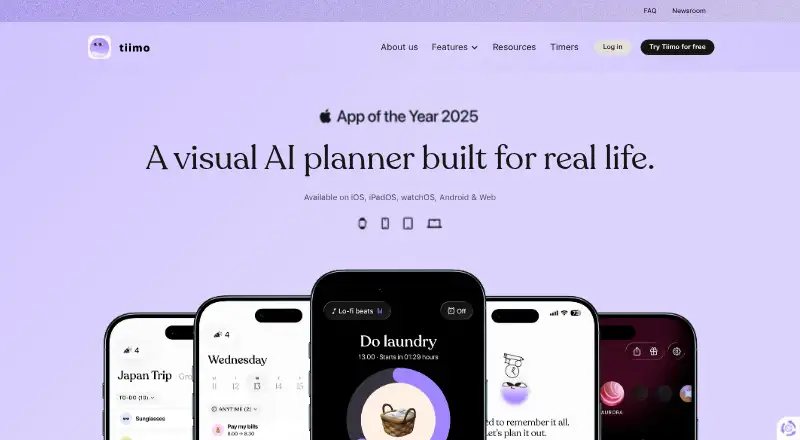
What Tiimo is
Tiimo is a visual daily planner for people who benefit from structure, reminders, and flexibility, including neurodivergent users. It combines calendar planning, to-do lists, focus tools, gentle nudges, and AI planning. Its AI co-planner turns ideas into structured tasks, breaks them into steps, and estimates their duration; it is currently available only on iOS and the web app. Users can import Google, iCloud, and Outlook calendars, though Outlook and Exchange must first connect through Google Calendar, and iCloud import is not available on Android. Visuals, sounds, fonts, and profiles can be adjusted. Tiimo is available on Android, iOS, macOS, and web, but its free plan offers selected planning tools on iOS and Android only and excludes the web app. A seven-day trial is listed; monthly and yearly Pro prices are not listed. Tiimo says it uses encryption, firewalls, and access controls, does not sell personal data, and retains data for up to two years after subscription cancellation.
Good
- Combines calendars, to-do lists, focus tools, and nudges.
- AI co-planner breaks ideas into tasks and steps.
- Visuals, sounds, fonts, and profiles are adjustable.
- Imports Google, iCloud, and Outlook calendars.
Watch out
- AI co-planner is limited to iOS and web.
- Free plan excludes the web app.
- iCloud calendar import is unavailable on Android.
- Pro plan prices are not listed.
Who it suits
Tiimo was built with ADHD and Autism in mind and may suit anyone who benefits from structure and flexibility. It may also suit users who want calendar planning, reminders, and focus tools in one app.
Verdict
Tiimo combines visual planning and reminders with an AI co-planner, though that feature is not available on every platform. Check the free-plan platform limits and calendar-import requirements before choosing it.
Plans and prices
From Tiimo's own pricing page, checked 30 Sep 2026.
| Plan | Price | What it gives you |
|---|---|---|
| Free | Free | Selected planning tools · iOS and Android apps only · web app excluded |
| Tiimo Pro monthly | — | All features across platforms · Monthly; charged immediately |
| Tiimo Pro yearly | — | All features across platforms · Full year; 7-day free trial available |
The facts
Each one read from Tiimo's own pages, with the date it was checked.
What it does
- AI availability
- The AI co-planner is currently available on iOS and the web app only.checked 30 Sep 2026
- Calendar integrations
- Users can import Google, iCloud, and Outlook calendars; Outlook and Exchange calendars must first be connected to Google Calendar.checked 30 Sep 2026
- Calendar limitation
- iCloud calendar import is not currently available on Android.checked 30 Sep 2026
- Calendar sync
- Yeschecked 22 Sep 2026
- Customization
- Users can adjust visuals, sounds, fonts, and profiles to suit their needs.checked 30 Sep 2026
- Data retention
- Tiimo says it retains data for up to two years after a subscription is cancelled, after which it is deleted.checked 30 Sep 2026
- Focus sessions
- Yeschecked 22 Sep 2026
- Intended users
- Tiimo was built with ADHD and Autism in mind and says its executive-functioning tools can support every brain.checked 30 Sep 2026
- Notable limits
- Tiimo says two accounts cannot be merged, so users must choose one account to keep using.checked 30 Sep 2026
- Privacy
- Tiimo says it does not sell personal data and shares the minimum necessary with providers that must comply with GDPR.checked 30 Sep 2026
- Purpose
- Tiimo is a visual daily planner designed to support neurodivergent people and others who benefit from structure, reminders, and flexibility.checked 30 Sep 2026
- Recurring tasks
- Yeschecked 22 Sep 2026
- Security
- Tiimo says it uses encryption, firewalls, and access controls to protect data from unauthorized access, loss, or misuse.checked 30 Sep 2026
- Support
- Users can contact support through the FAQ page chat or by emailing [email protected].checked 30 Sep 2026
Money
- AI planning
- Its AI co-planner turns ideas into structured tasks, breaks tasks into steps, and estimates how long they take.checked 30 Sep 2026
- Free plan
- Yeschecked 22 Sep 2026
- Planning method
- hybridchecked 22 Sep 2026
- Planning tools
- Tiimo combines calendar planning, to-do lists, focus tools, gentle nudges, and AI planning in one app.checked 30 Sep 2026
The company
- Founded
- 2015checked 23 Sep 2026
- Headquarters
- Copenhagen, Denmarkchecked 23 Sep 2026
Where it runs
- Mobile platforms
- bothchecked 22 Sep 2026
The full review of Tiimo
Tiimo is a visual planner for people who want daily structure that can flex around their needs. It suits neurodivergent users and others who benefit from reminders, routines, and adjustable planning. Its mix of calendars, tasks, and focus tools is compelling, but the free plan is limited to mobile and AI planning is unavailable on Android.
Overview
Tiimo brings scheduled calendar plans and task-based organization together rather than forcing users to choose between them. Recurring tasks, reminders, focus sessions, and gentle nudges can help turn a loose day into a manageable sequence; adjustable visuals, sounds, fonts, and profiles give users control over how that structure is presented.
Built with ADHD and Autism in mind, Tiimo is intended to support executive functioning for a wider range of people, too. That makes its flexibility central to its appeal: it can provide structure without requiring every user to plan in the same way.
Key features
Planning, routines, and focus
Calendar plans, to-do lists, recurring tasks, and focus tools sit within one hybrid planning approach. That breadth is useful for someone who needs both scheduled events and task reminders in the same routine. If the main need is simply a lightweight task list, Tiimo's broader planning setup may be more than necessary.
AI co-planner
The AI co-planner can turn ideas into structured tasks, break them into steps, and estimate how long they may take. This can help users move from an intention to a workable plan, but it is only available on iOS and the web app, not Android.
Calendar imports and account considerations
Tiimo can import Google, iCloud, and Outlook calendars. Outlook and Exchange calendars must first be connected to Google Calendar, adding a setup dependency for users of those services; iCloud calendar import is not available on Android. Tiimo also does not support merging two accounts, so anyone consolidating plans will need to choose one account to keep using.
Privacy and support
Tiimo says it uses encryption, firewalls, and access controls to protect data, does not sell personal data, and shares only the minimum necessary with providers that must comply with GDPR. It retains data for up to two years after a subscription is cancelled, then deletes it. Support is available through chat on the FAQ page or by email.
Pricing
Tiimo uses a freemium model, with a free plan and a 7-day trial. The free plan costs nothing and includes selected planning tools in the iOS and Android apps; it excludes the web app. That makes it a reasonable way to try mobile planning, but not a fit for someone who needs browser access or the full feature set.
Tiimo Pro monthly has custom pricing, is billed monthly, and is charged immediately. It includes all features across platforms, making it the option for users who want full access without committing to a full year. Tiimo Pro yearly also has custom pricing and includes all features across platforms, with a 7-day free trial available before the full-year billing term. The yearly plan is worth considering for a longer-term user who wants to try Pro first; check the renewal terms before starting the trial.
Platforms
Tiimo is available on Android, iOS, macOS, and the web. The free plan is limited to the iOS and Android apps, while Pro covers all features across platforms. Although the web app supports the AI co-planner, Android users do not get that feature, and Android users cannot import iCloud calendars.
Who it's for
Tiimo is best suited to people who want a customizable daily planner with recurring tasks, reminders, calendar syncing, and focus support—especially users with ADHD or Autism who value help turning plans into steps. It is less suitable for someone who needs AI co-planning on Android, iCloud imports on Android, or a free web-app plan.
Pros and cons
Pros
- Combines calendar planning, to-do lists, recurring tasks, and focus sessions, supporting both scheduled commitments and everyday tasks.
- Visual, sound, font, and profile customization lets users tailor the experience to their preferences.
- The AI co-planner structures ideas, breaks them down, and estimates duration on iOS and web.
- Imports Google, iCloud, and Outlook calendars, with support for several major calendar services.
Cons
- The free plan excludes the web app, limiting access for people who want browser-based planning without Pro.
- AI planning is not available on Android, and iCloud import is also unavailable there.
- Outlook and Exchange calendars must first be connected to Google Calendar.
- Accounts cannot be merged, which complicates switching between or consolidating accounts.
- Data may be retained for up to two years after cancellation.
Alternatives
For a more routine-centered option, compare Routine Planner Apps; for a broader day-planning shortlist, see Daily Planner Apps. If the priority is task management, browse To-do list apps.
Planner Pig is another freemium option across Android, iOS, macOS, and web, with prepaid plans starting at 1.99 USD for one month; consider it if prepaid access is preferable. MyRoutine has a free version with 10 habits and 3 diary entries and supports Android, iOS, and macOS, making it a more habit-focused alternative to compare. Routinery offers two routines and unlimited checklists free, with Premium at $5 a month or $36 a year; choose it if routine counts and checklists are the deciding factors. Thruday offers free visual daily planning, priority to-do lists, reminders, images, colors, and breathing exercises on Android, iOS, and web, so it may suit someone seeking those tools without a paid plan. TimeBloc is a free Android and iOS option with a trial and a Premium plan that adds unlimited routines and calendars, advanced notifications, and statistics. Fabulous is another freemium Android and iOS app, with a Premium monthly in-app purchase at $19.99 a month; it is an alternative to compare if that plan structure suits you. LearnWell Languages is a paid iOS and macOS app with a 6.99 USD monthly Premium plan, and is a more specialized alternative. Routinely supports iOS and macOS, with a free tier capped at two routines and five habits per routine; consider it if those limits fit your needs.
Verdict
Choose Tiimo if you want a flexible visual planner that combines calendar imports, routines, reminders, and focus support, especially if its AI co-planner can help turn intentions into steps. Look elsewhere if Android AI planning, iCloud imports on Android, or free web access is essential; those limits narrow an otherwise broad planning toolkit.
Getting started
- Visit https://www.tiimoapp.com/.
- Choose the free plan for selected planning tools on iOS or Android, or select a Pro plan for all features across platforms.
- Install the app on iOS or Android, or use macOS or the web with a Pro plan.
- Import a Google or iCloud calendar; connect Outlook or Exchange through Google Calendar first.
- Use the AI co-planner on iOS or the web app to turn ideas into tasks and steps.
Limits worth knowing
The free plan provides selected planning tools in the iOS and Android apps and excludes the web app. The yearly Pro plan has a seven-day free trial; the free plan also notes a seven-day trial.
Questions
Is Tiimo free?
Yes. The Free plan costs nothing and includes selected planning tools in the iOS and Android apps.
What platforms does Tiimo support?
Tiimo is available on Android, iOS, macOS, and the web. The Free plan excludes the web app.
Where can I use the AI co-planner?
The AI co-planner is currently available on iOS and the web app.
Which calendars can I import?
Tiimo supports Google, iCloud, and Outlook calendar imports. Outlook and Exchange calendars must first be connected to Google Calendar; iCloud import is unavailable on Android.
Who makes Tiimo?
Tiimo makes the app. The company was founded in 2015 and is headquartered in Copenhagen, Denmark.
Alternatives to Tiimo
- 1
Otsimo Speech Therapy
Free planAndroidiOS7.7From $4.49 a month - 2

Avaz
Free planAndroidiOS7.0$44.99 one-time - 3
Rethink Autism
AndroidiOSWeb5.3 - 4
VizyPlan
AndroidiOSWebmacOS5.3 - 5
Lusha
AndroidiOSmacOSWindows5.2 - 6
Pictalk Buddy
AndroidiOSWeb5.2