
ClickUp
ClickUp is a work-management app for organizing tasks and team activity.
What ClickUp is
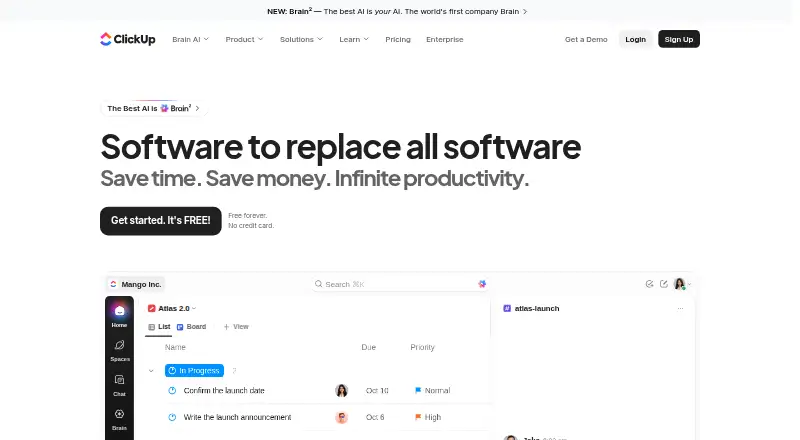
ClickUp is a work-management app for organizing tasks and team activity. Its views include List, Board, Calendar, Team, and Gantt, with automation rules, time tracking, and guest access. Apps are available for Android, iOS, macOS, and Windows. The Free Forever plan costs nothing and includes unlimited tasks and members, 60MB of file storage, and one form; it is available without a credit card and includes 24/7 support. ClickUp lists more than 50 native integrations, including Slack, HubSpot, Google Drive, Salesforce, Zapier, and Dropbox. Free-plan guests have full create and edit permissions that cannot be changed, while paid plans include limited external guest seats and unlimited read-only guests. Automation allowances vary by plan, from 100 to 250,000 executions. The listed starting price is $7/user/mo (annual); Unlimited is $10 a month billed yearly, and Business is $19 a month billed yearly. Workspaces are billed separately. Listed certifications include SOC 2 and ISO 27001, and listed compliance standards include GDPR and HIPAA.
Good
- Free plan includes unlimited tasks and members.
- Apps are available on four listed platforms.
- More than 50 native integrations are listed.
- Free plan includes 24/7 support.
Watch out
- Free storage is limited to 60MB.
- Free guests have unchangeable create and edit permissions.
- Workspaces are billed separately.
- Automation limits vary by plan.
Who it suits
ClickUp suits people who want multiple task views, time tracking, and automation across a team. Its free plan may suit teams that can work within 60MB of file storage and its guest-permission limits.
Verdict
ClickUp combines several task views with time tracking, automation, and integrations. Check the free plan’s storage and guest permissions, and account for separate Workspace billing when choosing a plan.
Plans and prices
From ClickUp's own pricing page, checked 27 Sep 2026.
| Plan | Price | What it gives you |
|---|---|---|
| Free Forever | Free | Free forever with no credit card. · 60MB storage · Unlimited tasks · Unlimited free plan members · 1 form |
| Unlimited | $10 a month | Paid plan with monthly billing. · Unlimited storage · Unlimited Gantt charts · Unlimited integrations · Unlimited custom fields · Billed yearly |
| Business | $19 a month | Popular business plan with monthly billing. · 5,000 automations per month · Unlimited dashboards · Unlimited activity views · Unlimited timeline views · Billed yearly |
| Enterprise | Priced on request | Custom pricing through sales. · 250,000 automations per month · Unlimited custom roles |
| Brain AI | $9 a month | AI plan with unlimited Brain Assistant and AI chat. · $9 per user/month |
| AI Free Forever | Free | Free AI plan with trial access to advanced AI features. |
The facts
Each one read from ClickUp's own pages, with the date it was checked.
What it does
- Automation limits
- Automation limits vary by plan, from 100 executions to 250,000 executions.checked 27 Sep 2026
- Automation rules
- Yeschecked 20 Sep 2026
- Compliance standards
- The page lists GDPR and HIPAA compliance.checked 27 Sep 2026
- Copyright year
- The page displays a 2026 copyright notice for ClickUp.checked 27 Sep 2026
- Customer support
- The Free plan includes 24/7 support.checked 27 Sep 2026
- Guest access
- Yeschecked 20 Sep 2026
- Guest permissions
- Free-plan guests have full create and edit permissions that cannot be modified.checked 27 Sep 2026
- Integration examples
- Examples include Slack, HubSpot, Google Drive, Salesforce, Zapier, and Dropbox.checked 27 Sep 2026
- Money-back guarantee
- ClickUp advertises a 100% money-back guarantee.checked 27 Sep 2026
- Native integrations
- The page lists 50+ native integrations.checked 27 Sep 2026
- Paid from
- 7checked 20 Sep 2026
- Paid guest access
- Paid plans include limited external guest seats and unlimited read-only guests.checked 27 Sep 2026
- Security certifications
- The page lists SOC 2 and ISO 27001 certifications.checked 27 Sep 2026
- Task views
- Available views include List, Board, Calendar, Team, and Gantt.checked 27 Sep 2026
- Time tracking
- Yeschecked 20 Sep 2026
The company
- Founded
- 2017checked 23 Sep 2026
- Headquarters
- San Diego, California, United Stateschecked 23 Sep 2026
Money
- Free members
- The Free plan includes unlimited members.checked 27 Sep 2026
- Free plan
- Yeschecked 20 Sep 2026
- Free storage
- The Free plan includes 60MB of file storage.checked 27 Sep 2026
- Free tasks
- The Free plan includes unlimited tasks.checked 27 Sep 2026
- Free tier
- Free Forever is available without a credit card.checked 27 Sep 2026
- Workspace billing
- Payment is charged separately for each Workspace.checked 27 Sep 2026
Where it runs
- Supported platforms
- ClickUp offers iOS, Android, Mac, and Windows apps.checked 27 Sep 2026
The full review of ClickUp
Overview
ClickUp is a work management platform for organizing tasks and coordinating team activity in one workspace. It best suits teams that want multiple ways to view work alongside time tracking, automation, and integrations. Its generous free task and member allowances are appealing, but the storage cap and guest permissions call for care.
Key features
Task views and collaboration
List, Board, Calendar, Team, and Gantt views let people approach work in different ways, from task lists to timeline planning. Unlimited tasks and members on the free plan remove headcount and task-count ceilings for small or growing teams. But its 60MB of file storage is a real constraint for teams that rely on shared files, and the single included form may also be limiting.
Automation, time tracking, and integrations
ClickUp includes automation rules and time tracking, useful for teams that want workflow triggers and time records within their work platform. Automation capacity scales sharply by plan, from 100 executions to 250,000; buyers should check that their expected volume fits their tier. More than 50 native integrations include Slack, HubSpot, Google Drive, Salesforce, Zapier, and Dropbox, which can reduce the need to move routine work between separate tools.
Access and safeguards
Free-plan guests have full create and edit permissions, and those permissions cannot be changed. That is a consequential drawback when inviting external collaborators who should only have limited access. Paid plans include limited external guest seats as well as unlimited read-only guests. ClickUp lists SOC 2 and ISO 27001 certifications and GDPR and HIPAA compliance. Free-plan users also receive 24/7 support.
Pricing
ClickUp uses a freemium model, with Free Forever available without a credit card. Billing is charged separately for each Workspace, so organizations using multiple workspaces should account for separate charges. ClickUp also advertises a 100% money-back guarantee.
| Plan | Price | What it means |
|---|---|---|
| Free Forever | free | Unlimited tasks and free-plan members, 60MB storage, and one form. A strong way to start, provided the storage and guest-permission limits work for the team. |
| Unlimited | $10 a month, billed yearly | Unlimited storage, Gantt charts, integrations, and custom fields. It addresses key free-plan constraints, though automation remains subject to plan-specific limits. |
| Business | $19 a month, billed yearly | 5,000 automations per month, unlimited dashboards, activity views, and timeline views. It fits teams that need higher workflow capacity and broader oversight. |
| Enterprise | Custom pricing | 250,000 automations per month and unlimited custom roles. This is the tier for organizations that need those larger limits and role controls. |
| Brain AI | $9 a month, billed $9 per user/month | Unlimited Brain Assistant and AI chat, as a separate AI plan. |
| AI Free Forever | Custom pricing | A free AI plan with trial access to advanced AI features. |
The listed Unlimited and Business prices are billed yearly, despite being expressed per month. Free Forever avoids a card requirement, but its low storage allowance and unchangeable guest permissions are practical trade-offs. Automation execution caps vary by plan, so teams with substantial automated workloads should compare their needs against the tier limits.
Platforms
ClickUp offers apps for Android, iOS, macOS, and Windows, covering mobile and desktop use.
Who it's for
ClickUp is a good fit for teams that want varied task views, built-in time tracking, automation, and many native integrations in a shared work platform. The free tier can suit teams with modest file needs and guests who can be trusted with editing access. Teams that need tighter control over external collaborators, more storage, or higher automation capacity should weigh a paid plan; organizations seeking only a basic task list may find its broader work-management scope unnecessary.
Pros and cons
- Pros: Unlimited free tasks and members make it possible to start without per-member or task-count caps.
- Pros: Five task views, time tracking, automation, and 50+ native integrations bring several work functions together.
- Pros: Free-plan users receive 24/7 support, and paid plans add unlimited read-only guests.
- Cons: The free plan's 60MB storage can restrict file-heavy teams.
- Cons: Free guests receive full create and edit access that cannot be modified, which may not suit sensitive external collaboration.
- Cons: Separate Workspace billing and plan-dependent automation quotas add costs and capacity decisions for teams operating multiple workspaces.
Alternatives
For a different work-management choice, compare Work Management Software. Teams focused on building AI into project workflows can also browse AI Project Management Software. Decisions has a free plan and a paid model, while Budibase is freemium with a free plan and trial. Workato Agent Studio and Zapier also offer free plans; Zapier's free tier includes 100 tasks per month. For partner management, Airstride has a free plan for up to three partners. Dock and Pricekeel offer free plans, and RevOps offers a freemium plan.
Verdict
Choose ClickUp if your team wants task views, time tracking, automation, and integrations in a single work platform, with room to begin on a free plan. Look elsewhere if the free storage cap or fixed guest permissions are unacceptable, and check Workspace billing and automation limits before committing to a paid tier.
Getting started
- Visit the ClickUp website.
- Choose the Free Forever plan or a paid plan.
- Install the app for Android, iOS, macOS, or Windows.
- Create a Workspace and organize tasks using a view such as List, Board, Calendar, Team, or Gantt.
- Add integrations from the listed native integration options.
Limits worth knowing
Free Forever includes 60MB of storage and one form. Automation execution limits vary by plan, from 100 to 250,000; paid guest access includes limited external guest seats and unlimited read-only guests.
Questions
Does ClickUp have a free plan?
Yes. Free Forever is available without a credit card and includes unlimited tasks and members, 60MB of storage, and one form.
How much does ClickUp cost?
Unlimited is $10 a month billed yearly, and Business is $19 a month billed yearly.
Which platforms have ClickUp apps?
ClickUp offers apps for Android, iOS, macOS, and Windows.
Can I use automations and time tracking?
Yes. ClickUp lists automation rules and time tracking. Automation limits vary by plan, from 100 to 250,000 executions.
What integrations does ClickUp offer?
ClickUp lists more than 50 native integrations, including Slack, HubSpot, Google Drive, Salesforce, Zapier, and Dropbox.
How does guest access work?
Free-plan guests have full create and edit permissions that cannot be changed. Paid plans include limited external guest seats and unlimited read-only guests.
Alternatives to ClickUp
- 1
Jira
Free planAndroidiOSWebAPI9.2Free plan - 2

Wrike
Free planAndroidiOSWebAPI9.2From $10 a month - 3

Teamwork.com
Free planAndroidiOSWebAPI9.2From $9.99 a month - 4

Trello
Free planAndroidiOSWebAPI9.2From $5 a month - 5

Linear
Free planAndroidiOSWebAPI9.2From $10 a month - 6

Hive
Free planAndroidiOSWebAPI9.0From $5 a month