Dock
Dock is a revenue enablement platform for sales, customer success, and marketing teams.
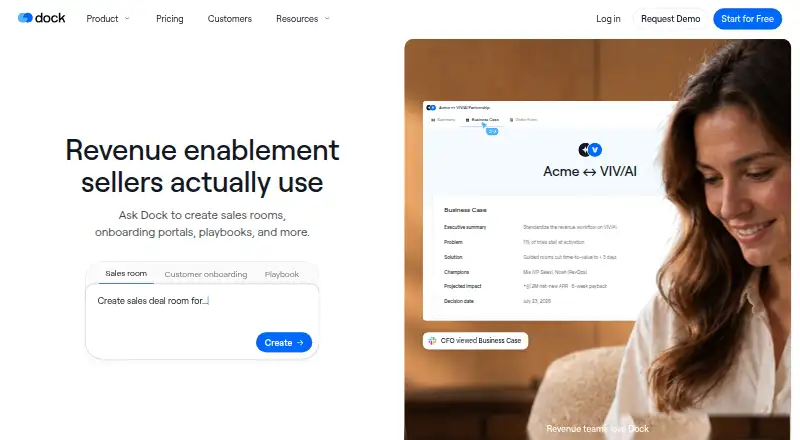
What Dock is
Dock is a revenue enablement platform for sales, customer success, and marketing teams. Its sales rooms give buyers and sellers a shared place for content, conversations, and next steps. Dock AI can create customer workspaces, slides, order forms, playbooks, and training courses. Teams can track workspace visitors, views, time spent, and actions by person, page, or asset. Dock also supports pricing proposals, approval rules, and signatures within order forms. Salesforce and HubSpot connections sync account and deal context with sales workflows, and other listed integrations include Gong, Zoom, Slack, Google Drive, SharePoint, Notion, and Confluence. A Chrome extension makes Dock content, workspaces, and its AI assistant available in Gmail, LinkedIn, a CRM, or elsewhere in the browser. Dock says it is GDPR compliant and SOC 2 Type II certified. External collaborators can access workspaces without charge; internal team members are the billable users.
Good
- Shared sales rooms organize content and next steps.
- AI can create workspaces, slides, and playbooks.
- Tracks visitor activity by person, page, or asset.
- Connects with Salesforce and HubSpot.
Watch out
- Free plan limits workspaces, assets, and AI usage.
- Team seats cost an additional $50/mo.
Who it suits
Dock suits sales, customer success, and marketing teams that coordinate buyer-facing material and next steps. It may also fit teams that want workspace engagement visibility and order-form workflows.
Verdict
Dock brings shared sales workspaces, buyer engagement tracking, and order-form tools together. Compare the free plan limits and paid seat costs with your team's needs.
Plans and prices
From Dock's own pricing page, checked 2 Oct 2026.
| Plan | Price | What it gives you |
|---|---|---|
| Free | Free | 10 workspaces · 25 CMS assets · 1 slide · 1 playbook · 1 course · 1 order form · limited AI usage · forever |
| Standard | $350 a month | 5 users · additional seats $50/mo · unlimited workspaces · 100 CMS assets · 5 playbooks · 1 course · unlimited order forms · per month |
| Premium | $1,000 a month | 10 users · additional seats $50/mo · unlimited workspaces · 250 CMS assets · unlimited playbooks and courses · unlimited order forms · per month, billed annually |
| Enterprise | Priced on request | 25+ users · unlimited workspaces and CMS assets · API · SCIM provisioning · dedicated CSM · managed implementation · Custom annual contract |
The facts
Each one read from Dock's own pages, with the date it was checked.
What it does
- AI creation
- Dock AI can create customer workspaces, slides, order forms, playbooks, and training courses.checked 2 Oct 2026
- AI usage limits
- Dock says AI usage scales with each plan, with fair-use protections to prevent abuse and ensure reliability.checked 2 Oct 2026
- Buyer engagement
- Dock lets teams see workspace visitors, views, time spent, and actions by person, page, or asset.checked 2 Oct 2026
- Chrome extension
- The Chrome extension provides access to Dock content, workspaces, and its AI assistant in Gmail, LinkedIn, a CRM, or elsewhere in the browser.checked 2 Oct 2026
- CRM integrations
- Dock connects with Salesforce and HubSpot to sync account and deal context with sales workflows.checked 2 Oct 2026
- External collaborators
- Dock says it charges only for internal team members and that external collaborators have free access.checked 2 Oct 2026
- Order forms
- Dock supports pricing proposals and order forms, approval rules, and signatures within Dock.checked 2 Oct 2026
- Other integrations
- Listed integrations include Gong, Zoom, Microsoft Teams, Chorus, Fathom, Avoma, Slack, Google Drive, SharePoint, Notion, and Confluence.checked 2 Oct 2026
- Product
- Dock describes itself as a revenue enablement platform for sales, customer success, and marketing teams.checked 2 Oct 2026
- Security certifications
- Dock states that it is GDPR compliant and SOC 2 Type II certified.checked 2 Oct 2026
- Security practices
- Dock says it conducts annual penetration tests, trains employees in security awareness, encrypts data in transit and at rest, and requires SSO and MFA for its systems.checked 2 Oct 2026
- Shared sales workspaces
- Dock sales rooms bring buyer-facing content, conversations, and next steps into one shared workspace.checked 2 Oct 2026
The company
- Company founding
- Dock says its founders left Lattice in 2021 to build the company.checked 2 Oct 2026
- Founded
- 2021checked 28 Sep 2026
The full review of Dock
Overview
Dock is a revenue enablement platform for sales, customer success, and marketing teams. It is a strong fit for sales teams that want buyer-facing workspaces and engagement signals alongside order forms, rather than a standalone file-sharing tool.
Key features
Dock sales rooms bring buyer-facing content, conversations, and next steps into one shared workspace. Teams can see visitors, views, time spent, and actions by person, page, or asset, giving salespeople concrete signals to shape follow-up. That focus is valuable when buyer engagement matters; teams that only need to distribute files may find the sales workflow broader than they need.
Dock AI can create customer workspaces, slides, order forms, playbooks, and training courses. AI usage scales with the plan and is subject to fair-use protections, so the free plan's limited usage is a constraint for teams expecting to rely on AI regularly.
Pricing proposals and order forms, including approval rules and signatures, are handled within Dock. Salesforce and HubSpot connect account and deal context to sales workflows. Other integrations include Gong, Zoom, Microsoft Teams, Chorus, Fathom, Avoma, Slack, Google Drive, SharePoint, Notion, and Confluence. The Chrome extension provides access to Dock content, workspaces, and its AI assistant in Gmail, LinkedIn, a CRM, or elsewhere in the browser.
Dock says it is GDPR compliant and SOC 2 Type II certified, conducts annual penetration tests, trains employees in security awareness, encrypts data in transit and at rest, and requires SSO and MFA for its systems. External collaborators have free access; Dock charges for internal team members.
Pricing
The free plan costs nothing, billed forever. It allows 10 workspaces and 25 CMS assets, but caps slides, playbooks, courses, and order forms at one each, with limited AI usage. Those limits make it useful for a small-scale evaluation, not a full-featured team rollout.
Standard costs $350 a month, billed per month, for 5 users, unlimited workspaces, 100 CMS assets, 5 playbooks, 1 course, and unlimited order forms. Additional seats cost $50/mo. It suits a small team that needs ongoing sales rooms and order forms, but the single-course cap may be restrictive if training content is central.
Premium costs $1,000 a month, billed annually. It includes 10 users, unlimited workspaces, 250 CMS assets, unlimited playbooks and courses, and unlimited order forms; additional seats cost $50/mo. It is the more capable fit for teams producing substantial enablement content, though its annual billing and higher monthly price require a larger commitment.
Enterprise has custom pricing on an annual contract, for 25+ users. It adds unlimited CMS assets, API access, SCIM provisioning, a dedicated CSM, and managed implementation. This is the tier for larger organizations that need provisioning and implementation support; smaller teams can start with Standard or Premium instead.
Platforms
Dock is available on the web, through a Chrome extension, and via API. The extension's browser access is useful for teams working in Gmail, LinkedIn, or a CRM. Dock also supports request intake, work tracking, file sharing, custom domains, and single sign-on.
Who it's for
Dock is best suited to sales and customer-facing teams that want shared buyer workspaces, identifiable engagement activity, and order forms tied to their sales process. Teams should weigh the free plan's tight content caps against paid plans starting at $350 a month, plus $50/mo for each additional seat.
Pros and cons
- Pro: Buyer activity is visible by person, page, and asset, making workspace engagement actionable for sales follow-up.
- Pro: Order forms, approval rules, and signatures sit alongside shared sales workspaces.
- Pro: External collaborators have free access, so paid seats are reserved for internal team members.
- Con: The free plan limits slides, playbooks, courses, and order forms to one each, with limited AI usage.
- Con: Standard starts at $350 a month for 5 users, and extra seats cost $50/mo.
- Con: Premium's $1,000 a month price is billed annually, a substantial commitment for teams needing unlimited courses and playbooks.
Alternatives
For broader customer-portal options, compare Customer Portal Software; for order and approval workflows, see Deal Desk Software. Teams focused on organizing and distributing sales materials can browse Sales Content Management Software, while post-sale workflow needs may point to Customer Onboarding Software. For buyer-facing sales spaces, compare Digital Sales Rooms; teams centered on creating presentations can also review Sales Presentation Software.
FuseBase is a freemium alternative with a free plan, free trial, and a Free Forever plan at no cost that includes one client portal and one workspace. Plutio is a paid alternative with a free plan and free trial; its Core plan is $19 a month, billed monthly, and includes 9 active clients with no additional contributors. Assembly offers a free plan and an Empower plan at $3 a year, billed at $3 per user / month (billed yearly). ProjectSend is a free, web-based option with a self-hosted open-source plan that includes client accounts and groups, client uploads, and custom branding. Clinked is a paid option with a free trial; its Start Up plan is $11 a month and shows 200 GB storage for 1–25 users. ManyRequests is a paid alternative with a free trial and a Core plan at $39 a year, billed when paid annually, with one seat included. Salesforce Experience Cloud is another paid option; its Mobile Publisher for Experience Cloud (login) plan is $2 a month, with total cost billed annually and a $25,000 minimum. SuiteDash is a paid alternative with a free trial; its START plan is $19 a month and includes unlimited portals and 100GB file storage.
Verdict
Choose Dock if your sales or customer-facing team needs shared buyer workspaces, engagement tracking, and order forms in one workflow, and can justify paid seats for internal users. Look elsewhere if your requirements are mainly file sharing or your budget cannot accommodate the paid plans' seat costs and content limits.
Alternatives to Dock
- 1

FuseBase
Free planAndroidiOSWebAPI8.2From $32 a month - 2
Forward
Free planAndroidiOSWeb7.9From €39 a month - 3

Data Dwell
Free planWebAPI7.3From $89 a month - 4
Kollab
Free planWeb7.2From $25 a month - 5

HummingDeck
Free planWebAPIExtension6.9From $10 a month - 6

Aligned
Free planWeb6.8From $35 a month