
Skedda
Skedda is space booking and scheduling software for desks, meeting rooms, conference rooms, collaborative spaces, and facilities.
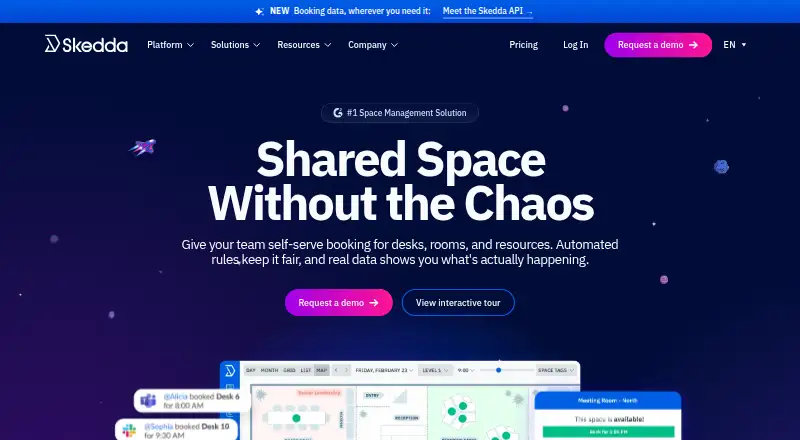
What Skedda is
Skedda is space booking and scheduling software for desks, meeting rooms, conference rooms, collaborative spaces, and facilities. Users can check availability and book from an interactive map tailored to a location's floor layout. Administrators can set rules for booking eligibility and timing, quotas, booking windows, buffers, cancellations, check-ins, and approval requests. Two-way calendar sync works with Microsoft 365, Outlook, and Google; listed integrations include Zoom, Webex, Microsoft Teams, Slack, Google Workspace, Okta, Zapier, Stripe, and webhooks. Skedda offers iOS and Android apps as well as white-labeled progressive web apps installable on Windows, macOS, and mobile devices. It supports SAML 2.0 single sign-on and says it is SOC 2 Type 2 compliant, with data encrypted in transit using TLS 1.2 or later. Its customers include businesses and organizations, with use cases such as workplaces, universities, parking facilities, academic labs, and education centers. A free trial is available, but there is no free plan.
Good
- Interactive maps show availability and support booking.
- Booking rules cover quotas, check-ins, and approvals.
- Two-way calendar sync with Microsoft 365, Outlook, and Google.
- iOS and Android apps are available.
- Supports SAML 2.0 single sign-on.
Watch out
- No free plan is available.
- Starter at $99 a month is billed annually.
- Starter includes 15 spaces in EMEA and APAC.
Who it suits
It suits businesses and organizations that need to manage bookings for shared spaces, from workplace desks and rooms to university facilities and parking. The interactive maps and configurable booking rules are useful for locations with defined spaces and booking policies.
Verdict
Skedda combines map-based space booking with configurable rules, calendar sync, and mobile apps. Compare the listed regional plans and included space counts with the size of your booking setup.
Plans and prices
From Skedda's own pricing page, checked 29 Sep 2026.
| Plan | Price | What it gives you |
|---|---|---|
| Starter (EMEA & APAC) | $99 a month | 15 spaces included · unlimited users and bookings · basic rules and roles engine · limited insights dashboard · Billed annually |
| Plus (EMEA & APAC) | $149 a month | 20 spaces included · unlimited users and bookings · limited rules and roles engine · full insights dashboard · Billed annually |
| Premier (EMEA & APAC) | $199 a month | 25 spaces included · unlimited users and bookings · full rules and roles engine · full insights dashboard · Billed annually |
| Plus (US & Canada) | $249 a month | 35 spaces · Unlimited users · Unlimited bookings · Billed annually; priced per space |
| Premier (US & Canada) | $349 a month | 45 spaces · Billed annually; priced per space |
| Enterprise (US & Canada) | — | Custom spaces |
| Plus (United States & Canada) | $249 a month | 35 spaces included · unlimited users and bookings · limited rules and roles engine · full insights dashboard · Billed annually |
| Premier (United States & Canada) | $349 a month | 45 spaces included · assigned spaces · full rules and roles engine · unlimited custom fields · Billed annually |
| AllBooked | Priced on request | Embedded pricing and payments · membership management · integrations · public or private booking · Plans available for organizations of all sizes |
| Enterprise (United States & Canada) | Priced on request | Custom spaces · dedicated account manager · legal agreement flexibility · white glove implementation · Pricing tailored to your organization’s needs |
The facts
Each one read from Skedda's own pages, with the date it was checked.
What it does
- Booking controls
- Custom rules can control booking eligibility and timing, quotas, booking windows, buffers, cancellations, check-ins, and approval requests.checked 29 Sep 2026
- Calendar sync
- Skedda offers two-way calendar sync with Microsoft 365, Outlook, and Google.checked 29 Sep 2026
- Integrations
- The integrations page lists connections including Zoom, Webex, Microsoft Teams, Slack, Google Workspace, Microsoft 365, Okta, Zapier, Stripe, and webhooks.checked 29 Sep 2026
- Interactive maps
- Users can check availability and book from a live interactive map customized to match a location’s floor layout.checked 29 Sep 2026
- Product
- Skedda is space booking and scheduling software for desks, meeting rooms, conference rooms, collaborative spaces, and facilities.checked 29 Sep 2026
- Security
- Skedda says it is SOC 2 Type 2 compliant and encrypts data in transit using TLS with a stated minimum of TLS 1.2.checked 29 Sep 2026
- Security controls
- Skedda says it conducts automated vulnerability scans weekly, maintains encrypted geo-redundant backups, and supports SAML 2.0 single sign-on.checked 29 Sep 2026
- Support
- Skedda’s pricing page says plans include live support by chat with a real human; its FAQ also lists phone support, email/help desk, chat, and a help center.checked 29 Sep 2026
- Who it serves
- Skedda describes its customers as businesses and organizations, and lists use cases including workplaces, universities, parking facilities, academic labs, and education centers.checked 29 Sep 2026
The company
- Company history
- Skedda says it was established in 2013 and began in Melbourne, Australia.checked 29 Sep 2026
- Founded
- 2013checked 28 Sep 2026
- Headquarters
- Boston, Massachusetts, United Stateschecked 28 Sep 2026
Money
- Free plan
- Nochecked 21 Sep 2026
- Free trial
- Skedda advertises a free 14-day Premium trial with no payment method required.checked 29 Sep 2026
Where it runs
- Mobile and desktop apps
- Skedda offers iOS and Android apps and white-labeled progressive web apps installable on Windows, macOS, and mobile devices.checked 29 Sep 2026
The full review of Skedda
Overview
Skedda is space-booking software for desks, meeting rooms, collaborative spaces and facilities. It suits organizations that need to manage bookings across shared locations, with rules that can shape who books and when. Its map-led booking and flexible controls are compelling; the main trade-off is a paid entry point with different space allowances by region.
Key features
A live, customizable floor map lets people check availability and book a space in its location context. That is a useful fit for workplaces with varied rooms or desks, while rule-based controls can govern eligibility, booking windows, quotas, buffers, cancellations, check-ins and approvals. The breadth is a strength for administrators, though setups that need only straightforward desk reservations may not need so much control.
Two-way calendar sync with Microsoft 365, Outlook and Google helps keep bookings aligned with calendars. Connections also include Zoom, Webex, Microsoft Teams, Slack, Google Workspace, Okta, Zapier, Stripe and webhooks. iOS and Android apps cover mobile booking; white-labeled progressive web apps can be installed on Windows, macOS and mobile devices.
Skedda says it is SOC 2 Type 2 compliant, encrypts data in transit with TLS 1.2 or later, runs weekly automated vulnerability scans and keeps encrypted geo-redundant backups. It supports SAML 2.0 single sign-on. Plans include live chat support with a real person; phone, email/help desk, chat and a help center are also support channels.
Pricing
Skedda has no free plan, but offers a free trial. Regional plans are billed annually, and the included space count is a key constraint to compare against the size of your setup. Users and bookings are unlimited on the EMEA & APAC plans.
- Starter (EMEA & APAC): $99 a month (billed annually). Includes 15 spaces, basic rules and roles, and a limited insights dashboard. It is the entry option for smaller setups willing to accept simpler controls and reporting.
- Plus (EMEA & APAC): $149 a month (billed annually). Raises the allowance to 20 spaces and provides a full insights dashboard, but keeps a limited rules and roles engine. It suits teams that value reporting more than extensive booking controls.
- Premier (EMEA & APAC): $199 a month (billed annually). Includes 25 spaces, full rules and roles, and full insights. This is the strongest fit of these three for organizations needing more control, though the included-space cap remains relevant.
- Plus (United States & Canada): $249 a month (billed annually). Includes 35 spaces, unlimited users and bookings, a limited rules and roles engine, and full insights. The larger space allowance comes with less complete controls than Premier.
- Premier (United States & Canada): $349 a month (billed annually). Includes 45 spaces, assigned spaces, a full rules and roles engine, and unlimited custom fields. It is the regional option for organizations that need the expanded controls and fields.
- Enterprise (United States & Canada): custom pricing. Custom spaces, a dedicated account manager, flexible legal agreements and white-glove implementation make it the option for organizations seeking tailored deployment rather than a fixed space tier.
- AllBooked: custom pricing. For organizations focused on public or private booking, it adds embedded pricing and payments, membership management and integrations.
Platforms
Skedda supports web, iOS, Android and API access. Its installable, white-labeled progressive web apps extend the experience to Windows and macOS, rather than requiring a separate native desktop app.
Who it's for
Skedda serves businesses and organizations, with use cases spanning workplaces, universities, parking facilities, academic labs and education centers. It is best suited to teams coordinating several kinds of shared space and needing policies, check-ins or approvals. A small team seeking a free booking tool should look elsewhere.
Pros and cons
- Pros: Map-based booking gives users a spatial view of availability, and configurable rules cover a broad range of booking policies.
- Pros: Calendar sync, mobile apps and extensive integrations support organizations already using common workplace tools.
- Cons: There is no free plan, and annual billing starts at $99 a month in EMEA & APAC and $249 a month in the United States & Canada.
- Cons: Space allowances are capped on the fixed plans, and the cheaper tiers limit rules and roles or insights.
Alternatives
For narrower comparisons, see Desk Booking Software, Room Booking Software and Workplace Management Software.
- desk.ly is worth considering if a free plan for up to 15 users matters more than Skedda's region-specific space tiers.
- Officely is an option for teams wanting a free plan for up to five users or simple desk booking on its Basic plan.
- OfficeSpace combines desk and room booking with facility requests, visitor management and portfolio reports.
- Robin covers desk, room, parking and locker booking alongside meeting management and workplace analytics.
- WorkInSync may suit larger organizations: its Standard annual plan specifies a minimum of 250+ employees and includes desk and meeting-room booking.
- deskbird offers per-active-user monthly pricing and includes desk, room and parking booking, check-ins and auto releases.
- Kadence is another option for desk and room booking with visitor management and workplace analytics.
- Joan Workplace is another paid workplace-software option.
Verdict
Choose Skedda if your organization needs map-based booking, enforceable rules and calendar-connected scheduling across shared spaces. Its main advantage is the combination of spatial booking and configurable administration; its main reason to look elsewhere is the paid, annually billed entry point and capped space counts.
Alternatives to Skedda
- 1

desk.ly
Free planAndroidiOSWebAPI8.1From €1.65 a month - 2
Deska
Free planiOSWeb7.2From $990 a year - 3

WorkInSync
AndroidiOSWeb7.2 - 4

Eden Workplace
AndroidiOSWeb7.1From $2.25 a month - 5

Archie
AndroidiOSWeb6.9From $109 a month - 6

Gfacility
AndroidiOSWebAPI6.9