Deska
Deska is desk booking software for hybrid offices.
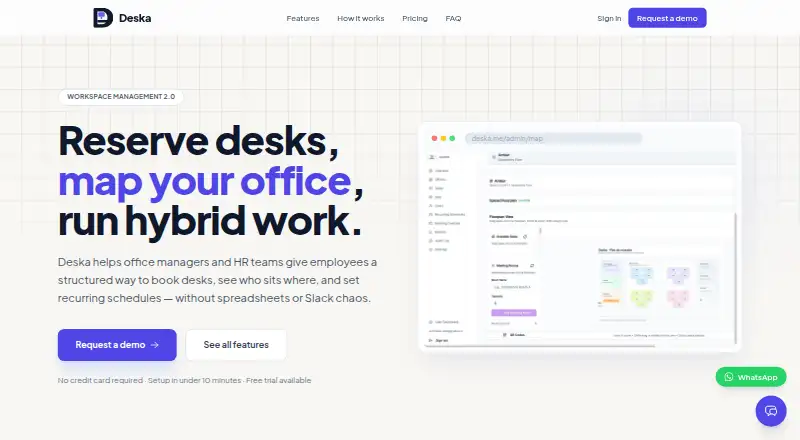
What Deska is
Deska is desk booking software for hybrid offices. Employees can reserve desks from an interactive office map and set recurring weekly schedules. Administrators can upload SVG floor plans, place desk markers with a drag-and-drop editor, and set booking windows, consecutive-day limits, release times, and office access rules. A Telegram bot lets employees check desk availability, book, or cancel without a separate Deska app or login.
Admin dashboards show real-time and historical attendance, with CSV export for facilities planning, HR reporting, or lease decisions. Deska is available on the web and iOS. The company says it is designed for hybrid or flexible-work organizations, typically with 20 to 500 employees, including agencies, technology companies, professional services firms, and coworking operators. Deska says workspace data is partitioned by organization, protected with database row-level security, and encrypted in transit via TLS.
Good
- Interactive maps support desk reservations and recurring schedules
- Telegram bot supports booking without a separate app or login
- Dashboards include attendance history and CSV export
- Admins can set office-specific booking rules
Watch out
- The free Simple plan is limited to one office, two desks, and two users
- The iOS app requests camera access to scan desk QR codes
Who it suits
Deska is aimed at hybrid or flexible-work organizations that need employees to reserve desks and administrators to manage office occupancy. The listed target range is typically 20 to 500 employees.
Verdict
Deska combines map-based reservations, booking controls, and occupancy reporting for flexible offices. The free plan is small, so organizations needing more desks or offices will need to consider a paid plan.
Plans and prices
From Deska's own pricing page, checked 9 Oct 2026.
| Plan | Price | What it gives you |
|---|---|---|
| Simple | Free | 1 office · 2 desks · 2 users · interactive office map · web desk booking · Free forever |
| Starter | $99 a month | 1 office · up to 25 desks · additional desks available · recurring bookings · basic analytics · standard support · $99/month |
| Growth | $249 a month | Up to 3 offices · up to 75 desks · additional desks available · QR code check-in · waitlist management · advanced booking rules · admin roles · enhanced analytics · priority support · $249/month |
| Business | $499 a month | Multi-office · up to 200 desks · additional desks available · advanced reports and CSV exports · guided onboarding · premium support · $499/month |
| Starter | $990 a year | 1 office · up to 25 desks · additional desks available · recurring bookings · basic analytics · standard support · $990/yr — 2 months free |
| Growth | $2,490 a year | Up to 3 offices · up to 75 desks · additional desks available · QR code check-in · waitlist management · advanced booking rules · admin roles · enhanced analytics · priority support · $2490/yr — 2 months free |
| Business | $4,990 a year | Multi-office · up to 200 desks · additional desks available · advanced reports and CSV exports · guided onboarding · premium support · $4990/yr — 2 months free |
| Enterprise | Priced on request | Unlimited offices · 200+ desks · custom SLA · integrations · dedicated support · Custom |
The facts
Each one read from Deska's own pages, with the date it was checked.
What it does
- Additional desks
- Paid plans list included desk limits and say additional desks are available; all plans include self-service map setup.checked 9 Oct 2026
- Booking controls
- Admins can configure booking windows, maximum consecutive days, release times, and per-office access rules.checked 9 Oct 2026
- Hosting and authentication
- Deska says it uses Supabase for data storage and Vercel for web and API hosting, with Supabase Auth supporting Google OAuth and email-based invite flows.checked 9 Oct 2026
- Occupancy analytics
- Admin dashboards show real-time and historical attendance, with CSV export for facilities planning, HR reporting, or lease decisions.checked 9 Oct 2026
- Office maps
- Admins can upload SVG floor plans and place desk markers using a drag-and-drop editor.checked 9 Oct 2026
- Privacy
- Deska says it does not sell personal data, uses Stripe for billing, and uses only essential session cookies rather than advertising or tracking cookies.checked 9 Oct 2026
- Product
- Deska is desk booking software for hybrid offices that lets employees reserve specific desks on an interactive office map and set recurring weekly schedules.checked 9 Oct 2026
- Security
- Deska says workspace data is partitioned per organization, database row-level security is enforced, and data in transit is encrypted via TLS.checked 9 Oct 2026
- Support
- The pricing page lists standard support for Starter, priority support for Growth, premium support for Business, and dedicated support for Enterprise.checked 9 Oct 2026
- Target users
- Deska says it is designed for hybrid or flexible-work companies, typically with 20 to 500 employees, including tech companies, agencies, professional services firms, and coworking operators.checked 9 Oct 2026
- Telegram
- The included Telegram bot lets employees check availability, book desks, and cancel bookings without a separate Deska app or login.checked 9 Oct 2026
Where it runs
- iOS app
- The privacy policy says the Deska iOS app requests camera access when scanning a desk QR code and processes camera images on the device without storing or uploading them.checked 9 Oct 2026
Money
- Plan limit
- On the Simple free plan, one office can have up to 2 desks and 2 users.checked 9 Oct 2026
- Trial
- The site advertises a free trial, while the pricing FAQ says users can start immediately on the free Simple plan without a credit card; it does not state a trial duration.checked 9 Oct 2026
The full review of Deska
Deska is desk-booking software for hybrid offices, built around reservations on an interactive floor map and recurring weekly schedules. It suits organizations that want employees to choose specific desks while administrators manage access and attendance. Its booking controls and reporting make it a considered option for flexible workplaces, though its free plan is too small for most offices.
Overview
Deska puts desk selection on a visual office map: administrators upload an SVG floor plan and position desk markers in a drag-and-drop editor, while employees reserve desks and set recurring schedules. That approach is useful when knowing which specific desk is free matters more than making a general attendance declaration.
Administrators can set booking windows, maximum consecutive booking days, release times and office-specific access rules. These controls help shape reservations around local workplace policies rather than leaving availability entirely open. Employees can also use the Telegram bot to check availability, make or cancel bookings without a separate Deska app or login.
Key features
Maps, reservations and check-in
Self-service map setup is included across plans, and the map-based booking flow gives employees a clear way to select desks. QR code check-in appears on Growth and above; the iOS app requests camera access to scan a desk QR code, and processes camera images on the device without storing or uploading them.
Occupancy reporting
Admin dashboards show current and historical attendance. Starter includes basic analytics; Growth adds enhanced analytics, and Business includes advanced reports and CSV exports. Exportable records are useful for facilities planning, HR reporting and lease decisions, while the tiered reporting means teams needing richer analysis must move beyond the entry paid plan.
Security and privacy
Deska says organization data is partitioned, database row-level security is enforced, and data in transit is encrypted with TLS. It uses Supabase for data storage and authentication, Vercel for web and API hosting, and supports Google OAuth and email invitations. The company says it does not sell personal data and uses essential session cookies rather than advertising or tracking cookies.
Pricing
Deska is freemium. Simple is free forever and covers one office, two desks, two users, an interactive map and web booking. That is enough for a very small pilot, but the desk and user caps make it unsuitable as a lasting plan for a typical team.
Starter costs $99/month for one office and up to 25 desks, with additional desks available. It adds recurring bookings, basic analytics and standard support. It is the entry point for a small office that needs recurring reservations, but it does not include the QR check-in, waitlist management or advanced booking rules offered at the next tier.
Growth costs $249/month and covers up to three offices and 75 desks, with additional desks available. It adds QR check-in, waitlists, advanced booking rules, admin roles, enhanced analytics and priority support. This is the more complete fit for organizations coordinating several locations or needing stricter booking workflows.
Business costs $499/month and includes multiple offices, up to 200 desks, additional desks available, advanced reports and CSV exports, guided onboarding and premium support. Enterprise has custom pricing for unlimited offices, 200+ desks, a custom SLA, integrations and dedicated support. Support rises from standard on Starter to priority on Growth, premium on Business and dedicated on Enterprise.
The site advertises a free trial, but does not state its duration. The pricing FAQ also says users can start immediately on Simple without a credit card, so teams can begin on the free plan without committing to a paid tier.
Platforms
Deska is available on the web and iOS. The Telegram bot provides another way to book and manage reservations, without requiring employees to install a separate Deska app or sign in there. Android is not among its listed platforms.
Who it's for
Deska is aimed at hybrid and flexible-work organizations, typically with 20 to 500 employees, including technology companies, agencies, professional-services firms and coworking operators. Its visual maps, office-level access controls and attendance reporting suit teams that need to coordinate desk use across offices. The Simple plan is best treated as a tiny pilot; even Starter's 25-desk ceiling may not cover a larger workplace without added desks or a higher tier.
Pros and cons
Pros
- Reservations are tied to a visual layout. Employees can choose specific desks on an interactive map, and administrators can set it up from an SVG floor plan.
- Booking policies are configurable. Windows, consecutive-day limits, release times and office access rules give administrators practical control over availability.
- Reporting grows with the plan. Attendance dashboards range from basic analytics to advanced reports and CSV exports for operational planning.
- Telegram reduces booking friction. Employees can check availability, book and cancel without a separate app or login.
Cons
- The free plan is exceptionally constrained. One office, two desks and two users are enough to try the workflow, not to serve a normal hybrid team.
- Useful capabilities sit above Starter. QR check-in, waitlists and advanced booking rules begin at Growth, which costs $249/month.
- Platform choice is narrow. Web and iOS are listed, with no Android app listed for employees who need a dedicated mobile client.
- The trial has no stated duration. Buyers cannot plan around a defined trial window, although the free Simple plan can be started without a credit card.
Alternatives
For a broader comparison, see Desk Booking Software.
- desk.ly is worth considering if cross-platform access, including Android and API, or a free allowance for up to 15 users matters more than Deska's two-user free cap; its free plan includes enterprise features.
- Flexopus is an option for buyers seeking Android and API support and a 30-day demo with Starter and Business functions and no credit card required.
- Officely may suit teams prioritizing a free plan for up to five users with all features, or simple desk booking on a $2.50 a month Basic plan for unlimited users.
- Roomzilla is an alternative for teams whose needs fit a free allowance of up to three resources, or a yearly Standard plan priced per resource.
- Hot Desk is worth a look for web-only workplaces seeking a free plan with up to five seats and unlimited admins, or an unlimited-seat Scale plan priced per seat.
- Workplacify may suit organizations that prefer self-hosting and a Community Edition whose source code the company says is publicly available to review, modify and download.
- DeskFlex is another option for buyers needing a broader platform footprint, including Linux, macOS and Windows alongside mobile and web.
- DeskGrid is a free, open-source, MIT-licensed self-hosted option for teams that want to avoid license costs.
Verdict
Deska is a strong fit for hybrid offices that need map-based desk choice, configurable booking rules and attendance reporting in one system. Its Telegram booking path and progressively richer analytics add practical value, but the free plan is only a small pilot and QR check-in and advanced controls require Growth at $249/month. Choose Deska when visual reservations and office-level administration are priorities; look elsewhere if a meaningful free team plan, Android support or a lower-cost route to advanced booking controls matters more.
Getting started
- Visit https://deska.me/.
- Start on the free Simple plan without a credit card, or review the paid plans.
- Use the web platform or iOS app.
- Have an admin upload an SVG floor plan and place desk markers with the editor.
- Employees can book through Deska or use the Telegram bot.
Limits worth knowing
The free Simple plan supports one office, up to two desks, and two users. The Starter plan is $99/month and includes one office and up to 25 desks; additional desks are available.
Questions
Is Deska free?
Yes. The Simple plan is free forever and includes one office, two desks, and two users.
Does Deska offer a free trial?
Yes, the site advertises a free trial, but does not state its duration. Users can start immediately on the free Simple plan without a credit card.
Which platforms does Deska support?
Deska is available on the web and iOS.
Can employees book without the Deska app?
Yes. The included Telegram bot lets employees check availability, book desks, and cancel bookings without a separate Deska app or login.
What does Deska include for office maps and reporting?
Admins can upload SVG floor plans and add desk markers with a drag-and-drop editor. Admin dashboards show attendance and support CSV export.
What security and privacy practices does Deska describe?
Deska says it partitions workspace data by organization, enforces database row-level security, and encrypts data in transit with TLS. It says it does not sell personal data and uses essential session cookies rather than advertising or tracking cookies.
Alternatives to Deska
- 1

desk.ly
Free planAndroidiOSWebAPI8.1From €1.65 a month - 2

Skedda
AndroidiOSWebAPI7.4From $99 a month - 3

WorkInSync
AndroidiOSWeb7.2 - 4

Eden Workplace
AndroidiOSWeb7.1From $2.25 a month - 5

Archie
AndroidiOSWeb6.9From $109 a month - 6

Gfacility
AndroidiOSWebAPI6.9