
Hot Desk
Hot Desk helps hybrid office teams see who plans to be in and book desks with colleagues through Slack.
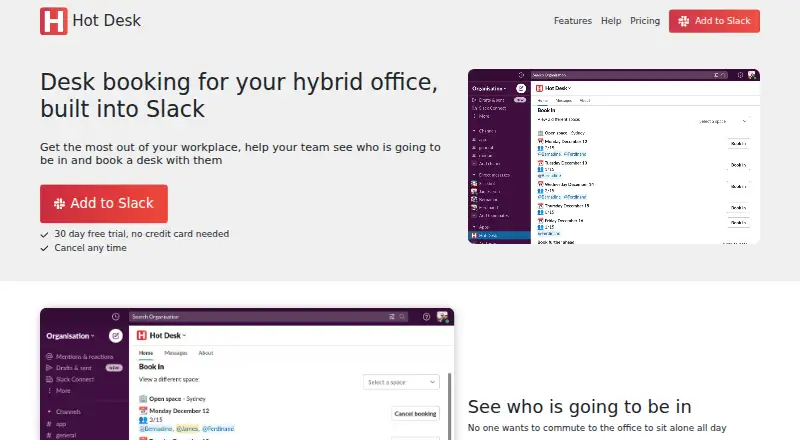
What Hot Desk is
Hot Desk helps hybrid office teams see who plans to be in and book desks with colleagues through Slack. Teams can set up and manage their workplace within Slack, subdividing offices into named spaces with locations. Users can book a preferred desk and see who is seated nearby, or check meeting room availability, equipment, and capacity before booking. Spaces can be restricted to specified users. Parking bookings can cover numbered spots or use a car park booking limit, and admins can send weekly reminders to book a workplace space. Google Calendar sync updates working locations and meeting room bookings from Hot Desk to Google Calendar; the listed sync works one way from Hot Desk to Google Calendar. The service is web-based and offers a free Starter plan for up to five seats, with unlimited admins and no per-user charge. The Scale plan costs $2.35 a month per seat and includes unlimited seats and admins. A 30-day trial is listed. Hot Desk is headquartered in Corby, England, UK.
Good
- Desk and meeting room bookings can be managed through Slack.
- Free Starter plan supports up to five seats.
- Scale has unlimited seats and admins.
- Google Calendar syncs working locations and room bookings.
Watch out
- Calendar sync is one way from Hot Desk to Google Calendar.
- Free Starter plan is limited to five seats.
- Slack permissions include reading channel membership and direct messages sent to Hot Desk.
Who it suits
Hot Desk suits hybrid office teams that use Slack to coordinate desks, rooms, or parking. Its free plan may fit workplaces with up to five seats.
Verdict
Hot Desk brings desk, room, and parking bookings into Slack, with a free option for small workplaces. Consider the one-way calendar sync and Slack permissions when evaluating it.
Plans and prices
From Hot Desk's own pricing page, checked 9 Oct 2026.
| Plan | Price | What it gives you |
|---|---|---|
| Starter | Free | Up to 5 seats · unlimited admins · no cost per user |
| Scale | $2.35 a month | Unlimited seats · unlimited admins · no cost per user · Per seat per month |
| Enterprise | Priced on request | For organisations with over 500 seats · unlimited admins · no cost per user |
The facts
Each one read from Hot Desk's own pages, with the date it was checked.
What it does
- Booking controls
- A space can be restricted so only specified users can book it.checked 9 Oct 2026
- Calendar integration
- Google Calendar sync updates working locations and meeting room bookings from Hot Desk, and the page says the sync is one way from Hot Desk to Google Calendar.checked 9 Oct 2026
- Data handling
- The privacy policy says data is deleted within seven days after uninstalling Hot Desk or requesting deletion.checked 9 Oct 2026
- Meeting rooms
- Users can check room availability, view equipment and capacity, and book rooms in Slack.checked 9 Oct 2026
- Parking
- Teams can book numbered parking spots or use a booking limit for a car park.checked 9 Oct 2026
- Permissions
- The Slack permissions listed include reading channel membership and direct messages sent to Hot Desk, and uploading requested reports.checked 9 Oct 2026
- Preferred desks
- Teams can book a specific preferred desk and see who is sitting nearby.checked 9 Oct 2026
- Pricing basis
- Pricing is based on bookable workplace capacity, and the pricing page says there is no charge per user.checked 9 Oct 2026
- Product
- Hot Desk helps hybrid office teams see who will be in and book desks with colleagues through Slack.checked 9 Oct 2026
- Reminders
- Admins can send a weekly reminder to the team to book a workplace space.checked 9 Oct 2026
- Security
- The privacy policy describes administrative and electronic safeguards, while stating that it cannot guarantee information will never be compromised.checked 9 Oct 2026
- Slack
- The service says teams can set up and manage their workplace without leaving Slack.checked 9 Oct 2026
- Support
- Hot Desk provides setup and usage guides and a contact form for support inquiries.checked 9 Oct 2026
- Workspace setup
- Spaces can be configured with a name and location to subdivide an office.checked 9 Oct 2026
The company
- Headquarters
- Corby, England, UKchecked 28 Sep 2026
The full review of Hot Desk
Overview
Hot Desk is a Slack-centered workplace booking service for hybrid offices that need desks, rooms, parking, and attendance visibility in one workflow. It is best suited to teams already organizing work in Slack; offices that require two-way calendar control or minimal Slack access may be better served elsewhere.
The product combines broad workplace controls with a genuinely usable free starting point. Its main trade-offs are the one-direction Google Calendar connection and the breadth of Slack permissions required.
Key features
Administrators can divide an office into named spaces and locations, then control who may book each space. Employees can reserve a preferred desk, see nearby colleagues, and check in. That combination is useful for teams coordinating in-person days and for offices with separate zones or access rules, although it is more structure than a very small workplace may need.
Meeting-room booking works inside Slack, with availability, capacity, and equipment shown before reservation. This gives employees practical information at the point of booking rather than requiring a separate room directory. Parking is covered too: teams can reserve numbered spots or impose a booking limit for a car park, which helps offices where parking is a scarce resource.
Admins can send a weekly reminder asking staff to book a workplace space. This is a simple attendance prompt rather than a planning system, but it can reduce unrecorded office visits. Desk check-in is supported.
Google Calendar sync carries working locations and meeting-room bookings from Hot Desk into Google Calendar. The flow is only from Hot Desk to Google Calendar, so edits made in the calendar do not update Hot Desk; calendar-first teams should treat that as a significant limitation.
Setup and usage guides are provided, along with a contact form for support. The privacy policy describes administrative and electronic safeguards, while acknowledging that no system can guarantee information will never be compromised. Data is deleted within seven days after uninstalling Hot Desk or requesting deletion. Slack permissions include reading channel membership and direct messages sent to Hot Desk, plus uploading requested reports, so administrators should review the access model before deployment.
Pricing
Hot Desk is freemium, with a 30-day trial and pricing based on bookable workplace capacity. The pricing page says there is no charge per user, although the paid plan is presented on a per-seat-per-month basis.
| Plan | Price | What it includes |
|---|---|---|
| Starter | free | Up to 5 seats, unlimited admins, no cost per user |
| Scale | $2.35 a month, billed per seat per month | Unlimited seats, unlimited admins, no cost per user |
| Enterprise | Custom pricing | For organisations with over 500 seats, unlimited admins, no cost per user |
Starter is a sensible fit for a workplace of up to five seats that wants to establish a booking process without a subscription. Scale removes the five-seat ceiling and is aimed at larger deployments, but its per-seat billing should be reconciled with the stated capacity-based pricing before purchase. Enterprise is the route for organisations exceeding 500 seats and requires a quote.
Platforms
Hot Desk is available on the web and is designed to be managed through Slack. It is headquartered in Corby, England, UK.
Who it's for
Choose Hot Desk if your hybrid workplace already relies on Slack and needs one place for desk, meeting-room, parking, and check-in workflows. The free Starter plan is particularly suitable for a very small office, while Scale fits organisations that need unlimited seats and administrative accounts. It is a weaker choice for teams that expect calendar edits to synchronize back to the booking system or that are uncomfortable granting the stated Slack permissions.
Pros and cons
Pros
- Slack-native workflow: Workplace setup and booking stay in the collaboration tool many teams already use.
- Wide booking coverage: Desks, meeting rooms, numbered parking, and car-park limits address several office resources in one service.
- Useful access controls: Named spaces and user restrictions support offices with distinct areas or eligibility rules.
- Free entry tier: Starter supports up to five seats with unlimited admins at no cost.
- Clear deletion window: Data is deleted within seven days after uninstalling or requesting deletion.
Cons
- One-way calendar sync: Google Calendar changes do not flow back into Hot Desk.
- Slack access requirements: The listed permissions include channel-membership and direct-message reading, plus report uploads.
- Small free-plan cap: Starter stops at five seats, so growing teams must move to paid service.
- Enterprise pricing is custom: Organisations over 500 seats cannot assess the subscription from a published figure.
Alternatives
For a wider comparison, see Desk Booking Software.
desk.ly is a stronger fit if you need Android, iOS, API, and web access, or a free plan covering up to 15 users.
Deska suits a very small office wanting a forever-free plan limited to one office, two desks, and two users.
Flexopus is worth considering if you prefer a paid product with a 30-day, no-credit-card demo and Android, iOS, API, and web platforms.
Officely is an alternative for Slack-oriented teams comparing a free tier for up to five users with a 2.50 USD per-user monthly Basic plan.
Roomzilla is a resource-booking alternative with a free allowance of up to three resources and paid yearly pricing.
Workplacify is the alternative to consider if self-hosting and publicly reviewable source code are priorities.
DeskFlex is suited to organisations seeking a paid, multi-platform workplace system with visitor management and floor-plan support in its Growth plan.
DeskGrid is a free, MIT-licensed, self-hosted option.
Verdict
Hot Desk is a strong choice for Slack-based hybrid offices that want desks, rooms, parking, and attendance coordination together, with a free plan for up to five seats. Choose it for the breadth of workplace booking and Slack workflow; look elsewhere if two-way calendar synchronization or narrower Slack permissions are essential.