Officely
Officely manages desk, meeting-room and car-parking bookings through Slack and Microsoft Teams.
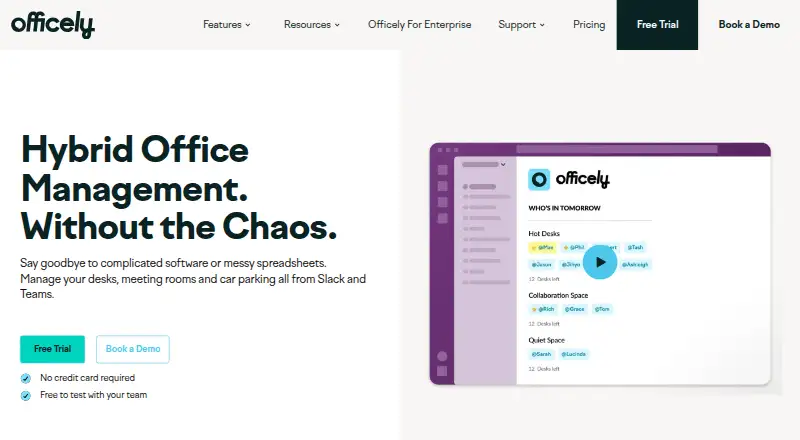
What Officely is
Officely manages desk, meeting-room and car-parking bookings through Slack and Microsoft Teams. Teams can book desks with one click, check in daily, and see bookings and attendance. Office analytics show who booked, who arrived, and which spaces are underused. Meeting Rooms by Officely provides live availability and booking in Slack and Teams, while daily updates and recommendations help coordinate office days. Integrations include Slack, Microsoft Teams, Outlook, Google Calendar and HR systems such as HiBob, Deel, BambooHR and Personio. The service is listed for Android, iOS and web, and offers a Help Centre with setup and employee guides. Pricing includes a free plan for up to five users, Basic at $2.50 per user per month billed annually, and Premium at $3.50 per user per month. Meeting Rooms costs $12 per space per month, and Parkly costs $15 per space per month. A seven-day free trial is included with Meeting Rooms. Some features marked with an asterisk are not currently available on Microsoft Teams.
Good
- One-click desk booking and daily check-ins.
- Analytics report bookings, attendance and underused spaces.
- Room availability and booking within Slack and Teams.
- Free plan covers up to five users.
- Integrates with calendars and multiple HR systems.
Watch out
- Some asterisked features are unavailable on Microsoft Teams.
- Basic and higher plans have listed monthly charges.
- Free plan is limited to five users.
Who it suits
Officely suits hybrid teams coordinating office attendance and shared spaces. Its listed roles include senior leadership, office management, people and culture, and team leaders.
Verdict
Officely brings desk, room and parking coordination into Slack and Microsoft Teams, with attendance reporting and hybrid scheduling. Check the plan details for your team size and whether any asterisked features are needed on Teams.
Plans and prices
From Officely's own pricing page, checked 15 Oct 2026.
| Plan | Price | What it gives you |
|---|---|---|
| Free | Free | up to 5 users · all features |
| Basic | $2.50 a month | unlimited users · simple desk booking · annual billing |
| Basic | $3 a month | unlimited users · desk booking · monthly billing |
| Premium | $3.50 a month | unlimited users · all Officely features · annual billing |
| Premium | $4.50 a month | full feature suite · unlimited users · monthly billing |
| Meeting Rooms | $12 a month | unlimited users · unlimited spaces · per space/per month |
| Parkly | $15 a month | unlimited users · unlimited spaces · per space/per month |
| Enterprise | Priced on request | unlimited users · all features · enterprise extras |
The facts
Each one read from Officely's own pages, with the date it was checked.
What it does
- Administration model
- There is no standalone admin dashboard; account and user management occur inside Slack or Teams.checked 15 Oct 2026
- API documentation
- The enterprise page says buyers can read API documentation before contacting sales, but it does not expose a public developer portal link there.checked 15 Oct 2026
- API extensibility
- Officely says its enterprise offering accepts workplace data through an API and provides scoped credentials, audit trails and exports.checked 15 Oct 2026
- Attendance visibility
- The product shows who is expected in the office and broadcasts attendance information in Slack or Teams.checked 15 Oct 2026
- Automatic release
- A desk can be freed automatically when its booker fails to check in.checked 15 Oct 2026
- Calendar integrations
- The service integrates with Google Calendar and Outlook so office bookings can appear with calendar information.checked 15 Oct 2026
- Desk booking
- Employees can reserve desks in Slack or Teams through a two-click workflow.checked 15 Oct 2026
- Desk neighborhoods
- Administrators can group desks into neighborhoods so teams sit together.checked 15 Oct 2026
- Documentation
- The help center contains separate collections for Slack admins, Slack employees, Microsoft Teams, meeting rooms and parking, with dozens of setup articles.checked 15 Oct 2026
- Enterprise controls
- The enterprise page lists scoped credentials, an audit trail, retention controls and data exports.checked 3 Oct 2026
- HR integrations
- The integrations directory lists more than 40 HR-system connections, including BambooHR, Deel, Personio, Workday and Gusto.checked 15 Oct 2026
- Hybrid scheduling
- Officely gives teams daily updates and recommendations to coordinate office days.checked 3 Oct 2026
- Integrations
- The integrations directory lists Microsoft Teams, Slack, Outlook, Google Calendar and multiple HR systems, including HiBob, Deel, BambooHR and Personio.checked 3 Oct 2026
- Intended users
- Officely describes its audience as hybrid teams and lists senior leadership, office management, people and culture, and team leaders as roles it serves.checked 3 Oct 2026
- Licence
- The terms grant customers limited, non-transferable access and prohibit reverse engineering, indicating proprietary hosted software rather than open-source licensing.checked 15 Oct 2026
- Limit: calendar reliability
- A G2 reviewer reports that Google Calendar repeatedly disconnects.checked 15 Oct 2026
- Limit: customization
- G2 reviewers report that default working-status options cannot be modified and that navigation or customization can feel limited.checked 15 Oct 2026
- Limit: historical bookings
- A G2 reviewer says the product cannot manage backlog data and focuses on present and future bookings.checked 15 Oct 2026
- Limit: reporting depth
- A G2 reviewer says reporting is limited for ordinary users.checked 15 Oct 2026
- Meeting rooms
- Meeting Rooms by Officely provides live availability and booking in Slack and Teams.checked 3 Oct 2026
The company
- Company founders
- Crunchbase lists Max Shepherd-Cross and Rich Turnbull as co-founders and identifies HotelFlex Limited as the legal name.checked 15 Oct 2026
- Company legal name
- The legal entity is HotelFlex Limited, trading as Officely.checked 15 Oct 2026
- Company profile
- LinkedIn lists Officely as privately held, headquartered in London, founded in 2021, with 11–50 employees.checked 15 Oct 2026
Money
- Limit: free-tier size
- A G2 reviewer says a larger free tier than five users would be useful.checked 15 Oct 2026
The full review of Officely
Overview
Officely is a workplace booking tool for teams coordinating desks, rooms and parking through Slack or Microsoft Teams. It is a strong fit for hybrid offices that want booking and attendance visibility alongside day-to-day scheduling. The breadth is useful, though the small free allowance and Teams feature caveat matter when choosing a plan.
Key features
One-click desk booking, daily check-ins and booking visibility give employees a straightforward way to reserve a place and confirm attendance. A 42-day booking horizon supports advance planning, but the lack of a floor plan view is a meaningful drawback for offices where people need to choose desks by location.
Office analytics compares bookings with attendance and identifies underused spaces, giving office managers and senior leaders useful signals for planning capacity. Hybrid scheduling adds daily updates and recommendations to help teams coordinate office days. Meeting Rooms by Officely provides live availability and booking through Slack and Teams; desk, room and parking functions make the product broader than a desk-only booking tool.
Integrations include Slack, Microsoft Teams, Outlook, Google Calendar and HR systems such as HiBob, Deel, BambooHR and Personio. Enterprise controls include scoped credentials, an audit trail, retention controls and data exports. Officely identifies Hotelflex Limited, trading as Officely, as its data controller and says it does not collect special categories of personal data. A Help Centre offers setup and employee guides for Slack and Teams.
Pricing
The Free plan costs nothing for up to 5 users and includes all features. That is a useful way for a very small team to try the full set, but the cap makes it unsuitable as a lasting option for a larger office.
Basic is $2.50 a month, billed per user/per month, with unlimited users and simple desk booking. It is the entry point for teams that need desk reservations without the broader feature set. Premium costs $3.50 a month, billed per user/per month, and includes everything Officely offers, making the modest step up more compelling for teams that need its full toolkit.
Meeting Rooms costs $12 a month, billed per space/per month, with unlimited users and unlimited spaces. Parkly costs $15 a month on the same per-space basis and also includes unlimited users and spaces. These plans suit room- or parking-focused deployments, though per-space billing means the cost is not tied to headcount. Enterprise has custom pricing, unlimited users, all features and enterprise extras. The Meeting Rooms plan includes a 7 Day Free Trial. Features marked with an asterisk are not currently available on Microsoft Teams, so Teams users should check whether any needed feature carries that mark before selecting a plan.
Platforms
Officely is available on Android, iOS and the web, with booking workflows delivered through Slack and Microsoft Teams. Its collaboration-tool focus is an advantage for teams already working in those platforms, but the asterisk caveat means Teams and Slack feature coverage may differ.
Who it's for
Officely is aimed at hybrid teams, particularly senior leadership, office managers, people and culture teams, and team leaders who need to coordinate attendance and shared spaces. It is less suitable for offices that rely on visual floor plans to assign desks or for teams that need an unqualified feature match between Slack and Teams.
Pros and cons
- Pros: Desk, room and parking coordination plus attendance reporting and hybrid scheduling cover several workplace needs in one tool.
- Pros: A free plan includes all features for up to 5 users, allowing a small team to evaluate the wider offering.
- Pros: Enterprise controls include audit trails, scoped credentials, retention controls and data exports.
- Cons: The free plan stops at 5 users, so growing teams need a paid plan.
- Cons: No floor plan view makes it harder to pick a desk based on its physical location.
- Cons: Some asterisk-marked features are unavailable on Microsoft Teams, requiring teams to verify feature fit before committing.
Alternatives
For desk booking, compare Desk Booking Software; for room-focused options, see Room Booking Software.
desk.ly is worth considering if a larger free allowance is the priority: its free plan supports up to 15 users for as long as you like and includes enterprise features. Roomzilla may suit a smaller room setup, with a free plan for up to 3 resources and a yearly Standard option priced at $10 a year at a monthly rate paid yearly.
DeskFlex is a paid alternative with a Growth plan at $50 a month on an annual subscription, covering up to 25 spaces and including desk booking, meeting room booking, visitor management and workplace analytics. DeskGrid is an open-source, self-hosted option with a 0.00 USD license cost.
Skedda is another paid option, with a Starter plan for EMEA and APAC at $99 a month billed annually and 15 spaces included. Kadence offers a WorkOps plan with desk and room booking, visitor management, workplace analytics, move management and interactive floor plans. Trezod, WorkInSync are also alternatives to consider.
Verdict
Choose Officely if your hybrid team already works in Slack or Teams and wants desk, room and parking coordination tied to attendance insight. Its range of workplace tools is the clearest reason to choose it; the lack of floor plans and feature differences on Teams are the reasons to look elsewhere if visual desk selection or consistent platform coverage is essential.
Getting started
- Open the Officely website
- Choose Slack or Microsoft Teams as your workplace platform
- Select the Free, Basic, Premium, Meeting Rooms or Parkly plan
- Use the 7 Day Free Trial for Meeting Rooms if appropriate
- Follow the Help Centre setup and employee guides
Limits worth knowing
The Free plan allows up to five users. Desk bookings can look ahead 42 days, and some features marked with an asterisk are not currently available on Microsoft Teams.
Questions
Is there a free plan?
Yes. The Free plan costs 0.00 USD and supports up to five users with all features.
Which platforms are supported?
Officely lists web, Android and iOS, with workplace use through Slack and Microsoft Teams.
Does it integrate with calendars and HR systems?
Listed integrations include Outlook, Google Calendar, HiBob, Deel, BambooHR and Personio.
Is a meeting-room trial available?
Yes. The Meeting Rooms plan includes a 7 Day Free Trial.
Alternatives to Officely
- 1

desk.ly
Free planAndroidiOSWebAPI8.1From €1.65 a month - 2
Roomzilla
Free planAndroidiOSWeb8.1Free plan - 3

classroombookings
Free planOpen sourceWebSelf-hosted7.7£29 one-time - 4

Spacebring
AndroidiOSWebAPI7.6From $178 a month - 5
MyDesk
AndroidiOSWebAPI7.5 - 6
BookitWise
AndroidiOSWeb7.4From $10 a month