Roomzilla
Roomzilla is a workplace management and booking system for meeting rooms, desks, and other assets.
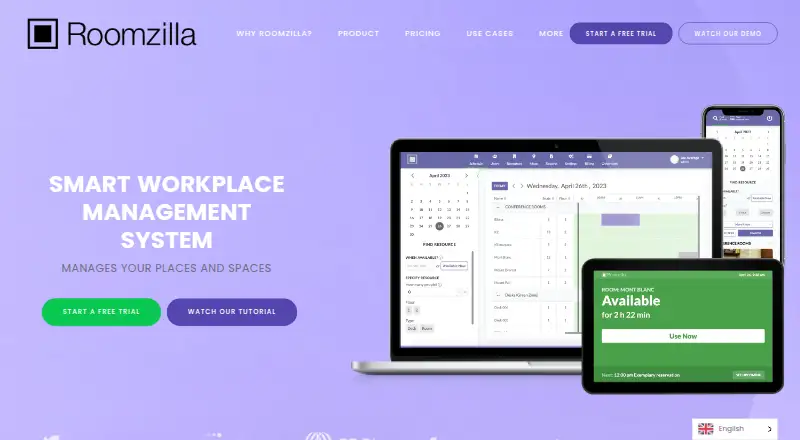
What Roomzilla is
Roomzilla is a workplace management and booking system for meeting rooms, desks, and other assets. Its timeline view shows availability, supports two-click reservations, and offers filters for capacity, amenities, and location. Check-in and automatic cancellation can release a booking when a user misses the configured check-in window. Through a mobile browser, users can search, book, change, and cancel reservations on a phone or tablet; room displays work with Android tablets and iPads. Roomzilla describes syncing room resources, users, and calendar events with Google Calendar and Microsoft Outlook. Other tools include QR-code reservations, interactive maps, approval queues, guest bookings, reports, and booking limits. It is intended for offices, venues, classrooms, and home offices. The Free plan allows up to three resources. A 14-day trial is available without a card. Roomzilla supports Android, iOS, and web, and its FAQ says formal customer security documentation is not yet available.
Good
- Timeline view shows room availability
- Filters cover capacity, amenities, and location
- Missed check-ins can release bookings
- Syncs room resources and events with Google Calendar and Outlook
- 14-day trial requires no card
Watch out
- Free plan allows up to three resources
- Formal customer security documentation is not yet available
- The service collects account and reservation information
Who it suits
Roomzilla suits organizations managing shared meeting rooms, desks, or other bookable assets. It may fit workplaces that need check-in, calendar syncing, or mobile-browser reservation access.
Verdict
Roomzilla combines resource booking with availability filters, check-in, and calendar syncing. The Free plan is limited to three resources, so review the per-resource or per-desk/equipment billing basis when considering paid plans.
Plans and prices
From Roomzilla's own pricing page, checked 15 Oct 2026.
| Plan | Price | What it gives you |
|---|---|---|
| Free | Free | up to 3 resources · email support · free |
| Standard (yearly) | $10 | Unlimited resources · monthly rate paid yearly; per resource |
| Business (yearly) | $10 | Unlimited resources · monthly rate paid yearly; per desk/equipment |
| Standard (annual billing) | $10 a month | unlimited resources · guided onboarding · hands-on training · monthly rate paid yearly |
| Business desks/equipment (annual billing) | $10 a month | unlimited resources · desks/equipment · monthly rate paid yearly |
| Standard (monthly) | $12 a month | Unlimited resources · per resource |
| Business desks/equipment (monthly billing) | $12 a month | unlimited resources · desks/equipment · monthly |
| Standard (monthly billing) | $12 a month | unlimited resources · guided onboarding · hands-on training · monthly |
| Business (monthly) | $12 a month | Unlimited resources · per desk/equipment |
| Business rooms (annual billing) | $17 a month | unlimited resources · rooms · monthly rate paid yearly |
| Business rooms (monthly billing) | $20 a month | unlimited resources · rooms · monthly |
The facts
Each one read from Roomzilla's own pages, with the date it was checked.
What it does
- API availability
- Roomzilla's FAQ says it does not currently provide a customer-facing API.checked 15 Oct 2026
- Calendar integrations
- Two-way integrations are available for Google Workspace and Microsoft 365, synchronizing users, resources and reservations.checked 15 Oct 2026
- Check-in automation
- Reservations can require check-in through a tablet, QR code or email, and missed check-ins can trigger automatic cancellation.checked 15 Oct 2026
- Data handling
- The privacy policy says Roomzilla collects account and reservation information, including names, email addresses, and reservation location, time, and stated purpose.checked 2 Oct 2026
- Documentation
- The knowledge base includes setup and administration articles covering integrations, users, resources, reservations, reports, QR codes and tablet displays.checked 15 Oct 2026
- Funding record
- Dealroom lists a 2013 launch, Cambridge headquarters, 2–10 employees and a $280,000 seed round in July 2014.checked 15 Oct 2026
- Hardware responsibility
- Roomzilla states that customers must purchase and install tablets or other display hardware themselves.checked 15 Oct 2026
- Industries
- Roomzilla says it supports space management for offices, venues, classrooms, and home offices.checked 2 Oct 2026
- Integrations
- Roomzilla describes syncing room resources, users, and calendar events with Google Calendar and Microsoft Outlook.checked 2 Oct 2026
- Interactive maps
- Roomzilla provides interactive maps that let users locate resources and make map-based reservations.checked 15 Oct 2026
- Licence
- The terms prohibit copying, reselling or modifying the service, and the copyright notice identifies Roomzilla Technologies, Inc. as owner.checked 15 Oct 2026
- Limit: check-in friction
- TrustRadius reports complaints about the 10-minute check-in window, glitches and lost reservations, plus requests for more flexible durations and a newer interface.checked 15 Oct 2026
- Limit: mobile experience
- G2 reviewers repeatedly mention slow refreshes, missing advanced filters and the lack of a dedicated iOS app.checked 15 Oct 2026
- Limit: rescheduling
- Software Advice reviewers say rescheduling can require finding the original email, cancelling and booking again, and that repeating reservations can be difficult to cancel.checked 15 Oct 2026
- Mobile access
- Users can search, book, modify, and cancel reservations through the mobile version in a phone or tablet browser.checked 2 Oct 2026
- Notable product update
- The official September 2020 update announced full Office 365 support, color customization, CSV export and API stability fixes.checked 15 Oct 2026
- Origin
- Roomzilla says its first system was created for Cambridge Innovation Center and that early users included MIT and Harvard laboratories.checked 15 Oct 2026
- Other features
- The product includes QR code quick reservations, interactive maps, approval queues, guest reservations, reports, and booking limits.checked 2 Oct 2026
- Praise: ease of use
- G2's review summary identifies intuitive, user-friendly operation as the most frequently mentioned advantage, with 45 mentions.checked 15 Oct 2026
- Praise: quick booking
- TrustRadius synthesis says reviewers frequently praise ease of use, rapid room identification and quick booking.checked 15 Oct 2026
- Praise: tablet integration
- Software Advice reviewers praise iPad room displays that update the website after check-in and show room capacity and photos.checked 15 Oct 2026
The company
- Company profile
- LinkedIn lists Roomzilla as a Cambridge, Massachusetts software company founded in 2013 with 2–10 employees.checked 15 Oct 2026
- Founded
- 2010checked 23 Sep 2026
- Headquarters
- Cambridge, Massachusetts, USAchecked 23 Sep 2026
The full review of Roomzilla
Roomzilla is a workplace system for booking meeting rooms, desks, and other shared resources. It best suits organizations coordinating several kinds of spaces and wanting missed bookings returned to circulation. Its booking tools are broad, but the three-resource free limit and per-resource or per-desk/equipment billing make fit and cost worth weighing carefully.
Overview
A timeline view and two-click reservations keep routine booking direct, while availability filters help people find a room that fits. Roomzilla also supports desks and other assets, so it can serve workplaces that need one system for more than meeting rooms. The trade-off is that paid billing is tied to the resources or desks and equipment managed, rather than a single flat organizational fee.
Key features
Finding and reserving space
Filters for capacity, amenities, and location help narrow room choices before booking. Interactive maps add a spatial view, and QR code quick reservations offer another way to reserve. Approval queues, guest reservations, reports, and booking limits give administrators tools for more structured use. This range is useful across offices, venues, classrooms, and home offices; teams that only need a simple reservation calendar may not need the broader controls.
Check-in and availability recovery
Organizations can configure a check-in window, after which a missed check-in can trigger automatic cancellation. That makes unused rooms or desks available again instead of leaving them blocked by no-shows. The value depends on whether people reliably follow the check-in process and whether the configured window suits the workplace.
Calendars and mobile access
Roomzilla describes syncing resources, users, and calendar events with Google Calendar and Microsoft Outlook. Users can search, book, change, and cancel reservations in a phone or tablet browser; the product also says room displays work with Android tablets and iPads. These options extend access across common devices, though the mobile reservation experience is browser-based rather than described as a native app.
Pricing
The Free plan costs nothing and covers up to three resources. It is a practical way for a small team to try the booking workflow, but the cap makes it unsuitable once the inventory grows beyond three resources. Free includes email support.
Standard and Business offer unlimited resources, with the billing unit distinguishing them: Standard is per resource, while Business is per desk/equipment. Yearly plans are shown at $10 a year, described as a monthly rate paid yearly; monthly plans are $12 a month. Accounts with more than 30 resources can receive discounts. The per-unit basis means teams should count the resources or desks and equipment they intend to manage before comparing total cost.
A 14-day free trial requires no card. The Free plan's email support is more limited by comparison.
| Plan | Price | Billing basis and fit |
|---|---|---|
| Free | free | Up to 3 resources; for small-scale use |
| Standard (yearly) | $10 a year | Monthly rate paid yearly; per resource; unlimited resources |
| Business (yearly) | $10 a year | Monthly rate paid yearly; per desk/equipment; unlimited resources |
| Standard (monthly) | $12 a month | Per resource; unlimited resources |
| Business (monthly) | $12 a month | Per desk/equipment; unlimited resources |
Platforms
Roomzilla supports Android, iOS, and web. Mobile users reserve through a phone or tablet browser, and Android tablets and iPads can serve as room displays.
Who it's for
Roomzilla is a strong fit for organizations managing meeting rooms alongside desks or other shared assets, especially when no-shows waste scarce space. Its filters, maps, approvals, guest bookings, and reporting can also suit venues and classrooms. It is less compelling for a team with only a few simple desk reservations, or one unwilling to budget according to a per-resource or per-desk/equipment model.
Security-conscious organizations should also weigh that Roomzilla says it does not yet have formal security documentation for customers. Its privacy policy says it collects account and reservation information, including names, email addresses, location, time, and stated purpose. That can be material where procurement requires customer-facing security documentation or where reservation details are sensitive.
Pros and cons
- Flexible booking scope: Rooms, desks, and other assets can be handled alongside maps, approvals, guest reservations, and booking limits.
- Space recovery: Configurable check-in and automatic cancellation can return unused bookings to availability.
- Useful access options: Calendar syncing, mobile-browser reservations, and tablet room displays cover several booking contexts.
- Restrictive free tier: Three resources is a low ceiling for organizations coordinating multiple rooms and desks.
- Unit-based paid billing: Per-resource or per-desk/equipment charges require careful inventory-based cost planning.
- Security documentation gap: The absence of formal customer security documentation may complicate organizational review.
Alternatives
For a free desk-booking option with a larger stated user allowance, consider desk.ly: its Free plan covers up to 15 users and includes enterprise features, while Corporate is €165 a month. Choose it when a user-based free allowance is a better fit than Roomzilla's three-resource cap.
Robin is a paid workplace platform spanning desk, room, parking, and locker booking, with interactive maps, meeting management, and workplace analytics; it is an option for teams seeking that combination.
deskbird offers a Business plan at $4.75 a month per active user, billed monthly, with desk, room, and parking booking, native mobile apps, check-ins, and auto releases. It may suit organizations preferring active-user billing and native mobile apps.
Skedda has a Starter plan for $99 a month, billed annually, with 15 spaces included and unlimited users and bookings. It may fit a team whose space count is within that allowance and that wants unlimited users and bookings.
BookingONE is another paid option for organizations comparing booking software.
OfficeSpace offers desk and room booking alongside a mobile app, integrations, facility requests, visitor management, and portfolio reports on its Essentials Plus plan with custom pricing. Consider it when those additional workplace and portfolio functions matter.
WorkInSync has an annual Standard plan at $2.25 a year per user per month, with a 250+ employee minimum and desk and meeting-room booking. It is a possible fit for larger organizations that meet that minimum.
Seatsurfing has a Free plan for up to 10 users, with managed cloud hosting in Germany and Teams, Exchange, and Confluence integrations. It is worth considering when that user limit and integration set suit the team.
Browse more options in Room Booking Software or Desk Booking Software.
Verdict
Roomzilla is a sound choice for organizations coordinating rooms, desks, and other resources that want check-in rules to free space after no-shows. Its filters, calendar syncing, and administrative booking tools make it more than a basic room calendar. Choose another system if three resources are not enough for a free start, per-unit billing is a poor match, or formal customer-facing security documentation is a requirement.
Alternatives to Roomzilla
- 1

Skedda
AndroidiOSWebAPI7.4From $99 a month - 2

Seatsurfing
Free planWebAPILinuxSelf-hosted6.9From €0.90 a month - 3

YAROOMS
AndroidiOSWebAPI6.9From $99 a month - 4

Yoffix
AndroidiOSWebAPI6.9From €1.50 a month - 5
BookingONE
AndroidiOSWebmacOS6.6 - 6

Joan Workplace
AndroidiOSWebAPI6.5