
Seatsurfing
Seatsurfing helps organizations book desks, rooms, parking lots, and other shared spaces.
What Seatsurfing is
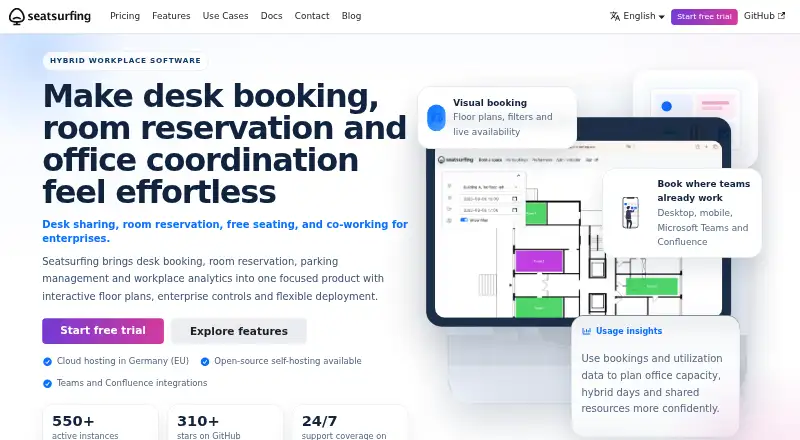
Seatsurfing helps organizations book desks, rooms, parking lots, and other shared spaces. Employees use a mobile-ready progressive web app with floor-plan and list views. Administrators can upload floor plans, place spaces by drag and drop, set booking limits, and review utilization statistics. Integrations include Microsoft Teams, Microsoft Exchange, and Atlassian Confluence, depending on plan or plugin. Bookings can sync one way to CalDAV calendars; the personal CalDAV integration does not support Google Calendar or Microsoft Exchange. Authentication can use a password or an external OAuth2 provider, and multifactor authentication supports TOTP or passkeys. The REST API checks roles and organization membership. The maker says SaaS servers are in Germany, with Finland hosting optionally available to Enterprise customers. Free cloud hosting supports up to 10 users, while free Self-Hosted supports unlimited users. Professional costs €0.90 a month, paid upfront at the start of each subscription cycle. Seatsurfing is intended for organizations providing free employee spaces, not commercial rental.
Good
- Floor-plan and list booking views
- Supports recurring bookings and interactive floor plans
- Offers password or external OAuth2 authentication
- Free self-hosted option supports unlimited users
Watch out
- Free cloud plan supports up to 10 users
- Personal CalDAV sync excludes Google Calendar and Exchange
- Not intended for commercially rentable spaces
- Self-hosting requires Linux, a Docker-compatible runtime, and PostgreSQL
Who it suits
It suits organizations coordinating employee access to shared desks, rooms, parking, or other spaces. Its stated model is for free employee use rather than managing commercially rentable spaces.
Verdict
Seatsurfing offers booking, administration, and integrations for organizations sharing spaces with employees. Check its commercial-rental limitation and the exact calendar and integration support for the chosen setup.
Plans and prices
From Seatsurfing's own pricing page, checked 30 Sep 2026.
| Plan | Price | What it gives you |
|---|---|---|
| Free | Free | Up to 10 users · Managed cloud hosting in Germany · Teams, Exchange and Confluence integrations · Free forever |
| Self-Hosted | Free | Unlimited users · Open source · Self-managed hosting · Plus Plugin adds features · Free; Plus Plugin is a yearly add-on |
| Professional | €0.90 a month | Unlimited users · Approvals and restrictions · Recurring bookings · Custom domains · Third-party identity provider · Kiosk mode · 24/7 support · Monthly payment; paid upfront at the beginning of the subscription cycle |
| Enterprise | Priced on request | Professional features · Dedicated infrastructure in Germany or Finland · 24/7 priority support · Enterprise pricing available for 500 and more users |
The facts
Each one read from Seatsurfing's own pages, with the date it was checked.
What it does
- Administration
- Administrators can upload floor plans, place spaces by drag and drop, configure booking limits and view utilization statistics.checked 30 Sep 2026
- API
- Seatsurfing provides a REST API with role-based permission checks and organization membership checks.checked 30 Sep 2026
- Booking interface
- The employee booking interface is a mobile-ready progressive web app with floor plan and list views.checked 30 Sep 2026
- Calendar support
- Users can sync bookings one way to CalDAV calendars; the documentation says Google Calendar and Microsoft Exchange are not supported through this personal CalDAV integration.checked 30 Sep 2026
- Hosting and data location
- The maker says its SaaS servers are in Germany, with Finland hosting optionally available for Enterprise customers.checked 30 Sep 2026
- Identity and security
- Authentication options include username and password or an external OAuth2 identity provider, and MFA can use TOTP or passkeys.checked 30 Sep 2026
- Integrations
- The product offers Microsoft Teams, Microsoft Exchange and Atlassian Confluence integrations, with availability depending on plan or plugin.checked 30 Sep 2026
- Limit
- Seatsurfing does not include an accounting model for commercially rentable spaces and is intended for organizations providing free seats to employees.checked 30 Sep 2026
- Privacy
- The privacy policy says app servers are in Germany unless otherwise communicated, and HTTPS/TLS is used to transport data.checked 30 Sep 2026
- Self-hosted requirements
- The self-hosted Docker guide lists a Linux server, a Docker-compatible runtime and PostgreSQL as system requirements.checked 30 Sep 2026
- Support
- Professional includes 24/7 support, Enterprise includes 24/7 priority support, and self-hosted support options are available by contacting the maker.checked 30 Sep 2026
- Use cases
- Seatsurfing lets organizations book desks, rooms, parking lots and other shared spaces.checked 30 Sep 2026
The company
- Headquarters
- Friedrichsdorf, Germanychecked 28 Sep 2026
The full review of Seatsurfing
Seatsurfing is a shared-space booking system for organizations allocating desks, rooms and other spaces to employees. It suits workplace teams that need floor-plan booking and administrative controls without per-user pricing. Its strongest fit is internal space management, not commercial rentals.
Overview
Seatsurfing covers desks, rooms, parking lots and other shared spaces through a mobile-ready progressive web app. Employees can choose a floor plan or list view, while administrators manage layouts, booking limits and utilization. This makes it a better fit for workplaces coordinating space across a changing office than for organizations that only need a basic reservation list.
A key boundary is its intended use: Seatsurfing does not include an accounting model for commercially rentable spaces. Organizations providing free seats to employees are the natural audience; businesses selling access to rooms or desks should look elsewhere.
Key features
Administrators can upload floor plans, place spaces with drag and drop, set booking limits and view utilization statistics. These tools connect the booking process to actual office layouts and capacity, though teams without a need to manage floor plans may find less reason to choose it over a simpler booking tool.
Recurring bookings are supported. Professional adds approvals and restrictions, so organizations that need those controls should account for the paid plan rather than assume they are included in the free cloud tier.
Integrations include Microsoft Teams, Microsoft Exchange and Atlassian Confluence, with availability depending on plan or plugin. Bookings can sync one way to CalDAV calendars; the personal CalDAV integration does not support Google Calendar or Microsoft Exchange. That limitation matters for teams expecting those calendars to serve as the direct personal sync destination.
Authentication supports username and password or an external OAuth2 identity provider, while MFA can use TOTP or passkeys. Its REST API applies role-based permission and organization-membership checks, which gives organizations a controlled basis for connecting booking data to other systems.
Pricing
The Free plan costs nothing and stays free forever, but is capped at 10 users. It includes managed cloud hosting in Germany and Teams, Exchange and Confluence integrations, making it a sensible starting point for a small organization that can stay within that user limit.
Self-Hosted costs nothing and supports unlimited users, with open-source, self-managed hosting. The Plus Plugin is a yearly add-on and adds features. This avoids a user cap but shifts hosting responsibility to the organization: the Docker guide requires a Linux server, a Docker-compatible runtime and PostgreSQL.
Professional costs €0.90 a month, billed monthly and paid upfront at the beginning of the subscription cycle. It supports unlimited users and adds approvals and restrictions, recurring bookings, custom domains, a third-party identity provider, kiosk mode and 24/7 support. For organizations needing those features without managing their own server, it is the clearest paid step up from the 10-user cloud plan.
Enterprise uses custom pricing for 500 or more users. It includes Professional features, dedicated infrastructure in Germany or Finland, and 24/7 priority support. This is aimed at larger organizations that need dedicated hosting and priority assistance; the price needs to be assessed against the organization’s requirements.
Platforms
Seatsurfing supports web, Linux, API and self-hosted use. Its SaaS servers are in Germany, with Finland hosting optionally available to Enterprise customers. The privacy policy says app servers are in Germany unless otherwise communicated, and data is transported over HTTPS/TLS.
Who it's for
Seatsurfing is best for organizations allocating shared spaces to employees, especially those that need floor-plan administration, recurring bookings or integrations with workplace tools. Small teams can start with the capped free cloud tier; organizations that need unlimited users can choose Professional or take on self-hosting. It is not suited to commercial space rental, and teams dependent on personal Google Calendar or Microsoft Exchange sync should consider the CalDAV limitation before choosing it.
Pros and cons
- Pros: Floor-plan and list booking views, plus drag-and-drop administration, give workplace teams practical control over mapped spaces.
- Pros: Professional supports unlimited users for €0.90 a month and adds approvals, restrictions, recurring bookings and 24/7 support.
- Pros: Self-hosting is free for unlimited users, with open-source software and a yearly Plus Plugin option.
- Cons: The managed cloud Free plan stops at 10 users, so larger teams need a paid plan or self-managed hosting.
- Cons: Personal CalDAV sync is one way and does not support Google Calendar or Microsoft Exchange.
- Cons: It lacks an accounting model for commercially rentable spaces, limiting it to organizations providing employee access without commercial rental.
Alternatives
Room Booking Software is a useful category overview for comparing options in this space.
desk.ly is worth considering if a free cloud plan for up to 15 users better matches your team; its Corporate plan costs €165 a month.
Flexopus is a paid alternative with a 30-day demo plan that includes Starter and Business functions and requires no credit card.
Officely may suit a very small team seeking a free plan capped at five users, or a simple desk-booking plan at $2.50 a month per user.
Roomzilla is an option if a free plan limited to three resources is enough, or if resource-based pricing is preferable: its Standard yearly plan is $10 a year per resource, billed monthly rate paid yearly.
BookingONE is another paid alternative.
classroombookings is a free self-hosted option for organizations focused on classroom bookings, with a cloud plan billed per year.
MRBS is a free, self-hosted web application for Linux.
Open Meeting is a free, MIT-licensed open-source option for self-hosting.
Verdict
Choose Seatsurfing if your organization needs employee booking across mapped shared spaces, with room to scale through unlimited-user plans or self-hosting. Floor-plan administration and the inexpensive Professional tier are its main draws. Look elsewhere if you need commercial rental accounting or personal Google Calendar and Microsoft Exchange sync.
Alternatives to Seatsurfing
- 1
Roomzilla
Free planAndroidiOSWeb8.1Free plan - 2

Skedda
AndroidiOSWebAPI7.4From $99 a month - 3

YAROOMS
AndroidiOSWebAPI6.9From $99 a month - 4

Yoffix
AndroidiOSWebAPI6.9From €1.50 a month - 5
BookingONE
AndroidiOSWebmacOS6.6 - 6

Joan Workplace
AndroidiOSWebAPI6.5