Flook
Flook is user onboarding software for building in-product tours, tooltips, banners, popups, and other guidance without code.
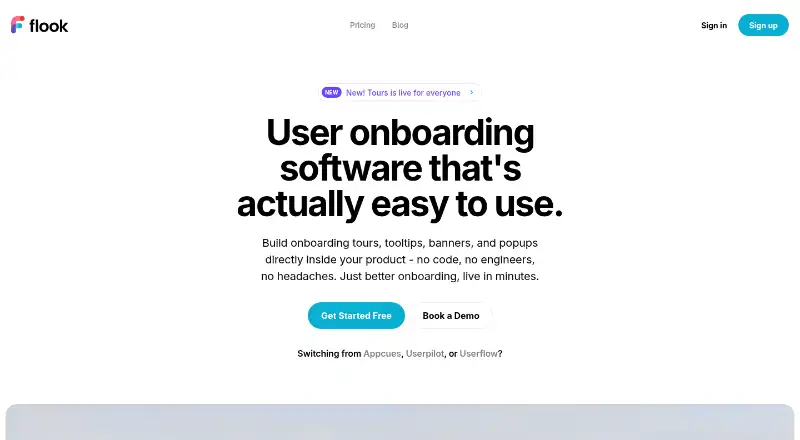
What Flook is
Flook is user onboarding software for building in-product tours, tooltips, banners, popups, and other guidance without code. The workflow uses a Chrome extension: select elements in a live product interface, compose the content, and publish it. Tours can guide users through product flows and branch based on role, plan, or a trigger event. Other listed formats include highlights and modals, and widgets can be styled with fonts, colours, borders, timing, and animation. Built-in analytics report completion rates, drop-off points, and click-through for each flow. Flook says its script loads asynchronously and has been tested under 12 KB gzipped. The Free plan costs nothing and includes watermarked widgets. Pro is $39 a month with all widget types and custom branding. Growth costs $79 a month and adds analytics, segmentation, and priority support; Lifetime is 75.00 USD once and includes Pro features, project management, and premium support. Checklists and keyboard-driven terminals are listed as upcoming patterns.
Good
- Tours can branch by role, plan, or trigger.
- Built-in analytics show completion and drop-off.
- Widgets support custom styling.
- Free plan is available.
Watch out
- Free widgets carry Flook branding.
- Checklists are listed as coming soon.
- Pricing page does not specify plan-specific user caps.
Who it suits
Flook suits solo founders starting with its Free plan or product teams creating guided in-app onboarding. Teams that need flow analytics or segmentation can consider Growth.
Verdict
Flook provides several in-product guidance formats and flow analytics, with plan options ranging from free to paid. Check the watermarked Free widgets and unspecified plan-specific user caps against your needs.
Plans and prices
From Flook's own pricing page, checked 15 Oct 2026.
| Plan | Price | What it gives you |
|---|---|---|
| Free | Free | Everything on paid plans · Watermarked widgets |
| Pro | $39 a month | All widget types · Custom branding · monthly |
| Lifetime | $75, paid once | Everything in Pro · Project management · Premium support · Early adopters · one-time |
| Growth | $79 a month | Everything in Pro · Analytics · Segmentation · AI Helpers (Soon) · Priority Support · monthly |
The facts
Each one read from Flook's own pages, with the date it was checked.
What it does
- Analytics
- Built-in analytics report completion rates, drop-off steps and click-through for each flow.checked 15 Oct 2026
- API events
- Flook's product blog says widgets can be triggered by actions, URLs or API events.checked 15 Oct 2026
- Audience
- The Free plan is described as being for solo founders, while Pro is described as ideal for most product teams.checked 29 Sep 2026
- Branding
- The site says widgets can be themed with fonts, colours, borders, timing, and animation.checked 29 Sep 2026
- Build workflow
- Flook says users install its Chrome extension, select elements on their live product UI, compose content, and publish.checked 29 Sep 2026
- Chrome extension details
- The Flook Builder listing shows 301 users, version 1.5.3, a July 13 2026 update and a 5.53 MiB package.checked 15 Oct 2026
- Chrome privacy declaration
- The Chrome listing says the developer will not collect or use user data and will not sell or transfer it outside approved purposes.checked 15 Oct 2026
- Chrome workflow
- The builder Chrome extension lets users select elements on their live product, attach widgets and publish immediately.checked 15 Oct 2026
- Coming-soon widgets
- Checklists and the keyboard-driven Terminals launchpad are described as coming soon.checked 15 Oct 2026
- Documentation
- The help center exposes Getting Started, FAQs and Documentation categories, with five documentation articles listed.checked 15 Oct 2026
- Domain management
- A Flook Company groups related production, staging and development domains, sharing widgets across them.checked 15 Oct 2026
- Funding
- The same 2024 factsheet says Flook was bootstrapped and raised $17,000 through lifetime deals in its first month.checked 15 Oct 2026
- Highlights
- Highlights can be attached to product elements to draw user attention.checked 15 Oct 2026
- Installation
- Initial setup requires the Chrome Builder extension and a Flook JavaScript player snippet in the target site's head.checked 15 Oct 2026
- Integrations
- The terms page names Facebook's API for displaying Facebook and Instagram posts and also lists YouTube terms.checked 15 Oct 2026
- Licence
- Flook credits third-party runtime packages under MIT, ISC, BSD-3-Clause and Apache-2.0 licenses, but does not present the Flook service itself as open source.checked 15 Oct 2026
- Limit: onboarding dependence
- A Reddit commenter cautioned that onboarding flows are often skipped by users and can be risky to outsource completely.checked 15 Oct 2026
- Limit: refunds
- Paid subscriptions renew automatically and Flook says it gives no refunds or credits for partial, upgraded, downgraded or unused months.checked 15 Oct 2026
- Limit: service reliability
- Terms warn that maintenance or technical difficulties can interrupt service and disclaim continuous or error-free operation.checked 15 Oct 2026
- Multi-site limitation
- Unrelated sites in one Company share monthly-active-user quotas and billing, lack ring-fenced widget management and can encounter selector and reporting conflicts.checked 15 Oct 2026
- No-code builder
- The product lets teams build and publish onboarding content without writing code or filing engineering tickets.checked 15 Oct 2026
The company
- Company size
- LinkedIn describes Flook.co as privately held with 2–10 employees and four employees listed.checked 15 Oct 2026
- Maker address
- The Chrome listing identifies the publisher as Flook Group PTY Ltd at L24/300 Barangaroo Ave, Barangaroo, NSW 2000, Australia.checked 15 Oct 2026
Where it runs
- Limit: Mac app
- Flook's roadmap marks a Mac desktop application request as unlikely to be built.checked 15 Oct 2026
The full review of Flook
Flook is no-code software for guiding users through a product with tours, tooltips, and other in-app prompts. It best suits solo founders and product teams shaping onboarding flows, especially when role- or event-based guidance matters.
Overview
Flook combines several in-product guidance formats with branching tours and flow-level analytics. That makes it more useful than a basic sequence of welcome screens for teams that need to tailor guidance and see where users disengage. Building depends on a Chrome extension: select elements in the live product interface, compose content, and publish. This keeps the workflow code-free, but teams should be comfortable authoring through an extension.
Key features
Guidance and targeting
Onboarding tours can branch according to user role, plan, or trigger event, while advanced tooltips, highlights, popups, and modals cover other moments in the product journey. The range gives product teams flexibility to match a prompt to its context rather than rely on tours alone. Customer segmentation is supported, but it is a paid-plan feature. Checklists and keyboard-driven terminals are coming soon, so they are not a reason to choose Flook today.
Flow analytics and presentation
Built-in analytics show completion rates, drop-off steps, and click-through for each flow. These measures can help a team identify where a tour loses users, though teams seeking analytics need Growth rather than Pro. Widgets can be themed with fonts, colours, borders, timing, and animation, giving teams control over presentation. Flook says the software loads asynchronously and has been tested under 12 KB gzipped, a useful design aim for teams mindful of page weight.
Privacy and payments
Flook says it will not sell, rent, or otherwise distribute information submitted on its website. It also says it does not store credit card details and sends purchase card information to Stripe for processing. These statements address website submissions and payment handling; they do not describe broader product-data practices.
Pricing
The Free plan costs nothing and includes everything on paid plans, but its widgets are watermarked. That makes it a way for solo founders to start without a subscription, with visible branding as the trade-off. Pro costs $39 a month and includes all widget types and custom branding, fitting product teams that need polished guidance but do not require the higher-tier analytics and segmentation.
Growth costs $79 a month and includes everything in Pro, analytics, segmentation, AI Helpers (Soon), and priority support. It is the stronger fit for teams measuring flow performance or tailoring guidance to user segments; AI Helpers are not yet available. Lifetime costs $75, paid once and includes everything in Pro, project management, and premium support. It is available for early adopters, but does not include the Growth plan's stated analytics and segmentation.
The pricing page displays a monthly active user selector from 1,000 to 25,000+, but plan-specific user caps are unspecified. Confirm that the applicable allowance fits expected usage before committing. A support email is provided, with priority support on Growth and premium support on Lifetime.
Platforms
Flook is available as a web product and an extension. The Chrome extension is central to selecting live interface elements during the build process.
Who it's for
Flook fits solo founders who want to begin with a free, watermarked setup and product teams that need multiple guidance formats. Pro is suited to teams prioritising custom branding; Growth is the better match when analytics and segmentation are essential. Teams that require checklists now, or need clear plan-specific user allowances before choosing, should look elsewhere or confirm the fit first.
Pros and cons
- Pros: Tours can branch by role, plan, or trigger event, supporting more context-specific onboarding.
- Pros: Tours, tooltips, highlights, popups, and modals provide several ways to guide users.
- Pros: Flow completion, drop-off, and click-through analytics give Growth users concrete signals for refining guidance.
- Cons: Free widgets carry a watermark, so the no-cost plan is less suitable for a polished branded experience.
- Cons: Analytics and segmentation are reserved for Growth, adding cost for teams that need either capability.
- Cons: Plan-specific user caps are unspecified despite the monthly active user selector, making capacity harder to assess in advance.
- Cons: Checklists and keyboard-driven terminals are still upcoming rather than current patterns.
Alternatives
Customer Onboarding Software is the broader category to compare when Flook's particular combination of extension-based building and in-product prompts is not the right fit.
Choose Pendo Analytics if its free plan's 500 monthly active users and product analytics alongside in-app guides better match your starting needs, or if Android and iOS platforms matter. Choose Stonly if its Basic plan's 400 guide views per month, five published guides, one language, and one team member suit a narrowly scoped guide program.
Wakeline is another freemium option, with a free plan capped at three flows, 1,000 monthly active users, and one teammate. Driver.js is a free alternative with unlimited projects and personal and commercial use. Baltu is a web-based alternative with a free plan for up to 500 monthly active users.
Dock is an alternative with a free plan covering workspaces, CMS assets, slides, playbooks, courses, and order forms. StepBeam offers a free plan for up to 1,000 monthly active users, three team seats, and one application, with basic analytics. Synerdeck is a freemium alternative whose free plan covers up to 10 clients, two templates, and 500 MB of storage.
Verdict
Flook is a sound choice for founders and product teams that want code-free, context-aware onboarding across several widget types, with Growth adding useful flow analytics and segmentation. Its chief draw is the combination of branching guidance and measurable flows; look elsewhere if you need checklists now, or establish the user-cap fit before relying on a particular plan.
Alternatives to Flook
- 1

StepBeam
Free planWebAPI7.5From $124 a month - 2

Wakeline
Free planAndroidiOSWebExtension7.5From $41 a month - 3

Chameleon
WebAPIExtension7.2From $279 a month - 4
GatherMonk
WebExtension7.2From $29 a month - 5

Inline Manual
WebAPIExtensionSelf-hosted7.2From $3 a month - 6
Userpilot
AndroidiOSWebAPI7.2From $299 a month