
Homebase
Homebase is a staff scheduling and workforce management tool available on the web and iOS.
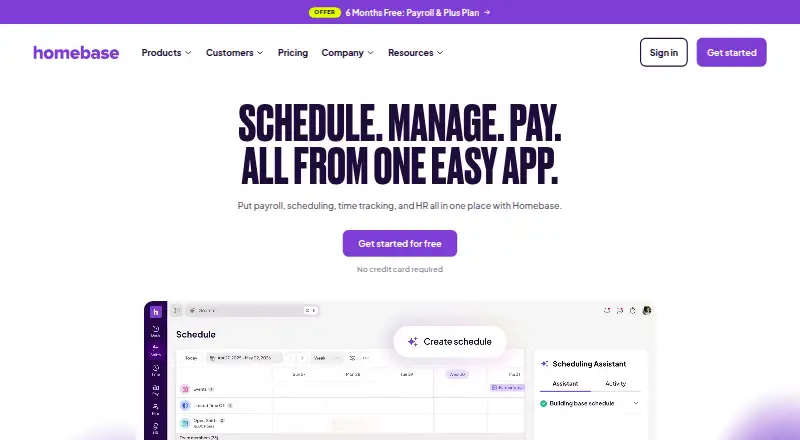
What Homebase is
Homebase is a staff scheduling and workforce management tool available on the web and iOS. Its listed scheduling features include automatic shift scheduling, open-shift management, and shift swaps. Teams can also collect staff availability and manage time off, covering several common tasks involved in coordinating schedules. Mobile apps are available alongside the web service. The company was founded in 2014 and is headquartered in San Francisco, California, United States. The service's listed capabilities focus on organizing shifts, gathering availability, handling time-off requests, and letting staff manage schedule changes through open shifts and swaps. Readers comparing scheduling options can consider whether those tools match their team's routine. Its website is https://www.joinhomebase.com/.
Good
- Includes automatic shift scheduling.
- Staff availability collection is listed.
- Supports open shifts and shift swaps.
- Time-off management is included.
Watch out
- A 14-day trial is listed.
Who it suits
Homebase may suit businesses that need to coordinate shifts, gather availability, and manage time-off requests. Its web and iOS access may fit teams whose staff use mobile devices as well as browsers.
Verdict
Homebase focuses on staff scheduling and related workforce coordination, with a free plan and mobile apps. Its listed features center on shifts, availability, swaps, and time off.
Plans and prices
From Homebase's own pricing page, checked 21 Oct 2026.
| Plan | Price | What it gives you |
|---|---|---|
| Basic | Free | 1 location · up to 10 employees · basic scheduling · basic time tracking · POS integration · per location / month |
| Task Manager add-on | $13 a month | Build and assign task lists · Track completion in app or desktop |
| Tip Manager add-on | $25 a month | Pulls tips from POS · Calculates tip pool · Adds it to timesheets |
| Background checks add-on | $30, paid once | Background checks run in Homebase |
| Essentials | $30 a month | unlimited employees · advanced scheduling · advanced time tracking · team communication · payroll add-on · per location / month; $24 per location / month annually |
| Payroll add-on | $49 a month | available with any plan · tax calculation and filing · direct deposit · W-2 and 1099 filing · $49 monthly base fee plus $6 per employee paid monthly |
| Job post boosts add-on | $50, paid once | Boosts visibility across job boards |
| Plus | $70 a month | unlimited employees · AI scheduling · PTO and time-off controls · departments and permissions · payroll add-on · per location / month; $56 per location / month annually |
| Hiring Assistant add-on | $99 a month | Job posts · Candidate finding · Interviews · First month free offer shown |
| All-in-One | $120 a month | unlimited employees · employee onboarding · labor-cost management · HR and compliance · payroll add-on · per location / month; $96 per location / month annually |
The facts
Each one read from Homebase's own pages, with the date it was checked.
What it does
- AI assistants
- Homebase offers AI assistants for hiring, scheduling and payroll error detection.checked 21 Oct 2026
- API
- The plan comparison says customers can use Homebase's API to build custom integrations.checked 4 Oct 2026
- API access
- API keys are read-only by default and require approval; partners can request write permissions from Homebase representatives.checked 21 Oct 2026
- Compliance
- The Trust Center lists SOC 2 Type 2, SOC 3, PCI DSS v4.0.0, CCPA, PIPEDA, and NIST CSF.checked 4 Oct 2026
- Developer documentation
- The public API documentation shows curl authentication examples, JSON responses, ISO 8601 dates and versioned media types.checked 21 Oct 2026
- Funding news
- Homebase announced a $60 million Series D financing on April 3, 2024, led by L Catterton Growth with Emerson Collective and existing investors participating.checked 21 Oct 2026
- Hiring
- Hiring tools support job posting, candidate screening and interview booking.checked 21 Oct 2026
- HR and compliance
- The All-in-One tier adds employee onboarding, HR support and compliance tools.checked 21 Oct 2026
- Integrations
- The integrations directory lists 17 connections including Square, Toast, Clover, Shopify, ADP, Gusto, QuickBooks, Paychex, Lightspeed and payroll providers.checked 21 Oct 2026
- Intended users
- Homebase describes its app as built for small, hourly, shift-based businesses such as restaurants, retail, beauty and wellness, medical, and home services.checked 4 Oct 2026
- Licence
- The public product pages describe a hosted SaaS application and API and do not state an open-source licence.checked 21 Oct 2026
- Limit: glitches and lag
- Independent reviews mention recurring app glitches, lag, syncing delays and inconsistent performance.checked 21 Oct 2026
- Limit: pricing and scaling
- Reviewers complain that advanced features, extra locations and some payroll or billing functions become expensive as needs grow.checked 21 Oct 2026
- Limit: support
- Reviewers report slow responses or difficulty reaching knowledgeable support for complex problems.checked 21 Oct 2026
- Notable news
- The April 3, 2024 financing announcement said Homebase served more than 100,000 small businesses and tracked over 1 billion hours for 2.5 million workers in the prior year.checked 21 Oct 2026
- Payroll
- Homebase payroll calculates wages, overtime, tips and taxes and supports direct deposit plus tax filings.checked 21 Oct 2026
The company
- Company facts
- LinkedIn lists Homebase as privately held, founded in 2014, headquartered in San Francisco and employing 201–500 people.checked 21 Oct 2026
- Company identity
- The site footer identifies the rights holder as Pioneer Works, Inc.checked 4 Oct 2026
- Company legal name
- Crunchbase identifies the legal entity as Pioneer Works, Inc.checked 21 Oct 2026
- Company mission
- Homebase states its mission is to make local business teams unstoppable.checked 4 Oct 2026
- Founded
- 2014checked 28 Sep 2026
- Headquarters
- San Francisco, California, United Stateschecked 23 Sep 2026
Where it runs
- iOS requirement
- The App Store listing identifies the app as iPhone-only and requires iOS 17.0 or later.checked 21 Oct 2026
Money
- Plan limit
- Basic is free for one location and up to 10 employees; the pricing page describes paid plans as unlimited employees per location.checked 4 Oct 2026
The full review of Homebase
Homebase is workforce software for hourly businesses, with tools spanning scheduling, timekeeping, payroll, hiring, and team administration. It is best suited to small shift-based employers that want to coordinate daily work in one system. Its free tier makes it accessible to a single small location, while broader capabilities and employee limits require paid plans or add-ons.
Overview
Homebase covers more than building schedules: its product also reaches hiring, onboarding, HR, compliance, payroll, and team communication. That range can reduce the need to piece together separate workflows for an hourly workforce, particularly in restaurants, retail, beauty and wellness, medical, and home services. The trade-off is a tiered, add-on-heavy offering: businesses should map the capabilities they need to the plan and extra charges before choosing.
Key features
- Scheduling and shift coordination: Availability collection, auto-scheduling, open-shift management, shift swaps, and time-off management cover both schedule creation and the changes that follow. This is useful for managers dealing with changing availability; the Basic tier limits a business to one location and 10 employees.
- Time clocks: Staff can clock in and out on mobile or tablet time clocks, with PIN, photo, and GPS or geofencing verification. Those checks give employers several ways to confirm a clock-in, while the choice of verification method can be matched to how employees work.
- Payroll: Approved hours feed into payroll, where Homebase says it calculates wages, overtime, tips, and taxes and handles tax filings. Payroll is an add-on rather than an included plan feature, so businesses should account for its separate cost.
- Hiring and workforce administration: Hiring, onboarding, HR, and compliance extend Homebase beyond shift management. Hiring Assistant is a separate add-on; onboarding and HR and compliance are included in All-in-One.
- Integrations and access controls: Connections include Square, Toast, Clover, Shopify, ADP, Gusto, and QuickBooks. Homebase also supports custom integrations through its API. Its security measures include encryption in transit and at rest, two-factor authentication, SSO, password-less login, and role-based access control; it says it runs annual penetration tests and monthly vulnerability scans. Its Trust Center lists SOC 2 Type 2, SOC 3, PCI DSS v4.0.0, CCPA, PIPEDA, and NIST CSF.
Pricing
Homebase is freemium, with a 14-day trial and paid plans from $30/mo. Basic is free for one location and up to 10 employees, and includes basic scheduling, basic time tracking, and POS integration; payroll is available as an add-on. It is a sensible starting point for a small single-site team, but not for a growing workforce or a business needing advanced scheduling.
Paid plans are billed per location and allow unlimited employees per location. Essentials costs $30 a month and adds advanced scheduling, advanced time tracking, and team communication; payroll remains an add-on. It fits businesses that have outgrown Basic but do not need the broader HR suite. All-in-One costs $120 a month and adds employee onboarding, labor cost management, HR, and compliance, with payroll still available separately. Plus costs $700 a month and adds an AI-powered Scheduling Assistant, PTO and time-off controls, departments, and permissions. The six-month-free payroll promotion is advertised with Plus.
Several capabilities carry separate charges. The Payroll add-on is $496 a month, with the first six months free; after that, a base fee plus a per-employee charge applies. Tip Manager is $25 a month and pulls tips from a POS, calculates the tip pool, and adds it to timesheets. Task Manager is $13 a month for creating task lists and tracking completion in the app or desktop. Hiring Assistant is $99 a month, with a first-month-free offer, for job posts, candidate finding, and interviews. Background checks cost $30 per check, while Job post boosts cost $50 per boost. These extras let employers add targeted tools, but multiple add-ons can materially raise the cost beyond the base plan.
The pricing page also advertises a six-month-free payroll offer with Plus; promotional terms matter when comparing ongoing costs. Homebase lists 24/7 AI chat support and a Help Center, with live chat and phone support appearing in plan comparisons.
Platforms
Homebase runs on Android, iOS, and the web. Mobile access is particularly relevant for hourly teams using phone-based time clocks, while the web option serves managers handling schedules and administration from a desktop.
Who it's for
Homebase is a strong fit for small hourly businesses that need scheduling, timekeeping, and shift coordination, with a path into payroll and broader workforce administration. Its stated audience includes restaurants, retail shops, beauty and wellness businesses, medical workplaces, and home services. Basic is best for a single location with no more than 10 employees; paid plans suit larger teams at a location or employers that need advanced scheduling or HR functions. Businesses that only need a basic schedule may find the paid tiers and optional modules more than they need, while multi-location teams should compare the per-location pricing carefully.
Pros and cons
- Pro: The free Basic plan supports one location and up to 10 employees, making it possible for a small team to begin with scheduling and time tracking without a subscription.
- Pro: Scheduling, time clocks, payroll, hiring, and HR capabilities can sit within one workforce platform, and integrations include common POS and payroll services such as Square, Toast, ADP, Gusto, and QuickBooks.
- Pro: Clock-in verification can use PIN, photo, GPS, or geofencing, giving employers options for checking attendance.
- Con: Basic is capped at 10 employees and one location; businesses that exceed either limit need a paid plan.
- Con: Payroll costs extra even on paid plans, and its listed add-on price is $496 a month before the later base-plus-per-employee charge.
- Con: Several useful functions, including tip pooling and task management, are separately priced add-ons, so the advertised base plan may not cover a team's full workflow.
Alternatives
For restaurant operators comparing labor tools, browse Restaurant Labor Management Software.
7shifts is worth considering for restaurant teams wanting a free plan with a higher stated employee cap: its Comp plan covers 15 employees at one location, compared with Homebase Basic's 10.
Deputy is an alternative for businesses willing to pay per user: its Lite plan is $5 a month per user and includes basic scheduling and timesheets. It has no free plan, but does offer a free trial.
Workforce.com suits readers comparing paid scheduling, HR, and payroll options, including an All-in-One plan with advanced implementation support and a separate Scheduling plan; both have custom pricing.
TimeForge may suit larger retail operations seeking enterprise-focused labor tools: its Enterprise Retail plan is for 50+ stores and includes a dedicated account representative, with custom pricing.
Restaurant365 Workforce Management is another paid workforce-management option for Android, iOS, and web.
HotSchedules is a paid scheduling and team-management alternative with a one-year offer; it has no free plan and offers a free trial.
Altametrics Workforce Scheduling is worth comparing for teams interested in employee scheduling and forecasting. Its Essential plan is advertised at $75 a month during a three-month 50% discount offer, with taxes excluded.
Sling offers a free plan for up to 30 users, with shift scheduling, time-off requests, available shifts, and private messaging. It is a strong alternative if a larger free-user cap and those core coordination tools are the priority.
Verdict
Choose Homebase if you run a small hourly business and want scheduling and timekeeping that can expand into payroll and HR as your operation grows. Its free single-location plan is the clearest reason to start here, while its modular pricing and paid payroll are the main reasons to compare alternatives before committing to a broader setup.
Getting started
- Open the Homebase website
- Choose Android, iOS, or web access
- Start with the free Basic plan
- Use the listed 14-day trial
- Select a paid plan billed per location when needed
- Add payroll or other listed add-ons as required
Limits worth knowing
The free Basic plan covers one location and up to 10 employees, with basic scheduling, basic time tracking, POS integration, and an available payroll add-on. Essentials is listed at 30 USD per month per location with unlimited employees and advanced scheduling and time tracking.
Questions
Is Homebase free?
Yes. A free Basic plan is listed for one location and up to 10 employees.
Which platforms does Homebase support?
Homebase is listed for Android, iOS, and web.
Which businesses is Homebase for?
It is described for small, hourly, shift-based businesses, including restaurants, retail, beauty and wellness, medical, and home services.
Does Homebase connect to payroll and POS systems?
Listed integrations include Square, Toast, Clover, Shopify, ADP, Gusto, and QuickBooks. An API is also available for custom integrations.
What does the Basic plan include?
Basic is billed per location and covers one location with up to 10 employees, basic scheduling, basic time tracking, POS integration, and a payroll add-on option.
Alternatives to Homebase
- 1

Wave
Free planAndroidiOSWebAPI8.3From $72 a year - 2

CDM+
AndroidiOSWebAPI7.9From $25 a month - 3

Employment Hero
AndroidiOSWebAPI7.8 - 4
OnPay
AndroidiOSWebAPI7.7From $10 a month - 5
Patriot Payroll
AndroidiOSWeb7.7From $17 a month - 6
Sage Payroll
AndroidiOSWebAPI7.7From £12 a month