
Sling
Sling is an employee scheduling, communication, and workforce management platform for teams organizing shifts and labor costs.
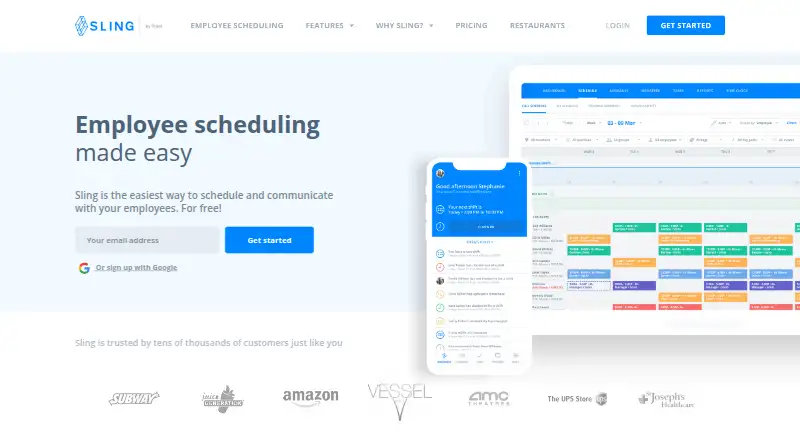
What Sling is
Sling is an employee scheduling, communication, and workforce management platform for teams organizing shifts and labor costs. It supports reusable schedule templates, employee availability, time-off requests, shift offers, shift swaps, open shifts, and auto-scheduling. The Free plan supports up to 30 users and includes shift scheduling, time-off requests, available shifts, news sharing, long-term scheduling, and private messaging. Premium adds mobile time tracking, labor cost management, overtime tracking, and group messaging for $2 per user per month. Business costs $4 per user per month and adds kiosk time tracking, reports of hours worked and wages earned, no-show and sick call-out features, and PTO management. Communication includes private and group messages, Newsfeed, Announcements, and notifications via email, push, browser, and in some cases SMS. Sling lists integrations with Toast and other point-of-sale systems. The Toast connection syncs employee data, compares sales with labor costs, and exports timesheets to Toast Payroll. Sling is available on Android, iOS, and the web.
Good
- Free plan supports up to 30 users.
- Supports shift swaps, availability, and time-off requests.
- Premium includes mobile time tracking and overtime tracking.
- Business adds kiosk time tracking and reports.
- Available on Android, iOS, and web.
Watch out
- Some actions require a desktop browser.
- Mobile app requires iOS 11 or later or Android 5 or later.
- Premium costs $2 per user per month.
- Business costs $4 per user per month.
Who it suits
Sling suits small and medium-sized businesses that need to schedule staff, coordinate availability, or track labor. Its audience spans businesses in more than 30 industries.
Verdict
Sling combines scheduling and staff communication with paid labor-tracking options. Consider whether the mobile app requirements and desktop-only actions fit your team's devices and workflows.
Plans and prices
From Sling's own pricing page, checked 14 Oct 2026.
| Plan | Price | What it gives you |
|---|---|---|
| Free | Free | up to 30 users · shift scheduling · time-off requests · available shifts · news sharing · long-term scheduling · private messaging |
| Premium | — | mobile time tracking · labor cost management · overtime tracking · private and group messaging · calendar synchronization · everything in Free · monthly or annually; annual billing saves 15% |
| Business | — | kiosk time tracking · reports · no-shows · sick call-outs · PTO management · everything in Premium · monthly or annually; annual billing saves 15% |
The facts
Each one read from Sling's own pages, with the date it was checked.
What it does
- API
- Sling publishes an OAS 2.0 API with a /v1 base URL and OAuth2 endpoints for clients, authorization, tokens and userinfo.checked 14 Oct 2026
- Availability and conflicts
- The software records employee availability and time-off requests and flags overlaps or double-bookings.checked 14 Oct 2026
- Communication
- The product provides private and group messaging, announcements, news sharing and schedule notifications.checked 14 Oct 2026
- Documentation depth
- The help center lists hundreds of articles across schedules, time clock, reports, labor costs, integrations, employee profiles and legal topics.checked 14 Oct 2026
- GDPR
- Sling states that it has verified the functionality for GDPR compliant data deletion and retention and that customer data is processed according to customer instructions.checked 29 Sep 2026
- Integrations
- Official integration documentation covers Toast synchronization, schedule import, projected-sales forecasting and Toast time-clock features.checked 14 Oct 2026
- Intended audience
- Sling describes itself as an employee scheduling platform for SMBs and says it serves businesses across more than 30 industries.checked 29 Sep 2026
- Labor management
- Premium includes labor cost management and overtime tracking, and Business includes reports of hours worked and wages earned.checked 29 Sep 2026
- Labor optimization
- Sling calculates projected labor costs during scheduling and supports overtime monitoring against budgets.checked 14 Oct 2026
- Licence
- Sling is offered as hosted SaaS with paid per-user subscriptions; the reviewed pages do not state an open-source licence or self-hosted edition.checked 14 Oct 2026
- Limit: feature gaps and pricing
- Capterra reviewers mention limited reporting without upgrades, per-employee costs rising with team size, and lack of skill-based scheduling.checked 14 Oct 2026
- Limit: mobile reliability
- Software Advice identifies mobile-app issues, loading problems and interface difficulties as recurring negatives.checked 14 Oct 2026
- Mobile limitation
- The mobile app requires iOS 11 or later or Android 5 (API 21) or later, and some actions require a desktop browser.checked 29 Sep 2026
- Paid from
- 2checked 21 Sep 2026
- Praise: ease of use
- G2 and Capterra reviewers repeatedly describe Sling as easy to learn, user friendly and quick for creating and viewing schedules.checked 14 Oct 2026
- Praise: mobile access
- Software Advice says users value mobile access, calendar management and scheduling from anywhere.checked 14 Oct 2026
Where it runs
- App distribution
- Google Play lists the Android app as free, with more than 1 million downloads and an Everyone content rating.checked 14 Oct 2026
- Limit: app bugs
- Google Play reviewers report crashes, broken navigation, missing notifications and repeated login or loading problems on some devices.checked 14 Oct 2026
- Mobile apps
- Yeschecked 21 Sep 2026
The company
- Company founding and origin
- Sling says it was founded in Reykjavik, Iceland by CEO Helgi Hermannsson in 2015 and later opened a New York office.checked 14 Oct 2026
- Company ownership
- Sling's privacy statement identifies Sling, Inc. as a Toast company.checked 14 Oct 2026
- Company reach
- Sling says it serves tens of thousands of businesses across more than 30 industries and 150 countries.checked 14 Oct 2026
- Company scale
- LinkedIn lists Sling as privately held, headquartered in Brooklyn, New York, founded in 2015, with 11–50 employees.checked 14 Oct 2026
Money
- Free plan
- Yeschecked 21 Sep 2026
The full review of Sling
Overview
Sling is a staff scheduling and workforce-management service for small and midsize businesses. It suits teams coordinating recurring shifts and employee coverage; the free plan handles core scheduling, while labor tracking and cost controls require a paid tier.
Reusable templates, availability collection, time-off requests, open shifts, offers, and swaps address both schedule planning and last-minute coverage changes. Auto-scheduling is also supported. For managers, the practical distinction is that those scheduling tools extend into labor costs and time tracking only on paid plans.
Key features
Scheduling and communication
Employees can share availability, request time off, take available shifts, offer shifts, or swap them. That gives teams a way to distribute schedule changes rather than leaving all coverage adjustments to managers. Private and group messages, a Newsfeed, Announcements, and notifications by email, push, browser, and in some cases SMS provide several channels for staff updates.
Labor tools and integrations
Premium adds mobile time tracking, labor-cost management, and overtime tracking. Business adds kiosk time tracking on a shared device and reports of hours worked and wages earned. These upgrades make Sling more useful to managers watching labor, but organizations that need those controls must pay per user.
Sling lists integrations with Toast, Square, Harbortouch, Restaurant Manager, and POSiTouch. Its Toast integration syncs employee data, compares Toast POS sales with Sling labor costs, and exports timesheets to Toast Payroll, a meaningful connection for restaurants using Toast.
Security and support
Sling says customer data is stored in Amazon cloud infrastructure and communication channels are encrypted. Its security FAQ says most data at rest is not encrypted; passwords are hashed, and social security numbers are encrypted if provided. Sling also says it has verified GDPR-compliant data deletion and retention functionality and processes customer data according to customer instructions. Support includes a help center and contact by email at [email protected].
Pricing
Sling has a free plan, paid plans, and a 15-day trial. Free supports up to 30 users and includes shift scheduling, time-off requests, available shifts, news sharing, long-term scheduling, and private messaging. That cap makes it a strong fit for smaller teams that need scheduling and basic communication, but it excludes time and labor management.
Premium costs $2 a month, billed per user per month; the page also displays $1.70 with annual billing selected. It adds mobile time tracking, labor-cost and overtime tracking, private and group messaging, calendar synchronization, and everything in Free. It suits teams that need to connect schedules to labor oversight, though the per-user charge makes headcount a direct cost factor.
Business costs $4 a month, billed per user per month; the page also displays $3.40 with annual billing selected. It includes everything in Premium plus kiosk time tracking, reports, no-shows, sick call-outs, and PTO management. This is the better fit where managers need shared-device clocking and broader reporting, but teams that only need mobile tracking may not need the higher tier.
Platforms
Sling runs on Android, iOS, and the web, with mobile apps for phones. The mobile app requires iOS 11 or later or Android 5 (API 21) or later, and some actions require a desktop browser. Teams relying on older phones or expecting every workflow to be completed on mobile should account for those constraints.
Who it's for
Sling is aimed at SMBs and says it serves businesses across more than 30 industries. Its free scheduling tier can work for teams of up to 30 users that need shift planning, availability, time-off handling, and staff messages. Restaurants may particularly value its Toast connection. Teams needing paid labor controls should compare per-user costs and decide whether mobile tracking or shared-device kiosk tracking better fits their operation.
Pros and cons
- Pros: The free plan covers scheduling for up to 30 users and includes time-off requests, available shifts, and private messaging, making it usable beyond a bare calendar.
- Pros: Shift offers, swaps, availability collection, and auto-scheduling support both schedule creation and coverage changes.
- Pros: Paid tiers connect scheduling with mobile or kiosk time tracking, labor costs, overtime, and reports.
- Cons: Mobile operating-system minimums exclude older devices, and some actions require a desktop browser.
- Cons: Labor-management features sit behind paid per-user tiers, so teams needing these tools cannot stay on the free plan.
- Cons: Sling says most data at rest is not encrypted, a consideration for organizations evaluating data-security practices.
Alternatives
- 7shifts is worth comparing for restaurant teams: its free Comp plan limits use to 15 employees at one location, while Essentials supports 30 employees and unlimited locations.
- Rosnet Scheduling & Forecasting is a paid option for teams willing to request a demo rather than choose from a published plan price.
- Lineup.ai is a paid alternative for teams seeking automated AI-generated forecasts and a custom labor allowance budget; Forecasts Only costs $79 a month, billed $79/loc/month, with unlimited users and employees.
- SynergySuite Labor & Scheduling is another paid alternative.
- TimeForge is a paid alternative.
- Workforce.com is a paid alternative.
- Altametrics Workforce Scheduling is a paid option with an Essential plan at $75 a month during a 50% off for 3 months offer, billed $150 as the original price; taxes are not included.
- Deputy is a paid alternative with a Lite plan at $5 a month, billed per user per month, upfront or in monthly installments, excluding applicable taxes.
For broader comparisons, see Restaurant Labor Management Software, Restaurant Scheduling Software, Employee Scheduling Software, and Gym Staff Scheduling Software.
Verdict
Sling is a sensible choice for SMBs that need flexible shift scheduling and staff communication, especially if the free plan’s 30-user limit covers the team or a paid tier’s labor tools fit its workflow. Its main drawback is the combination of paid labor controls and mobile limitations: teams that need those features should budget per user and confirm desktop-dependent actions work for their staff.
Getting started
- Visit the Sling employee-scheduling website.
- Choose the Free plan or a paid plan: Premium at $2 per user per month or Business at $4 per user per month.
- Use Sling on Android, iOS, or the web; some actions require a desktop browser.
- For mobile use, meet the iOS 11 or Android 5 (API 21) minimum.
Limits worth knowing
The Free plan supports up to 30 users and does not include Premium mobile time tracking, labor cost management, or overtime tracking. Premium adds those tools, while Business adds kiosk time tracking and reports; the listed mobile app requirements are iOS 11 or later or Android 5 (API 21) or later.
Questions
Is there a free plan?
Yes. The Free plan supports up to 30 users and includes shift scheduling, time-off requests, available shifts, news sharing, long-term scheduling, and private messaging.
How much do the paid plans cost?
Premium is $2 per user per month and Business is $4 per user per month. The page also displays $1.70 and $3.40 with annual billing selected.
Which platforms does Sling support?
Sling is available on Android, iOS, and the web. Some actions require a desktop browser.
What integrations are listed?
Sling lists Toast, Square, Harbortouch, Restaurant Manager, and POSiTouch. Its Toast integration syncs employee data, compares POS sales with Sling labor costs, and exports timesheets to Toast Payroll.
What does Premium add?
Premium adds mobile time tracking, labor cost management, overtime tracking, private and group messaging, and calendar synchronization.
What does Business add?
Business adds kiosk time tracking, reports of hours worked and wages earned, no-show and sick call-out features, and PTO management.
Alternatives to Sling
- 1

Workforce.com
AndroidiOSWebAPI7.9From C$12.80 a month - 2

Papershift
AndroidiOSWebAPI7.8 - 3
Planday
AndroidiOSWebAPI7.8From £2.99 a month - 4

Deputy
AndroidiOSWeb7.4From $5 a month - 5

RotaCloud
AndroidiOSWebAPI7.1From £10 a month - 6

Infor Workforce Management
AndroidiOSWebAPI6.9