
Wave
Wave is invoicing software for businesses to create and send invoices, collect payments, and manage customer information.
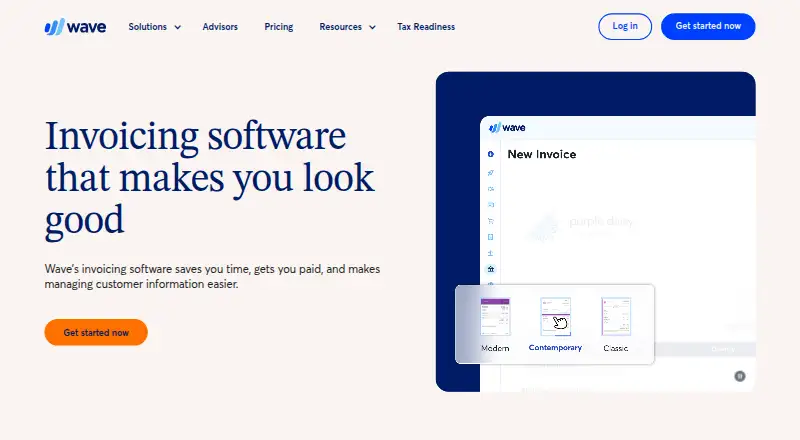
What Wave is
Wave is invoicing software for businesses to create and send invoices, collect payments, and manage customer information. Invoice templates can be edited with drag-and-drop controls and customized with a logo and brand colors. Repeat customers can receive recurring invoices, with automatic credit card payments supported. Customers can pay by credit card, bank payment (ACH/EFT), or Apple Pay, and invoicing and payment data connects to Wave’s accounting feature. The Starter plan is free and includes unlimited estimates, invoices, bills, and bookkeeping records; online payments have transaction fees. Pro costs $19 a month and adds automatic bank transaction import, transaction merging and categorization, receipt capture, expense tracking, and late-payment reminders. Wave lists integrations including Amazon, eBay, Capsule, and Etsy, but connecting or maintaining Partner integrations and Make requires Pro or a Wave Advisors bookkeeping subscription. The API also requires an active Pro or Wave Advisors package for third-party app connections. Wave says it is not HIPAA-compliant and does not support healthcare-related businesses.
Good
- Free plan includes unlimited invoices and estimates.
- Supports recurring invoices and automatic card payments.
- Accepts card, bank, and Apple Pay payments.
- Available on web, Android, and iOS.
- Offers expense tracking on the Pro plan.
Watch out
- Online payments carry transaction fees on Starter.
- Integrations and API connections require paid eligibility.
- Not HIPAA-compliant; healthcare businesses are unsupported.
- Eligible email or live-chat support runs weekdays only.
Who it suits
Wave suits businesses that need invoicing, payment collection, customer records, and connected bookkeeping. Its Starter plan is aimed at people starting a business or seeking basic features.
Verdict
Wave combines invoicing and payment collection with accounting connections, recurring billing, and expense tools. Check the Starter transaction fees and paid-plan requirements for integrations before choosing it.
Plans and prices
From Wave's own pricing page, checked 14 Oct 2026.
| Plan | Price | What it gives you |
|---|---|---|
| Starter | Free | unlimited estimates, invoices, bills and bookkeeping records · mobile invoicing · cash-flow and customer dashboard |
| Receipts | $8 a month | unlimited receipt scans · OCR · expense tracking · Billed monthly |
| Pro | $19 a month | bank transaction imports · automatic categorization · unlimited receipt capture · payment reminders · additional users · live chat and email support · Billed monthly |
| Pro Plan | $19 a month | Includes Starter · Auto-import, merge, and categorize bank transactions · Unlimited receipt capture · Automated late payment reminders · Billed monthly |
| Receipts | $72 a year | unlimited receipt scans · OCR · expense tracking · Billed annually |
| Wave Advisors | $149 a month | Pro features · dedicated bookkeeper · monthly financial statements · expert support |
| Pro Plan | $190 a year | Includes Starter · Auto-import, merge, and categorize bank transactions · Unlimited receipt capture · Automated late payment reminders · Billed annually |
| Pro | $190 a year | same Pro features as monthly plan · Billed annually |
The facts
Each one read from Wave's own pages, with the date it was checked.
What it does
- Accounting
- Wave uses double-entry accounting and provides income, expense, cash-flow, profit-and-loss and balance-sheet reporting.checked 14 Oct 2026
- API
- Wave provides an API with application creation, endpoint documentation, query and mutation examples, a playground and webhooks.checked 14 Oct 2026
- API authentication
- Third-party integrations must use OAuth2 and may require Wave approval; Wave reserves the right to impose restrictions or future access fees.checked 14 Oct 2026
- Audience
- Wave describes its Starter plan as suited to people starting a business or looking for basic features.checked 29 Sep 2026
- Bank feeds
- Pro supports read-only bank and credit-card connections with automatic transaction import, merging and categorization.checked 14 Oct 2026
- Compliance
- Wave identifies itself as a PCI Level 1 Service Provider and says it is not HIPAA compliant.checked 14 Oct 2026
- Documentation and support
- Wave offers a developer portal, help center, email support and live-person chat for Pro or qualifying paid features.checked 14 Oct 2026
- Integration requirement
- As of May 26, 2025, businesses need a Pro Plan or Wave Advisors bookkeeping subscription to connect to or maintain existing Partner integrations and Make.checked 29 Sep 2026
- Integrations
- Wave Pro lists integrations including Etsy, Driversnote, GoHighLevel, Google Sheets and Make.com.checked 14 Oct 2026
- Invoice customization
- Users can add their logo and brand colors to invoice templates and customize them with drag-and-drop editing.checked 29 Sep 2026
- Invoicing
- Users can create unlimited professional invoices and estimates, send them online, track status and accept card or bank payments.checked 14 Oct 2026
- Legal name and founding
- Crunchbase lists the legal name as Wave Financial Inc., founded in 2009 and headquartered in Toronto.checked 14 Oct 2026
- Licence
- Wave API use is governed by Wave terms of service; the reviewed pages do not identify an open-source licence.checked 14 Oct 2026
- Limit: customer support
- Trustpilot reviewers frequently report long response times, chatbot frustration and difficulty reaching a human.checked 14 Oct 2026
- Limit: held payments
- G2 and GetApp reviews describe legitimate customer payments being held while Wave requests verification documents.checked 14 Oct 2026
- Limit: integrations and advanced features
- G2 reviewers cite limited integrations, costly upgrades and missing advanced capabilities.checked 14 Oct 2026
- Limit: mobile feature gap
- A Google Play reviewer says the mobile app lacks much of the desktop product's advanced accounting and reporting.checked 14 Oct 2026
- Online payments
- Starter card processing is 2.9% plus $0.60 for Visa, Mastercard and Discover, while ACH costs 1% with a $1 minimum.checked 14 Oct 2026
The company
- Company size
- LinkedIn lists Wave HQ as a privately held software company with 201–500 employees in Toronto.checked 14 Oct 2026
- Founded
- 2010checked 28 Sep 2026
- Headquarters
- Toronto, Ontario, Canadachecked 28 Sep 2026
- Ownership news
- H&R Block announced on June 11, 2019 that it would acquire Wave for $405 million in cash.checked 14 Oct 2026
Money
- Free plan
- Yeschecked 19 Sep 2026
Where it runs
- Mobile app
- The mobile app supports invoices, estimates, receipt scanning, dashboards and paid mobile accounting transactions.checked 14 Oct 2026
The full review of Wave
Overview
Wave is invoicing and payment software for small businesses and independent operators who want to connect customer billing with bookkeeping. Its free Starter plan covers core invoicing, while Pro adds bank transaction tools and expense features for $19 a month.
Its strongest fit is a business that can work within Wave’s ecosystem and pay per transaction for online collections. It is a weaker fit for healthcare businesses or anyone who needs integrations or API connections without a paid subscription.
Key features
Invoicing and collection
Wave lets businesses create and send invoices, manage customer information, and customize invoice templates with a logo and brand colors using drag-and-drop editing. That gives a small operation room to present a consistent brand without needing separate design software. Recurring invoices and automatic credit card payments can reduce routine billing work for repeat customers.
Customers can pay invoices by credit card, secure bank payment (ACH/EFT), or Apple Pay. The free Starter plan has no stated invoice or bookkeeping-record quota, but online payments carry transaction fees: 2.9% + $0.60 per credit card transaction and 3.4% + $0.60 per Amex transaction. Those charges matter for businesses with frequent or high-value collections.
Accounting, expenses, and integrations
Wave connects invoice and payment information to its accounting feature. Pro adds automatic bank transaction import, transaction merging and categorization, unlimited receipt capture and expense tracking, and automated late-payment reminders. These tools make the paid tier more compelling for owners who want to reduce manual bookkeeping; Starter is the leaner choice when basic invoicing is enough.
Wave lists integrations including Amazon, eBay, Capsule, and Etsy, and supports workflows through Make. Since May 26, 2025, connecting to or maintaining existing Partner integrations and Make requires Pro or a Wave Advisors bookkeeping subscription. Third-party apps connected through Wave’s API likewise require an active Pro plan or Wave Advisors package, so the free plan is not suitable when those connections are essential.
Wave says data in transit is protected with up to 256-bit TLS encryption and that it is a PCI Level 1 Service Provider. It also says it is not HIPAA-compliant and does not currently support healthcare-related businesses.
Pricing
Starter
free. Starter includes unlimited estimates, invoices, bills, and bookkeeping records. Wave describes it as suited to people starting a business or seeking basic features. Online payments are available, but transaction fees apply at 2.9% + $0.60 per credit card transaction and 3.4% + $0.60 per Amex transaction. It is a sensible starting point for businesses that do not need Pro’s automation or restricted integrations.
Pro
$19 a month, billed monthly. Pro includes Starter, discounted online payment rates, automatic bank transaction import, automatic transaction merging and categorization, unlimited receipt capture, expense tracking, and automated late-payment reminders. Choose it when expense and bank-feed automation justify a recurring monthly cost, or when Partner integrations, Make, or API-based third-party connections are required. The plan terms provided do not state a seat limit or trial period.
Platforms
Wave offers web access and mobile apps for iOS and Android, plus an API for developers. The API’s third-party app connections require Pro or Wave Advisors.
Who it's for
Wave is best for small businesses and freelancers that need branded invoices, recurring billing, and a straightforward path from collections into bookkeeping. Starter suits basic billing with transaction fees accepted; Pro is a better match for owners who want bank imports, expense tools, reminders, or integrations. Healthcare businesses should look elsewhere because Wave says it is not HIPAA-compliant and does not support healthcare-related businesses.
Pros and cons
- Pro: Starter has unlimited estimates, invoices, bills, and bookkeeping records, making it useful for a new business that wants to avoid a monthly software charge.
- Pro: Recurring invoices, multiple payment methods, and automatic card payments support repeat-customer billing.
- Pro: Pro combines bank transaction automation, unlimited receipt capture, expense tracking, and late-payment reminders for a single monthly price.
- Con: Starter’s online payment fees can add up, especially for businesses processing many card payments.
- Con: Partner integrations, Make workflows, and API connections require Pro or Wave Advisors, limiting the usefulness of the free tier for connected workflows.
- Con: Wave is not a suitable option for healthcare businesses that require HIPAA compliance.
Alternatives
For a broader set of accounting-category choices, compare Bookkeeping Software. Industry-specific roundups include Salon Accounting Software and Gym Accounting Software; freelancers can also browse Freelance Invoicing Software. For payroll-focused needs, see Nonprofit Payroll Software.
Choose Payroll4Free instead when payroll is the priority and a free, advertising-supported service for 9 or fewer employees paid monthly fits. Consider CDM+ if you want accounting software with a free trial and a $25 a month Essentials plan for one program and one user. Rippling, ADP Workforce Now, Employment Hero, Homebase, PayFWDs, and Justworks Benefits are alternatives to compare for other business software needs.
Verdict
Choose Wave if you are a small business or freelancer who wants branded invoicing, recurring payment collection, and connected bookkeeping, with a free starting point and an optional $19 a month upgrade for expense automation. Look elsewhere if online payment fees undermine your margins, your workflows depend on integrations but you do not want Pro, or you operate in healthcare.
Getting started
- Open Wave’s invoicing website.
- Choose the free Starter plan or Pro at $19 a month.
- Create invoices and customize templates with a logo and brand colors.
- Enable recurring invoices for repeat customers if needed.
- Use a Pro Plan or Wave Advisors package to connect Partner integrations, Make, or third-party apps through the API.
Limits worth knowing
Starter includes unlimited estimates, invoices, bills, and bookkeeping records, but online payments have transaction fees of 2.9% + $0.60 for credit cards and 3.4% + $0.60 for Amex. Partner integrations, Make, and third-party API connections require Pro or a Wave Advisors package.
Questions
Does Wave have a free plan?
Yes. Starter is free and includes unlimited estimates, invoices, bills, and bookkeeping records.
How much does Pro cost?
Pro costs $19 a month, billed monthly.
How can customers pay Wave invoices?
Customers can pay by credit card, secure bank payment (ACH/EFT), or Apple Pay.
Which integrations are listed?
Wave lists Amazon, eBay, Capsule, and Etsy, and supports workflows through Make. Connecting or maintaining Partner integrations and Make requires Pro or Wave Advisors.
Can Wave be used by healthcare-related businesses?
Wave says it is not HIPAA-compliant and does not currently support healthcare-related businesses.
Alternatives to Wave
- 1
Sage Accounting
Free planAndroidiOSWebAPI9.1From £2 a month - 2

FreeAgent
Free planAndroidiOSWebAPI8.9Free plan - 3

GnuCash
Free planOpen sourceAndroidiOSAPILinux8.8Free plan - 4

Zoho Books
Free planAndroidiOS8.7From $15 a month - 5

FreshBooks
AndroidiOSWebAPI8.7From $4.60 a month - 6

Clear Books
Free planAndroidiOSWeb8.7From £5 a month