
Confluence
Confluence is Atlassian’s workspace for managing knowledge and collaborating on projects.
What Confluence is
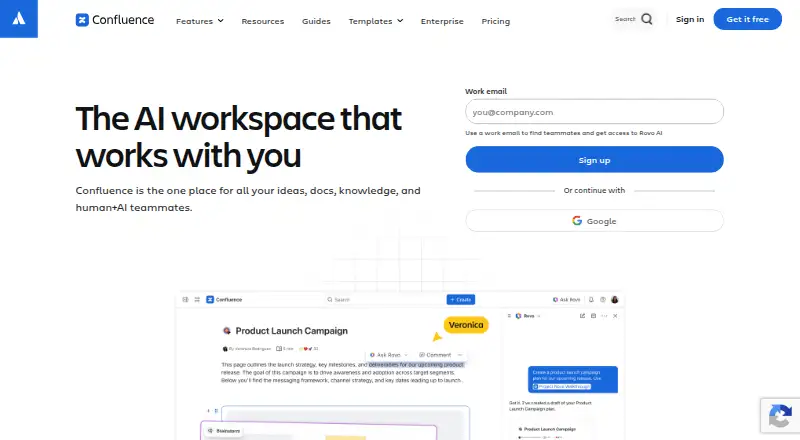
Confluence is Atlassian’s workspace for managing knowledge and collaborating on projects. Teams can create pages, whiteboards, databases and Loom video messages, then edit together in real time, comment on content and receive notifications when tagged or assigned tasks. Its connection with Jira links project tracking and documentation planning, and whiteboards can turn ideas into Jira work. View-only pages can be shared through public links, and the product includes version history, content analytics and integrations with other apps. The Free plan supports up to 10 users, includes 2 GB of file storage and allows three active whiteboards per user. Cloud products provide a hosted service; Data Center products can be deployed on infrastructure of a team’s choice. The mobile app syncs published work across smartphones, tablets and desktop web. Confluence also offers AI capabilities through Rovo, which can turn content into timelines, charts, maps, slides and prototypes.
Good
- Free plan supports up to 10 users.
- Real-time editing, comments and task notifications.
- Public links allow view-only page sharing.
- Cloud and self-managed Data Center options.
Watch out
- Free plan includes only 2 GB of storage.
- Free plan limits active whiteboards to three per user.
- Enterprise pricing is not listed.
Who it suits
Confluence suits teams that need a shared place for documentation, project planning and collaborative work. It is particularly relevant for teams that use Jira or want pages, whiteboards and databases in the same workspace.
Verdict
Confluence brings team documentation and collaboration together, with a Free plan for smaller groups and paid plans for larger needs. Jira connections and cloud or self-managed deployment options broaden how teams can use it.
Plans and prices
From Confluence's own pricing page, checked 28 Sep 2026.
| Plan | Price | What it gives you |
|---|---|---|
| Free | Free | Free forever for 10 users · 10 users · 2 GB file storage · 3 active whiteboards per user · 50 automation steps per subscription per month · free forever |
| Standard | $5.42 a month | Everything from Free plus · Up to 250,000 users per site · 250 GB storage · 100 automation steps per user per month · 9/5 regional support · per user / month |
| Premium | $10.44 a month | Everything from Standard plus · Unlimited storage · Unlimited whiteboards · 250 automation steps per user per month · 24/7 critical-issue support · 99.9% uptime SLA · per user / month |
| Enterprise | Priced on request | Contact sales · Multiple sites up to 150 · 500 automation steps per user per month · 24/7 support · 99.95% uptime SLA · annually |
The facts
Each one read from Confluence's own pages, with the date it was checked.
What it does
- Advanced encryption
- Enterprise includes advanced encryption and Shadow IT controlschecked 27 Sep 2026
- AI capabilities
- Rovo can turn content into timelines, charts, maps, slides, and prototypeschecked 27 Sep 2026
- Cloud option
- Cloud products provide a complete SaaS solutionchecked 27 Sep 2026
- Collaboration
- Teams can edit content in real time, comment inline or on pages, and receive notifications when teammates are tagged or assigned tasks.checked 28 Sep 2026
- Compliance
- Atlassian lists SOC 2, SOC 3, PCI DSS, ISO/IEC 27001, ISO/IEC 27018, and GDPR in its compliance program.checked 28 Sep 2026
- Content analytics
- Premium Analytics provides deeper insights into team, site, space, and page usechecked 27 Sep 2026
- Core content
- Confluence provides pages, whiteboards, databases, and Loom video messaging.checked 28 Sep 2026
- Custom domain
- Yeschecked 20 Sep 2026
- Encryption
- Confluence encrypts data in transit with TLS 1.2 or later with perfect forward secrecy and uses AES-256 full-disk encryption at rest.checked 28 Sep 2026
- Enterprise controls
- Confluence Enterprise supports multiple sites, centralized visibility and identity management with Guard Standard, advanced analytics, and compliance controls.checked 28 Sep 2026
- External connectors
- Rovo Connectors can bring knowledge from Google Drive, Slack, Salesforce, GitHub, Microsoft Teams, and SharePoint into AI-powered search, chat, and workflows.checked 28 Sep 2026
- Guest access
- Paid plans allow up to 5 free guests per paid userchecked 27 Sep 2026
- History
- Atlassian says Confluence 1.0 was born and released in 2002.checked 28 Sep 2026
- Identity access
- Enterprise supports IdPs, SCIM, and enforced SSOchecked 27 Sep 2026
Where it runs
- App integrations
- Confluence integrates with other apps teams already usechecked 27 Sep 2026
The company
- Company name
- Atlassianchecked 27 Sep 2026
- Founded
- 2002checked 23 Sep 2026
- Headquarters
- Sydney, Australiachecked 23 Sep 2026
Money
- Free automation
- 50 automation steps per subscription per monthchecked 27 Sep 2026
- Free plan
- Yeschecked 20 Sep 2026
- Free storage
- 2 GB of file storagechecked 27 Sep 2026
- Free trial
- A 7-day free trial is available for Standard or Premiumchecked 27 Sep 2026
- Free user limit
- The Free plan supports up to 10 userschecked 27 Sep 2026
- Free whiteboards
- Up to 3 active whiteboards per userchecked 27 Sep 2026
The full review of Confluence
Overview
Confluence is Atlassian’s workspace for team knowledge and project collaboration, best suited to organizations that need shared documentation alongside Jira planning. Its combination of pages, whiteboards, databases, and video messaging is useful for keeping work connected, though its free tier is deliberately small and the broadest controls sit on higher plans.
Teams can edit together in real time, comment on pages or specific passages, and receive notifications when tagged or assigned tasks. Jira connections also let teams turn whiteboard ideas into tracked work, making Confluence a stronger fit for project-centered documentation than a standalone wiki.
Rovo can reshape content into timelines, charts, maps, slides, and prototypes. Its Connectors can bring material from Google Drive, Slack, Salesforce, GitHub, Microsoft Teams, and SharePoint into AI-powered search, chat, and workflows. That breadth suits teams working across those services, although Confluence’s central appeal remains the shared workspace and Jira connection.
Key features
- Pages, whiteboards, databases, and Loom video messaging: These give teams several ways to record knowledge and develop ideas in one workspace, rather than limiting collaboration to documents alone.
- Live collaboration and history: Co-editing, comments, task assignments, notifications, and version history support active team work and a record of changes.
- Jira connection: Documentation and project tracking can sit together, and whiteboard ideas can become Jira work. This is a meaningful advantage for teams already organizing projects in Jira.
- Integrations and Marketplace: Confluence connects with other apps teams use; Atlassian says its own catalog has hundreds of apps for areas such as theming, diagrams, and workflows, within thousands of Marketplace apps overall.
- Sharing and guests: View-only pages can be shared by public link, while paid plans allow up to five free guests per paid user. These options help extend access, but public links are view-only.
- Security and compliance: Data is encrypted in transit using TLS 1.2 or later with perfect forward secrecy and at rest with AES-256 full-disk encryption. Atlassian’s compliance program includes SOC 2, SOC 3, PCI DSS, ISO/IEC 27001, ISO/IEC 27018, and GDPR.
Pricing
Confluence is freemium, with a seven-day trial and paid plans from $5.42 per user per month. Monthly subscriptions qualify for a refund within the first paid month; annual subscriptions qualify within 30 days of payment.
| Plan | Price and terms | What it includes and who it suits |
|---|---|---|
| Free | free; free forever | Up to 10 users, 2 GB file storage, three active whiteboards per user, and 50 automation steps per subscription per month. A sensible way for a small group to start, but the user cap and shared automation allowance constrain larger or more active teams. |
| Standard | $5.42 per user per month | Everything in Free, up to 250,000 users per site, 250 GB storage, 100 automation steps per user per month, and 9/5 regional support. It removes the free tier’s team-size ceiling and adds business-hours regional support, making it the practical paid starting point for growing teams. |
| Premium | $10.44 per user per month | Everything in Standard, unlimited storage and whiteboards, 250 automation steps per user per month, 24/7 critical-issue support, and a 99.9% uptime SLA. The higher price is most relevant to teams that need those capacity, support, or uptime commitments. |
| Enterprise | Custom pricing; billed annually; contact sales | Multiple sites up to 150, 500 automation steps per user per month, 24/7 support, and a 99.95% uptime SLA. It is aimed at organizations needing multi-site administration and enterprise-level service commitments. |
Enterprise adds advanced encryption and Shadow IT controls, IdP support, SCIM, enforced SSO, multiple sites, centralized visibility and identity management with Guard Standard, advanced analytics, and compliance controls. Advanced encryption and these identity controls make the tier more relevant to organizations with stringent governance needs. Support ranges from Community Support on Free to 24/7 dedicated support on Enterprise; Premium has 24/7 critical-issue support, with a 30-minute critical-issue response time on Enterprise.
Platforms
Confluence is available on Android, iOS, web, and as a self-hosted option. The Cloud mobile app syncs published work across smartphones, tablets, and desktop web. Cloud products provide a complete SaaS solution; Data Center products can be deployed on infrastructure of the organization’s choice, which suits teams that need to manage their own deployment.
Who it's for
Confluence fits teams that want a shared knowledge base tied to project planning, especially those using Jira or needing real-time editing, multiple content formats, and integrations with other workplace apps. Small groups can use Free, while larger organizations can scale through paid plans and, at Enterprise, multiple sites and centralized controls. It is less compelling for a team that only needs a lightweight, standalone wiki or has no use for its wider collaboration and project-work features.
Pros and cons
- Pro: Pages, whiteboards, databases, and Loom messaging serve different documentation and collaboration needs in one workspace.
- Pro: Jira integration links planning and documentation with project tracking, including a path from whiteboard ideas to Jira work.
- Pro: The Free plan supports 10 users, with whiteboards and automation included, offering a usable starting point for small teams.
- Pro: Cloud and self-managed deployment options, plus guest and public sharing, accommodate different access and operating needs.
- Con: Free is limited to 10 users and 2 GB of storage, with only 50 automation steps per subscription each month.
- Con: Storage and whiteboards become unlimited only on Premium, and stronger uptime, support, and enterprise identity controls require higher-priced tiers.
Alternatives
MediaWiki is a free, self-hosted option under GNU GPL version 2 or later for teams that want wiki software across a broad range of platforms without a paid plan.
Wiki.js is a free, AGPL-licensed self-hosted alternative for teams seeking a no-cost wiki deployment.
BookStack offers a free, MIT-licensed self-hosted installation for teams that want to run their own instance at no software cost.
Slab has a free plan for up to 10 users, with unlimited posts and topics, making it an alternative for small teams that want a web-based knowledge space.
TiddlyWiki is a free alternative available on web, desktop, and mobile platforms.
BlueSpice offers a free self-hosted distribution with business features including a visual editor, performance search, templates, and PDF export.
Docmost has a free Community edition with real-time collaboration, spaces, full-text search, page history and restore, and public sharing, for teams wanting those capabilities in a self-hosted edition.
MoinMoin is a free software alternative licensed under the GNU GPL, with self-hosted availability.
Browse Wiki Software, Knowledge base software, Knowledge Management Software, Internal Knowledge Base Software, Document Collaboration Software, and Team Collaboration Software for more options in these categories.
Verdict
Choose Confluence if your team needs a shared documentation hub that can connect directly to Jira and support collaboration across pages, whiteboards, databases, and video. Its Free tier is a credible start for up to 10 people, but its limits make Standard the more practical choice as a team grows. Look elsewhere if you need only a lean wiki or prefer a free, self-hosted tool without Confluence’s broader workspace.
Getting started
- Open the Confluence website
- Choose cloud service or a self-managed Data Center deployment
- Start with the Free plan or begin the listed seven-day trial
- Install or open Confluence on Android, iOS, web, or self-hosted infrastructure
- Create pages, whiteboards, databases, or Loom video messages
- Connect Jira and other team applications as needed
Limits worth knowing
The Free plan is limited to 10 users, 2 GB of file storage, three active whiteboards per user, and 50 automation steps per subscription each month. Standard starts at $5.42 per user per month and raises storage to 250 GB, while Premium adds unlimited storage and whiteboards.
Questions
Is Confluence free?
Yes. The Free plan costs 0.00 USD and is free forever for up to 10 users.
What platforms does Confluence support?
It supports Android, iOS, web, and self-hosted deployment.
Does Confluence offer a trial?
Yes. A seven-day trial is listed.
Does Confluence support single sign-on?
Yes. Single sign-on is supported, and Enterprise adds identity-provider and SCIM support.
Can Confluence be self-hosted?
Yes. Data Center products can be deployed on infrastructure of your choice.
Alternatives to Confluence
- 1

ProProfs Knowledge Base
Free planAndroidiOSWebAPI9.0From $0.99 a month - 2

Zendesk Guide
AndroidiOSWebAPI8.6From $19 a month - 3

Scalar
Free planOpen sourceWebAPILinuxmacOS8.6From $150 a month - 4

Mintlify
Free planWebAPILinuxmacOS8.5From $450 a month - 5

Lark
Free planAndroidiOSWebAPI8.5From $6 a month - 6

GitBook
Free planWebAPI8.4From $65 a month