
Scalar
Scalar is a collection of API products for documentation, client generation, API management, requests, and MCP server use.
What Scalar is
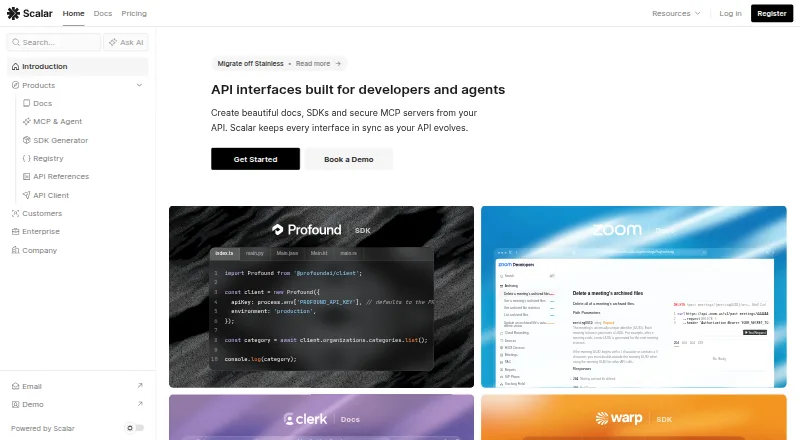
Scalar is a collection of API products for documentation, client generation, API management, requests, and MCP server use. Scalar Docs combines product guides with interactive references generated from OpenAPI documents in a developer portal. Documentation can use Markdown or MDX and GitHub content, with pull request previews and publishing through a CLI or after a merge. The SDK Generator creates idiomatic, type-safe client libraries from OpenAPI documents and can publish through repository pull requests. Registry stores and versions OpenAPI and AsyncAPI documents, JSON Schema, and Spectral rules with Git integration. Scalar API Client is an open-source, offline-first tool for sending requests, organizing collections, and testing APIs from OpenAPI documents. Scalar supports hosted and self-hosted use. Its Free plan is limited to three APIs, one SDK of up to 25 endpoints, one editor seat, and 50 Agent Scalar credits. Pro is $150 a month; Business is $600 a month. Enterprise pricing is not listed.
Good
- Interactive references are generated from OpenAPI documents.
- Docs supports Markdown, MDX, and GitHub content.
- SDK Generator creates type-safe client libraries.
- API Client works offline.
- Self-hosting is supported.
Watch out
- Free plan is limited to three APIs.
- Free plan includes one editor seat.
- Pro is $150 a month.
- Enterprise price is not listed.
Who it suits
Scalar suits developers and teams that work with OpenAPI-based documentation, SDKs, or API registries. Its hosted and self-hosted options may suit teams with different deployment preferences.
Verdict
Scalar connects documentation, SDK generation, registry management, and API requests around API definitions. Review the plan limits and pricing against the number of APIs, seats, and credits your team needs.
Plans and prices
From Scalar's own pricing page, checked 15 Oct 2026.
| Plan | Price | What it gives you |
|---|---|---|
| Free | Free | 3 APIs · 1 editor seat · 1 SDK up to 25 endpoints · hosted OpenAPI docs · built-in API client · landing pages · 50 Agent Scalar credits · $0; no credit card required |
| Pro | $150 a month | 15 APIs · 5 editor seats · 1 SDK up to 100 endpoints · custom domains · Git Sync · Markdown/MDX · access groups · hosted MCP · 500 Agent Scalar credits · $150/month or $125/month billed yearly ($1,500/year) |
| Business | $600 a month | 25 APIs · 10 editor seats · 1 SDK up to 250 endpoints · SSO/SAML · subpath hosting · 2,000 Agent Scalar credits · $600/month or $500/month billed yearly ($6,000/year) |
| Enterprise | Priced on request | Unlimited APIs · custom SDK size · RBAC · priority support and SLAs · migration services · dedicated Slack/Teams channel · Custom pricing |
The facts
Each one read from Scalar's own pages, with the date it was checked.
What it does
- API client
- The open-source client imports OpenAPI, Swagger, Postman collections and cURL, then creates requests, environments, scripts and response tests.checked 15 Oct 2026
- API Client
- Scalar API Client is an open-source, offline-first client for sending requests, organizing collections, and testing APIs from OpenAPI documents.checked 29 Sep 2026
- API reference
- The API Reference renders OpenAPI and AsyncAPI documents with search, themes, dark mode, request testing and code samples.checked 15 Oct 2026
- Authentication
- The client supports HTTP Basic, Bearer, API keys, OAuth 2.0 flows and OpenID Connect, with reusable credentials and environment variables.checked 15 Oct 2026
- Changelog
- API Reference release 1.74.0 on October 12, 2026 added broader AsyncAPI channel and message search, message documentation, collapsible nested tags and local SDK-generation tools.checked 15 Oct 2026
- Custom domain
- Yeschecked 20 Sep 2026
- Desktop availability
- The API Client provides installers for macOS, Windows and Linux, plus a browser version requiring no installation.checked 15 Oct 2026
- Docs
- Scalar Docs combines product guides and interactive API references generated from OpenAPI documents in a developer portal.checked 29 Sep 2026
- Docs workflow
- Docs supports Markdown and MDX, GitHub content, pull request previews, and publishing through a CLI or on merge.checked 29 Sep 2026
- Documentation sites
- Scalar Docs combines Markdown or MDX guides with interactive API references and supports GitHub, CLI and web-editor publishing.checked 15 Oct 2026
- Environments
- Variables can be scoped locally, per environment, collection-wide or globally and referenced in URLs, headers, bodies, authentication and scripts.checked 15 Oct 2026
- Integrations
- Scalar documents more than 35 framework integrations, including Express, Fastify, Hono, NestJS, Next.js, FastAPI, Django, Rails, Laravel, ASP.NET Core, Spring Boot, Go and Rust.checked 15 Oct 2026
- Investors
- Scalar lists General Catalyst managing director Trevor Oelschig, Kindred managing director Steve Jang and individual technology founders among its investors.checked 15 Oct 2026
- Leadership
- Scalar identifies Marc Laventure as CEO and co-founder, with Cameron Rohani and Hans Pagel as co-founders.checked 15 Oct 2026
- Licence
- The Scalar API Reference and API Client repositories are publicly available under the MIT licence.checked 15 Oct 2026
- Limit: client protocols
- Scalar's Postman comparison says the API client is HTTP-first and does not yet support gRPC, GraphQL, WebSocket, SOAP or SSE.checked 15 Oct 2026
- Limit: ecosystem
- Scalar's own comparison says Terraform provider generation is not currently supported.checked 15 Oct 2026
- Limit: generator licensing
- Scalar states that its documentation stack is open source, while the SDK generator is proprietary.checked 15 Oct 2026
- Limit: scale
- FAUN.dev reports that very large API specifications can still take noticeable time to load in the browser.checked 15 Oct 2026
The company
- Company
- The company describes itself as a team of 10 engineers and designers focused on accessibility, API-first work, and open source.checked 29 Sep 2026
- Company launch
- A LinkedIn post by CEO Marc Laventure said Scalar had launched about one year earlier and was already used by Nvidia, Microsoft, Cloudinary, Tesla, eBay, Qualcomm, Snap, Autodesk, Boeing and Maersk.checked 15 Oct 2026
- Company size
- Scalar describes itself as a 10-person team of engineers and designers.checked 15 Oct 2026
- Headquarters
- The company's terms list API Documentation Inc. (doing business as Scalar) at 2812 Dewdney Ave., British Columbia, Canada.checked 29 Sep 2026
Money
- Free plan
- Yeschecked 20 Sep 2026
The full review of Scalar
Overview
Scalar is an API toolkit for teams that want documentation, SDK generation, specification management, and request testing connected to their API definitions. It suits API-first teams working with OpenAPI, particularly those that want documentation changes to follow a GitHub workflow. Its breadth is a strength, but the paid plans’ API, SDK, seat, and credit caps make the right tier depend on how much of the suite a team will use.
Key features
Documentation and publishing
Scalar Docs pairs interactive references generated from OpenAPI documents with guides written in Markdown or MDX. GitHub integration can read selected repository files, open pull requests, and publish after a merge; teams can also publish through a CLI. That workflow should suit teams that review documentation alongside code, rather than maintain it as a separate publishing process.
SDKs and API assets
The SDK Generator produces idiomatic, type-safe client libraries from OpenAPI documents and can publish them through repository pull requests. Registry adds a shared place to store and version OpenAPI and AsyncAPI documents, JSON Schema, and Spectral rules, with Git integration. These features make Scalar more than a documentation portal, though the plan limits on SDKs and endpoints matter if a team needs several generated libraries or large specifications.
Request testing and privacy
Scalar API Client is an open-source, offline-first client for sending requests, organizing collections, and testing APIs from OpenAPI documents. Scalar also offers an MCP server. The company says hosted API interfaces use only technically required cookies, do not log request traffic, and avoid fingerprinting on custom-domain projects. It reports a SOC 2 Type 1 report and GDPR-compliant privacy practices.
Pricing
Scalar uses a freemium model. The Free plan costs nothing and allows up to 3 APIs, 1 SDK of up to 25 endpoints, 1 editor seat, and 50 Agent Scalar credits. It is a practical starting point for an individual or small project, but one seat and the low SDK endpoint cap will constrain collaborative or larger-scale work.
Pro costs $150 a month, or $125/month billed yearly ($1,500 per year). It raises the caps to 15 APIs, 1 SDK of up to 100 endpoints, 5 editor seats, and 500 credits. This is the first tier suited to a small team sharing editorial work, although it still allows only one SDK.
Business costs $600 a month, or $500/month billed yearly ($6,000 per year). It includes up to 25 APIs, 1 SDK of up to 250 endpoints, 10 editor seats, and 2,000 credits. The higher seat and endpoint allowances suit a larger team, but teams needing multiple SDKs should account for the one-SDK cap.
Enterprise has custom pricing and unlimited APIs. It includes priority support, SLAs, migration services, and a dedicated Slack or Teams channel. Agent Scalar credits reset each billing period and do not roll over, so unused allowance cannot be carried forward. The stated plan terms do not specify a different renewal arrangement.
Platforms
Scalar supports API, Linux, macOS, self-hosted, web, and Windows use. Its hosting model is both hosted and self-hosted, and custom domains are supported. Teams that need to run open-source tooling in their own environment have that option alongside hosted use.
Who it's for
Scalar is best suited to API-first teams that maintain OpenAPI definitions and want documentation publishing, client generation, registry management, and request testing under one umbrella. GitHub-based review and publishing are particularly relevant for teams that already manage API changes through repositories. A solo developer can start free, while teams should weigh the seat and SDK limits against their actual workload before choosing a paid tier.
It is a weaker fit for teams seeking a broad general-purpose documentation platform or those that need multiple SDKs within a plan. The paid tiers also represent a substantial step up from the free plan, so a team that only needs basic API references may not benefit from the wider suite.
Pros and cons
- Pros: Documentation, SDK generation, registry, and API requests are connected to API definitions, reducing the need to choose separate tools for each job.
- Pros: Markdown and MDX, GitHub pull requests, previews, and merge-based publishing support a code-review-oriented documentation workflow.
- Pros: Hosted and self-hosted options, plus custom domains, give teams flexibility over deployment.
- Cons: Every listed plan allows only one SDK, and even Business caps it at 250 endpoints.
- Cons: Free is limited to one editor seat and 50 credits; credits also expire at each billing-period reset rather than rolling over.
- Cons: Pro and Business have significant monthly prices, making the free tier the only low-cost entry point.
Alternatives
For API documentation choices, compare Scalar with the API Documentation Tools list; for tools focused on producing documentation, see Documentation Generators. Teams looking beyond API-specific publishing can also review Knowledge base software.
- Doxygen is a free and open-source option for Windows, Linux, and macOS; choose it when those platforms and a free software model are the priority.
- Redocly has a free plan and trial, with Pro at $10 a month billed per seat/month, billed monthly; its Pro allowance is 1 project and 100 pages, with extra projects at USD $49/month and extra pages at USD $0.12/month. Consider it when that per-seat, project-and-page pricing better matches your documentation needs.
- ApiNotes offers a free Starter plan for 1 public API, a 10-release changelog, up to 25 subscribers, and 1 team member, alongside unlimited validator and diff tools. Consider it when those release-notes and validation limits fit your use case.
- Palt has a free plan with 3 projects, custom domain, Try It playground, and basic analytics. Consider it when those capabilities and its project-based plan better suit your needs.
- PilotDocs has a Starter plan at $49 a month with 10 projects, unlimited API endpoints, and unlimited guides and tutorials. It may suit teams prioritizing those project and content allowances.
- Apiary offers a free plan with unlimited API projects and 5 participants per project, but projects are public and there is no team. Consider it when public projects and that participant cap are acceptable.
- Stoplight Elements is free, open-source documentation building blocks that can be embedded into an existing CMS and hosted by the user; it is an option for teams seeking embeddable components.
- Zudoku is free, MIT-licensed, and self-hostable; consider it when those open-source terms and self-hosting are the main requirements.
Verdict
Choose Scalar if your team wants API documentation tied to OpenAPI, repository-based publishing, and adjacent tools for SDKs, specifications, and requests. Its strongest case is the connected workflow across those jobs; its clearest drawback is the one-SDK cap even on paid plans, alongside the jump to $150 a month for Pro. If your needs are limited to a simpler documentation workflow, compare alternatives before paying for the broader suite.
Getting started
- Visit https://scalar.com/.
- Choose hosted use or run Scalar's open-source tooling in your own environment.
- Start with the Free plan or choose a paid plan.
- Import an OpenAPI document to work with API references or SDK generation.
- Use the Scalar Docs GitHub connection to read selected files, open pull requests, or publish after merges.
Limits worth knowing
The Free plan includes up to 3 APIs, 1 SDK up to 25 endpoints, 1 editor seat, and 50 Agent Scalar credits. Included credits reset each billing period and do not roll over.
Questions
Is Scalar free?
Yes. The Free plan is free and includes up to 3 APIs, 1 SDK up to 25 endpoints, 1 editor seat, and 50 Agent Scalar credits.
What do the paid plans cost?
Pro is $150 a month, with yearly billing listed as $125/month ($1,500 per year). Business is $600 a month, with yearly billing listed as $500/month ($6,000 per year).
Can Scalar be self-hosted?
Yes. Scalar says its open-source tooling can run in a customer's own environment.
Does Scalar support OpenAPI?
Yes. Its Docs references and SDK Generator use OpenAPI documents, and its API Client can test APIs from them.
What does Scalar integrate with?
Scalar Docs connects with GitHub to read selected repository files, open pull requests, and publish after merges.
What security and privacy practices does Scalar state?
Scalar says it has received a SOC 2 Type 1 report and maintains GDPR-compliant privacy practices. It also says hosted API interfaces use technically required cookies, do not fingerprint custom-domain projects, and do not log request traffic.
Alternatives to Scalar
- 1

Redocly
WebAPIExtension7.0From $10 a month - 2

Sphinx
Free planWebAPILinuxmacOS7.0Free plan - 3
Asciidoctor
Free planWebAPIExtensionLinux6.9Free plan - 4
JSON Schema for Humans
Free planLinuxmacOSSelf-hostedWindows6.5Free plan - 5
StepShot
Free planmacOS6.5CN¥269 one-time - 6
TypeDoc
Free planAPILinuxSelf-hosted6.5Free plan