
Lark
Lark brings workplace communication and collaboration into one platform, with chat, calendars, document creation, and cloud storage.
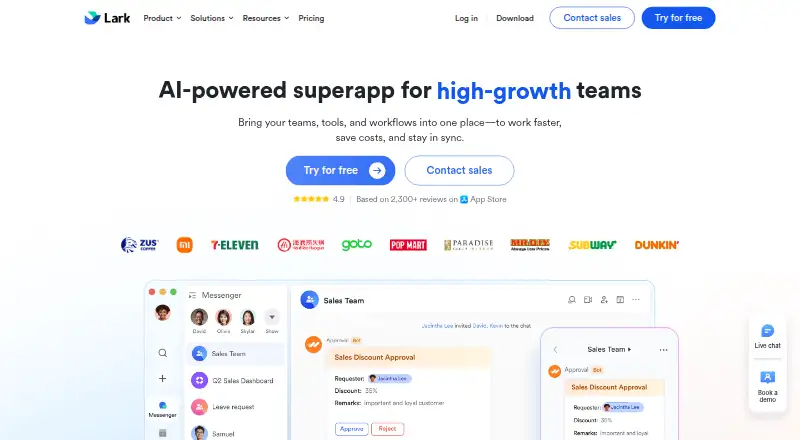
What Lark is
Lark brings workplace communication and collaboration into one platform, with chat, calendars, document creation, and cloud storage. It supports web, Windows, macOS, Linux, iOS, and Android. During video meetings, participants can edit shared Docs in the call window. The Starter plan includes unlimited real-time translation, while AnyCross provides drag-and-drop workflow automation and integrations, including ready-to-use solutions. Lark’s App Directory lists third-party tools for areas such as recruitment, expense control, CRM, and ERP. Developers can use the Open Platform to build custom bots, web apps, and blocks, with access to more than 2,500 APIs. Plans have different capacity limits: Starter allows 20 users, 100 GB of storage, and one-on-one meetings; Pro and Enterprise allow meetings with up to 500 participants. The listed plans include different storage and automation allowances. Lark describes Starter as intended for small teams with simple communication needs and Enterprise for large companies needing advanced security and organizational management. A free plan is listed.
Good
- Combines chat, calendar, documents, and cloud storage.
- Shared Docs can be edited during video calls.
- Starter includes unlimited real-time translation.
- AnyCross offers drag-and-drop workflow automation.
- Open Platform provides access to more than 2,500 APIs.
Watch out
- Starter is limited to 20 users.
- Starter storage is limited to 100 GB.
- Starter meetings are one-on-one.
- Message history is listed as limited.
Who it suits
Lark may suit teams looking to bring chat, calendars, documents, and storage together. Its plans address both small teams and large companies, with different user, storage, meeting, and automation limits.
Verdict
Lark combines several workplace communication and collaboration tools, with integrations and developer options. Check plan limits for users, storage, message history, meetings, and automation before choosing.
Plans and prices
From Lark's own pricing page, checked 20 Oct 2026.
| Plan | Price | What it gives you |
|---|---|---|
| Starter | Free | up to 500 users · 100 GB storage · 1-on-1 video meetings · 18 months message history · 1,000 Base automations/month · 2,000 rows/table · monthly |
| Lark Base Starter | Free | 20 users · 100 GB storage · 2,000 rows/table · 1,000 automation workflows/month · 7-day Base Time Machine · 18 months chat history |
| Basic | $6 a month | up to 500 users · 5 TB storage · 1-on-1 video meetings · unlimited message history · 1,000 Base automations/month · 2,000 rows/table · annually |
| Lark Base Pro | $8 a month | 500 users · 1 TB storage · 20,000 rows/table · 5,000 automation workflows/month · 30-day Base Time Machine · granular row and column permissions · annually |
| Pro | $12 a month | up to 500 users · 15 TB storage · 500-participant meetings · unlimited message history · 50,000 Base automations/month · 20,000 rows/table · advanced Base permissions · annually |
| Lark Base Enterprise | Priced on request | unlimited users · 5 TB storage · 50,000 rows/table · 50,000 automation workflows/month · 365-day Base Time Machine · advanced security controls |
| Enterprise | Priced on request | unlimited users · 15 TB plus 30 GB per purchased seat · 500-participant meetings · 500,000 Base automations/month · 50,000 rows/table · SSO · advanced security and compliance controls · annually |
The facts
Each one read from Lark's own pages, with the date it was checked.
What it does
- AI meeting notes
- AI Meeting Notes produces live notes, summaries, action items and links to Messenger, Tasks and Calendar; it is a paid add-on for any plan.checked 20 Oct 2026
- API documentation
- The API documentation provides endpoint descriptions, authentication requirements, scopes, rate limits, request and response examples, error codes and SDK references.checked 20 Oct 2026
- Base automation
- Base provides no-code tables, multiple views, dashboards, workflows, webhooks and automation quotas that vary by plan.checked 20 Oct 2026
- Changelog
- The version-updates page lists releases such as V7.68 dashboard-chart insertion into Docs, V7.67 AI features for Base and Forms, and V7.65 advanced Base automation formatting.checked 20 Oct 2026
- Channels
- Yeschecked 21 Sep 2026
- Docs suite
- Lark Docs includes Docs, Sheets, Slides, MindNotes, Base and file storage with permission controls.checked 20 Oct 2026
- Help and support
- Lark's Help Center contains getting-started guides plus topic documentation for Messenger, Meetings, Docs, Base, Email, Calendar and Approval.checked 20 Oct 2026
- Integrations
- TrustRadius lists integrations including Salesforce Agentforce Sales, Jira, Zoom Workplace, Asana, Trello, Jenkins, GitHub, GitLab, Zapier, Sentry, Grafana Cloud and Giphy.checked 20 Oct 2026
- Launch news
- TechNode reported on April 3, 2019 that ByteDance launched Lark overseas through its Singapore-headquartered subsidiary and offered macOS, Windows, iOS and Android apps.checked 20 Oct 2026
- Limit: login and messaging defects
- Google Play reviewers report delayed OTP delivery, contact-adding errors and broken mentions.checked 20 Oct 2026
- Limit: mobile UX
- An Apple reviewer reports language-interface confusion and needing a browser to access some documents.checked 20 Oct 2026
- Limit: performance and complexity
- G2 reviewers report lag when switching tools or opening large files and say the many settings can overwhelm new users.checked 20 Oct 2026
- Limit: pricing and usability
- A Trustpilot reviewer called Lark unintuitive and badly priced compared with Microsoft Teams.checked 20 Oct 2026
- Limit: visual design
- Gartner reviewers list high-contrast design as tiring.checked 20 Oct 2026
- Meetings
- Lark Meetings supports live document collaboration through Magic Share, meeting transcription, translated subtitles and meetings of up to 1,000 participants with up to 50 breakout sessions.checked 20 Oct 2026
- Message history
- limitedchecked 21 Sep 2026
- Messenger
- Messenger links chat with sharing, calendar scheduling, tasks, approvals, threads, rich formatting and automatic translation.checked 20 Oct 2026
Where it runs
- App directory
- Lark’s App Directory lists third-party apps and tools for areas including collaboration, recruitment, expense control, CRM, and ERP.checked 4 Oct 2026
- Developer platform
- Lark Open Platform offers custom bots, web apps, blocks, and more than 2,500 APIs.checked 4 Oct 2026
The company
- Company profile
- LinkedIn lists Lark as privately held, headquartered in Singapore, founded in 2016, with 1,001–5,000 employees.checked 20 Oct 2026
- Headquarters
- Singaporechecked 28 Sep 2026
- Intended teams
- Lark describes Starter as intended for small teams with simple communication needs and Enterprise as intended for large companies with advanced security and organizational management needs.checked 4 Oct 2026
- Maker legal name
- The App Store identifies the developer as LARK TECHNOLOGIES PTE. LTD.checked 20 Oct 2026
Money
- Free plan
- Yeschecked 21 Sep 2026
The full review of Lark
Lark is a workplace suite for teams that want chat, scheduling, shared documents, and storage together, with options to automate workflows or build custom tools. It suits organizations coordinating work across those functions; small teams should weigh Starter’s narrow meeting and user limits, while larger ones need to match capacity to a custom-priced plan.
Overview
Lark’s central advantage is bringing communication and shared work into one platform: teams can chat, manage calendars, create documents, and store files. During meetings, participants can edit shared Docs in the call window, which helps keep a discussion tied to the work under review. The caveat is capacity: Starter supports only one-on-one video meetings, so teams that regularly meet in groups need a higher tier.
The platform also reaches beyond day-to-day collaboration. AnyCross provides drag-and-drop workflow automation and ready-to-use integrations; the App Directory covers third-party tools for collaboration, recruitment, expense control, CRM, and ERP. Lark Open Platform supports custom bots, web apps, blocks, and more than 2,500 APIs. That breadth can serve teams connecting tools and processes, but it is less compelling for those who need only basic messaging.
Key features
Communication and shared work
Chat, calendars, document creation, and cloud storage are combined in the same service. Editing Docs while on a call is a useful distinction for teams working through documents together. Starter’s one-on-one meeting cap is a meaningful constraint, though: group collaboration requires a plan that supports larger meetings.
Automation, integrations, and development
AnyCross combines visual workflow automation with integrations and ready-made solutions. The App Directory offers third-party tools across business functions, while the developer platform provides several ways to build custom extensions, including bots and web apps. These options favor teams with processes to connect or technical capacity to extend the service; they add less value to a team seeking a simple communication tool.
Translation, security, and support
Starter includes unlimited real-time translation, a useful inclusion for teams communicating across languages. Lark says it uses industry-standard encryption and continuous system monitoring, and that employees do not have access to user data by default. It also says its data compliance systems address EU GDPR, US CCPA/CPRA, Japan APPI, and Singapore PDPA. Customer terms provide weekday help-desk email support from 9:00 a.m. to 6:00 p.m. Singapore Time, with an intended initial response within one business day.
Pricing
Lark is freemium, and each plan has custom pricing. The free Starter plan is aimed at small teams with simple communication needs, but its 20-user ceiling, 100 GB of storage, 18 months of message history, and one-on-one meetings limit its headroom. It includes 1,000 automations per month and unlimited real-time translation.
Basic raises the limits to 500 users, 5 TB of storage, and unlimited message history, while retaining 1,000 monthly automations. It is a better fit for teams that need more seats, storage, or searchable history but do not need a larger automation quota. Pro also supports up to 500 users, adds 15 TB of storage and meetings for up to 500 participants, and increases the automation allowance to 50,000 per month. That makes it the more suitable tier for larger meetings or automation-heavy operations.
Enterprise is intended for large companies needing advanced security and organizational management. It supports unlimited users, 15 TB plus 30 GB per user of storage, meetings for up to 500 participants, and 500,000 automations per month. Since all paid plans have custom pricing, teams should compare the required capacity and automation allowance before committing.
Platforms
Lark supports web, Windows, macOS, Linux, iOS, and Android, and also offers an API. This range suits teams working across desktop and mobile devices, as well as developers integrating with the platform.
Who it's for
Lark is a strong candidate for teams that want communication, documents, calendars, and storage in one environment, especially if meetings, translation, automation, or custom integrations are part of their work. Starter can suit a small team with simple needs and one-on-one calls. Organizations that need group meetings, much more storage, higher automation quotas, or enterprise-level organizational management should assess the higher tiers. It is less suited to teams looking only for lightweight chat or a document-focused tool.
Pros and cons
- Pro: Chat, calendars, documents, and storage share one platform, with in-call editing of shared Docs for collaborative meetings.
- Pro: AnyCross, the App Directory, and more than 2,500 APIs provide room to automate and extend workflows.
- Pro: Starter includes unlimited real-time translation, alongside a free tier for up to 20 users.
- Con: Starter is limited to one-on-one meetings, so teams needing group calls must choose a higher plan.
- Con: The free plan caps storage at 100 GB and message history at 18 months, while higher allowances require custom-priced plans.
- Con: Support is weekday email help desk service on Singapore Time, with an intended initial response within one business day.
Alternatives
If a narrower tool is a better fit, consider these alternatives:
- AppFlowy is another freemium option with a free plan and support for Android, API, iOS, Linux, macOS, self-hosted, web, and Windows use.
- Nuclino offers a free plan with up to 50 items, three canvases, and 2 GB total storage, plus a free trial.
- WPS Docs has a free plan with 1 GB cloud space, limited template downloads, basic PDF features, 47 file formats, and 46 languages.
- Collabora Online has a free Development Edition for on-premise testing and home use, with rolling updates.
- ContactOffice offers a free plan with a 500 MB mailbox, 500 MB of documents, 200 address book entries, and no monthly SMS allowance.
- Craft has a free plan with 1,500 blocks, 1 GB storage, a 25 MB media upload limit, seven days of version history, and 15 AI assistant credits.
- ONLYOFFICE Docs offers a free Community edition for up to 20 recommended users under GNU AGPL v.3, with community support.
- Zoho Writer has a free individual edition that includes Writer features and 200 free document automation credits per organization per month.
For category-specific comparisons, see Collaborative Document Software, No-Code Database Software, Document Collaboration Software, Knowledge Management Software, Calendar apps, and Team Collaboration Software.
Verdict
Choose Lark if your team wants a single workplace suite that connects communication and shared documents with automation and developer options. Its range is the reason to choose it; plan-dependent meeting, storage, history, and automation caps are the reason to compare tiers carefully or look elsewhere if your needs are modest or narrowly focused.
Getting started
- Visit https://www.larksuite.com/
- Choose a plan: Starter, Basic, Pro, or Enterprise
- Select the platforms your team will use: web, Windows, macOS, Linux, iOS, or Android
- Use chat, calendar, document creation, and cloud storage for team collaboration
- Explore AnyCross for workflow automation or the App Directory for third-party tools
Limits worth knowing
Starter is limited to 20 users, 100 GB of storage, one-on-one video meetings, 18 months of message history, and 1,000 automations per month. Basic lists 500 users, 5 TB of storage, unlimited message history, and 1,000 automations per month.
Questions
Does Lark have a free plan?
Yes. Lark lists a free plan, and Starter is the plan with the stated limits of 20 users and 100 GB of storage.
Which platforms does Lark support?
Lark supports web, Windows, macOS, Linux, iOS, and Android.
What is included in Lark?
Lark combines chat, calendar, document creation, and cloud storage. Its tools also include meetings, workflow automation, an App Directory, and a developer platform.
Can people edit documents during Lark meetings?
Yes. Participants can edit shared Docs within the video call window.
What integrations are listed?
The listed integrations are Exchange, Outlook, Google Calendar, Gmail, AnyCross, Lark Developer, and Lark Base.
Who makes Lark and where is it based?
The maker is Lark, and its headquarters are in Singapore.
Alternatives to Lark
- 1
EGroupware
Free planOpen sourceAndroidiOSWebAPI9.2From €21.90 a month - 2
Teamup
Free planAndroidiOSWebAPI9.0From $12 a month - 3
Twake Calendar
Open sourceAndroidiOSWebAPI9.0From €4 a month - 4
TimeFinder
Free planAndroidiOSWebmacOS8.9$119.99 one-time - 5

7shifts
Free planAndroidiOSWebAPI8.9From $39.99 a month - 6

Calendar.com
Free planAndroidiOSWebAPI8.8From $20 a month