
Collabora Online
Collabora Online is an open-source office suite for organisations to integrate into their own infrastructure.
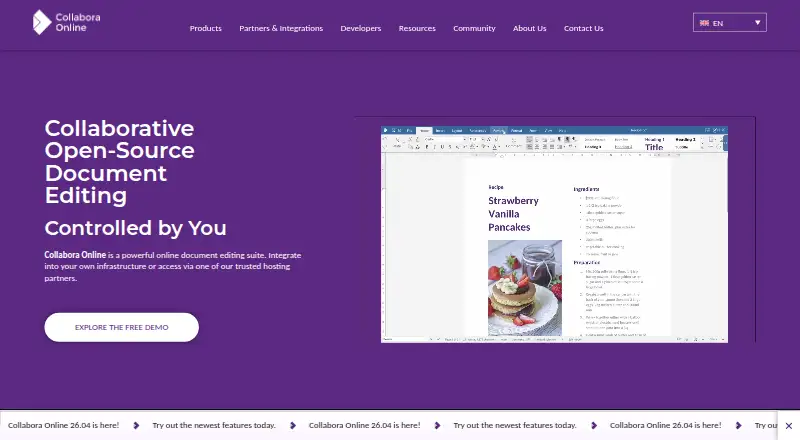
What Collabora Online is
Collabora Online is an open-source office suite for organisations to integrate into their own infrastructure. It includes Writer, Calc, Impress, and Draw for documents, spreadsheets, presentations, and graphics, with support for major formats including Microsoft Office and Open Document. Users can edit together in real time through a modern browser without a plugin. Deployment options include on-premises, local cloud, or hybrid arrangements, so documents can remain within an organisation’s chosen infrastructure. The maker says documents are processed in memory and cleared when sessions end, rather than stored persistently on Collabora Online servers. Listed controls include per-document process isolation, HTTPS/TLS, WOPI proof signatures, access tokens, configurable logging, and Prometheus-compatible monitoring. Paid subscriptions include long-term support, service-level agreements, and signed security updates. The free Development Edition is intended for testing and home use, without an SLA or long-term support. Optional AI assistance in release 26.04 works in Writer, Calc, and Impress, is off by default, and can use a preferred provider or a self-hosted model. Collabora Online is designed to integrate with existing platforms and infrastructure.
Good
- Includes Writer, Calc, Impress, and Draw
- Supports Microsoft Office and Open Document formats
- Enables real-time browser collaboration without a plugin
- Offers on-premises, local cloud, and hybrid deployment
- Optional AI assistance is off by default
Watch out
- Free Development Edition has no SLA
- Free Development Edition has no long-term support
- Business plan costs $3.40 a month
Who it suits
Collabora Online suits organisations, including enterprise and government customers, that want collaborative office tools within their own infrastructure. The free Development Edition is intended for testing and home use.
Verdict
Collabora Online provides browser-based collaborative office apps with deployment options for organisational infrastructure. The free edition is limited to testing and home use and lacks long-term support and an SLA.
Plans and prices
From Collabora Online's own pricing page, checked 3 Oct 2026.
| Plan | Price | What it gives you |
|---|---|---|
| Collabora Online Development Edition | Free | On premise · Rolling updates · For testing and home use |
| Collabora Online for Business | $3.40 a month | On premise · Up to 99 users · Long Term Support · Service Level Agreement · Signed Security Updates · Lifetime Maintenance · Customer Portal · Accessibility Certified · Per User Per Month |
| Collabora Online for Enterprise | Priced on request | On premise · 100+ users · Long Term Support · Service Level Agreement · Signed Security Updates · Lifetime Maintenance · Customer Portal · Accessibility Certified · Roadmap Input · Integration Support · Customisation · Desktop Version · Mobile Support · Personalised Volume Discounts |
The facts
Each one read from Collabora Online's own pages, with the date it was checked.
What it does
- AI assistance
- The 26.04 release includes optional AI assistance across Writer, Calc and Impress, which is off by default and can use a preferred provider or a self-hosted model.checked 3 Oct 2026
- Certifications
- Collabora Productivity says it has achieved ISO 9001, ISO 14001 and ISO 27001 certifications.checked 3 Oct 2026
- Collaboration
- Users can edit documents collaboratively in real time through a modern browser without a plugin.checked 3 Oct 2026
- Compatibility
- It supports major document formats, including Microsoft Office and Open Document formats.checked 3 Oct 2026
- Deployment
- The product can be deployed on-premises, in a local cloud, or in a hybrid model so documents remain within the organisation’s chosen infrastructure.checked 3 Oct 2026
- Integration
- Collabora Online is designed to integrate with existing platforms and infrastructure, with over 230 global partners listed on its integrations page.checked 3 Oct 2026
- Notable limit
- The free Development Edition is intended for testing and home use and does not include an SLA or long-term support.checked 3 Oct 2026
- Product
- Collabora Online is an open-source collaborative office suite that can be integrated into an organisation’s infrastructure.checked 3 Oct 2026
- Security
- The maker says documents are processed in memory and automatically cleaned up when sessions end, without persistent document storage on Collabora Online servers.checked 3 Oct 2026
- Security controls
- Listed controls include per-document process isolation, HTTPS/TLS, WOPI proof signatures, access tokens, configurable logging and Prometheus-compatible monitoring.checked 3 Oct 2026
- Support
- Paid subscriptions include long-term support, service-level agreements and signed security updates; the maker also describes a full-time support team and customer portal.checked 3 Oct 2026
- Who it serves
- Collabora Productivity describes its products and consulting as serving enterprise and government customers.checked 3 Oct 2026
The company
- Headquarters
- Cambridge, United Kingdomchecked 28 Sep 2026
Where it runs
- Office apps
- The suite includes Writer, Calc, Impress and Draw for documents, spreadsheets, presentations and graphics.checked 3 Oct 2026
The full review of Collabora Online
Collabora Online is a browser-based office suite that organisations can deploy in their own infrastructure. It is best suited to teams that need real-time editing alongside control over document hosting and operational support. Its main appeal is the combination of flexible deployment and supported business plans; the free edition is not a supported production option.
Overview
Writer, Calc, Impress and Draw cover documents, spreadsheets, presentations and graphics. Support for Microsoft Office and Open Document formats helps teams work across office suites, and collaborative editing runs in a browser without a plugin. Track changes is supported, but there are no desktop apps or offline editing, so it is a poor fit for people who need to work without a connection.
Key features
Organisations can deploy Collabora Online on-premises, in a local cloud or in a hybrid model. That flexibility is useful when document handling needs to stay within a chosen infrastructure, but it makes this more compelling for organisations managing their own environment than for individuals seeking a ready-made standalone office suite. The maker says documents are processed in memory and cleaned up at the end of sessions rather than persistently stored on Collabora Online servers.
Controls include per-document process isolation, HTTPS/TLS, WOPI proof signatures, access tokens, configurable logging and Prometheus-compatible monitoring. Collabora Productivity holds ISO 9001, ISO 14001 and ISO 27001 certifications. These are relevant credentials and controls for organisations assessing deployment, though a team still needs to decide whether the product's deployment model and support terms meet its own requirements.
The suite is designed to integrate with existing platforms and infrastructure, with more than 230 global partners listed on its integrations page. Optional AI assistance in release 26.04 covers Writer, Calc and Impress; it is off by default and can use a preferred provider or a self-hosted model. That opt-in approach gives organisations a choice over whether to enable AI and how to supply it.
Pricing
The free Collabora Online Development Edition costs nothing and offers on-premises deployment with rolling updates. It is intended for testing and home use, with no SLA or long-term support, so it is not the right plan for organisations that depend on continuity or a formal support commitment.
Collabora Online for Business costs $3.40 a month, billed Per User Per Month, for on-premises deployment and up to 99 users. It adds long-term support, an SLA, signed security updates, lifetime maintenance, a customer portal and accessibility certification. This is the practical choice for smaller organisations that need a supported deployment and fit within the seat cap.
Collabora Online for Enterprise has custom pricing, with personalised volume discounts for 100+ users. It includes the Business support and maintenance provisions, plus roadmap input, integration support, customisation, a desktop version and mobile. It suits larger organisations that need those additional services or versions; the trade-off is that the price must be tailored rather than chosen from a fixed rate.
Platforms
Collabora Online supports Android, iOS, Linux, macOS, self-hosted environments, the web and Windows. Browser-based real-time collaboration is the clearest fit for teams whose users can work online.
Who it's for
Collabora Productivity describes its products and consulting as serving enterprise and government customers. The strongest match is an organisation that wants collaborative office tools integrated with existing infrastructure and values control over where documents are handled, with paid support available when it needs an SLA and long-term maintenance. Home users can try the free edition, but teams that need dependable production support should budget for a paid plan.
Pros and cons
- Pros: On-premises, local-cloud and hybrid deployment lets organisations choose where documents are handled.
- Pros: Real-time browser editing, track changes and support for Microsoft Office and Open Document formats cover common collaborative workflows and file exchanges.
- Pros: Business and Enterprise subscriptions include an SLA, long-term support and signed security updates, addressing needs the free edition does not meet.
- Cons: The free edition is limited to testing and home use and has neither an SLA nor long-term support.
- Cons: No offline editing or desktop apps are listed as general capabilities, limiting its appeal for users who need local work outside the browser.
- Cons: Enterprise pricing is custom, so larger organisations cannot select it at a published fixed price.
Alternatives
For a different office-suite choice, compare the Office Suite Software directory. Readers choosing specifically for writing can also browse Word Processing Software, while teams focused on shared files can compare Collaborative Document Software and Document Collaboration Software.
- Zoho Workplace is worth considering for a freemium alternative with a free Mail plan for up to five users, one custom email domain and 5 GB of mail storage per user.
- ONLYOFFICE Docs is another freemium, self-hosted option; its free Docs Community plan supports up to 20 recommended users and GNU AGPL v.3, with community support.
- Hancom Office offers a free plan with 2 GB storage and web and mobile Hancom Office, alongside Windows and Mac viewer apps.
- Apple iWork is a free alternative for Pages documents, Numbers spreadsheets and Keynote presentations with real-time collaboration.
- Nextcloud Office is a free alternative with a free trial.
- WPS Office is a freemium alternative whose Standard plan includes 1 GB cloud storage, 47 file formats and 46 languages.
- SoftMaker Office is a paid alternative with a free trial; its NX Home monthly plan supports up to five computers and five mobile devices under a household licence.
- Google Workspace is a paid alternative with a free trial and a Business Starter plan priced at $3.50 a month per user with an annual commitment, on a promotional basis through Dec 7, 2026, then $7.00 per user/month.
Verdict
Choose Collabora Online if your organisation needs browser-based collaboration integrated with infrastructure it controls, and can pay for support when production reliability matters. Its deployment options and paid support are the strongest reasons to choose it; look elsewhere if offline editing, desktop apps or a supported free production tier are essential.
Getting started
- Open the Collabora Online website.
- Choose the Development Edition for testing and home use, or review the Business and Enterprise plans.
- Deploy on-premises, in a local cloud or in a hybrid model.
- Integrate the suite with your existing platform or infrastructure.
Limits worth knowing
The free Development Edition is intended for testing and home use and does not include an SLA or long-term support. The Business plan costs $3.40 a month, billed per user per month, and covers up to 99 users.
Questions
Is Collabora Online free?
Yes. The Development Edition costs nothing and is intended for testing and home use.
What does the Business plan cost?
It costs $3.40 a month, billed per user per month, for up to 99 users.
Which office apps are included?
The suite includes Writer, Calc, Impress and Draw for documents, spreadsheets, presentations and graphics.
Can teams collaborate in real time?
Yes. Users can edit documents together in a modern browser without a plugin.
Can it be self-hosted?
Yes. Deployment options include on-premises, local cloud and hybrid models.
Does it include desktop apps or offline editing?
No. Desktop apps and offline editing are not available.
Alternatives to Collabora Online
- 1

ONLYOFFICE Docs
Free planOpen sourceAndroidiOSWebAPI8.7From $8 a month - 2
LibreOffice Impress
Free planOpen sourceAndroidiOSWebAPI8.6$8.99 one-time - 3

Calmly Writer
Free planAndroidWebLinuxmacOS8.2Free plan - 4

WPS Office
Free planAndroidiOSWebAPI8.2From $41.99 a year - 5
Dropbox Paper
Free planAndroidiOSWebAPI7.7Free plan - 6

GitHub CodeQL
Free planWebExtensionLinuxmacOS7.5From $30 a month