AppFlowy
AppFlowy is an open-source workspace for wikis and projects, with apps and access options across Android, iOS, Linux, Mac, Windows, web, and self-hosted setu…
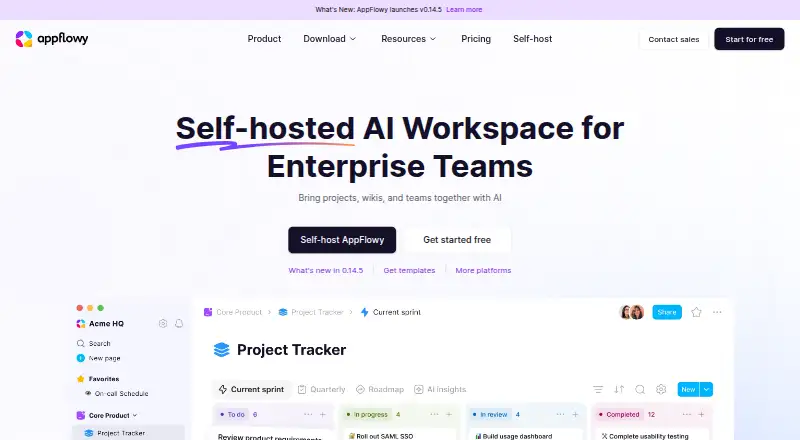
What AppFlowy is
AppFlowy is an open-source workspace for wikis and projects, with apps and access options across Android, iOS, Linux, Mac, Windows, web, and self-hosted setups. Its listed capabilities include AI search, writing, chat, research, and meeting notes. AppFlowy AI can help create draft ideas, summarize or expand material, fill columns, and answer questions. The Free plan includes real-time collaboration, but is limited to one shared workspace for up to two members and 5 GB of storage. Pro is described as a plan for small teams managing projects and team knowledge. Listed integrations and connections include Slack, Microsoft Teams, Google Calendar, ChatGPT, Airtable, Gmail, GitHub, Google Drive, Jira, Claude, Zapier, Loom, and Salesforce. Enterprise connections include SAML and OIDC SSO, SCIM, LDAP, MCP, and public APIs. AppFlowy can run on customer infrastructure, in a cloud, or in an air-gapped environment. For self-hosted instances, customers control where data is stored and processed, and the vendor says it cannot access the instance.
Good
- Open-source workspace for wikis and projects.
- Free plan includes real-time collaboration.
- Can run in an air-gapped environment.
- Self-hosted customers control data storage and processing.
Watch out
- Free plan allows one workspace for up to two members.
- Free plan storage is limited to 5 GB.
Who it suits
AppFlowy suits individuals and teams organizing wikis, projects, and team knowledge, including groups that want real-time collaboration or AI tools. Its self-hosting options may suit organizations that need control over where data is stored and processed.
Verdict
AppFlowy brings project and knowledge workspaces together with AI capabilities and a broad range of deployment options. The free tier has clear workspace and storage limits, while self-hosting gives customers control over data location and processing.
Plans and prices
From AppFlowy's own pricing page, checked 29 Sep 2026.
| Plan | Price | What it gives you |
|---|---|---|
| Free | Free | 1 collaborative workspace up to 2 members · unlimited pages and blocks · 5 GB storage · 10 AI responses · 2 AI images · forever |
| Vault Workspace | $6 a month | per user · local AI on your own hardware · unlimited AI responses and file size for AI Chat · billed annually |
| AppFlowy AI MAX | $8 a month | per user · unlimited AI responses · unlimited file uploads · 50 AI images per month · billed monthly |
| Pro | $10 a month | per user · unlimited storage · up to 50 workspace members · up to 100 guest editors · unlimited AI responses · 50 AI images per month · unlimited file uploads · billed annually |
The facts
Each one read from AppFlowy's own pages, with the date it was checked.
What it does
- AI features
- AppFlowy AI can brainstorm drafts, summarize or expand content, autofill columns, and answer questions.checked 29 Sep 2026
- AI workspace
- The product page lists AI search, AI writing, AI chatbot, AI research, and AI meeting notes among its workspace capabilities.checked 29 Sep 2026
- Collaboration
- The Free plan includes real-time collaboration, and Pro is described as a plan for small teams managing projects and team knowledge.checked 29 Sep 2026
- Compliance
- The product page displays SOC 2 Type II, GDPR, HIPAA, and ISO/IEC 27001 badges.checked 29 Sep 2026
- Enterprise connections
- The product page names SAML and OIDC SSO, SCIM, LDAP, MCP, and public APIs as supported ways to fit into an existing stack.checked 29 Sep 2026
- Integrations
- The product page lists connections or integrations including Slack, Microsoft Teams, Google Calendar, ChatGPT, Airtable, Gmail, GitHub, Google Drive, Jira, Claude, Zapier, Loom, and Salesforce.checked 29 Sep 2026
- Privacy and residency
- For self-hosted instances, AppFlowy says customers control where data is stored and processed and that the vendor has no access to the instance.checked 29 Sep 2026
- Security
- The product page lists built-in identity and access management, granular permissions and admin controls, and fine-grained control over AI access and usage.checked 29 Sep 2026
- Self-hosting
- AppFlowy can run on a customer's infrastructure, cloud, or in a fully air-gapped environment, with self-hosted LLMs and embedding models.checked 29 Sep 2026
- Support
- The pricing page links to help articles and contact support, while the download page links to bug reporting, a community server, and forums.checked 29 Sep 2026
- Workspace
- AppFlowy describes itself as an open-source workspace for wikis and projects.checked 29 Sep 2026
The company
- Maker
- The about page identifies co-founder Annie Wang and presents AppFlowy as serving individuals, teams, and enterprises with differing workplace needs.checked 29 Sep 2026
Money
- Plan limit
- The Free plan is limited to one collaborative workspace with up to two members and 5 GB storage.checked 29 Sep 2026
Where it runs
- Platforms
- AppFlowy is listed as available on macOS, Windows, Linux, iOS, Android, and the web, with syncing across devices.checked 29 Sep 2026
The full review of AppFlowy
Overview
AppFlowy is an open-source workspace for building wikis and managing projects. It brings shared knowledge and project work together, with capabilities for individuals, teams, and enterprises. Real-time editing, comments, guest access, and offline access are listed features.
AI is integrated into the workspace through search, writing, chat, research, and meeting notes. AppFlowy AI can brainstorm drafts, summarize or expand content, autofill columns, and answer questions. The product also lists connections to services such as Slack, Microsoft Teams, Google Calendar, ChatGPT, Airtable, Gmail, GitHub, Google Drive, Jira, Claude, Zapier, Loom, and Salesforce.
Organizations can connect AppFlowy to existing systems using options including SAML and OIDC single sign-on, SCIM, LDAP, MCP, and public APIs. Self-hosting is another notable choice: deployments can run on customer infrastructure or in the cloud, including fully air-gapped environments, with self-hosted LLMs and embedding models.
Key features
Wikis, projects, and collaboration
The workspace is designed to bring wiki content and projects into a shared environment. Real-time collaboration is included in the Free plan, which allows one collaborative workspace for up to two members, with unlimited pages and blocks. Comments and guest access are also listed. Pro is aimed at small teams managing projects and team knowledge.
AI across workspace tasks
The listed AI capabilities cover search, drafting, research, chat, and meeting notes. AppFlowy AI can help develop or refine content, produce summaries, fill columns automatically, and answer questions. The plans differ in their AI allowances, so users considering regular AI use should compare the included responses, image generation, and upload limits.
Deployment, privacy, and administration
AppFlowy can run on a customer's infrastructure or cloud, including in an air-gapped setup. For self-hosted instances, the company says customers control where data is stored and processed and that the vendor has no access to the instance. The product lists built-in identity and access management, granular permissions and admin controls, and fine-grained controls for AI access and usage. Its product page displays SOC 2 Type II, GDPR, HIPAA, and ISO/IEC 27001 badges.
Pricing
AppFlowy uses a freemium model. The Free plan costs nothing, billed forever. It includes one collaborative workspace for up to two members, unlimited pages and blocks, 5 GB storage, 10 AI responses, and 2 AI images.
- Vault Workspace: $6 a month, billed billed annually, per user. Includes local AI on your own hardware, unlimited AI responses, and unlimited file size for AI Chat.
- AppFlowy AI MAX: $8 a month, billed billed monthly, per user. Includes unlimited AI responses, unlimited file uploads, and 50 AI images per month.
- Pro: $10 a month, billed billed annually, per user. Includes unlimited storage, up to 50 workspace members, up to 100 guest editors, unlimited AI responses, 50 AI images per month, and unlimited file uploads.
The listed starting paid price is 12.5 /user/mo. Compare the plan details carefully, since the displayed plan prices and the stated starting paid price differ.
Platforms
AppFlowy is available on Android, iOS, Linux, macOS, web, and Windows. An API and self-hosted deployments are also listed. Native app coverage is listed for all supported platforms.
Who it's for
AppFlowy may suit people who want a workspace for both project coordination and organized knowledge, from individual use through team and enterprise needs. Its Free plan provides a small shared starting point, while Pro is described for small teams. Organizations with deployment or residency requirements may find the self-hosting options relevant, and those already relying on connected services can assess its listed integrations and enterprise connections.
AI features are prominent, but the free allowance is limited to 10 responses and 2 images. The paid plans offer different combinations of local AI, responses, image generation, storage, and uploads, so the best fit depends on which of those limits matter.
Pros and cons
- Pros: Wikis and projects share a workspace; real-time collaboration is available on Free; broad AI capabilities; self-hosted and air-gapped deployment options; listed integrations and enterprise identity connections; offline access is listed.
- Cons: Free is limited to one collaborative workspace, two members, and 5 GB storage; the listed prices and starting paid price are not aligned; AI allowances and capabilities vary by plan.
Alternatives
Depending on whether you prioritize collaborative documents, team knowledge, or a different workspace approach, you can also consider Nuclino, WPS Docs, Collabora Online, ContactOffice, Craft, Lark, ONLYOFFICE Docs, and Zoho Writer. See more options in Collaborative Document Software.
Verdict
AppFlowy combines wiki and project work with collaboration, AI tools, and a broad choice of deployment options. Its strongest distinction in the listed details is the ability to self-host, including in air-gapped environments, alongside integrations and enterprise connections. The Free plan is useful for a small shared workspace, but the two-member cap and modest AI allowance make plan limits worth checking early. Teams should also confirm the pricing that applies to their needs, since the plan prices shown do not match the stated starting paid price.
Getting started
- Visit the AppFlowy website.
- Choose web access or a supported Android, iOS, Linux, macOS, or Windows option.
- Start with the Free plan or select a paid plan.
- For a self-hosted setup, choose customer infrastructure, cloud, or an air-gapped environment.
Limits worth knowing
The Free plan is limited to one collaborative workspace with up to two members and 5 GB of storage. It also includes 10 AI responses and two AI images.
Questions
Is AppFlowy free?
Yes. Its Free plan is listed as free, billed forever.
What does the Free plan include?
It includes one collaborative workspace for up to two members, unlimited pages and blocks, 5 GB storage, 10 AI responses, and two AI images.
Which platforms does AppFlowy support?
The listed platforms are Android, iOS, Linux, macOS, web, Windows, and self-hosted.
Can AppFlowy be self-hosted?
Yes. It can run on customer infrastructure, in a cloud, or in an air-gapped environment.
What does paid access cost?
The listed plans also include Vault Workspace at $6 a month, AppFlowy AI MAX at $8 a month, and Pro at $10 a month.
What integrations are listed?
Listed connections include Slack, Microsoft Teams, Google Calendar, ChatGPT, Airtable, Gmail, GitHub, Google Drive, Jira, Claude, Zapier, Loom, and Salesforce.
Alternatives to AppFlowy
- 1

ONLYOFFICE Docs
Free planOpen sourceAndroidiOSWebAPI8.7From $8 a month - 2

Lark
Free planAndroidiOSWebAPI8.4From $6 a month - 3
Nextcloud Office
Open sourceAndroidiOSWebAPI8.0From €71.29 a year - 4

Superhuman Docs
Free planAndroidiOSWebmacOS7.8From $12 a month - 5
Dropbox Paper
Free planAndroidiOSWebAPI7.7Free plan - 6

Collabora Online
Free planAndroidiOSWebLinux7.5From $3.40 a month