
Zoho Writer
Zoho Writer is a web-based word processor for creating, editing, sharing, and collaborating on documents.
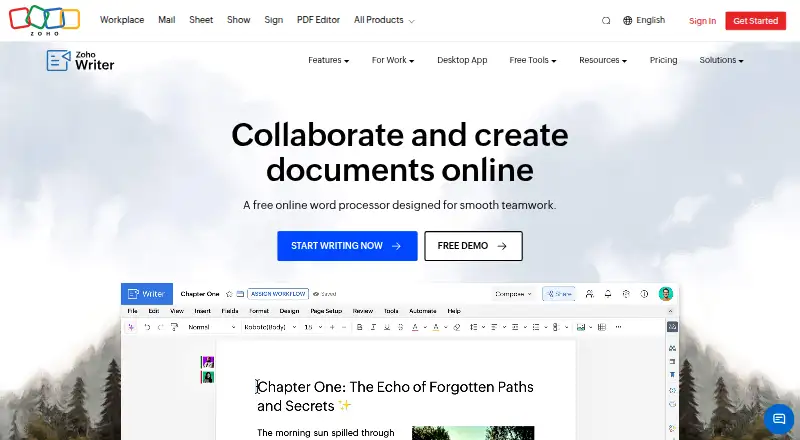
What Zoho Writer is
Zoho Writer is a web-based word processor for creating, editing, sharing, and collaborating on documents. Its layout and formatting tools include columns, section breaks, borders, headers and footers, tables, images, and charts. The Zia assistant can help generate, edit, rephrase, and rewrite content. Review tools include tracked changes, comments with @mentions, version management, grammar and spelling checks, and plagiarism checking. Writer can generate documents from templates and business data, create fillable forms, and support digital signature collection and approval workflows. Desktop apps for Windows, Mac, and Linux allow offline work and sync it when the connection returns. It imports, edits, saves, and exports DOCX, DOC, ODT, PDF, TXT, and HTML files; imports are limited to 50 MB for DOCX and 10 MB for other listed formats. The free individual edition costs nothing and includes 200 document automation credits per month per organization. Organizations also have free Writer access, with 1,000 such credits monthly; additional automation credits can be purchased.
Good
- Desktop apps support offline work and later syncing.
- Supports tracked changes, comments, and version management.
- Imports and exports six listed document formats.
- No limit is stated for the number of documents.
- Includes 200 monthly automation credits in the individual edition.
Watch out
- DOCX imports are limited to 50 MB.
- Other listed format imports are limited to 10 MB.
- More automation credits require purchase.
Who it suits
Writer suits individuals and organizations that need document editing, collaboration, or automation. Its desktop apps are useful for people who need offline editing on Windows, Mac, or Linux.
Verdict
Zoho Writer covers document editing, review, collaboration, and automation, with desktop offline support. Consider its import-size limits and included automation credits if your workflow depends on larger files or document generation.
Plans and prices
From Zoho Writer's own pricing page, checked 30 Sep 2026.
| Plan | Price | What it gives you |
|---|---|---|
| Zoho Writer (For Individuals — Free Edition) | Free | Writer features included · 200 free document automation credits/month/org · Additional automation credits can be purchased |
| Zoho Writer (For Businesses — Paid Edition) | Priced on request | Writer is free for organizations · 1,000 free document automation credits/month/org · Additional automation credits can be purchased |
The facts
Each one read from Zoho Writer's own pages, with the date it was checked.
What it does
- AI writing
- Its Zia assistant can help generate, edit, rephrase, and rewrite content.checked 30 Sep 2026
- API
- Zoho Writer provides REST APIs for creating, editing, managing, merging, signing, publishing, and converting documents.checked 30 Sep 2026
- Document automation
- Writer can generate documents from templates and business data, create fillable forms, and support digital signature collection and approval workflows.checked 30 Sep 2026
- Document limit
- Zoho says there is no limit to the number of documents users can create.checked 30 Sep 2026
- File formats and size limits
- Writer can import, edit, save, and export DOCX, DOC, ODT, PDF, TXT, and HTML; imports are limited to 50 MB for DOCX and 10 MB for other listed formats.checked 30 Sep 2026
- Integrations
- Listed integrations include Zoho Sign and CRM, DocuSign, Adobe Sign, WordPress, Medium, ChatGPT, Zapier, Zotero, and cloud storage services including Google Drive, Dropbox, Box, and OneDrive.checked 30 Sep 2026
- Layouts and formatting
- It supports multi-column layouts, section breaks, custom borders, headers, footers, tables, images, and charts.checked 30 Sep 2026
- Offline use
- Writer's desktop apps for Windows, Mac, and Linux support offline work, and the product page says work syncs when the connection returns.checked 30 Sep 2026
- Product
- Zoho Writer is a web-based word processor for creating, editing, sharing, and collaborating on documents.checked 30 Sep 2026
- Review tools
- Writer supports live change tracking, comments with @mentions, version management, grammar and spelling checks, and plagiarism checking.checked 30 Sep 2026
- Security
- Zoho's security page says customer data in transit uses TLS 1.2/1.3 and sensitive data at rest is encrypted with AES-256; the page was last updated December 4, 2024.checked 30 Sep 2026
- Support resources
- Writer's help center lists a user guide, knowledge base, community, videos, developer guide, integration help, and webinars.checked 30 Sep 2026
- Who it serves
- The pricing page describes free Writer access for both individual users and organizations; document automation beyond included credits requires purchasing credits.checked 30 Sep 2026
The company
- Founded
- 1996checked 23 Sep 2026
The full review of Zoho Writer
Overview
Zoho Writer is a word processor for creating documents and working on them with others. It suits individuals and organizations that want review and document-automation tools without a Writer subscription; the trade-off is that automation beyond the included monthly credits costs extra.
Formatting spans multi-column pages, section breaks, custom borders, headers and footers, tables, images, and charts, making Writer capable of handling structured documents as well as straightforward text. The product also has a desktop-app option for offline work, a useful distinction for people who cannot rely on a constant connection. Compare it with other options in Word Processing Software, Document Collaboration Software, and Collaborative Document Software.
Key features
Writing and review
Zia can generate, edit, rephrase, and rewrite content, while live change tracking, @mention comments, and version management support collaborative revision. Grammar and spelling checks and plagiarism checking add further review tools. This combination makes Writer a strong fit for documents that pass between contributors, though users who do not need review features may find its broader toolkit unnecessary.
Writer imports, edits, saves, and exports DOCX, DOC, ODT, PDF, TXT, and HTML. The import ceiling is 50 MB for DOCX and 10 MB for each of the other listed formats, so unusually large source documents may need to be reduced or handled elsewhere. Zoho says users can create an unlimited number of documents.
Automation and integrations
Writer can generate documents from templates and business data, create fillable forms, and support signature collection and approval workflows. Those capabilities are more compelling for repeatable business paperwork than for occasional personal writing, but document generation beyond the included credits requires buying more.
Integrations include Zoho Sign and CRM, DocuSign, Adobe Sign, WordPress, Medium, ChatGPT, Zapier, Zotero, and cloud storage services such as Google Drive, Dropbox, Box, and OneDrive. REST APIs cover creating, editing, managing, merging, signing, publishing, and converting documents, giving teams ways to connect Writer to wider workflows.
Security and help
Zoho says data in transit uses TLS 1.2/1.3 and sensitive data at rest is encrypted with AES-256. Support resources include a user guide, knowledge base, community, videos, developer guide, integration help, and webinars.
Pricing
Writer is freemium, with free access for individuals and organizations. The distinction between editions is the monthly automation allowance, not a paid Writer seat price.
| Plan | Price and allowance | Best for |
|---|---|---|
| Zoho Writer (For Individuals — Free Edition) | free; Writer features included and 200 free document automation credits/month/org. Additional credits can be purchased. | Individual users who need the word processor and modest automation. |
| Zoho Writer (For Businesses — Paid Edition) | Custom pricing; Writer is free for organizations and includes 1,000 free document automation credits/month/org. Additional credits can be purchased. | Organizations that need a larger included automation allowance. |
The business edition’s custom pricing should not be read as a charge for Writer itself: the product is free for organizations, while additional automation credits are the extra cost to watch. The individual allowance is lower, so frequent template-based generation is more likely to push a solo user toward paid credits.
Platforms
Writer is available on Android, iOS, Linux, macOS, the web, Windows, as an extension, and through an API. Its Windows, Mac, and Linux desktop apps support offline editing and sync work when the connection returns. Real-time collaboration and track changes are also supported, balancing local work with shared review.
Who it's for
Writer is a good choice for people or teams who want a free word processor with collaboration, review, and a route into document automation. It is less suitable for workflows built around importing files larger than its format-specific limits, or generating documents at a volume that makes included credits insufficient.
Pros and cons
- Pros: Writer is free for individuals and organizations, and there is no stated cap on document count.
- Pros: Live tracking, @mention comments, version management, and desktop offline editing cover several common collaboration and continuity needs.
- Pros: Templates, business-data generation, forms, signatures, approvals, integrations, and APIs support more structured document workflows.
- Cons: Monthly automation credits are capped at 200 for the individual edition and 1,000 for organizations; extra credits must be purchased.
- Cons: Imports top out at 50 MB for DOCX and 10 MB for other listed formats, a constraint for large source files.
Alternatives
- Microsoft Word is a suitable alternative for readers who want its free web version, real-time sharing, basic spelling and grammar, and 5 GB of cloud storage.
- ONLYOFFICE Docs is worth considering for readers who want a self-hosted option or a free community edition recommended for up to 20 users.
- Collabora Online offers a free on-premise development edition intended for testing and home use.
- Google Docs is an alternative for readers who want its web-focused offering or a Business Starter plan with 30 GB pooled storage per user and a 300-user maximum.
- Apple Pages is a free option for readers who want to create, view, edit, and collaborate without a subscription.
- Dropbox Paper is another free option, with its Basic plan including 2 GB of storage.
- LyX is a free software option released under the GPL.
- SoftMaker FreeOffice is free for personal and business use, with a stated allowance of one copy on up to three computers in one family household or one organization computer.
Verdict
Choose Zoho Writer if you want free document editing with live review, desktop offline support, and business-oriented automation in the same product. Its strongest case is the breadth of those tools without a Writer subscription; look elsewhere if large imports or high-volume document generation are central to your workflow.
Alternatives to Zoho Writer
- 1

ONLYOFFICE Docs
Free planOpen sourceAndroidiOSWebAPI8.7From $8 a month - 2
LibreOffice Impress
Free planOpen sourceAndroidiOSWebAPI8.6$8.99 one-time - 3

Calmly Writer
Free planAndroidWebLinuxmacOS8.2Free plan - 4

WPS Office
Free planAndroidiOSWebAPI8.2From $41.99 a year - 5
Dropbox Paper
Free planAndroidiOSWebAPI7.7Free plan - 6

Collabora Online
Free planAndroidiOSWebLinux7.5From $3.40 a month