LyX
LyX is a free document processor for structured writing, combining TeX and LaTeX capabilities with a graphical interface.
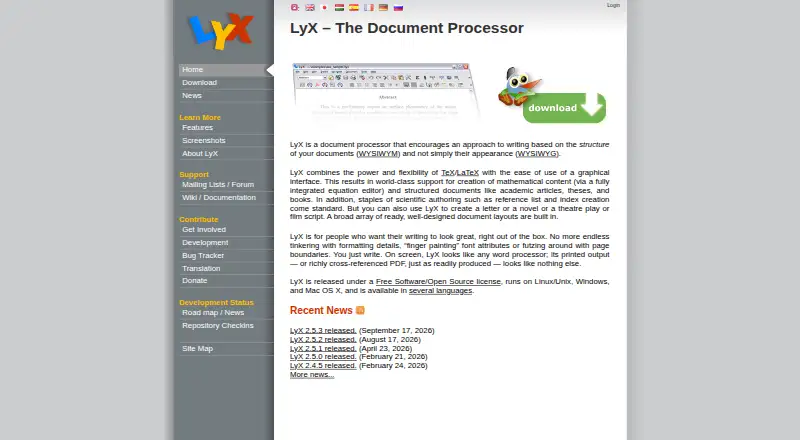
What LyX is
LyX is a free document processor for structured writing, combining TeX and LaTeX capabilities with a graphical interface. It supports academic articles, theses, books, letters, novels, plays, and film scripts. Its equation editor accepts point-and-click input or LaTeX commands and renders formulas on screen. Labels, references, indexes, and bibliography tools include advanced BibTeX support. Configurable converters import and export formats such as LaTeX, PDF, PostScript, DVI, ASCII, HTML, OpenDocument, RTF, and MS Word. LyX also supports multilingual documents, right-to-left writing, CJK writing systems, and Unicode. Basic support is available for Maple, Maxima, Octave, and Mathematica, while modules can add Noweb, Sweave, and LilyPond support. It works offline on Linux, Windows, and macOS and supports external version control systems including RCS, CVS, Subversion, and Git. Windows installations require a TeX distribution, and Mac installations require a TeX system such as MacTeX. The project releases LyX under the GPL and accepts donations.
Good
- Free software released under the GPL
- Equation editor accepts point-and-click or LaTeX input
- Includes bibliography and advanced BibTeX support
- Supports multiple document formats
- Available for Linux, Windows, and macOS
Watch out
- Windows installation requires a TeX distribution
- Mac installation requires a TeX system
Who it suits
LyX suits writers working on structured documents, from academic texts to books and scripts. It may also suit users who need formula editing, bibliography tools, multilingual writing, or offline desktop use.
Verdict
LyX combines structured-document tools with a graphical interface and broad format support. Check the TeX installation requirement for your operating system before getting started.
Plans and prices
From LyX's own pricing page, checked 4 Oct 2026.
| Plan | Price | What it gives you |
|---|---|---|
| LyX | Free | Free software released under the GPL |
The facts
Each one read from LyX's own pages, with the date it was checked.
What it does
- Document formats
- Configurable converters support importing and exporting formats including LaTeX, PDF, PostScript, DVI, ASCII, HTML, OpenDocument, RTF, and MS Word.checked 4 Oct 2026
- Document processor
- LyX is a document processor that focuses on document structure and combines TeX/LaTeX capabilities with a graphical interface.checked 4 Oct 2026
- Download integrity
- The project provides GPG-signed source tarballs and binaries so users can verify downloaded packages.checked 4 Oct 2026
- Installation requirement
- The official download page says Windows installations require a TeX distribution, while Mac installations require a TeX system such as MacTeX.checked 4 Oct 2026
- Intended users
- LyX supports structured writing such as academic articles, theses, and books, as well as letters, novels, plays, and film scripts.checked 4 Oct 2026
- Languages
- LyX supports multilingual documents, right-to-left writing, CJK writing systems, and Unicode.checked 4 Oct 2026
- License and donations
- LyX is released under the GPL, and the project accepts donations to support its development.checked 4 Oct 2026
- Math editor
- Its equation editor supports point-and-click and LaTeX command entry, with formulas rendered on screen.checked 4 Oct 2026
- References and bibliography
- LyX includes labels, references, indexes, and bibliography features, including advanced BibTeX support.checked 4 Oct 2026
- Release
- The homepage lists LyX 2.5.3 as released on September 17, 2026.checked 4 Oct 2026
- Scientific tools
- LyX has basic support for Maple, Maxima, Octave, and Mathematica, and modules can add Noweb, Sweave, and LilyPond support.checked 4 Oct 2026
- Support
- Users can ask usage questions on the lyx-users mailing list and consult its archives before posting.checked 4 Oct 2026
- Version control
- LyX supports external version control systems including RCS, CVS, Subversion, and Git.checked 4 Oct 2026
Money
- Free plan
- Yeschecked 22 Sep 2026
Where it runs
- Platforms
- The official site lists LyX for Linux, Windows, and Mac; its current Windows binaries support Windows 7 and later.checked 4 Oct 2026
The full review of LyX
LyX is a desktop document processor that brings TeX and LaTeX capabilities into a graphical, structure-focused workflow. It is best suited to academic and technical writers, and to authors working on longer documents with equations, references, or bibliographies. Its extensive writing tools are free, but Windows and macOS users need to install a TeX system separately.
Overview
LyX organizes writing around a document’s structure rather than treating each page as a canvas for manual formatting. That makes it a natural fit for articles, theses, and books, while its support for letters, novels, plays, and film scripts extends its reach beyond academia. For routine writing that needs only a conventional word processor, its TeX/LaTeX-oriented approach may be more than necessary.
LyX is GPL-licensed free software with offline editing and desktop apps for Linux, Windows, and macOS. The project accepts donations; its homepage lists version 2.5.3, released September 17, 2026.
Key features
Equations, references, and bibliography
The equation editor supports both point-and-click input and LaTeX commands, and renders formulas on screen. This gives writers a visual way to build mathematical expressions without giving up command entry. Labels, references, indexes, and advanced BibTeX support make the package particularly useful for long or technical documents where cross-references and bibliographies are central.
Format conversion and specialized tools
Configurable converters support importing and exporting LaTeX, PDF, PostScript, DVI, ASCII, HTML, OpenDocument, RTF, and MS Word. That breadth helps when a document must move between technical and general-purpose formats, though the converters are configurable rather than a promise that every workflow will be seamless. LyX also has basic support for Maple, Maxima, Octave, and Mathematica; modules can add Noweb, Sweave, and LilyPond support.
Language, collaboration, and integrity
Multilingual documents, right-to-left writing, CJK writing systems, and Unicode support give LyX reach beyond English-language writing. It supports external version control systems including RCS, CVS, Subversion, and Git, a practical option for writers already managing document history that way. The project also provides GPG-signed source tarballs and binaries for users who want to verify downloaded packages. Usage questions can go to the lyx-users mailing list, whose archives are available to consult before posting.
Pricing
LyX costs nothing. The LyX plan includes free software released under the GPL, with no separate paid tier or free-trial period to weigh. This is a strong proposition for individuals and teams comfortable using desktop software and external version control; the trade-off is that users must arrange the required TeX system themselves on Windows and macOS.
Platforms
LyX has desktop apps for Linux, Windows, and macOS, and supports offline editing. Installation has an important platform-specific prerequisite: Windows installations require a TeX distribution, while Mac installations require a TeX system such as MacTeX. Linux users are not given the same installation requirement in these terms. The external TeX dependency makes LyX less convenient for anyone seeking a self-contained word processor.
Who it's for
Choose LyX if your work benefits from structured documents, mathematical notation, bibliographies, or technical formats, and you want to work offline on a desktop. It also suits writers of books and scripts who value its range of document types and formats. If your priority is conventional page-by-page editing, or you want to avoid setting up a TeX system on Windows or macOS, another word processor may be a better fit.
Pros and cons
- Pro: A visual equation editor with LaTeX command entry supports both point-and-click work and direct control of formulas.
- Pro: Labels, references, indexes, and advanced BibTeX support serve documents with demanding citation and cross-reference needs.
- Pro: Broad conversion support and multilingual, right-to-left, CJK, and Unicode capabilities accommodate varied writing and output needs.
- Con: Windows and macOS installations require a separate TeX system, adding setup before writing can begin.
- Con: Support is oriented around a mailing list and its archives rather than an in-app support channel.
Alternatives
For shared scriptwriting, Celtx offers cloud-based script editors and real-time collaboration; its free studio is limited to one project. WriterDuet is another option for collaborative writing, with a free plan capped at three projects and real-time collaboration in its Plus plan. Campfire offers writing and worldbuilding modules with limited access on its no-credit-card-required trial plan, making it worth considering when worldbuilding is part of the work.
For LaTeX work in a browser, Overleaf provides unlimited projects on its free plan, with one collaborator per project. Substack is a different fit for writers publishing through a platform: its free-to-start plan has no platform fees, tiers, or contracts. Story Architect is an open-core writing alternative available on desktop and mobile platforms.
Final Draft is a paid screenwriting option with a free trial and an annual plan priced at $99.99 a year. Etherpad is a free, open-source alternative if an open data format and Apache 2.0-licensed code are priorities. For more options, browse Writing Apps, LaTeX Editors, and Word Processing Software.
Verdict
LyX is a strong choice for academic, technical, and long-form writers who want structured documents, capable equation and reference tools, and broad format support without a license fee. Its main drawback is the extra TeX setup required on Windows and macOS; readers seeking a conventional, self-contained word processor should look elsewhere.
Alternatives to LyX
- 1

Overleaf
Free planOpen sourceWebAPIExtensionLinux8.3From $8.25 a month - 2
Verbosus
Free planAndroidiOSWebWindows8.0$15.99 one-time - 3
VerbTeX
Free planAndroidiOSWebmacOS8.0Free plan - 4
Papeeria
Free planAndroidiOSWeb7.4From $5 a month - 5
Avidemux
Free planOpen sourceWebLinuxmacOSWindows7.3Free plan - 6

Oleafly
Free planOpen sourceAPILinuxmacOSSelf-hosted7.2Free plan