
Calendar.com
Calendar.com combines calendars, scheduling, contacts, analytics, and automation in a service available on the web, iOS, and Android, as well as through an A…
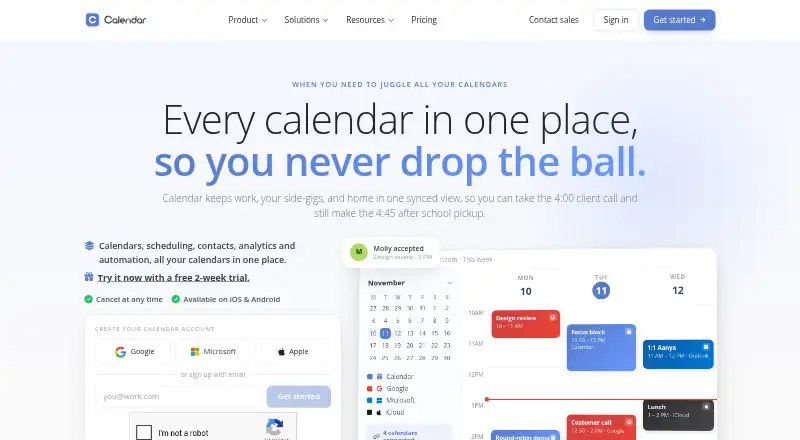
What Calendar.com is
Calendar.com combines calendars, scheduling, contacts, analytics, and automation in a service available on the web, iOS, and Android, as well as through an API and browser extensions. It supports shared calendars, two-way sync, time blocking, and scheduling links with time-zone-aware availability. Meeting options include one-on-one, group, round-robin, multi-host, and one-off bookings. Teams can use shared availability, routing rules, and analytics. Calendar connections include Google, Outlook, iCloud, Exchange, CalDAV, and native calendars; automation covers more than 40 integrations. Video meeting integrations include Zoom, Microsoft Teams, Google Meet, Webex, and GoTo Meeting. Individuals can use the Free plan forever. Standard costs $20 a month for up to 10 users, while Pro costs $30 a month for up to 30 users. Enterprise pricing is custom for teams of 30 or more. Teams can try the service for 14 days, and annual billing advertises a 20% saving.
Good
- Free forever for individuals.
- Supports two-way sync across connected calendars.
- Offers group, round-robin, and multi-host bookings.
- More than 40 automation integrations.
- Annual billing advertises a 20% saving.
Watch out
- Enterprise pricing is custom.
- Team trial lasts 14 days.
Who it suits
Calendar.com suits individuals who want ongoing free access and teams that need shared scheduling, booking, and calendar connections. Its higher-tier options address teams needing more users or additional security and support controls.
Verdict
Calendar.com brings scheduling, shared calendars, integrations, and analytics into one service, with a free individual option and paid team plans. Check the user limits and plan-specific controls before choosing a tier.
Plans and prices
From Calendar.com's own pricing page, checked 20 Sep 2026.
| Plan | Price | What it gives you |
|---|---|---|
| Free | Free | Free forever for individuals |
| Standard | $20 a month | Up to 10 users per workspace · Up to 10 users per workspace · 6 connected calendars · email & chat support · Starting at $20/ month; annual option advertises Save 20% |
| Pro | $30 a month | Up to 30 users per workspace · Up to 30 users per workspace · 10 connected calendars · expedited support · SSO available as add-on · Starting at $30/ month; annual option advertises Save 20% |
| Enterprise | Priced on request | For teams of 30+ with advanced security, control and support · Unlimited users · SSO & SCIM provisioning · domain control · dedicated account partner · custom integrations · Custom |
| Individual | Free | Individuals · Free forever for individuals |
| Teams trial | Free | Teams · 14-day trial for teams |
The facts
Each one read from Calendar.com's own pages, with the date it was checked.
What it does
- Access Control
- Pro includes role-based access control and SSO is available as an add-on.checked 28 Sep 2026
- Analytics
- Calendar offers individual, team, and expanded analytics through Google or Microsoft integrations.checked 28 Sep 2026
- Annual Discount
- Annual billing saves 20%.checked 28 Sep 2026
- Automation
- Calendar describes workflows that chain triggers, conditions, and actions, plus booking routing rules.checked 29 Sep 2026
- Booking Features
- The product supports one-on-one, group, round-robin, multi-host, and one-off meetings.checked 28 Sep 2026
- Business Customers
- The company reports 80,000 businesses and institutions.checked 28 Sep 2026
- Calendar Connections
- It supports Google, Outlook, iCloud, Exchange, CalDAV, and native calendars.checked 28 Sep 2026
- Calendar sync
- Calendar lists Google, Outlook, iCloud, Exchange, and CalDAV calendar syncing.checked 29 Sep 2026
- Data privacy
- Calendar says personal events are private by default and can block time without exposing event details.checked 29 Sep 2026
- Global Reach
- Calendar says it helps people in 140 countries.checked 28 Sep 2026
- Integration Count
- Automation includes more than 40 integrations.checked 28 Sep 2026
- Integrations
- Listed integrations include Zoom, Microsoft Teams, Google Meet, Stripe, Zapier, HubSpot, Salesforce, Slack, Webex, and GoTo Meeting.checked 29 Sep 2026
- Intended users
- The pricing page presents Standard for individuals or small to medium-sized teams, Pro for individuals through larger teams, and Enterprise for teams of 30 or more.checked 29 Sep 2026
- Payment Processing
- Users can take payment for events and sell session packages paid up front.checked 28 Sep 2026
- Product
- Calendar combines calendars, scheduling, contacts, analytics, and automation in one service.checked 29 Sep 2026
- Scheduling
- Scheduling features include one-click booking links, time-zone-aware availability, and multi-person scheduling.checked 29 Sep 2026
Where it runs
- Browser extensions
- Calendar lists Chrome and Edge extensions for sharing availability from a browser tab or webpage.checked 29 Sep 2026
- Mobile apps
- ios and androidchecked 20 Sep 2026
The company
- Company history
- Calendar says it was founded in 2018 and has users in 140+ countries.checked 29 Sep 2026
- Founded
- 2018checked 28 Sep 2026
Money
- Free access
- The About page says Calendar is free forever for individuals and offers a 14-day trial for teams.checked 29 Sep 2026
- Free Individuals
- Individuals can use Calendar free forever.checked 28 Sep 2026
- Free plan
- Yeschecked 20 Sep 2026
- Free Trial
- All plans include a 14-day free trial.checked 28 Sep 2026
The full review of Calendar.com
Overview
Calendar.com is a calendar and booking service for individuals and teams coordinating across multiple calendars. It is strongest when scheduling, shared availability, and automation need to sit alongside calendar management; for a simple personal calendar, its broader toolset may be more than necessary.
Key features
Two-way sync works with Google, Outlook, iCloud, Exchange, CalDAV, and native calendars, while shared calendars and time blocking help people coordinate without making personal event details public by default. That provider range is a practical advantage for mixed-calendar households and teams, although paid tiers cap the number of connected calendars.
Booking supports one-on-one, group, round-robin, multi-host, and one-off meetings, with time-zone-aware availability and automated reminders. Users can collect payment for events and sell session packages paid up front. This covers more than basic appointment links, but people who do not need booking or payment workflows may have little reason to pay for the extra breadth.
Team tools include shared availability, round-robin routing, and team analytics. Automation can chain triggers, conditions, and actions, and the service offers more than 40 integrations, including Stripe, Zapier, HubSpot, Salesforce, Slack, and video meeting services such as Zoom, Microsoft Teams, Google Meet, Webex, and GoTo Meeting. Chrome and Edge extensions let users share availability from a browser tab or webpage. Stored data is encrypted with 256-AES and transmitted data with 128-bit SSL encryption.
Pricing
Individuals can use Calendar free forever. Teams can start with a 14-day trial, and the site says users can cancel at any time. Annual billing advertises a 20% saving; compare the workspace limits before committing, since the listed monthly prices are starting prices.
- Free: free. This is the clearest fit for individuals who want no-cost calendar access, rather than a team workspace.
- Standard: Starting at $20/ month, billed monthly, for up to 10 users per workspace and 6 connected calendars, with email and chat support. It suits individuals or small to medium-sized teams, but the calendar and seat ceilings may constrain growing operations.
- Pro: Starting at $30/ month, billed monthly, for up to 30 users and 10 connected calendars, with expedited support. Role-based access control is included, and SSO is available as an add-on. It fits larger teams needing more governance, though SSO adds to the plan rather than coming standard.
- Enterprise: Custom pricing for teams of 30 or more, with unlimited users, SSO, SCIM provisioning, domain control, custom integrations, a dedicated account partner, and onboarding specialists. It is the tier for organizations needing advanced security and support controls, not a transparent-price option.
Support rises with the tiers: Standard has email and chat, Pro adds expedited support, and Enterprise includes dedicated account and onboarding support. The free option is for individuals, while teams looking to evaluate paid use have the 14-day trial.
Platforms
Calendar.com is available on web, iOS, Android, and through browser extensions and an API. Mobile apps support both major phone platforms, while extensions provide a way to share availability while browsing.
Who it's for
Calendar.com is a good fit for people and teams juggling several calendar providers, paid appointments, or coordinated booking across staff. Its privacy defaults and time blocking also suit users who want to show availability without revealing personal event details. Those seeking only a lightweight personal calendar, or teams unwilling to work within connected-calendar caps on paid plans, should look elsewhere.
Pros and cons
- Pro: Two-way connections span major calendar providers and CalDAV, making the service useful when a team does not share one calendar ecosystem.
- Pro: Booking supports several meeting formats, payment collection, and up-front session packages, so it can serve both scheduling and paid appointment workflows.
- Pro: Enterprise combines unlimited users with SSO, SCIM, domain control, and dedicated support for larger organizations.
- Con: Standard and Pro limit workspaces to 10 and 30 users respectively, and connected calendars to 6 and 10; teams that outgrow those caps must consider custom-priced Enterprise.
- Con: Pro's SSO is an add-on, while the stronger security controls and dedicated support arrive only at Enterprise.
Alternatives
For a different balance of price and scheduling scope, consider Cal.com, whose free plan allows one user, unlimited event types and calendars, and more than 100 app integrations; it is worth comparing if those free-tier allowances matter more than Calendar.com's team controls. Zoho Bookings offers a free one-user plan and a 15-day premium trial without requiring card details, a useful alternative for solo users evaluating booking software. Koalendar has a free forever plan with unlimited bookings and booking pages, calendar sync, website embeds, and video conferencing, so it is a strong candidate when those no-cost booking basics are the priority.
SimplyMeet.me has a free tier capped at one user, three meeting types, and 50 meetings per user each month, making it a lower-limit option to compare. Slotly offers a free plan with one event type and up to 100 monthly bookings, with Slotly branding on the booking page. YouCanBookMe has a free plan with one calendar connection and one booking page. DayOtter offers a free plan with an AI scheduling assistant, unlimited event types and booking pages, calendar sync, email reminders, and group polls. Calendly has a free plan limited to one event type and one calendar connection, a straightforward option to compare for simpler booking needs.
Browse more options in Meeting Scheduling Software, Calendar apps, and Appointment Scheduling Software.
Verdict
Calendar.com is best for individuals and teams that want connected calendars, flexible booking, and team coordination in one service. Its broad booking and integration toolkit is the central reason to choose it; the main reason to look elsewhere is the cost and tier ceilings, especially if a simpler calendar or a more generous free booking plan will do.
Getting started
- Open the Calendar.com website.
- Choose free individual access or review the Standard, Pro, and Enterprise plans.
- Teams can use the 14-day trial; the site says users can cancel at any time.
- Use the web service or select an iOS or Android app, API, or Chrome or Edge extension.
- Connect calendars such as Google, Outlook, iCloud, Exchange, CalDAV, or native calendars.
Limits worth knowing
Individuals can use the Free plan forever. Standard supports up to 10 users and six connected calendars; Pro supports up to 30 users and 10 connected calendars. Teams can use a 14-day trial, while Enterprise pricing is custom.
Questions
Is Calendar.com free?
Individuals can use Calendar free forever.
How much do the paid plans cost?
Standard is $20 a month and Pro is $30 a month. Enterprise pricing is custom, and annual billing advertises a 20% saving.
Which platforms does Calendar.com support?
It is available on the web, iOS, Android, through an API, and as Chrome and Edge extensions.
Which calendars can it connect to?
Calendar connections include Google, Outlook, iCloud, Exchange, CalDAV, and native calendars.
What team limits apply to the plans?
Standard supports up to 10 users per workspace, Pro up to 30, and Enterprise has unlimited users.
What does the 14-day trial cover?
The 14-day trial is for teams. The site says users can cancel at any time.
Alternatives to Calendar.com
- 1

Cal.com
Free planAndroidiOSWebAPI9.1Free plan - 2

Setmore
Free planAndroidiOSmacOSWindows8.9From $5 a month - 3

SchedulingKit
Free planAndroidiOSWebAPI8.8From $10 a month - 4

Reservio
Free planAndroidiOSWebAPI8.8Free plan - 5

Fresha
AndroidiOSWeb8.7From $2.95 a month - 6

Zoho Bookings
Free planAndroidiOS8.6From $8 a month