
DayOtter
DayOtter is a scheduling and booking tool for the web and Android.
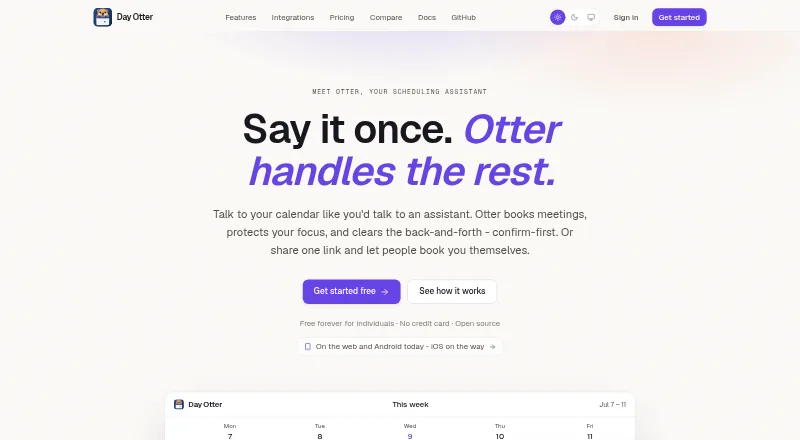
What DayOtter is
DayOtter is a scheduling and booking tool for the web and Android. It provides booking pages, two-way calendar sync, group events, and round-robin scheduling, including team booking pages. Automated email reminders are included on its Free plan, while the Pro plan adds SMS reminders, team scheduling, routing forms, automations, booking analytics, and payment collection. The Free plan is $0 forever and includes an AI scheduling assistant, unlimited event types and booking pages, calendar sync, email reminders, and group polls. Pro costs $9 a month, billed monthly. DayOtter also lists a free-forever self-hosted edition, described as open source and including every Pro feature, with Docker and docker-compose. Payment collection is listed as available. Custom booking domains are not available. DayOtter is headquartered in Bengaluru, Karnataka, India.
Good
- Free plan includes unlimited booking pages.
- Calendar sync works two ways.
- Supports group events and round-robin routing.
- Pro includes SMS reminders and payment collection.
- Free self-hosted edition includes Pro features.
Watch out
- Custom booking domains are not available.
- Pro costs $9 a month, billed monthly.
Who it suits
DayOtter suits individuals or teams arranging appointments, group events, or rotating bookings. Its free plan covers booking pages and calendar coordination, while Pro lists team scheduling, analytics, and payment collection.
Verdict
DayOtter offers booking and scheduling features on web and Android, with a free plan and a free self-hosted edition. Consider Pro for its listed team tools, automations, analytics, and payment collection.
Plans and prices
From DayOtter's own pricing page, checked 23 Sep 2026.
| Plan | Price | What it gives you |
|---|---|---|
| Free | Free | AI scheduling assistant · Unlimited event types and booking pages · Calendar sync · Email reminders and group polls · $0 forever |
| Pro | $9 a month | Team scheduling · Routing forms · Automations · Booking analytics · SMS reminders · Payment collection · billed monthly |
| Self-hosted | Free | Open-source edition · Every Pro feature · Docker and docker-compose · Free forever |
The facts
Each one read from DayOtter's own pages, with the date it was checked.
What it does
- Automated reminders
- Yeschecked 23 Sep 2026
- Booking pages
- Yeschecked 23 Sep 2026
- Calendar sync
- two-waychecked 23 Sep 2026
- Group booking
- Yeschecked 23 Sep 2026
- Paid from
- 9checked 23 Sep 2026
- Payment collection
- Yeschecked 23 Sep 2026
- Round-robin scheduling
- Yeschecked 23 Sep 2026
Money
- Free plan
- Yeschecked 23 Sep 2026
The company
- Headquarters
- Bengaluru, Karnataka, Indiachecked 23 Sep 2026
The full review of DayOtter
DayOtter is a booking and scheduling app for people arranging individual appointments or shared meetings. It suits solo schedulers who want generous free booking capacity, and teams that need routing, reminders, or payment collection. Its appeal is the breadth of its free plan; its main trade-off is that most team-focused tools are reserved for a per-user subscription.
Overview
DayOtter combines booking pages with two-way calendar sync, group booking, round-robin scheduling, and automated reminders. That makes it useful for coordinating both one-to-one appointments and meetings shared across a team. Free covers a substantial individual workflow, but team scheduling, automations, analytics, SMS reminders, and payment collection make Pro the relevant choice for more involved operations.
Key features
Booking and coordination
The Free plan includes unlimited event types and booking pages, along with calendar sync and group polls. Individuals who offer different meeting formats can build those out without a page or event-type cap. Group events and round-robin routing support shared scheduling; team booking pages are also supported, though the team scheduling tools that make them useful are part of Pro.
Reminders and payments
Email reminders are included with Free, while Pro adds SMS reminders and payment collection. Email is a sensible fit for straightforward follow-up; businesses that want text reminders or to collect payment as part of booking need to budget for Pro. Its automations and booking analytics also suit teams that want more structured workflows and a view of booking activity.
Self-hosting
The free self-hosted edition includes every Pro feature and can be run with Docker and docker-compose. It is the strongest value proposition for users prepared to host the software themselves; those who want a hosted service instead can start with Free or pay for Pro. DayOtter does not support a custom booking domain, which may rule it out for teams that require one.
Pricing
DayOtter is freemium, with hosted Pro priced at $9 a month per user, billed monthly. The per-user term matters as a team grows: each additional seat increases the subscription cost.
- Free — $0.00 USD, free forever: AI scheduling assistant, unlimited event types and booking pages, calendar sync, email reminders, and group polls. It is a capable starting point for individuals, but lacks Pro’s team scheduling, routing forms, automations, analytics, SMS reminders, and payment collection.
- Pro — $9 per user per month, billed monthly: adds team scheduling, routing forms, automations, booking analytics, SMS reminders, and payment collection. It fits teams and businesses that need those capabilities, though the per-seat cost is a meaningful trade-off.
- Self-hosted — $0.00 USD, free forever: the open-source edition includes every Pro feature and Docker and docker-compose. It avoids the hosted per-user charge, but is intended for users willing to manage a self-hosted setup.
Platforms
DayOtter is available on the web and Android. It supports two-way calendar sync, but no iOS, macOS, or Windows app is included among its platforms.
Who it's for
Choose DayOtter if you need booking pages and calendar coordination, particularly if unlimited pages and event types on a free hosted plan cover your individual needs. Pro is a better fit for teams that need team scheduling, routing forms, automations, analytics, texts, or payments. Look elsewhere if a custom booking domain is essential, or if you need a platform beyond web and Android.
Pros and cons
- Pro: Free includes unlimited booking pages and event types, making it practical for solo schedulers with several appointment formats.
- Pro: The free self-hosted edition includes every Pro feature, a notable option for users able to run Docker or docker-compose.
- Con: Team scheduling, SMS reminders, automations, analytics, and payment collection require Pro on the hosted service.
- Con: Pro is priced per user, so team costs rise with each seat.
- Con: No custom booking domain is supported, limiting fit for teams that need branded booking URLs.
Alternatives
Consider Ari if you use iOS or macOS and can work within its free allowance of 10 meetings total, one Google and one Microsoft calendar, and one booking page; it also supports Zoom, Meet, and Teams links. Remeet is worth considering for a web, Android, macOS, or Windows team that values a free concierge onboarding session and can work within its free plan’s 15-user limit and one weekly sync hour.
CalendarBridge AI Scheduling Assistant is an option if you need iOS support or prefer a paid plan starting at $5 a month for unlimited event syncing and up to 10 scheduling pages. Choose Agentic Calendars if you need a macOS or Windows option and prefer a paid Starter plan at $12 a month, with unlimited AI bookings and 400 credits per month.
Kronologic may suit web users whose free needs are limited to a booking page, Google Calendar, and two meeting types; its Pro plan is $15 a month and adds unlimited meeting types. Sidekick Scheduling is another freemium alternative with Android, iOS, and web support. For other options, browse AI Scheduling Assistants, Meeting Scheduling Software, Appointment Scheduling Software, or Calendar apps.
Verdict
DayOtter is a strong pick for solo schedulers who want plenty of booking capacity at no cost, and for teams whose Pro tools justify a $9.00 USD monthly charge per user. Its free self-hosted edition is especially compelling for people who can manage their own deployment. Choose another service if you need a custom booking domain, a broader set of native platforms, or team features without a per-seat hosted subscription.
Alternatives to DayOtter
- 1

Lark
Free planAndroidiOSWebAPI9.2From $6 a month - 2
EGroupware
Free planOpen sourceAndroidiOSWebAPI9.2From €21.90 a month - 3
Teamup
Free planAndroidiOSWebAPI9.0From $12 a month - 4
Twake Calendar
Open sourceAndroidiOSWebAPI9.0From €4 a month - 5
TimeFinder
Free planAndroidiOSWebmacOS8.9$119.99 one-time - 6

7shifts
Free planAndroidiOSWebAPI8.9From $39.99 a month