
Ari
Ari is an AI scheduling assistant that users copy on an email thread to find mutually available times and arrange meetings.
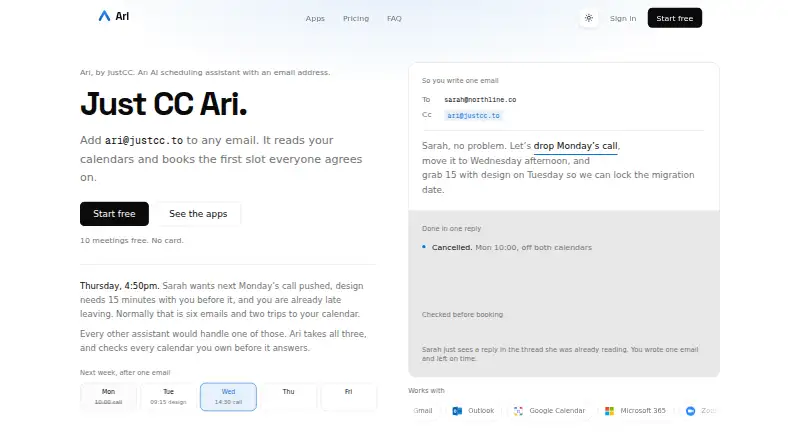
What Ari is
Ari is an AI scheduling assistant that users copy on an email thread to find mutually available times and arrange meetings. With permission, it reads Google Calendar and Microsoft 365 calendars and can create, update, or cancel events. It processes the content of copied email threads to identify scheduling requests. Supported services include Gmail, Outlook, Google Calendar, Microsoft 365, Zoom, Google Meet, and Microsoft Teams. The Mac and iPhone apps can record and transcribe meetings, make summaries, and help book follow-ups; recording begins only when the user presses record. The macOS app stores recordings and transcripts on-device unless cloud features are used. The free plan allows 10 meetings total and one Google and one Microsoft calendar. Basic costs $24 a month and Premium costs $39 a month. The maker says email content is sent to Anthropic’s Claude API to process scheduling intent and is not retained beyond what is needed to complete the request. Ari can misunderstand intent or propose wrong times, so users must review and confirm meetings before they are finalized.
Good
- Can create, update, and cancel calendar events with permission.
- Works with listed email, calendar, and meeting services.
- Recording requires the user to press record.
- macOS recordings and transcripts stay on-device unless cloud features are used.
- Free plan includes 10 meetings total.
Watch out
- Free plan is limited to 10 meetings total.
- Free plan supports one Google and one Microsoft calendar.
- Basic costs $24 a month.
- Users must review and confirm proposed meetings.
Who it suits
Ari suits people who want to arrange meetings through email and connect Google Calendar or Microsoft 365. Its Mac and iPhone apps may also suit users who want meeting recordings, transcripts, summaries, and follow-up booking.
Verdict
Ari brings email-based scheduling together with calendar actions and meeting tools on Mac and iPhone. Its free allowance is limited, and users remain responsible for checking proposed times before meetings are finalized.
Plans and prices
From Ari's own pricing page, checked 30 Sep 2026.
| Plan | Price | What it gives you |
|---|---|---|
| Free | Free | 10 meetings total · One Google and one Microsoft calendar · One booking page · Zoom, Meet and Teams links |
| Basic | $24 a month | Unlimited meetings · Three booking pages with your own URLs · Follow-up nudges · Holds on proposed times · Mac and iPhone apps · $24 per month |
| Premium | $39 a month | Unlimited calendar accounts · Unlimited booking pages with Ari branding off · Personalized writing tone and sign-off · Day summaries, block time, clear a day · $39 per month |
The facts
Each one read from Ari's own pages, with the date it was checked.
What it does
- AI limitation
- The terms say Ari may misunderstand scheduling intent or propose incorrect times, and users are responsible for reviewing and confirming meetings before they are finalized.checked 30 Sep 2026
- AI processing
- The privacy policy says email content is sent to Anthropic’s Claude API for scheduling-intent processing and is not retained beyond what is needed to complete the request.checked 30 Sep 2026
- Calendar actions
- With permission, Ari reads Google Calendar and Microsoft 365 calendars and can create, update, and cancel events.checked 30 Sep 2026
- Desktop data
- The macOS app records and transcribes on the Mac, and keeps recordings and transcripts on-device unless cloud features are used.checked 30 Sep 2026
- Email handling
- Ari processes email content from threads where it is CC’d to detect and fulfill scheduling requests.checked 30 Sep 2026
- Integrations
- The site lists Gmail, Outlook, Google Calendar, Microsoft 365, Zoom, Google Meet, and Microsoft Teams as supported services.checked 30 Sep 2026
- Privacy
- JustCC says it does not sell personal information or use email and calendar data for purposes outside providing and improving the scheduling service.checked 30 Sep 2026
- Recording controls
- Meeting recording does not start automatically; the user must press record.checked 30 Sep 2026
- Scheduling
- Ari is an AI scheduling assistant that you CC on an email thread to find mutually available times and arrange meetings.checked 30 Sep 2026
- Security
- The maker says data in transit uses TLS/HTTPS, OAuth tokens are encrypted at rest, and passwords are stored in hashed form.checked 30 Sep 2026
- Support
- The maker lists [email protected] as its contact address.checked 30 Sep 2026
Money
- Free allowance
- The Free plan includes 10 meetings total and one Google and one Microsoft calendar.checked 30 Sep 2026
Where it runs
- Meeting apps
- The Mac and iPhone apps can record meetings, transcribe them, summarize them, and help book follow-ups.checked 30 Sep 2026
The full review of Ari
Overview
Ari is an email-first scheduling assistant for people who want meeting coordination to happen inside the threads they already use. It is best suited to individuals and teams working with Google Calendar or Microsoft 365, especially those who also want meeting notes and follow-up tools on Mac or iPhone. Its main appeal is combining scheduling and meeting support; its free tier is small, and proposed times still need a person’s review.
Key features
CC Ari on an email thread and it processes the conversation to identify a scheduling request, find times that work across calendars, and arrange the meeting. With permission, it can read Google Calendar and Microsoft 365 calendars and create, update, or cancel events. This is a practical fit for people who coordinate by email; it is less suitable for anyone who wants scheduling to stay out of their inbox.
Ari supports Gmail, Outlook, Google Calendar, Microsoft 365, Zoom, Google Meet, and Microsoft Teams. It also supports invitee messaging, autonomous rescheduling, and team scheduling. The Mac and iPhone apps add meeting recording, transcription, summaries, and help booking follow-ups. Recording requires the user to press record, so it does not begin automatically. On macOS, recordings and transcripts stay on the device unless cloud features are used.
Privacy protections include TLS/HTTPS in transit, encrypted OAuth tokens at rest, and hashed passwords, according to the maker. JustCC says it does not sell personal information or use email and calendar data outside providing and improving its scheduling service. Email content is sent to Anthropic’s Claude API for scheduling-intent processing and is not retained beyond what is needed to complete the request. That may reassure users about retention, but it still means email content is processed by an external AI service. Ari can misunderstand intent or suggest incorrect times, so users must review and confirm meetings before they are finalized.
Pricing
The Free plan costs nothing and is capped at 10 meetings total. It includes one Google and one Microsoft calendar, one booking page, and Zoom, Meet, and Teams links. It is useful for trying the email workflow, but the lifetime meeting cap makes it a poor fit for regular scheduling.
Basic costs $24 a month, billed $24 per month. It removes the meeting cap and includes three booking pages with custom URLs, follow-up nudges, holds on proposed times, and the Mac and iPhone apps. This is the practical upgrade for an individual who schedules regularly and wants the native apps, though it does not include Premium’s unlimited calendar accounts or pages.
Premium costs $39 a month, billed $39 per month. It adds unlimited calendar accounts and booking pages with Ari branding removed, personalized writing tone and sign-off, day summaries, block time, and clear-a-day tools. It fits heavier users managing several calendars or wanting more control over booking-page presentation and daily planning. Neither paid plan is described with an annual rate or trial term.
Platforms
Ari is available on iOS, macOS, and the web. Its meeting recording and transcription tools are specifically associated with the Mac and iPhone apps; macOS keeps recordings and transcripts on-device unless cloud features are used.
Who it's for
Ari suits people whose meeting coordination already happens over email and who want an assistant to handle calendar actions across Google Calendar and Microsoft 365. It is also worth considering for Mac and iPhone users who want recording, transcripts, summaries, and follow-up booking in the same product. It is a weaker fit for occasional schedulers who need more than ten meetings without paying, or for users unwilling to review AI-proposed times.
Pros and cons
- Pro: Email-thread scheduling can find mutual availability and create, update, or cancel calendar events, reducing the handoff between inbox and calendar.
- Pro: Mac and iPhone meeting tools extend Ari beyond booking, with recording, transcription, summaries, and follow-up help.
- Pro: macOS recordings and transcripts remain on-device unless cloud features are used.
- Con: The free plan stops after 10 meetings total, limiting its usefulness as an ongoing no-cost option.
- Con: AI may misread requests or propose incorrect times, so Ari cannot remove the need to verify meetings.
- Con: Email content is processed by Anthropic’s Claude API, which may not suit users who prefer not to send scheduling messages to an external AI service.
Alternatives
AI Scheduling Assistants is the broader category for comparing scheduling tools. Choose Remeet instead if Android or Windows support, multi-user access, or cloud recordings are more important; its free plan includes up to 15 users and two weeks of cloud recordings. Clara is a web-based alternative with a 14-day, five-meeting free plan and a paid Standard plan at $80 a month billed monthly for 30 meetings. Consider DayOtter if you want a free assistant with unlimited event types and booking pages, calendar sync, reminders, and group polls, plus web and Android support.
Sarra offers a free allowance of three meetings per month per seat, one saved meeting type, one calendar connection, and one follow-up nudge every two days. CalendarBridge AI Scheduling Assistant is a paid alternative with a free trial and Android, iOS, and web support. Kronologic has a free plan with a booking page, Google Calendar, and two meeting types, making it an option for a smaller web-based setup. Agentic Calendars is a paid option for macOS, web, and Windows users. Scheduler AI is a paid web alternative with a free trial and combines scheduling with call recordings and summaries.
Verdict
Choose Ari if you want email-based scheduling tied to calendar actions, with meeting follow-up tools on Mac or iPhone. Its strongest reason to buy is that it brings those tasks together around email; its strongest reason to look elsewhere is the need to manually verify proposed times, alongside a free allowance that runs out after ten meetings.
Getting started
- Open https://justcc.to/
- Choose the Free, Basic, or Premium plan
- Connect Gmail or Outlook for email scheduling
- Grant permission for Google Calendar or Microsoft 365 calendars
- CC Ari on an email thread with a scheduling request
- Install the Mac or iPhone app on supported plans for meeting tools
Limits worth knowing
The Free plan allows 10 meetings total, one Google calendar, one Microsoft calendar, and one booking page. Basic adds unlimited meetings but is limited to three booking pages; Premium adds unlimited calendar accounts and booking pages.
Questions
Is there a free plan?
Yes. Free includes 10 meetings total, one Google calendar, one Microsoft calendar, one booking page, and Zoom, Meet, and Teams links.
How much do paid plans cost?
Basic costs $24 a month. Premium costs $39 a month.
Which calendars does Ari support?
With permission, Ari reads Google Calendar and Microsoft 365 calendars and can create, update, or cancel events.
Which meeting services integrate?
Supported services listed are Gmail, Outlook, Google Calendar, Microsoft 365, Zoom, Google Meet, and Microsoft Teams.
Does recording start automatically?
No. On the Mac and iPhone apps, you must press record.
Where are macOS recordings stored?
The macOS app keeps recordings and transcripts on the Mac unless cloud features are used.
Alternatives to Ari
- 1
Schedly
Free planAndroidiOSWebAPI8.1Free plan - 2
Toki
Free planAndroidiOSWebLinux7.5From $3.99 a month - 3

Clara
Free planWeb7.4From $80 a month - 4

Remeet
Free planAndroidWebmacOSWindows7.3From $10 a month - 5

Schedulera AI Scheduling Agent
Free planWebAPI7.3From $99.50 a year - 6
Sidekick Scheduling
Free planAndroidiOSWeb7.3From $5 a month