
Cal.com
Cal.com is a scheduling service for creating booking pages and coordinating appointments across calendars.
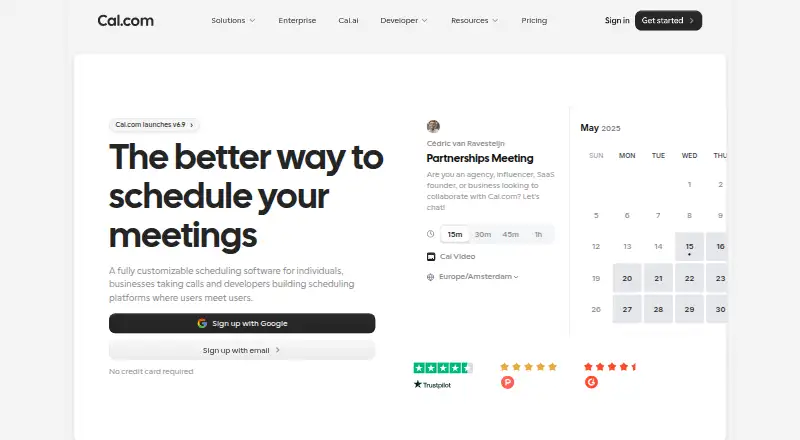
What Cal.com is
Cal.com is a scheduling service for creating booking pages and coordinating appointments across calendars. It supports two-way calendar synchronization, group bookings, round-robin scheduling, automated reminders, and payment collection. It is available on the web, Windows, macOS, Linux, iOS, and Android. The Free plan includes one user, unlimited event types, unlimited calendars, and more than 100 app integrations. Teams costs $12 a month, billed yearly, and includes one team; Organizations costs $28 a month, billed yearly, and includes unlimited sub-teams. Both paid plans list a 14-day free trial. The Enterprise plan has no listed price and includes dedicated onboarding and engineering support, service-level and uptime guarantees, HRIS and directory integrations, priority Slack and account support, and a dedicated database. Cal.com is made by a company headquartered in San Francisco, California, United States.
Good
- Free plan includes unlimited event types and calendars.
- Supports two-way calendar sync.
- Offers group bookings and round-robin scheduling.
- Payment collection and automated reminders are available.
Watch out
- Free plan is limited to one user.
- Teams costs $12 a month, billed yearly.
- Enterprise pricing is not listed.
Who it suits
Cal.com suits individuals who want booking pages and teams coordinating shared scheduling. Its group booking and round-robin options also fit organizations routing appointments among team members.
Verdict
Cal.com combines booking pages with calendar coordination, team scheduling, reminders, and payment collection. The Free plan supports one user, while paid plans list a 14-day trial.
Plans and prices
From Cal.com's own pricing page, checked 14 Oct 2026.
| Plan | Price | What it gives you |
|---|---|---|
| Free | Free | 1 user · unlimited event types and calendars · email and SMS notifications · 100+ app integrations · mobile app · browser extension · Stripe and PayPal payments · Salesforce and HubSpot sync · Calendly import · Free forever |
| Teams | $12 | Free features · 1 team with shared availability · round-robin · managed and collective event types · recurring events · customizable notifications · remove branding · routing forms · booking analytics · custom APIs · YEARLY; Save 25%; per user/month |
| Organizations | $28 | Teams features · unlimited sub-teams · custom-variable routing · company subdomain · SAML SSO and SCIM · SOC 2, HIPAA and ISO 27001 compliance · instant meetings · domain-wide delegation · role permissions · additional APIs · YEARLY; Save 25%; per user/month |
| Enterprise | Priced on request | Organizations features · dedicated onboarding and engineering · SLA and uptime guarantees · HRIS and directory integrations · priority Slack and account support · dedicated database · Annual pricing |
The facts
Each one read from Cal.com's own pages, with the date it was checked.
What it does
- API authentication
- API v2 supports OAuth and API keys, while the older Platform method is deprecated.checked 14 Oct 2026
- API documentation depth
- The API documentation covers bookings, schedules, slots, calendars, conferencing, event types, routing forms, workflows, webhooks, teams, organizations, OAuth and access control.checked 14 Oct 2026
- API rate limit
- The documented API-key rate limit is 120 requests per minute, with higher limits available by request and possible extra charges.checked 14 Oct 2026
- Automated reminders
- Yeschecked 21 Sep 2026
- Booking controls
- Users can set daily, weekly or monthly booking limits, minimum notice and before/after-event buffers.checked 14 Oct 2026
- Booking pages
- Yeschecked 21 Sep 2026
- Cal.diy licence
- Cal.diy's entire community codebase is described as 100% MIT-licensed.checked 14 Oct 2026
- Calendar coordination
- It cross-references connected calendars to prevent double bookings and lets users define availability and buffers.checked 14 Oct 2026
- Calendar sync
- two-waychecked 21 Sep 2026
- Changelog
- The September 15, 2026 update lists Workflows 2.0, Cal.ai returning to the app store and Troubleshooter 2.0.checked 14 Oct 2026
- Developer examples
- The booking endpoint documentation provides cURL, Python, JavaScript and PHP request examples.checked 14 Oct 2026
- Documentation and support
- Cal.com maintains API documentation and a help desk, and lists [email protected] as a support contact.checked 14 Oct 2026
- Embeds
- Cal.com offers website embedding so a booking page can be placed inside another site or product.checked 14 Oct 2026
- Extensibility
- Cal.com exposes React scheduling components, embeds, webhooks and an app store for integrations.checked 14 Oct 2026
- Funding
- The company's about page says it has raised $32.4 million in funding.checked 14 Oct 2026
- Group booking
- Yeschecked 21 Sep 2026
- Independent editorial limits
- DigiJaws says the product is more technical than simpler alternatives, self-hosting carries operational burden, the main product is closed source and its ecosystem is smaller than Calendly's.checked 14 Oct 2026
- Independent editorial praise
- DigiJaws rates Cal.com 4.5/5 and highlights its flexibility, developer orientation, white-labeling, API/webhooks and generous free tier.checked 14 Oct 2026
- Integrations
- The pricing page lists Google Meet, Microsoft Teams, Zoom, Cal Video, Google Calendar, Outlook, Apple Calendar, Zoho Calendar, Salesforce, HubSpot, Stripe, PayPal, Zapier, Make and more than 100 direct integrations.checked 14 Oct 2026
The company
- Company founding
- LinkedIn lists Cal.com as founded in 2021.checked 14 Oct 2026
- Company headquarters
- LinkedIn lists San Francisco, California as headquarters, while the company's about page says its team is fully distributed and has no physical headquarters.checked 14 Oct 2026
- Company size
- LinkedIn lists Cal.com in the 11–50 employee range.checked 14 Oct 2026
- Headquarters
- San Francisco, California, United Stateschecked 23 Sep 2026
Money
- Free plan
- Yeschecked 21 Sep 2026
The full review of Cal.com
Overview
Cal.com is scheduling software built around booking pages. Its feature set covers individual and group bookings, calendar synchronization in both directions, and round-robin scheduling and routing. It also includes automated reminders and payment collection. Cal.com is made by Cal.com, headquartered in San Francisco, California, United States.
The freemium model gives users a free plan alongside paid tiers. The listed entry price is $12/user/mo when billed annually, and the Teams and Organizations plans include a 14-day free trial. Cal.com belongs in several scheduling categories, including Meeting Scheduling Software, Appointment Scheduling Software, Sales Appointment Scheduling Software and Interview Scheduling Software.
Key features
- Booking pages: People can book time through pages designed for scheduling.
- Two-way calendar sync: Calendar information syncs in both directions.
- Group booking: The feature set supports bookings involving groups.
- Round-robin scheduling and routing: Bookings can be distributed using round-robin scheduling and routing.
- Automated reminders: The software can send reminders automatically.
- Payment collection: Cal.com supports collecting payments as part of scheduling.
Pricing
Cal.com has a free plan and paid plans billed yearly. The listed plan prices are:
| Plan | Price | Listed details |
|---|---|---|
| Free | free | 1 user, unlimited event types, unlimited calendars and 100+ app integrations |
| Teams | $12 a month, billed yearly | 14-day free trial; 1 team |
| Organizations | $28 a month, billed yearly | 14-day free trial; unlimited sub-teams |
| Enterprise | Price not listed | Dedicated onboarding and engineering support, SLA and uptime guarantees, HRIS and directory integrations, priority Slack and account support, and a dedicated database |
The listed annual entry point is $12/user/mo. Enterprise pricing is not provided.
Platforms
Cal.com is listed for web, Windows, macOS, Linux, iOS and Android.
Who it's for
Cal.com may suit individuals who need booking pages and calendar sync, as well as teams handling group bookings or distributing appointments through round-robin routing. Payment collection and reminders make it relevant to scheduling workflows where those capabilities are needed. Its category fit also includes meeting, appointment, sales appointment and interview scheduling.
Pros and cons
Pros
- A free plan is available, with unlimited event types and calendars listed.
- The feature set includes two-way calendar sync, group bookings, reminders, payments and round-robin routing.
- Apps are listed across desktop, mobile and web platforms.
Cons
- Enterprise pricing is not listed.
- The Organizations and Teams prices are billed yearly, rather than listed as monthly-billing options.
Alternatives
Other options in the scheduling space include Calendar.com, Jicoo, Zoho Bookings, Koalendar, SimplyMeet.me, YouCanBookMe, DayOtter and Book Like A Boss.
Verdict
Cal.com combines a free tier with team and organization plans, plus a broad set of scheduling capabilities that includes booking pages, two-way calendar sync, group bookings, round-robin routing, reminders and payments. Its listed platform coverage spans web, desktop and mobile. Teams comparing plans should note the annual billing on the paid prices and the absence of a published Enterprise price.
Getting started
- Visit the Cal.com website.
- Choose the Free, Teams or Organizations plan.
- Use the 14-day trial available with Teams or Organizations if appropriate.
- Access Cal.com on the web, Windows, macOS, Linux, iOS or Android.
Limits worth knowing
The Free plan is limited to one user. Teams includes one team; Organizations includes unlimited sub-teams. Teams and Organizations list a 14-day free trial.
Questions
Is Cal.com free?
Yes. Its Free plan costs nothing and includes one user, unlimited event types, unlimited calendars and 100+ app integrations.
How much do paid plans cost?
Teams costs $12 a month billed yearly. Organizations costs $28 a month billed yearly.
Is there a free trial?
Teams and Organizations each list a 14-day free trial.
Which platforms does Cal.com support?
It runs on the web, Windows, macOS, Linux, iOS and Android.
Who makes Cal.com?
Cal.com is made by Cal.com, headquartered in San Francisco, California, United States.
Alternatives to Cal.com
- 1

Setmore
Free planAndroidiOSmacOSWindows8.9From $5 a month - 2

SchedulingKit
Free planAndroidiOSWebAPI8.8From $10 a month - 3

Calendar.com
Free planAndroidiOSWebAPI8.8From $20 a month - 4

Reservio
Free planAndroidiOSWebAPI8.8Free plan - 5

Fresha
AndroidiOSWeb8.7From $2.95 a month - 6

Zoho Bookings
Free planAndroidiOS8.6From $8 a month