
GitBook
GitBook is a collaborative platform for creating, reviewing, and publishing branded documentation websites.
What GitBook is
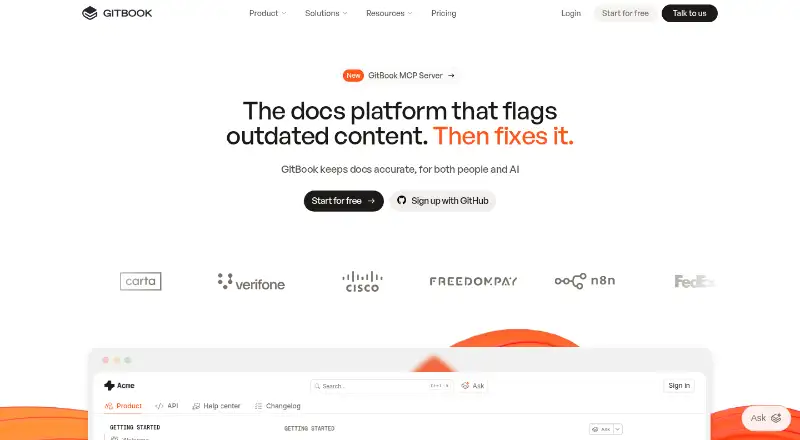
GitBook is a collaborative platform for creating, reviewing, and publishing branded documentation websites. Teams can write with a block-based visual editor or Markdown, use branches for review, or sync documentation with GitHub and GitLab. Published sites can use custom domains, responsive layouts, SEO tools, preview deployments, and site variants. GitBook Agent can identify gaps, draft updates, and review changes; GitBook Assistant answers questions using documentation and connected sources. Teams can control viewing and editing with roles and permissions, and restrict some documentation to authenticated users. GitBook also offers integrations with services including Slack and Intercom, along with a REST API for content, collaboration, and integrations. Its Free plan includes one user and 10 Agent messages per week. A 14-day trial is available, and published documentation traffic is not limited.
Good
- Edit with a visual editor, Markdown, or Git synchronization.
- Published sites support custom domains and responsive layouts.
- Roles and permissions control viewing and editing.
- Published documentation has no traffic limit.
- A 14-day trial is available.
Watch out
- The Free plan includes only one user.
- Free Agent use is limited to 10 messages weekly.
- Enterprise pricing is custom and not listed.
Who it suits
GitBook suits teams that need to write and publish product documentation, especially those using Git-based review workflows or needing different access levels for readers. Its individual Free plan is limited to one user.
Verdict
GitBook combines documentation authoring, review, and publishing with access controls and AI assistance. Check its per-site pricing and Free plan limits against the size of your team before choosing a plan.
Plans and prices
From GitBook's own pricing page, checked 28 Sep 2026.
| Plan | Price | What it gives you |
|---|---|---|
| Free | Free | For individuals; includes 1 free user. · 1 free user · unlimited page views · 10 GitBook Agent messages/week · per site/month |
| Premium | $65 a month | For public, branded docs sites. · unlimited page views · custom domain · AI search · analytics · site redirects · per site/month when billed annually · +$12 per user/month |
| Ultimate | $249 a month | For centralized docs with AI. · unlimited page views · AI Assistant · authenticated access · 500 successful Assistant answers included · per site/month when billed annually · +$12 per user/month |
| Enterprise | Priced on request | For global teams scaling docs; pricing is customized. · all Ultimate features · SAML SSO · custom integrations · dedicated support · custom contract and invoicing · Custom |
The facts
Each one read from GitBook's own pages, with the date it was checked.
What it does
- Access control
- Tiered roles and permissions control who can view and edit content.checked 28 Sep 2026
- AI access
- GitBook publishes llms.txt, llms-full.txt, Markdown versions, and an MCP connection for compatible AI tools and coding agents.checked 28 Sep 2026
- AI Assistant
- GitBook Assistant can provide contextual answers from documentation, connected knowledge sources, conversation context, and user data.checked 28 Sep 2026
- AI documentation assistant
- AI Assistant helps users find information from documentation and connected sources.checked 28 Sep 2026
- AI tools
- GitBook Agent can identify documentation gaps, draft updates, review changes, and help maintain product knowledge.checked 28 Sep 2026
- API
- The GitBook API is RESTful and supports standard GET, POST, PATCH, and DELETE methods for content, collaboration, and integrations.checked 28 Sep 2026
- Authenticated access
- Authenticated documentation supports Okta, Azure, Auth0, AWS Cognito, OIDC, or a custom authentication backend.checked 28 Sep 2026
- Authenticated content
- Authenticated access restricts docs to chosen customers, team members, or authorized users.checked 28 Sep 2026
- Content analytics
- Yeschecked 20 Sep 2026
- Custom domain
- Yeschecked 20 Sep 2026
- Data protection
- GitBook states that customer data is encrypted at rest and in transit and stored in U.S. data centers, with some cached assets served through a CDN.checked 28 Sep 2026
- Documentation workflow
- Git Sync supports branching, review, and merging documentation like a pull request.checked 28 Sep 2026
- Editing
- Teams can edit with a block-based WYSIWYG editor, Markdown, a branch-based workflow, or GitHub/GitLab synchronization.checked 28 Sep 2026
- Enterprise support
- Enterprise includes dedicated support, user training, migration, and custom integrations.checked 28 Sep 2026
- Integrations
- Built-in integrations include GitHub, GitLab, Slack, Intercom, analytics services, authentication providers, feature-flag tools, and support tools.checked 28 Sep 2026
- Paid from
- 65checked 20 Sep 2026
Money
- Annual billing discount
- Annual billing includes two months free.checked 28 Sep 2026
- Free Agent limit
- GitBook Agent has a 10-message weekly limit on the Free plan.checked 28 Sep 2026
- Free plan
- Yeschecked 20 Sep 2026
- Free trial period
- GitBook offers a 14-day free trial.checked 28 Sep 2026
- Free user limit
- The Free plan includes one free user.checked 28 Sep 2026
- Premium starting price
- Premium starts at $65 per site/month.checked 28 Sep 2026
The company
- Company identity
- The page identifies the company as GitBook INC., based in Covina, California.checked 28 Sep 2026
- Headquarters
- Covina, California, USAchecked 23 Sep 2026
The full review of GitBook
Overview
GitBook is a collaborative platform for building and publishing branded documentation sites. It is a strong fit for teams that want pull-request-style review alongside public or restricted documentation. Its main trade-off is cost that rises with sites and additional users.
Key features
Authors can work in a block-based editor or Markdown, then use branching and GitHub or GitLab synchronization to review and merge changes. That workflow will suit teams already comfortable with version control; the visual editor gives other contributors a way to participate without editing source files. Preview deployments and site variants help teams check changes and manage different presentations.
Published sites support custom domains, responsive layouts, built-in SEO, redirects, and analytics. Traffic to published documentation is unlimited, so reader growth does not run into a stated page-view cap. Tiered permissions separate viewing from editing, and authenticated access can reserve content for chosen customers, team members, or other authorized users.
GitBook Agent can identify gaps, draft updates, and review changes. Assistant answers questions using documentation and connected sources, while integrations connect both tools with Slack, Linear, and GitHub. Free includes only 10 Agent messages per week; Ultimate includes 500 successful Assistant answers, so teams planning frequent AI use should consider those allowances. Compatible AI tools and coding agents can access content through published Markdown files, llms.txt files, and an MCP connection. Setup options are provided for Claude, ChatGPT, and Cursor.
The REST API supports standard GET, POST, PATCH, and DELETE methods for content, collaboration, and integrations. Built-in integrations also cover services including GitHub, GitLab, Intercom, authentication providers, analytics, feature flags, and support. GitBook states that it is SOC 2 and ISO 27001 compliant; its Trust Center identifies SOC 2 Type II and ISO 27001:2022. It also states that customer data is encrypted in transit and at rest and stored in U.S. data centers, with some cached assets served through a CDN.
Pricing
GitBook is freemium, with pricing billed per site. Annual billing includes two months free, and the free trial lasts 14 days. Additional users cost +$12 per user/month on Premium and Ultimate, an important budget consideration for collaborative teams.
- Free: free, billed per site/month. Designed for individuals, it includes one free user, unlimited page views, and 10 Agent messages per week. It is a useful way to publish and maintain a small site, but the single-user cap makes it a poor fit for a team.
- Premium: $65 a month, billed per site/month when billed annually, plus $12 per user/month. Aimed at public, branded documentation, it includes unlimited page views, a custom domain, AI search, analytics, and site redirects. It adds the publishing and measurement tools a public docs site needs, but does not include the Assistant or authenticated access listed with Ultimate.
- Ultimate: $249 a month, billed per site/month when billed annually, plus $12 per user/month. For centralized documentation with AI, it includes unlimited page views, Assistant, authenticated access, and 500 successful Assistant answers. Choose it when restricting access and AI answers are central requirements; the included answer allowance is worth weighing against expected usage.
- Enterprise: custom pricing for global teams scaling documentation. It includes Ultimate features, SAML SSO, custom integrations, dedicated support, user training, migration, and custom contract and invoicing. This is the fit for organizations needing those enterprise services, rather than teams seeking a published fixed price.
Platforms
GitBook is available on the web and through an API. Its GitHub and GitLab synchronization supports source-controlled documentation workflows, while authenticated sites can use Okta, Azure, Auth0, AWS Cognito, OIDC, or a custom authentication backend.
Who it's for
GitBook is best for product and developer teams that need to author, review, and publish documentation in one workflow, especially when they need both public pages and access-controlled content. A solo author can start on Free, while multi-user teams should account for per-site pricing and added-user charges. Organizations requiring SAML SSO and dedicated migration or training support should consider Enterprise. It is less compelling for a small team that needs several editors but cannot justify paid per-user costs.
Pros and cons
- Pro: Git Sync brings branching, review, and merging to documentation, making it a natural choice for teams that already manage changes through Git.
- Pro: Unlimited published traffic avoids a reader-volume ceiling, and custom domains and analytics support a branded public site.
- Pro: Tiered permissions and authenticated access let teams publish selected documentation to chosen audiences.
- Con: Free allows one user, and paid plans add $12 per user/month, which can make team collaboration more expensive as editor counts grow.
- Con: Agent use on Free is limited to 10 messages per week, and Ultimate's 500 included successful Assistant answers may not suit teams expecting heavy usage.
- Con: Ultimate starts at $249 a month per site on annual billing, a substantial step up when Assistant and authenticated access are not needed.
Alternatives
For a public, branded documentation site, Mintlify is another freemium option: its free Starter plan includes five editor seats, a custom domain, authentication, an MCP server, and an API playground, making it worth considering when those provisions matter more than GitBook's specific workflow.
Fern offers a free plan with 10 team members, 1,000 pages, 250 AI credits per month, 2,000 page generations per month, and one site; choose it if those caps and allowances fit your needs better.
Read the Docs offers free hosting for open-source projects with public documentation supported by ads, a direct alternative for that use case.
Sphinx is free open-source software under a BSD 2-Clause license that can be installed locally or self-hosted, making it an alternative for teams that want that deployment model.
Docsie has a free knowledge-base plan with 25,000 AI credits, a custom domain, search, versioning, unlimited viewers, and no expiry or credit card requirement; consider it if those free-plan terms match your priorities.
ReadMe has a free Starter plan limited to one project and one published version, with 24 hours of request history and detailed logs; it is an alternative for a smaller project that can work within those limits.
Redocly charges $10 per seat/month for Pro, billed monthly, with one project and 100 pages; extra projects cost USD $49/month and extra pages USD $0.12/month. It is an option when per-seat billing and those project and page limits suit the budget.
Archbee is another documentation software option.
Compare options across Technical Documentation Software, Developer Documentation Software, AI Knowledge Base Software, Knowledge base software, Knowledge Management Software, and AI Documentation Generators.
Verdict
Choose GitBook if your team wants version-controlled documentation with polished publishing, access controls, and optional AI tools in the same platform. Its unrestricted published traffic and flexible audiences are strong advantages, but the one-user Free plan and per-site, per-user paid pricing make team size a key part of the decision. Look elsewhere if your documentation needs are simpler or the cost of collaboration outweighs the value of its review and publishing workflow.
Getting started
- Open https://www.gitbook.com/
- Start with the Free plan or begin the 14-day free trial
- Create documentation with the block editor or Markdown
- Connect GitHub or GitLab for synchronized, branch-based workflows
- Configure a custom domain, access controls, and integrations as needed
Limits worth knowing
The Free plan is free, includes one free user, and allows 10 GitBook Agent messages per week. Premium is $65 a month per site when billed annually plus $12 per user/month; Ultimate is $249 a month per site when billed annually plus $12 per user/month.
Questions
Is there a free plan?
Yes. The Free plan costs nothing and includes one user, unlimited page views, and 10 GitBook Agent messages per week.
How much do paid plans cost?
Premium is $65 a month per site when billed annually, plus $12 per user/month. Ultimate is $249 a month per site when billed annually, plus $12 per user/month. Enterprise pricing is custom.
Is there a trial?
Yes. GitBook offers a 14-day free trial.
Which platforms are supported?
GitBook is available through the web and an API.
Can documentation require sign-in?
Yes. Authenticated access can restrict documentation to selected customers, team members, or other authorized users, and enterprise includes SAML SSO.
Does GitBook offer AI tools?
Yes. GitBook Agent helps identify gaps, draft updates, and review changes, while GitBook Assistant provides contextual answers from documentation and connected sources.
Alternatives to GitBook
- 1
Confluence
Free planAndroidiOSWebSelf-hosted9.0From $5.42 a month - 2

ProProfs Knowledge Base
Free planAndroidiOSWebAPI9.0From $0.99 a month - 3

Zendesk Guide
AndroidiOSWebAPI8.6From $19 a month - 4

Scalar
Free planOpen sourceWebAPILinuxmacOS8.6From $150 a month - 5

Mintlify
Free planWebAPILinuxmacOS8.5From $450 a month - 6

Lark
Free planAndroidiOSWebAPI8.5From $6 a month