
Owlfiles
Owlfiles is a synchronization app for keeping folders in sync across its supported devices.
What Owlfiles is
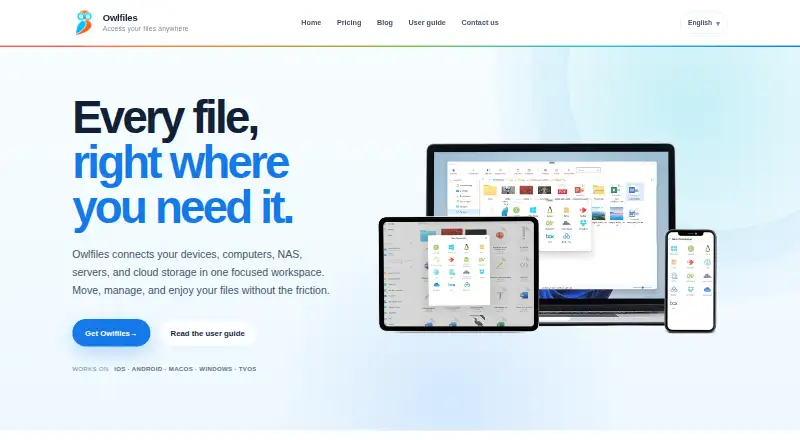
Owlfiles is a synchronization app for keeping folders in sync across its supported devices. It supports iOS, Android, macOS, Windows, tvOS and Android TV, and includes both folder synchronization and scheduled synchronization. Mobile apps are available. The free Basic plan allows 3 connections, while Pro costs $1.99/mo, billed monthly, and allows unlimited connections. That makes the number of connections the stated difference between the two plans: Basic has a limit, and Pro does not. Owlfiles may suit people who want folder syncing across phones, computers or TVs and want the option to schedule synchronization. Its freemium model lets users begin with the free plan before moving to the paid plan if they need additional connections. The product website is skyjos.com.
Good
- Free Basic plan allows 3 connections.
- Pro includes unlimited connections.
- Supports iOS, Android, macOS and Windows.
- Also supports tvOS and Android TV.
- Offers scheduled folder synchronization.
Watch out
- Basic is limited to 3 connections.
- Pro costs $1.99/mo, billed monthly.
Who it suits
Owlfiles suits people who want to synchronize folders across supported phones, computers or TVs. It may also suit users who want scheduled synchronization or need more than three connections.
Verdict
Owlfiles combines folder syncing and scheduling with support across mobile, desktop and TV platforms. Basic covers up to three connections for free; Pro removes that stated limit for $1.99/mo.
Plans and prices
From Owlfiles's own pricing page, checked 12 Oct 2026.
| Plan | Price | What it gives you |
|---|---|---|
| Pro | $1.99 a month | Unlimited connections · photo backup · file sync · PDF annotation · photo editing · use on mobile and desktop · sync connections across devices · $1.99 monthly |
| Pro | $12.99 a year | Unlimited connections · photo backup · file sync · PDF annotation · photo editing · use on mobile and desktop · sync connections across devices · $12.99 yearly |
| Basic | Free | Up to 3 connections · file management · document/photo viewing · music/video playback · transfers · app extensions · built-in servers · network tools · Free |
| Pro monthly | $1.99 a month | Unlimited connections · photo backup · file sync · PDF annotation · music playlists/LRC · photo editing · mobile and desktop use · connection sync · $1.99 monthly |
| Pro yearly | $12.99 a year | Unlimited connections · photo backup · file sync · PDF annotation · music playlists/LRC · photo editing · mobile and desktop use · connection sync · $12.99 yearly |
| Pro lifetime | $29.99, paid once | Unlimited connections · photo backup · file sync · PDF annotation · music playlists/LRC · photo editing · mobile and desktop use · connection sync · $29.99 lifetime |
The facts
Each one read from Owlfiles's own pages, with the date it was checked.
What it does
- AlternativeTo review coverage
- AlternativeTo lists Owlfiles as freemium and proprietary and says the page has no user comments or reviews.checked 15 Oct 2026
- Built-in servers
- The mobile apps provide built-in FTP and HTTP servers for transferring files.checked 15 Oct 2026
- CLI
- The macOS application includes a command-line interface for listing, searching, copying, moving, deleting, and creating folders across local disks, SMB, FTP, SFTP, WebDAV, NFS, and supported cloud services.checked 15 Oct 2026
- Cloud integrations
- Supported cloud and object-storage connections include OneDrive, Dropbox, Box, Amazon S3 and S3-compatible storage, MEGA, pCloud, Google Drive, and OwnCloud.checked 15 Oct 2026
- Connection data
- Connection settings are synchronized to the maker's server only when Sync Connections is enabled, which is disabled by default.checked 12 Oct 2026
- Connection sync
- Encrypted connection settings can be saved to a Skyjos account and synchronized across devices; the setting can be turned off for local-only settings.checked 12 Oct 2026
- Connection synchronization
- Encrypted connection settings can be synchronized through a Skyjos account across devices, and the feature can be disabled for local-only settings.checked 15 Oct 2026
- Cross-location transfers
- Files can be copied directly between mobile devices, computers, NAS, servers, and cloud drives.checked 12 Oct 2026
- Documentation
- The user guide is organized by iOS, Android, macOS, and Windows, with 20, 16, 13, and 10 articles respectively on the guide index.checked 15 Oct 2026
- Document editing
- Documents can be opened in Owlfiles or edited in Acrobat, Microsoft Office, or iWork with changes saved back to the original location.checked 15 Oct 2026
- Documents
- Documents can be opened in Owlfiles or edited using Acrobat, Office, or iWork, with changes saved back to their original location.checked 12 Oct 2026
- Encryption and analytics
- Skyjos says stored sign-in and OAuth data are encrypted and that Owlfiles uses no analytics services.checked 15 Oct 2026
- File operations
- It supports renaming, sorting, deleting, copying, moving, and organizing files into folders and subfolders.checked 12 Oct 2026
- File transfers
- Files can be copied directly between mobile devices, computers, NAS devices, servers, and cloud drives, including transfers between two remote locations.checked 15 Oct 2026
- Folder synchronization
- Sync tasks support remote-to-local, local-to-remote, and two-way synchronization, with optional automatic scheduling.checked 15 Oct 2026
- Google Play data safety
- Google Play states that no data is shared with third parties, personal information may be collected, data is encrypted in transit, and deletion requests are supported.checked 15 Oct 2026
- Licence
- AlternativeTo classifies Owlfiles as proprietary and freemium rather than open source.checked 15 Oct 2026
- Limit: Google Drive history
- The Apple listing’s version history says Google Drive support was removed because Skyjos had not passed Google’s CASA assessment for full access.checked 15 Oct 2026
- Limit: legacy purchases
- An Apple reviewer complained that older in-app purchases could not be restored and that a prior Apple TV purchase did not unlock the current app.checked 15 Oct 2026
- Limit: remote text editing
- A Google Play reviewer reported that saving remote text files sometimes produced an empty file and lost the original data.checked 15 Oct 2026
- Limit: video playback
- An Apple reviewer reported that long, lightly compressed and 4K video playback struggled and appeared limited to about 1 Mbps.checked 15 Oct 2026
The company
- Company background
- Skyjos describes its apps as having more than 15 years on the market and over 5 million downloads.checked 12 Oct 2026
- Company scale indicator
- Skyjos’s homepage states that its apps have more than 5 million downloads and have been on the market for more than 15 years.checked 15 Oct 2026
Money
- Free plan
- Yeschecked 21 Sep 2026
The full review of Owlfiles
Owlfiles is a file manager for connecting phones, computers and other devices to network storage, servers and cloud drives. It is best suited to people who need to manage or move files across several locations, particularly from mobile devices. Its combination of direct transfers, scheduled sync and broad platform support is compelling, but the free plan’s three-connection limit may not stretch to a larger setup.
Overview
Owlfiles brings everyday file management and transfers together across computers, NAS, servers and cloud storage. Users can copy, move, rename, sort, delete and organize files into folders and subfolders. Direct transfers between connected locations avoid the extra step of downloading a file to one device before uploading it elsewhere.
Connections include WebDAV, NFS, FTP, SFTP, OneDrive, Dropbox, Box and S3, as well as computers, servers and NAS. That range suits mixed storage setups; the practical constraint is that Basic allows only three connections, so people with several destinations may need a paid plan.
Key features
Sync and photo backup
Owlfiles can back up photos from iOS and Android to a computer, NAS or cloud storage when the app is opened. Scheduled folder sync can run in one direction or both, making it useful for recurring transfers without requiring users to move each file manually. These features are reserved for Pro, so Basic is for core file management rather than ongoing backup and sync.
Documents and media
Documents can be opened in Owlfiles or edited with Acrobat, Office or iWork, with changes saved to their original location. That is a practical advantage when working on files kept in network or cloud storage. The app also streams popular video and music formats without first downloading them and supports CUE and M3U playlists, which may appeal to people who browse media from connected storage.
Connection settings and privacy
Encrypted connection settings can sync across devices through a Skyjos account, or remain local if Sync Connections is turned off. Sync Connections is disabled by default, and sign-in and OAuth data stored in the app are encrypted. The maker says Owlfiles does not collect files, documents or media content and does not use analytics services in the app.
Pricing
Basic: free. It includes up to three connections, file management, document and photo viewing, music and video playback, and file transfer. This is a reasonable starting point for a small setup, but it excludes photo backup, file sync, PDF annotation and photo editing.
Pro: $1.99 a month, billed monthly. It adds unlimited connections, photo backup, file sync, PDF annotation, photo editing, use on mobile and desktop, and connection syncing across devices. This is the plan for users who need recurring backup or sync, or whose storage destinations exceed Basic’s cap.
Pro Lifetime: $29.99, paid once, billed as a lifetime purchase. It includes the same stated features as Pro, making it the one-time payment option for someone who wants those capabilities without a monthly bill. Basic’s three-connection cap is the main reason not to stay on the free plan; Pro’s paid features matter most to users who need backup, sync or the additional tools.
Platforms
Owlfiles supports iOS, Android, macOS, Windows, tvOS and Android TV. The combination of mobile, desktop and TV support gives it a broader device reach than a phone-only file manager. Step-by-step guides cover server and NAS setup, file transfer, folder sync and photo backup, which can help users working with network storage.
Who it's for
Owlfiles is a strong fit for people who regularly move files among phones, computers, NAS devices, servers and cloud drives, especially those who want scheduled folder sync or mobile photo backup. It is less compelling for someone with only a few files to manage in one location: Basic may suffice for simple transfers, but the three-connection cap can be restrictive as a setup grows.
Pros and cons
- Pros: Direct transfers between connected locations reduce the need for a download-and-upload workflow.
- Pros: Scheduled one-way or two-way folder sync and mobile photo backup support recurring file upkeep.
- Pros: Support for common network protocols, cloud drives, computers, servers and NAS makes it suitable for mixed storage.
- Pros: Documents can be edited in named third-party apps and saved back to their original location.
- Cons: Basic is capped at three connections and lacks photo backup and file sync, so users with a larger or more automated setup need Pro.
- Cons: Connection settings sync through a Skyjos account only when enabled, but users who want cross-device settings must opt in to that feature.
Alternatives
CloudDrive2 is worth considering for a cloud-drive-focused setup: its free Basic plan allows up to two cloud drives, one local mount and up to two devices online at once, though that device limit is not enforced yet.
rclone is a free, open-source alternative for readers who prefer a free project over Owlfiles’ freemium plans.
FolderSync is another freemium option for readers comparing file-sync software across Android, Linux, macOS and Windows.
Air Explorer may suit someone whose needs fit its free BASIC limits: one account per cloud, read-only cloud-to-cloud sync or transfer, and two simultaneous downloads and uploads.
RaiDrive is another freemium option for readers comparing software available on Linux and Windows.
Air Live Drive may suit a Windows or macOS user whose needs fit its free Basic allowance of one drive per cloud and a maximum of three drives.
Cyberduck is a freemium alternative for macOS and Windows; it is licensed under the GPL, with its source code available on GitHub.
ExpanDrive is another freemium option for Linux, macOS and Windows, with a free personal-use plan for up to 10 users or devices per year and community support.
For category comparisons, see WebDAV Client Software and File Manager Software.
Verdict
Choose Owlfiles if you want one cross-platform app for managing and transferring files across mobile devices, computers, network storage and cloud drives, with scheduled sync and photo backup available in Pro. The three-connection Basic cap is a real limitation for broader setups, while Pro’s $1.99 monthly price or $29.99 lifetime option makes the upgrade clear. If you only need basic file handling across a small number of locations, Basic may be enough; if you need more connections or recurring sync, Owlfiles makes a stronger case.
Getting started
- Visit the Owlfiles website
- Install the app on iOS, Android, macOS, Windows, tvOS, or Android TV
- Start with the free Basic plan or choose Pro monthly or lifetime
- Add computers, servers, NAS, protocols, or cloud drives as connections
- Use file operations or direct transfers between connected locations
- Enable photo backup or scheduled folder synchronization when needed
- Turn on Sync Connections only if you want settings synchronized across devices
Limits worth knowing
The free Basic plan permits up to three connections and includes file management, document and photo viewing, music and video playback, and file transfer. Pro removes the connection limit and adds photo backup, file synchronization, PDF annotation, photo editing, desktop and mobile use, and synchronized connection settings.
Questions
Is Owlfiles free?
Yes. The Basic plan costs nothing and allows up to three connections. Pro costs $1.99 per month, or $29.99 as a lifetime purchase.
Which platforms support Owlfiles?
The product lists iOS, Android, macOS, Windows, tvOS, and Android TV.
Can Owlfiles connect to cloud storage?
Yes. Listed connections include OneDrive, Dropbox, Box, and S3, along with computers, servers, NAS, WebDAV, NFS, FTP, and SFTP.
Does Owlfiles back up photos?
Photo backup can send iOS and Android photos to a computer, NAS, or cloud storage. This feature is included with Pro.
Are connection settings synchronized?
They can be encrypted and synchronized through a Skyjos account when Sync Connections is enabled. The setting is disabled by default and can be turned off for local-only settings.
Alternatives to Owlfiles
- 1

Filestash
Free planOpen sourceAndroidiOSWebAPI9.2From $50 a month - 2

WinSCP
Free planOpen sourceWindows7.9Free plan - 3

Dolphin
Free planOpen sourceLinuxWindows7.8Free plan - 4
FileRun
AndroidiOSWebAPI7.8From €9.90 a year - 5
OneCommander
Free planWindows7.8$30 one-time - 6
nnn
Free planAndroidLinuxmacOSWindows7.8Free plan