Filestash
Filestash is an open source platform for file sharing, document management, managed file transfer, and archiving.
What Filestash is
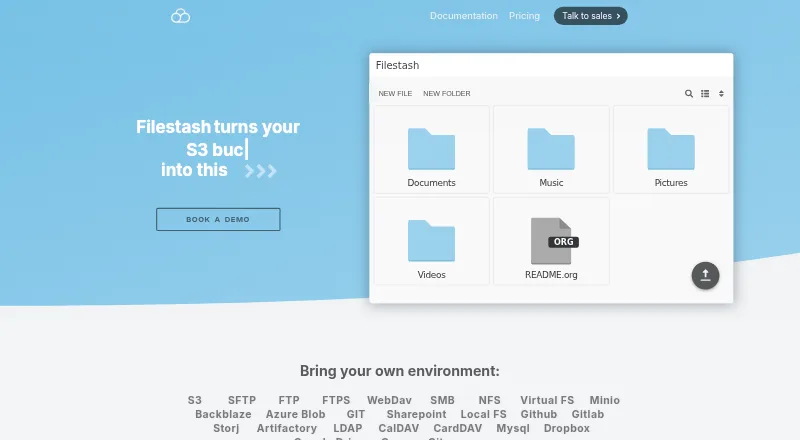
Filestash is an open source platform for file sharing, document management, managed file transfer, and archiving. Its browser interface connects to storage services including FTP, WebDAV, SFTP, S3, SMB, Git, SharePoint, Google Drive, Dropbox, and Storj, so users can browse, organize, and share files through one interface. It can also expose storage through SFTP, MCP, FTP, WebDAV, S3, or AS2 gateways. An event-based workflow engine chains actions and can be extended with plugins. Authentication options include LDAP, SAML, and OIDC single sign-on, with role-based access controls. Filestash describes its audit logs as immutable and traceable, and its plugin catalog includes security tools such as IP blocking and ClamAV scanning. Listed AI capabilities include semantic search, smart folders, and OCR, with local models through Ollama. It supports web, Windows, macOS, Linux, iOS, and Android. Self Served costs $50 a month and includes three seats; Enterprise Solutions costs $290 a month and includes unlimited users.
Good
- Connects to a wide range of storage services.
- Provides LDAP, SAML, and OIDC SSO options.
- Workflow engine can chain event-triggered actions.
- Supports web, desktop, and mobile platforms.
Watch out
- Self Served includes three seats.
- Installation guide requires a Linux server and Docker.
- Hobby and Pro prices are not listed.
Who it suits
The Hobby tier is presented for individuals, while Self Served and Enterprise Solutions are intended for companies. It may suit teams that need to connect several storage systems or control access across them.
Verdict
Filestash combines file access across connected storage with sharing, workflows, and access controls. Organizations should account for deployment requirements and plan limits when considering it.
Plans and prices
From Filestash's own pricing page, checked 14 Oct 2026.
| Plan | Price | What it gives you |
|---|---|---|
| Self Served | $50 a month | Cloud or self-hosted · commercial license · SSO (SAML, OIDC, LDAP) · RBAC · 3 seats · single node · From $50 / month |
| Enterprise Solutions | $290 a month | Unlimited users · audit and compliance · white-labeling · 24/7 support · high availability · From $290 / month |
| Pro | — | — |
| Hobby | Free | Self-hosted · AGPL v3 · up to 3 users |
The facts
Each one read from Filestash's own pages, with the date it was checked.
What it does
- Access control
- The product supports access controls including RBAC and says authorization can be tailored to control who can do what and where.checked 28 Sep 2026
- AI
- The site lists AI features for semantic search, smart folders, and OCR, including support for local models via Ollama.checked 28 Sep 2026
- API
- The HTTP API documents session-token creation plus endpoints for listing, uploading, downloading, zipping, renaming, deleting, creating directories and creating empty files.checked 14 Oct 2026
- Audit and compliance
- The site describes audit logs as immutable, tamper proof, traceable, timestamped, and non-repudiable, and says they support GDPR compliance.checked 28 Sep 2026
- Authentication
- The site lists corporate SSO integrations for LDAP, SAML, and OIDC.checked 28 Sep 2026
- Authentication integrations
- Available authentication methods include SAML, OIDC, LDAP, MFA, database authentication, signed URLs, proxy authentication and QR-code access, with vendors such as Okta, Auth0, Keycloak, AWS Cognito and Azure listed.checked 14 Oct 2026
- Community activity
- The GitHub repository showed about 14.8 thousand stars, 1 thousand forks and more than 2,500 commits when opened.checked 14 Oct 2026
- Core features
- The feature matrix includes API access, an MCP gateway, resumable TUS uploads, workflows, image and video viewers/transcoding, tagging, file and code editors, shared links, network-drive mounting and collaboration permissions.checked 14 Oct 2026
- Deployment
- The installation guide says Filestash can be installed using its official Docker image and requires a Linux server with Docker, Docker Compose, and curl.checked 28 Sep 2026
- Deployment options
- Getting-started documentation offers self-hosting, AWS Marketplace deployment with support and an online demo.checked 14 Oct 2026
- Documentation depth
- Documentation covers installation and upgrades, storage, authentication, authorization, APIs, gateways, plugins, configuration, versioning and hardening.checked 14 Oct 2026
- Extensibility
- Filestash uses a plugin architecture covering storage, authentication, authorization, viewers, editors, transcoding, security and themes.checked 14 Oct 2026
- File-format support
- The installation guide says plugins add support for about 140 niche file formats.checked 14 Oct 2026
- File sharing
- The site says users can browse, organize, and share files across storage solutions through one interface.checked 28 Sep 2026
- Gateways
- Gateways can expose connected storage through SFTP, S3, FTP, SMB, WebDAV, MCP and AS2 protocols.checked 14 Oct 2026
- Intended users
- The site presents Hobby for individuals and separate Self Served and Enterprise Solutions tiers for companies.checked 28 Sep 2026
- Licence
- The public repository is licensed under GNU AGPL version 3.0.checked 14 Oct 2026
- Limit: collaboration scope
- An independent technical review says Filestash connects to existing storage rather than providing a full collaboration suite with calendars, groupware or native document co-editing.checked 14 Oct 2026
- Limit: configuration complexity
- Reddit users say the plugin-driven setup requires more manual decisions and configuration than turnkey tools such as Nextcloud.checked 14 Oct 2026
- Limit: no native sync ecosystem parity
- Reddit criticism says Filestash lacks an Android client and sync-client breadth expected from a full Nextcloud replacement.checked 14 Oct 2026
- Limit: SSO pricing
- Reddit commenters criticize that OAuth or SSO access requires the paid plan, which they consider expensive for homelab or family use.checked 14 Oct 2026
The company
- Company/maintainer
- The public project identifies Mickael Kerjean as its maintainer and original author.checked 14 Oct 2026
- Headquarters
- West Ryde, New South Wales, Australiachecked 28 Sep 2026
Money
- Free plan
- Yeschecked 20 Sep 2026
The full review of Filestash
Filestash is a browser-based platform for managing and sharing files across connected storage, with gateways and workflow automation for broader transfer needs. It best suits organizations that need a common access layer and fine-grained controls; individuals may find its company-oriented paid tiers more than they need.
Its breadth is the draw: one interface spans many storage services, while self-hosting and protocol gateways offer room to fit existing infrastructure. The trade-off is deployment work and a sharp distinction between a small free tier and paid business capabilities.
Overview
Filestash brings file sharing, document management, managed file transfer, and archiving into an open-source platform. It connects to existing storage rather than requiring users to replace it, and can present that storage through a browser interface or expose it to other clients through gateways.
That makes it more than a conventional file manager, but also means its value depends on the systems and controls an organization needs to bring together. Individuals can use the Hobby tier for up to three users; companies have separate self-served and enterprise offerings.
Key features
Connect storage, then share or expose it
Filestash connects to FTP, FTPS, SFTP, WebDAV, SMB, S3, NFS, Git, SharePoint, Google Drive, Dropbox, and Storj. Users can browse, organize, and share files across those connections in one interface. This range is useful for teams working across older file-transfer services and cloud storage, though it is a bigger proposition than a simple single-server transfer client.
Gateways can expose underlying storage through SFTP, MCP, FTP, WebDAV, S3, or AS2. Folder synchronization, SSH-key authentication, and remote file editing add practical file-management and transfer options.
Automate and govern access
The workflow engine chains actions in response to events, with plugins available to extend it; scripting is also supported. That gives teams a way to automate recurring processes rather than treating every transfer as a manual task.
Corporate SSO integrations include LDAP, SAML, and OIDC, alongside role-based access control and configurable authorization. The plugin catalog includes audit logs, FIPS-compliant ciphers, activity detection, IP blocking, and ClamAV scanning. Filestash describes its audit logs as immutable and traceable, and says they support GDPR compliance. These capabilities make the platform more relevant to controlled organizational use than to casual personal file browsing.
AI tools and deployment
Semantic search, smart folders, and OCR are among the listed AI features, including support for local models through Ollama. Filestash can be installed from its official Docker image on a Linux server with Docker, Docker Compose, and curl. The guide says 128 MB of RAM and one CPU core will suffice except for demanding video transcoding or service to thousands of simultaneous users. Self-hosting offers deployment control, but it also puts setup and upkeep on the organization.
Pricing
The pricing model is freemium, with a free plan and a free trial. The Hobby plan is aimed at individuals and supports up to three users, but has no published price. That cap makes it a plausible small-group starting point, not a substitute for the seat allowance and business controls of a paid license.
Self Served costs $50 a month on a monthly subscription. It includes a commercial license, cloud or self-hosted deployment, SSO (SAML, OIDC, LDAP) with RBAC, three seats, and a single-node deployment. It is the more suitable paid choice for a small company that needs commercial use and access control, but three included seats and a single node constrain larger or more resilient deployments.
Enterprise Solutions costs $290 a month on a monthly subscription. It includes unlimited users, audit and compliance features, whitelabeling, 24/7 support, and high availability. This is the tier for organizations that need scale and continuity; teams without those needs may be paying for capacity and support they will not use. Pro has no published price, so it is difficult to weigh against the named tiers.
The maker also offers developer technical support, security patches before public disclosure, deployment options, hardening help, plugins, and consulting. Those services may matter to teams running a self-hosted deployment, but they do not remove the need to account for the deployment requirements.
Platforms
Filestash supports web, Windows, macOS, Linux, iOS, and Android, and is also offered as self-hosted software with an API. This combination gives organizations a browser-based access point across desktop and mobile platforms while retaining a server deployment option.
Who it's for
Choose Filestash when a team needs to unify access to multiple storage systems, offer protocol gateways, automate event-driven work, or apply SSO and role-based controls. Its self-hosted option and enterprise tier suit organizations that want deployment flexibility and, at the higher tier, high availability and 24/7 support.
It is less compelling for someone who only needs a free client to transfer files between a computer and a server. The setup requirements and business-tier pricing make its broader management layer unnecessary for that narrower job.
Pros and cons
- Broad storage and protocol coverage: connections and gateways span established transfer protocols, cloud services, and other storage, which can reduce the need for separate access points.
- Useful organizational controls: SSO, RBAC, audit features, security plugins, and an enterprise option with high availability address needs that basic transfer clients do not target.
- Self-hosting has modest stated baseline requirements: 128 MB of RAM and one CPU core are presented as sufficient for ordinary use, though intensive transcoding or very large simultaneous audiences need more.
- Paid self-served tier is limited to three included seats: that can fit a small team but may force a larger group toward Enterprise Solutions.
- Deployment takes infrastructure: self-hosting requires a Linux server plus Docker, Docker Compose, and curl, a meaningful burden for users seeking a ready-made personal file client.
Alternatives
For a focused transfer client, FileZilla Client is free and supports FTP, FTPS, and SFTP on Linux, macOS, and Windows. It is the simpler fit when those protocols are enough and a unified storage interface, workflows, or organization-level controls are not needed. WinSCP is another free Windows client, with SFTP, FTP, FTPS, SCP, WebDAV, and S3 support.
Core FTP is a Windows freemium alternative with single-user Standard and Pro licenses priced at $24.95 a month and $39.95 a month, respectively. Consider it when a Windows-focused client better matches the job than Filestash’s broader platform-and-storage layer. ExpanDrive offers a free tier billed forever for personal use, covering up to 10 users or devices per year and all 15 cloud services and protocols, with community support; it is worth considering for personal access across those services.
Cyberduck is a freemium option for macOS and Windows, and is licensed under the GPL with source available on GitHub. CrossFTP is a freemium client for Windows, macOS, and Linux, with Pro and Enterprise plans for one computer at custom pricing. Xftp is a Windows freemium option whose free license is restricted to personal, home, and educational non-commercial use. Commander One is a macOS freemium alternative with a Personal License for 29.99 USD as a one-time payment for one Mac.
Browse more options in SFTP Client Software or File Manager Software.
Verdict
Filestash is a strong fit for organizations that need one access layer across varied storage, plus gateways, automation, and granular controls. Its most persuasive case is the combination of infrastructure flexibility and business-grade access management. Look elsewhere if you only need a straightforward free transfer client, or if three seats and a single node are too restrictive but Enterprise Solutions is more than you need.
Getting started
- Visit the Filestash website and choose the Hobby or a paid tier.
- For self-hosting, prepare a Linux server with Docker, Docker Compose, and curl.
- Install Filestash using its official Docker image.
- Connect the storage services you want to browse, organize, or share.
Limits worth knowing
Hobby supports up to three users. Self Served costs $50 a month and includes three seats; Enterprise Solutions costs $290 a month and supports unlimited users.
Questions
Is Filestash open source?
Yes. Filestash describes itself as an open source platform.
Is there a free plan?
Yes. Filestash has a free plan; the Hobby tier supports up to three users.
What platforms does Filestash support?
It supports web, Windows, macOS, Linux, iOS, and Android.
How much do the paid plans cost?
Self Served costs $50 a month, and Enterprise Solutions costs $290 a month. Both are monthly subscriptions.
Which storage services can it connect to?
Connections include FTP, WebDAV, SFTP, S3, SMB, Git, SharePoint, Google Drive, Dropbox, and Storj.
Who makes Filestash?
The maker is Filestash, headquartered in West Ryde, New South Wales, Australia.