nnn
nnn is a free, open-source terminal file manager designed to be small and require little configuration.
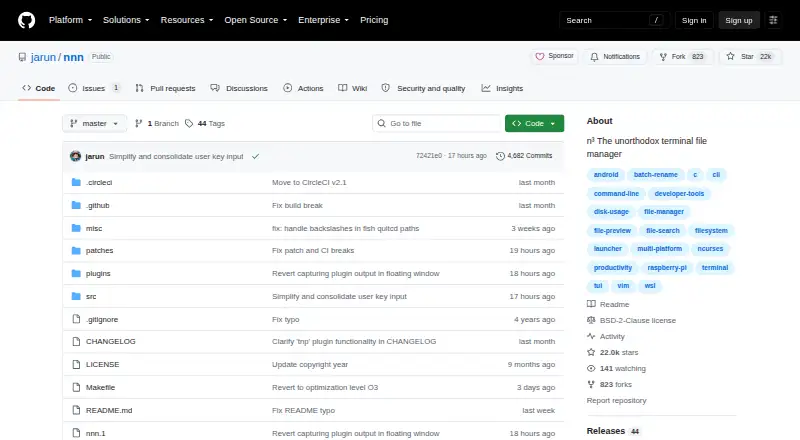
What nnn is
nnn is a free, open-source terminal file manager designed to be small and require little configuration. It handles copying, moving, deleting, archiving, and linking, along with batch renaming, disk-usage analysis, app launching, and file picking. Navigation includes contexts, sessions, bookmarks, and directory marks; search options include instant filtering, fuzzy matching, regular expressions, and string filters. Directory and text previews are built in, and plugins can add live previews, disk mounting, file comparison, and uploads. The tool can create, list, extract, and mount archives. Remote mounts use optional sshfs or rclone; nnn also supports desktop openers, shell integration, and FreeDesktop-compliant trash utilities. The project says it typically uses less than 3.5 MB of resident memory. It has no configuration file, though environment-variable settings are available. nnn runs on Android, Linux, macOS, and Windows, and is licensed under BSD-2-Clause. Installation options include a statically linked binary, packages, or compiling from source. It depends on a wide-character curses library and libc; libreadline is optional, and some features need external utilities.
Good
- Supports contexts, sessions, bookmarks, and directory marks.
- Includes directory and text previews.
- Can create, extract, and mount archives.
- Offers packages and a statically linked binary.
Watch out
- It does not provide a dual-pane layout.
- Remote mounts require optional sshfs or rclone.
- Some features need external utilities.
Who it suits
nnn suits people who want file management from a terminal, from beginners to power users. Its plugins and optional integrations also fit users who want to extend file workflows.
Verdict
nnn covers everyday file operations, search, previews, and archives in a terminal interface. Its default-driven setup may appeal to users who prefer a small tool over configuration files.
Plans and prices
From nnn's own pricing page, checked 5 Oct 2026.
| Plan | Price | What it gives you |
|---|---|---|
| Free | Free | Open-source terminal file manager |
The facts
Each one read from nnn's own pages, with the date it was checked.
What it does
- Archive support
- Yeschecked 21 Sep 2026
- Configuration
- nnn has no configuration file and uses sensible defaults with optional environment-variable configuration.checked 5 Oct 2026
- Dependencies
- Optional integrations include sshfs and rclone for remote mounts, gio trash or trash-cli for trash, and advcpmv for copy and move progress.checked 5 Oct 2026
- Dual-pane layout
- Nochecked 21 Sep 2026
- File operations
- It can analyze disk usage, batch rename, launch apps, pick files, and copy, move, delete, archive, and link selections.checked 5 Oct 2026
- Installation
- The project offers a statically linked binary and packages, and can also be compiled from source.checked 5 Oct 2026
- Integrations
- Remote mounts can use sshfs or rclone, and nnn supports desktop openers, shell integration, and FreeDesktop-compliant trash utilities.checked 5 Oct 2026
- Intended users
- The project describes nnn as unobtrusive and designed for smart workflows, and documents beginner and power-user quickstarts.checked 5 Oct 2026
- License
- The GitHub repository identifies the project license as BSD-2-Clause.checked 5 Oct 2026
- Navigation
- It supports contexts, sessions, bookmarks, directory marks, and remote mounts through sshfs or rclone.checked 5 Oct 2026
- Navigation and search
- It supports contexts, sessions, bookmarks, instant filtering, fuzzy search, and regex search.checked 5 Oct 2026
- Plugins
- Language-agnostic plugins can add capabilities such as live previews, disk mounting, file comparison, and uploads.checked 5 Oct 2026
- Preview and archives
- It includes directory and text previews, supports preview plugins, and can create, list, extract, and mount archives.checked 5 Oct 2026
- Preview pane
- Yeschecked 21 Sep 2026
- Privacy
- The project describes nnn as privacy-aware, with no unconfirmed user data collection.checked 5 Oct 2026
- Product
- nnn is a full-featured terminal file manager designed to be small, fast, and nearly zero-configuration.checked 5 Oct 2026
- Purpose
- nnn is a full-featured terminal file manager.checked 5 Oct 2026
- Remote file access
- Yeschecked 21 Sep 2026
- Remote mount limit
- Remote mounts require sshfs or rclone, and both are listed as optional dependencies.checked 5 Oct 2026
- Requirements
- nnn depends on a wide-character curses library and libc; libreadline is optional, and some features need external utilities.checked 5 Oct 2026
The company
- Founded
- 2016checked 28 Sep 2026
Where it runs
- Linux support
- Yeschecked 21 Sep 2026
- macOS support
- Yeschecked 21 Sep 2026
- Platforms
- The project says nnn runs on Linux, macOS, Android through Termux, Cygwin, and WSL, among other environments.checked 5 Oct 2026
The full review of nnn
nnn is a free, open-source terminal file manager for people who want broad file-handling tools without a configuration file. Its small footprint and sensible defaults are appealing, but optional utilities and a terminal-first workflow make it a less natural fit for readers who want a conventional graphical manager.
Overview
nnn covers routine file operations alongside search, previews, archives, and remote mounts. It can copy, move, delete, link, and batch-rename selections, analyze disk usage, launch apps, and pick files. The project says it typically uses less than 3.5 MB of resident memory, a practical advantage on resource-constrained systems.
There is no configuration file; optional environment variables provide a route to customization without making setup the starting point. That simplicity will suit users happy with defaults, while those who expect a dual-pane layout or a graphical interface should look elsewhere. The project describes its privacy approach as avoiding unconfirmed user data collection.
Key features
Navigation and search
Contexts, sessions, bookmarks, and directory marks help organize movement between locations. Search-as-you-type, fuzzy search, and string and regex filters support different ways to narrow a file list. These tools make nnn more capable than a basic directory browser, though using them requires comfort with a terminal interface.
Previews, archives, and extensions
Directory and text previews, plus preview plugins, help inspect files without leaving the manager. nnn can create, list, extract, and mount archives. Language-agnostic plugins can add live previews, disk mounting, file comparison, and uploads, giving users room to extend the tool without making those additions part of its default setup.
Remote access and integrations
Remote mounts can use sshfs or rclone, while desktop openers, shell integration, and FreeDesktop-compliant trash utilities connect nnn to surrounding workflows. These integrations are useful, but some depend on optional external utilities. The base requirements include a wide-character curses library and libc; libreadline is optional, and some features need additional tools.
Pricing
nnn is open-source software under the BSD-2-Clause license. Its Free plan costs nothing and includes the terminal file manager. There are no paid tiers or trial to weigh against it.
Platforms
nnn is listed for Android, Linux, macOS, and Windows. The project offers packages and a statically linked binary, and can also be compiled from source. Windows is among the listed platforms, although the platform details identify Windows support as No; readers on Windows should verify that nnn fits their setup before choosing it.
Who it's for
nnn is best suited to terminal users who want a compact manager for everyday operations, flexible search, previews, archive handling, and optional remote mounts. Beginner and power-user quickstarts serve different experience levels, but its terminal-first design remains a poor match for anyone seeking a conventional graphical or dual-pane file manager.
Pros and cons
- Pro: Broad file operations, search, previews, and archive handling are available in one small tool, reducing the need to switch among separate terminal utilities.
- Pro: No configuration file and low typical memory use make it a practical choice for users who value a light default setup.
- Pro: Plugins and optional sshfs or rclone integrations can extend its workflow when users are prepared to install dependencies.
- Con: There is no dual-pane layout, limiting its appeal to users who rely on side-by-side file management.
- Con: Some integrations require optional external utilities, so the full workflow can take more setup than the defaults suggest.
Alternatives
For another free terminal file manager, Rat Commander is a self-contained option for Linux, macOS, and Windows. FileManagerTUI is a free, MIT-licensed choice across those same platforms. Broot is another free option for Linux, macOS, and Windows, with source and precompiled binaries available.
Clifm is worth considering for Android alongside Linux and macOS; it is free under GPL version 2 or later. elio is a free alternative for Linux, macOS, Windows, and self-hosted use. Newt is another open-source option for Linux, macOS, and Windows.
pointer is a free Linux and macOS option credited to Geir Isene and distributed as a single binary under the Unlicense. Runa is a free alternative for Linux, macOS, and Windows.
Verdict
Choose nnn if you want a free, lightweight terminal file manager that combines everyday file operations with search, previews, archives, and optional remote mounts. Its defaults and breadth are the main reasons to choose it; look elsewhere if a dual-pane layout, graphical browsing, or an entirely self-contained dependency profile is important to your workflow.
Getting started
- Open the nnn GitHub website
- Install the statically linked binary or an available package
- Compile nnn from source if preferred
- Install optional sshfs or rclone for remote mounts
- Use environment variables for optional configuration
Limits worth knowing
Remote mounts depend on optional sshfs or rclone integrations. Some features also require external utilities.
Questions
Is nnn free?
Yes. The listed Free plan costs nothing, and nnn is open source.
Which platforms does nnn support?
The listed platforms are Android, Linux, macOS, and Windows. Windows support is separately marked as unavailable.
Does nnn support remote files?
Yes. Remote mounts use sshfs or rclone, which are optional dependencies.
Does nnn have a preview pane?
Yes. It provides directory and text previews, with plugins for live previews.
What license does nnn use?
The GitHub repository identifies the BSD-2-Clause license.
Alternatives to nnn
- 1

Filestash
Free planOpen sourceAndroidiOSWebAPI9.2From $50 a month - 2

Owlfiles
Free planAndroidiOSExtensionmacOS8.7From $12.99 a year - 3

WinSCP
Free planOpen sourceWindows7.9Free plan - 4

Dolphin
Free planOpen sourceLinuxWindows7.8Free plan - 5
FileRun
AndroidiOSWebAPI7.8From €9.90 a year - 6

OneCommander
Free planWindows7.8$30 one-time