
OneCommander
OneCommander is a dual-pane file manager for Windows, positioned as an alternative to Windows Explorer for power users.
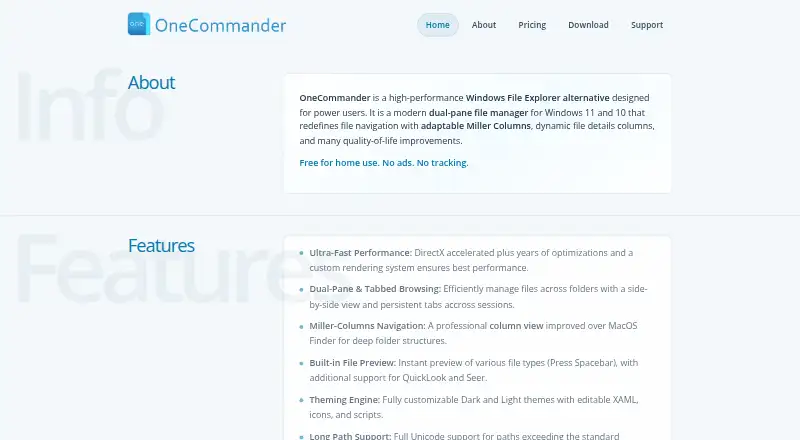
What OneCommander is
OneCommander is a dual-pane file manager for Windows, positioned as an alternative to Windows Explorer for power users. Its navigation includes persistent tabs and Miller Columns for moving through deep folder structures. Built-in previews support various file types and can work with QuickLook and Seer. File Automator offers RegEx renaming and batch image conversion, and users can run scripts on selected files or folders. Themes are customizable with editable XAML, icons, and scripts. OneCommander also supports Unicode paths longer than the standard Windows 260-character limit. It is available for Windows 10 and 11, as an MSI installer, portable ZIP, Microsoft Store build, or through Winget and Scoop. Free home use is limited to personal, non-commercial use, with some settings and advanced features locked. The Lifetime User License costs $30, paid once and includes future updates. The portable version must not be placed in a cloud folder or used on computers with more than one user account. Locally cached file-management data stays on the computer, while activation and optional diagnostics may involve Microsoft Application Insights.
Good
- Dual-pane browsing, persistent tabs, and Miller Columns.
- Batch image conversion and RegEx renaming.
- Supports long Unicode paths.
- Portable ZIP and several installation options.
Watch out
- Available only for Windows 10 and 11.
- Free mode locks some settings and advanced features.
- Portable version is unsuitable for cloud folders and multi-user computers.
- Activation and optional diagnostics may involve Microsoft Application Insights.
Who it suits
OneCommander suits Windows users who want dual-pane browsing, file automation, and customizable navigation. Personal home users can use its free mode, while commercial use requires a license.
Verdict
OneCommander brings deep-folder navigation, previews, and file automation together in a Windows file manager. Its free mode is limited to non-commercial home use, and the portable version has specific restrictions.
Plans and prices
From OneCommander's own pricing page, checked 29 Sep 2026.
| Plan | Price | What it gives you |
|---|---|---|
| Free Home Use | Free | For non-commercial personal use; some settings and advanced features remain locked. · Personal, non-commercial use · Some settings and advanced features locked |
| Lifetime User License | $30, paid once | For one named user; required for commercial use and includes Pro features and future updates. · One named user · Install on multiple computers personally owned and used · Includes future updates and commercial-use rights · One-time purchase |
| Company License | Priced on request | For teams with 5 or more users; volume discounts and a shared license key are available. · Multi-user volume license · Recommended for 5 or more users · Shared key for company deployment · Custom quote |
| School License | Free | For eligible school-owned computers managed on a shared school domain. · Eligible school-owned computers only · Shared school domain · Issued on request |
The facts
Each one read from OneCommander's own pages, with the date it was checked.
What it does
- Archive support
- Yeschecked 20 Sep 2026
- Automation Tools
- It includes RegEx renaming, batch image conversion, and script execution.checked 28 Sep 2026
- Batch rename
- Yeschecked 20 Sep 2026
- Customization
- Users can customize themes with editable XAML, icons, and scripts.checked 29 Sep 2026
- Dual-pane view
- Yeschecked 20 Sep 2026
- File Navigation
- It provides dual-pane browsing, persistent tabs, and Miller Columns navigation.checked 28 Sep 2026
- File tools
- Built-in File Automator provides RegEx renaming and batch image conversion, and users can run scripts on selected files or folders.checked 29 Sep 2026
- Future Updates
- The Lifetime User License includes all future updates.checked 28 Sep 2026
- History
- The project began as BitCommander, first reached users through Kickstarter, and has undergone three major rewrites.checked 29 Sep 2026
- Home Use Pricing
- Free for non-commercial personal use at home.checked 28 Sep 2026
- Install options
- The download page offers an MSI installer, portable ZIP, Microsoft Store build, Winget, and Scoop installation options.checked 29 Sep 2026
- Long paths
- OneCommander supports Unicode paths longer than the standard Windows 260-character limit.checked 29 Sep 2026
- Navigation
- It includes dual-pane browsing, persistent tabs, and Miller Columns for navigating deep folder structures.checked 29 Sep 2026
- Paid from
- 30checked 20 Sep 2026
- Portable Distribution
- The product is available as a portable ZIP version as well as an MSI installer.checked 28 Sep 2026
- Portable limitation
- The portable version must not be installed in a cloud folder and is not for computers with more than one user account.checked 29 Sep 2026
- Portable version
- Yeschecked 20 Sep 2026
Money
- Billing Model
- Licenses are one-time purchases with no subscriptions or renewal fees.checked 28 Sep 2026
- Free plan
- Yeschecked 20 Sep 2026
- Free Tier Limits
- The free mode includes the core file manager, but locks some settings and advanced features.checked 28 Sep 2026
The company
- Company
- OneCommander is developed in New York City and the site identifies Tangible Loop LLC as the copyright holder.checked 29 Sep 2026
- Founded
- 2013checked 28 Sep 2026
- Headquarters
- New York City, New York, United Stateschecked 28 Sep 2026
Where it runs
- Platform
- OneCommander is available for Windows 10 and Windows 11 only; pricing says its licenses do not apply to macOS or Linux.checked 29 Sep 2026
Alternatives to OneCommander
- 1

Filestash
Free planOpen sourceAndroidiOSWebAPI9.2From $50 a month - 2

Owlfiles
Free planAndroidiOSExtensionmacOS8.7From $12.99 a year - 3

WinSCP
Free planOpen sourceWindows7.9Free plan - 4

Dolphin
Free planOpen sourceLinuxWindows7.8Free plan - 5
FileRun
AndroidiOSWebAPI7.8From €9.90 a year - 6
nnn
Free planAndroidLinuxmacOSWindows7.8Free plan