
WinSCP
WinSCP is a free, open-source file manager and transfer client for Microsoft Windows.
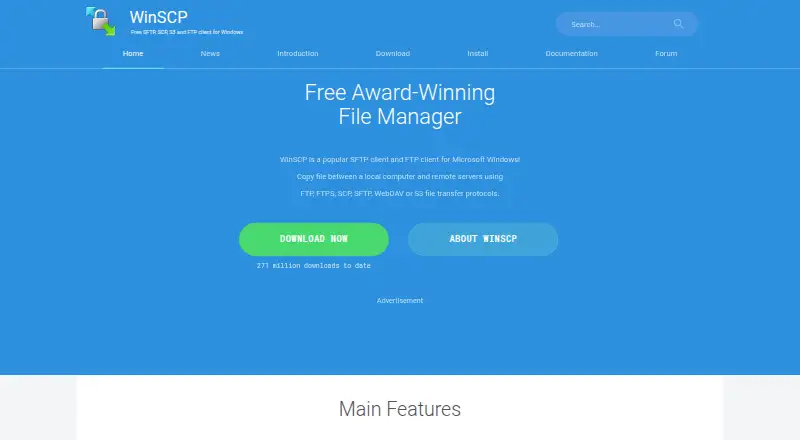
What WinSCP is
WinSCP is a free, open-source file manager and transfer client for Microsoft Windows. It copies files between a local computer and remote servers, supporting SFTP, SCP, FTP, FTPS, WebDAV, and S3. Users can work through Explorer or Commander interfaces; the Commander interface is geared toward keyboard control. The software includes common file operations, directory synchronization, and an integrated text editor. For repeat or advanced tasks, it offers scripting, command-line options, and a .NET assembly. WinSCP integrates with Windows and PuTTY, including sharing site settings with PuTTY, and supports password, keyboard-interactive, public-key, and Kerberos authentication. Stored site information can optionally be protected by a master password. It also provides a portable version and workspaces for session management. The listed stable release is version 6.5.7. Its security guidance cautions that malicious software on the computer running WinSCP may steal credentials stored or entered there.
Good
- Free and open source.
- Supports SFTP, SCP, FTP, FTPS, WebDAV, and S3.
- Includes scripting and task automation.
- Offers a portable version.
- Includes an integrated text editor.
Watch out
- Available for Microsoft Windows only.
- Malware on the computer may steal credentials.
Who it suits
WinSCP suits Windows users who need to move or manage files between a local computer and remote systems. Its scripting, command-line, and .NET options also suit users automating transfers.
Verdict
WinSCP combines file transfer, file management, and automation features in a free Windows client. Consider its Windows-only availability and the risk to credentials from malware on the computer running it.
Plans and prices
From WinSCP's own pricing page, checked 30 Sep 2026.
| Plan | Price | What it gives you |
|---|---|---|
| WinSCP | Free | Windows file transfer client · SFTP, FTP, FTPS, SCP, WebDAV and S3 protocols |
The facts
Each one read from WinSCP's own pages, with the date it was checked.
What it does
- Authentication
- Documented authentication methods include password, keyboard-interactive, public key and Kerberos; WinSCP also integrates with Pageant for SSH public-key authentication.checked 30 Sep 2026
- Automation
- It provides scripting, a command-line interface and a .NET assembly for advanced programming tasks.checked 30 Sep 2026
- Credential protection
- Stored site information can optionally be protected with a master password.checked 30 Sep 2026
- Download count
- The site reports 271,597,440 total downloads.checked 27 Sep 2026
- File management
- Features include common local and remote file operations, an integrated text editor and directory synchronization.checked 30 Sep 2026
- File operations
- Supports all common operations with files.checked 27 Sep 2026
- File transfer
- Copies files between a local computer and remote servers.checked 27 Sep 2026
- Graphical interface
- Provides a graphical user interface.checked 27 Sep 2026
- Integrated editor
- Includes an integrated text editor.checked 27 Sep 2026
- Integration resources
- Documentation includes .NET and COM Library and Command Line Options.checked 27 Sep 2026
- Integrations
- WinSCP integrates with Windows and PuTTY, and can share site settings with PuTTY.checked 30 Sep 2026
- Interfaces
- It offers Explorer and Commander interfaces, with the Commander interface focused on keyboard control.checked 30 Sep 2026
- Language support
- The software is translated into many languages.checked 27 Sep 2026
- Limit
- WinSCP is described as a file-transfer client between a local and remote computer; its listed platform is Windows.checked 30 Sep 2026
- Open source
- A user review describes WinSCP as great Open Source software.checked 27 Sep 2026
- Portable use
- The site provides a Portable Use section.checked 27 Sep 2026
- Pricing model
- The pricing page presents donation amounts rather than paid software plans.checked 27 Sep 2026
- Protocols
- It supports SFTP, SCP, FTP, FTPS, WebDAV and S3 file transfer protocols.checked 30 Sep 2026
Money
- Billing terms
- The supplied pricing text does not state recurring billing terms.checked 27 Sep 2026
- Free plan
- Yeschecked 20 Sep 2026
- Free software
- WinSCP is presented as a free SFTP, SCP, S3 and FTP client for Windows.checked 27 Sep 2026
The company
- Company identity
- The site identifies the publisher as WinSCP.net and shows rights from 2000 to 2026.checked 27 Sep 2026
- Founded
- 2000checked 23 Sep 2026
Where it runs
- Platform and version
- The official site describes WinSCP as a client for Microsoft Windows and lists stable version 6.5.7 as the supported release.checked 30 Sep 2026
The full review of WinSCP
WinSCP is a Windows file manager and transfer client for connecting a local computer to remote systems. It is best suited to Windows users who need several transfer protocols, remote file operations or repeatable jobs in one tool. Its breadth is useful, but it is not an option for users who need a native client on another operating system.
Overview
WinSCP pairs a graphical interface with file transfers over FTP, FTPS, SCP, SFTP, WebDAV and S3. Explorer and Commander layouts cater to different habits, with Commander oriented toward keyboard control. Common file operations, directory synchronization and an integrated text editor make it practical for managing remote files as well as copying them.
The software is open source and free, and a portable version is available. Its role is focused: it connects local and remote computers, rather than acting as a general-purpose cloud workspace. For Windows users with that specific need, the combination of transfer and management tools is compelling without a paid plan.
Key features
Transfers and file management
WinSCP supports FTP, FTPS, SCP, SFTP, WebDAV, WebDAVS and S3, covering a broad range of server and storage connections. That range can spare users from switching clients as their transfer needs vary. Workspaces help manage sessions, and port forwarding is supported. The integrated editor and routine file operations are useful for making remote changes without opening a separate tool; directory synchronization helps keep local and remote folders aligned.
Automation and integration
Scripting, command-line options and a .NET assembly give technical users ways to automate transfers and build more advanced workflows. This is a meaningful advantage over a client limited to manual copying, though it will matter less to someone who only moves files occasionally. WinSCP integrates with Windows and PuTTY, and can share site settings with PuTTY. Its authentication options include passwords, keyboard-interactive authentication, public keys and Kerberos; Pageant integration supports SSH public-key authentication.
Security and support
Stored site information can be protected with an optional master password, but that does not remove the risk posed by malware on the computer: malicious software can steal credentials stored or entered there. Users handling sensitive connections should treat the security of the Windows machine as part of the transfer setup. Documentation and a support forum monitored by the development team provide troubleshooting help; sensible, guideline-following forum posts receive replies within two business days on average.
Pricing
WinSCP costs nothing. The free plan includes the Windows file transfer client and support for SFTP, FTP, FTPS, SCP, WebDAV and S3. There is no free trial because the software is already free, and no paid tier is needed to access the listed client features. That makes it a straightforward choice for individuals and technical teams that can use Windows and do not need a different platform.
There are no paid plans to weigh against the free version. The supplied pricing text does not state recurring billing terms, and the plan description does not specify seat or transfer quotas.
Platforms
WinSCP is for Microsoft Windows. Its portable version is useful when an installation is not the preferred way to use the client, but it does not address the lack of native Linux or macOS support. Readers choosing software for those platforms should look elsewhere.
Who it's for
WinSCP is a strong fit for Windows users who connect to different kinds of remote systems, regularly manage files after connecting, or want to automate transfers. Its interface options accommodate both mouse-driven browsing and keyboard-focused work. Users who only need occasional basic transfers may not need its automation and management range; users who need cross-platform support should choose a client available on their operating system.
Pros and cons
- Broad protocol coverage: FTP, FTPS, SCP, SFTP, WebDAV, WebDAVS and S3 make one client useful across varied transfer needs.
- File management alongside transfers: An integrated editor, common file operations and directory synchronization support work beyond copying.
- Automation options: Scripting, command-line access and a .NET assembly suit repeatable or programmatic workflows.
- Free and open source: Users can access the client without a paid plan, and a portable version is available.
- Windows only: The platform restriction rules it out for users who need a native client on macOS or Linux.
- Credentials depend on computer security: A master password is optional protection for stored site information, but malware can still steal credentials entered or stored on the computer.
Alternatives
FileZilla Client is another free option, with Linux, macOS and Windows support and FTP, FTPS and SFTP transfers; choose it if cross-platform availability matters more than WinSCP's broader protocol coverage and management tools.
Cyberduck is a freemium option for macOS and Windows, with source code available under the GPL; it may suit readers looking for a cross-platform choice beyond Windows.
lftp is a free Linux option for users who want a client on that platform.
CrossFTP offers a free client as well as Pro and Enterprise plans, with Linux, macOS and Windows support; consider it if you need a cross-platform alternative.
FTP Rush is free and supports Android, iOS, Linux, macOS and Windows, making it an option for users who want mobile or broader platform coverage.
Core FTP is a Windows freemium alternative with paid single-user Standard and Pro licenses; consider it if you are comparing Windows clients with paid tiers.
WS_FTP Professional is a paid Windows client with a perpetual single-user license and community support; it is an alternative for readers seeking a paid product.
Transmit is a paid macOS option with a one-time purchase and no recurring fees; choose it if you need a Mac client.
Browse more FTP and SFTP clients, secure file transfer software, file manager software, SFTP client software and SSH clients.
Verdict
Choose WinSCP if you use Windows and want a free, open-source client that can transfer and manage files across a wide range of protocols, with automation available when routine work grows. Its strongest reason to choose it is that breadth at no cost; its clearest reason to look elsewhere is the Windows-only platform restriction, alongside the need to keep the computer itself secure when handling credentials.
Getting started
- Visit https://winscp.net/.
- Use the Windows version or the portable-use option provided on the site.
- Choose Explorer or Commander interface for file management.
- Set up a remote connection using a supported protocol and authentication method.
- Use the graphical interface, scripting, or command-line options for transfers.
Questions
How much does WinSCP cost?
WinSCP is free. The listed plan is free.
Which platforms does it support?
WinSCP is for Microsoft Windows.
Which transfer protocols are supported?
It supports FTP, FTPS, SCP, SFTP, WebDAV, WebDAVS, and S3. SSH is also listed among its supported protocols.
Is WinSCP open source?
Yes. WinSCP is open source.
Can WinSCP automate transfers?
Yes. It provides scripting, a command-line interface, and a .NET assembly.
What should users know about credential security?
Stored site information can optionally be protected with a master password. Malicious software on the computer running WinSCP can steal credentials stored or entered there.
Alternatives to WinSCP
- 1
Cyberduck
Free planmacOSWindows7.9Free plan - 2
Serv-U FTP Server
AndroidiOSWebAPI7.8 - 3

FileZilla Client
Free planLinuxmacOSWindows7.7Free plan - 4
FTP Commander
Free planAndroidWindows7.6$49.95 one-time - 5

FTP Rush
Free planAndroidiOSLinuxmacOS7.5Free plan - 6
CrossFTP
Free planLinuxmacOSWindows7.5$24.99 one-time