
FileZilla Client
FileZilla Client is a free FTP solution for transferring files, with support for FTP, FTPS, and SFTP.
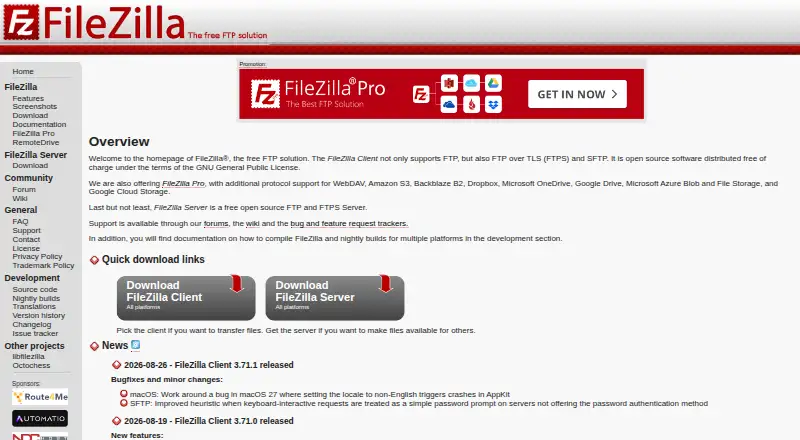
What FileZilla Client is
FileZilla Client is a free FTP solution for transferring files, with support for FTP, FTPS, and SFTP. It is available for Linux, macOS, and Windows. The project lists FileZilla Client separately from FileZilla Server, FileZilla Pro, and RemoteDrive, so these are distinct products rather than features to assume are included in the Client. Documentation covers installation on Windows, Linux, and Mac OS X, along with tutorials, usage instructions, and help with connection, transfer, and network configuration problems. The Wiki also has a guide to key-based authentication with SFTP. Support resources include a community forum, Wiki, FAQ, support section, and contact page. The project site links to source code, an issue tracker, nightly builds, translations, and version history. FileZilla Pro is a separate product; its listed capabilities include cloud services such as S3, Google Drive, and OneDrive. No paid price or free-tier limits are stated for the Client.
Good
- Free FTP solution with no paid price listed.
- Supports FTP, FTPS, and SFTP.
- Available for Linux, macOS, and Windows.
- Wiki includes SFTP key-based authentication guidance.
Watch out
- Cloud service support is listed for separate FileZilla Pro.
- No specific Client transfer features are stated.
- No free-tier limits are stated.
Who it suits
FileZilla Client suits people looking for a no-cost file transfer client with FTP, FTPS, and SFTP support on desktop operating systems. Its documentation and community resources may help users who need guidance with connections or transfers.
Verdict
FileZilla Client covers the listed FTP-family protocols across three desktop platforms and has documentation for common connection topics. Keep its scope distinct from FileZilla Pro and FileZilla Server when choosing a product.
Plans and prices
From FileZilla Client's own pricing page, checked 30 Sep 2026.
| Plan | Price | What it gives you |
|---|---|---|
| FileZilla Client | Free | FTP · FTPS · SFTP |
The facts
Each one read from FileZilla Client's own pages, with the date it was checked.
What it does
- Client features
- The maker has a dedicated FileZilla Client Features page.checked 30 Sep 2026
- Client Product
- The product is named FileZilla.checked 27 Sep 2026
- Community Support
- The site provides a community forum and wiki.checked 27 Sep 2026
- Direct Support
- The site includes a support section and contact page.checked 27 Sep 2026
- Documentation
- The Wiki lists client tutorials, usage instructions, connection and transfer troubleshooting, and FAQs.checked 30 Sep 2026
- Documentation Available
- The site provides documentation.checked 27 Sep 2026
- Downloads
- The download page provides a FileZilla Client download.checked 30 Sep 2026
- FAQ Support
- The site provides a general FAQ.checked 27 Sep 2026
- FTP Protocol
- The page identifies FileZilla as an FTP solution.checked 27 Sep 2026
- Issue Tracking
- The site links to an issue tracker.checked 27 Sep 2026
- Key-based authentication
- The Wiki includes a guide for key-based authentication with SFTP.checked 30 Sep 2026
- Legal Policies
- The site includes license, privacy, and trademark policy pages.checked 27 Sep 2026
- Nightly Builds
- The site links to nightly builds.checked 27 Sep 2026
- Pricing Details
- No paid price or billing schedule is stated on the supplied page text.checked 27 Sep 2026
- Pro distinction
- The maker’s product overview describes FileZilla Pro as supporting FTP, SFTP, FTPS, and cloud services including S3, Google Drive, and OneDrive.checked 30 Sep 2026
- Pro integrations
- The FileZilla Pro overview lists Amazon S3, Google Drive, Microsoft Azure, OneDrive, SharePoint, Backblaze B2, Box, and WebDAV among its cloud platforms.checked 30 Sep 2026
- Pro Product
- The site includes a FileZilla Pro product.checked 27 Sep 2026
- Pro server security
- The Pro overview says its Enterprise Server supports FTP, FTPS, SFTP, two-factor authentication, and unlimited users.checked 30 Sep 2026
- Protocol coverage
- ftp-ftps-sftpchecked 20 Sep 2026
- Purpose
- FileZilla describes itself as a free FTP solution.checked 30 Sep 2026
Where it runs
- Documentation platforms
- The FileZilla Wiki links to client installation instructions for Windows, Linux, and Mac OS X.checked 30 Sep 2026
Money
- Free FTP Solution
- FileZilla is presented as a free FTP solution.checked 27 Sep 2026
- Free plan
- Yeschecked 20 Sep 2026
- Free Tier Limits
- No free-tier limits are stated on the supplied page text.checked 27 Sep 2026
The full review of FileZilla Client
FileZilla Client is a free desktop client for transferring files over FTP, FTPS and SFTP on Linux, macOS and Windows. It suits people who need those protocols across desktop systems and value a substantial set of connection guides. Its focused protocol coverage is useful, but it is not the same product as FileZilla Pro, which adds cloud services.
Overview
FileZilla Client’s case is straightforward: it covers three common FTP-family protocols and runs on the major desktop platforms. That makes it a practical option for ordinary server transfers without a paid plan. Its scope matters, though: the project also offers a separate Pro product and a separate server product, neither of which should be confused with this client.
Key features
FTP, FTPS and SFTP cover a range of familiar transfer setups, and the SFTP documentation includes a guide to key-based authentication. The Wiki also covers installation, usage, connection and transfer troubleshooting, and network configuration. That support is valuable for users configuring connections themselves; it does not turn the client into a cloud-storage manager.
Documentation sits alongside a community forum, FAQ, support section and contact page. The project also links to source code, nightly builds, translations, version history and an issue tracker. This breadth gives users several avenues for guidance and project information, although the client’s core protocol list remains narrower than FileZilla Pro’s, which includes services such as Amazon S3, Google Drive, Microsoft Azure and OneDrive.
Pricing
FileZilla Client is free: the plan costs nothing and covers FTP, FTPS and SFTP. There is no free trial because the client already has a free plan. No paid Client plan is stated, so there is no paid price or billing schedule to weigh against the free option. Users looking for cloud integrations should consider FileZilla Pro as a distinct product rather than assume they come with Client.
Platforms
The client runs on Linux, macOS and Windows. This cross-platform reach is a clear advantage for people moving between desktop operating systems, while the listed scope does not extend to mobile platforms.
Who it's for
Choose FileZilla Client if you need a no-cost desktop tool for FTP, FTPS or SFTP and want installation and connection guidance close at hand. It is less suited to people seeking a single client for cloud storage services, or a server product to host transfers: FileZilla Pro and FileZilla Server are separate offerings.
Pros and cons
- Pros: Free access to FTP, FTPS and SFTP makes the client useful without a paid commitment.
- Pros: Linux, macOS and Windows support serves users across the three desktop platforms.
- Pros: Tutorials and troubleshooting documentation, including key-based SFTP guidance, help with common setup and connection tasks.
- Cons: Its stated protocols do not include the cloud services offered by FileZilla Pro.
- Cons: The platform list is desktop-only, so mobile users need another option.
Alternatives
For a broader shortlist, see FTP and SFTP clients, SFTP Client Software and Secure File Transfer Software.
- WinSCP is a free, open-source Windows client with SFTP, FTP, FTPS, SCP, WebDAV and S3 protocols; pick it if you want those additional protocols on Windows.
- Cyberduck is a freemium option for macOS and Windows; consider it if you want an alternative client on either platform.
- FTP Rush is free and covers Windows, macOS, Linux, iOS and Android; choose it if mobile platform coverage matters.
- Core FTP is a freemium Windows option with Standard and Pro single-user plans; consider it if you want to compare paid Windows editions.
- lftp is free software for Linux; it is an option for Linux users seeking another free client.
- CrossFTP is freemium and supports Windows, macOS and Linux; consider it as another cross-platform client.
- FTPShell Client is a Windows freemium product with a free trial; consider it if you want to evaluate another Windows client before choosing.
- gFTP is a free Linux option for users who want an alternative on that platform.
Verdict
FileZilla Client is a sound choice for desktop users who need free FTP, FTPS or SFTP transfers across Linux, macOS or Windows. Its combination of broad desktop coverage and practical connection documentation is the main reason to choose it. Look elsewhere if you need cloud-service integrations, mobile support or a server product rather than a focused transfer client.
Getting started
- Visit the FileZilla Project website.
- Download FileZilla Client for Linux, macOS, or Windows.
- Use the Wiki's installation instructions for your platform.
- Consult the Wiki for usage guidance, connection or transfer troubleshooting, or SFTP key-based authentication.
Questions
Is FileZilla Client free?
Yes. The listed FileZilla Client plan costs nothing.
Which protocols does FileZilla Client support?
The listed protocols are FTP, FTPS, and SFTP.
Which platforms can I use it on?
FileZilla Client is available for Linux, macOS, and Windows.
Does FileZilla Client include cloud service support?
The project describes cloud services such as Amazon S3, Google Drive, and OneDrive for the separate FileZilla Pro product.
Where can I find help with FileZilla Client?
The project provides a Wiki, community forum, FAQ, support section, and contact page. The Wiki covers installation, usage, connection and transfer troubleshooting, network configuration, and SFTP key-based authentication.
Is FileZilla Client open source?
The project site links to source code.
Alternatives to FileZilla Client
- 1

WinSCP
Free planOpen sourceWindows7.9Free plan - 2
Cyberduck
Free planmacOSWindows7.9Free plan - 3
Serv-U FTP Server
AndroidiOSWebAPI7.8 - 4
FTP Commander
Free planAndroidWindows7.6$49.95 one-time - 5

FTP Rush
Free planAndroidiOSLinuxmacOS7.5Free plan - 6
CrossFTP
Free planLinuxmacOSWindows7.5$24.99 one-time