
Dolphin
Dolphin is KDE's free, open-source file manager for Linux and Windows.
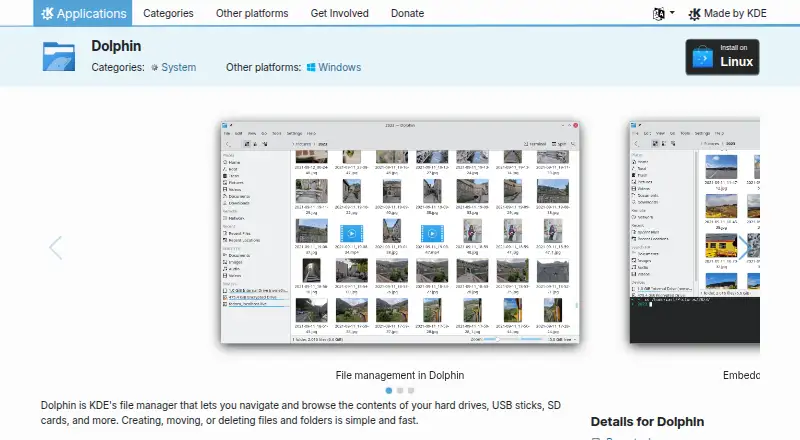
What Dolphin is
Dolphin is KDE's free, open-source file manager for Linux and Windows. It supports browsing, creating, moving, deleting, compressing, sharing, and duplicating files and folders on storage such as hard drives, USB sticks, and SD cards. It can also display files and folders from internet cloud services and remote machines. Multiple tabs let users work across folders, while split view allows files to be moved or copied between panes by dragging. Grid, detailed, and tree views provide different ways to browse, and most behavior can be configured. The right-click menu supports custom actions. An integrated terminal runs commands in the current folder. Plugins extend workflows with Git and Nextcloud support, Dropbox sync actions, and disk image mounting; listed extensions also cover Google Drive, Amazon S3, Samba sharing, and local network services. Linux installation is available through AppStream stores or distribution package managers, and Flathub is listed. Windows installers are nightly builds for testing. Dolphin is licensed under GPL-2.0-or-later, with a handbook and forum available for support.
Good
- Supports tabs and split-view file operations.
- Offers grid, detailed, and tree views.
- Can access cloud services and remote machines.
- GPL-2.0-or-later open-source license.
Watch out
- Windows installers are nightly builds for testing.
- Nightly installers are generated from the development branch.
Who it suits
Dolphin suits Linux and Windows users who want a configurable file manager with tabs, split view, and access to remote files. It may also suit users who want plugins or an integrated terminal.
Verdict
Dolphin covers common file operations alongside configurable views, remote files, and plugins. Windows users should note that the listed Windows installers are nightly builds for testing.
Plans and prices
From Dolphin's own pricing page, checked 2 Oct 2026.
| Plan | Price | What it gives you |
|---|---|---|
| Dolphin | Free | File manager · Linux and Windows downloads listed |
The facts
Each one read from Dolphin's own pages, with the date it was checked.
What it does
- Additional plugins
- Dolphin plugins integrate Bazaar, Mercurial, and Git, provide Dropbox sync actions, and add disk image mount and unmount actions.checked 2 Oct 2026
- Archive support
- Yeschecked 21 Sep 2026
- Audience
- KDE describes its software as free for anyone to use, study, change, and redistribute.checked 2 Oct 2026
- Batch rename
- Yeschecked 21 Sep 2026
- Cloud storage access
- Yeschecked 21 Sep 2026
- Context actions
- The right-click menu can compress, share, and duplicate files, with custom actions supported.checked 27 Sep 2026
- Developed by KDE
- Dolphin is made by KDE.checked 27 Sep 2026
- Donation option
- KDE accepts donations through PayPal and other ways.checked 27 Sep 2026
- Downloads
- The page lists Linux installation through AppStream stores or distribution package managers, a Flathub download, and nightly Flatpak and Windows installers for testing.checked 2 Oct 2026
- Dual-pane view
- Yeschecked 21 Sep 2026
- File management
- It supports navigating, browsing, creating, moving, and deleting files and folders.checked 27 Sep 2026
- File operations
- It supports creating, moving, deleting, compressing, sharing, and duplicating files and folders.checked 2 Oct 2026
- Integrated terminal
- An integrated terminal runs commands in the current folder.checked 27 Sep 2026
- Integrations
- The product page names Git and Nextcloud plugins, and lists extensions for Google Drive, Amazon S3, Samba sharing, and local network services.checked 2 Oct 2026
- License
- The Dolphin page lists the license as GPL-2.0-or-later.checked 2 Oct 2026
- Multiple tabs
- Multiple tabs allow navigating multiple folders at the same time.checked 27 Sep 2026
- Navigation
- Multiple tabs and split view let users navigate multiple folders and drag files between views.checked 2 Oct 2026
- Nightly installers
- Nightly installers are available for testing and are generated from the development branch.checked 27 Sep 2026
- Plugin support
- Plugins extend Dolphin for workflows including Git repositories and Nextcloud synchronization.checked 27 Sep 2026
- Pricing page
- No pricing page is provided; the pricing URL returns 404 Not Found.checked 27 Sep 2026
- Privacy and trust
- KDE says its software is free and open source and contains no ads, spyware, subscription services, forced updates, or secret crypto-mining.checked 2 Oct 2026
- Purpose
- Dolphin is KDE’s file manager for browsing and managing files on hard drives, USB sticks, SD cards, and other storage.checked 2 Oct 2026
Money
- Free plan
- Yeschecked 21 Sep 2026
Where it runs
- Linux installation
- Linux installation can use Discover, other AppStream stores, or a distribution package manager.checked 27 Sep 2026
The full review of Dolphin
Dolphin is KDE’s configurable file manager for local and remote files. It is especially well suited to Linux users who want several ways to browse folders and work between locations. Its broad set of file operations and plugins costs nothing.
Overview
Dolphin handles everyday file and folder work, including creating, moving, deleting, compressing, sharing, and duplicating items. Tabs keep multiple folders open, and split view places two locations side by side for drag-and-drop transfers. That combination is useful when sorting files across drives or moving between project folders; for occasional single-folder browsing, it may be more workflow flexibility than necessary.
Licensed under GPL-2.0-or-later, Dolphin is free and open source. KDE says its software has no ads, spyware, subscription services, forced updates, or secret crypto-mining. Users can also study, change, and redistribute it, making Dolphin a strong fit for people who value software freedoms as well as a zero purchase price.
Key features
Views and file operations
Grid, detailed, and tree views support visual browsing, closer inspection of file details, or following folder structure. Batch rename and archive support extend Dolphin beyond basic navigation, while right-click actions can compress, share, or duplicate files. Custom context actions and configurable behavior give users room to shape recurring workflows, but may be unnecessary for anyone seeking only a fixed, minimal file browser.
Remote files and extensions
Dolphin can display files from internet cloud services and remote machines. Its extensions include integrations for Google Drive, Amazon S3, Samba sharing, and local network services, alongside plugins for Git, Nextcloud synchronization, Dropbox actions, Bazaar, Mercurial, and disk-image mounting. This breadth helps users bring varied storage and development tasks into one manager, though it means the strongest case for Dolphin is broader than basic local file handling.
Terminal and support
The integrated terminal runs commands in the current folder, a practical shortcut for users who move between file browsing and command-line work. KDE provides a handbook and forum for help, plus bug reporting and contribution resources.
Pricing
Dolphin is free: its plan costs nothing and includes the file manager, with Linux and Windows downloads listed. There is no free trial because no paid plan is required. KDE also accepts donations through PayPal and other ways; donating is optional, not a subscription tier. For a free open-source manager with no paid feature split, Dolphin is unusually straightforward, though users should note that the Windows installers are nightly builds for testing rather than stable releases.
Platforms
Dolphin supports Linux and Windows. Linux installation is available through Discover, other AppStream stores, or a distribution package manager, as well as Flathub. Windows installers are nightly builds generated from the development branch and intended for testing, so Windows users who need a stable release should look elsewhere.
Who it's for
Dolphin is best for Linux users who regularly move files between folders, want configurable views, or need access to remote storage and workflow extensions. Its tabs, split view, and terminal also suit people who combine file management with command-line tasks. It is a less clear choice for Windows users who require a stable installer, or for anyone who only needs basic browsing and would not use its additional controls.
Pros and cons
- Pros: Free and open source under GPL-2.0-or-later, with no required subscription.
- Pros: Tabs, split view, and three view modes support different folder-management workflows.
- Pros: Remote-file access, plugins, and an integrated terminal extend it beyond local browsing.
- Cons: Windows downloads are testing builds from the development branch, not a stable release.
- Cons: Configurable views, actions, and extensions may be more than users need for basic file browsing.
Alternatives
Explore more options in File Manager Software.
- Filestash is worth considering for readers seeking a freemium file manager with a free trial and platforms including web, mobile, desktop, and self-hosted options.
- TagSpaces is another freemium, open-source option, with TagSpaces Lite licensed under AGPL-3.0 and support across desktop, mobile, web, and self-hosted platforms.
- WinSCP is a free, open-source Windows file transfer client for readers whose priority is SFTP, FTP, FTPS, SCP, WebDAV, or S3 protocols.
- Total Commander is a freemium alternative for Android and Windows.
- Multi Commander is a free Windows alternative with dual-pane management, tabs, batch renaming, archive management, and a portable version.
- OneCommander offers a free tier for non-commercial personal use on Windows, with some settings and advanced features locked.
- FileRun is a paid alternative with a free trial and platforms including web, self-hosted, mobile, and desktop options.
- xplorer² is a freemium Windows option whose Lite plan includes dual panes, folder tabs, and file previews for private, academic, and nonprofit use.
Verdict
Choose Dolphin if you use Linux and want a free, open-source manager that combines flexible folder browsing with remote files, plugins, and command-line access. Its main reason to look elsewhere is Windows: the available installers are testing builds, not a stable release.
Getting started
- For Linux, install Dolphin through an AppStream store or your distribution’s package manager.
- Alternatively, use the listed Flathub download.
- For Windows, use a nightly installer for testing.
- Open Dolphin and browse local drives, folders, cloud services, or remote machines.
- Consult the Dolphin Handbook or KDE forum for help.
Limits worth knowing
The listed plan is free at no cost. Nightly Flatpak and Windows installers are for testing.
Questions
Is Dolphin free?
Yes. Dolphin is listed as free, at no cost.
Is Dolphin open source?
Yes. It is licensed under GPL-2.0-or-later.
Which platforms are listed for Dolphin?
Linux and Windows are listed. Linux installation options include AppStream stores, distribution package managers, and Flathub; a nightly Windows installer is available for testing.
What can Dolphin do with files?
It supports creating, moving, deleting, compressing, sharing, and duplicating files and folders.
Can Dolphin access remote storage?
It can display files and folders from internet cloud services and remote machines. Listed extensions include Google Drive, Amazon S3, and Samba.
Who makes Dolphin?
Dolphin is made by KDE.
Alternatives to Dolphin
- 1

Filestash
Free planOpen sourceAndroidiOSWebAPI9.2From $50 a month - 2

Owlfiles
Free planAndroidiOSExtensionmacOS8.7From $12.99 a year - 3

WinSCP
Free planOpen sourceWindows7.9Free plan - 4
FileRun
AndroidiOSWebAPI7.8From €9.90 a year - 5

OneCommander
Free planWindows7.8$30 one-time - 6
nnn
Free planAndroidLinuxmacOSWindows7.8Free plan