xplorer²
xplorer² is a freemium Windows file manager for browsing locations, organizing files, and searching desktop collections.
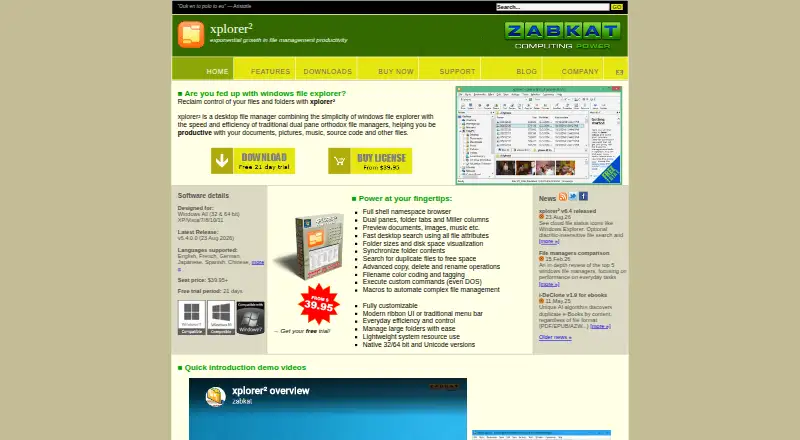
What xplorer² is
xplorer² is a freemium Windows file manager for browsing locations, organizing files, and searching desktop collections. Its layouts include dual panes, folder tabs, Miller columns, and ribbon or traditional menus. It can access network folders, ZIP folders, web folders, FTP, cameras, phones, and cloud storage. Search uses file attributes and can locate duplicate files and large folders. File operations cover copying, deleting, renaming, mass renaming, shredding, splitting, and joining, while previews are available for text, office, PDF, picture, audio, and video files. Archive support and portable deployment are also listed. It runs on Windows XP through Windows 11 in 32-bit and 64-bit versions. The free Microsoft Store edition is restricted to private, academic, and general non-profit use. Paid licenses start at USD $39.95; Professional is $39.95, paid once and Ultimate is $59.95, paid once. The trial lasts 21 days. Ultimate adds portable and network deployment, and licenses cover one user on many computers or many users on one PC.
Good
- Dual-pane and tabbed folder navigation
- Accesses cloud, network, ZIP, FTP, and devices
- Finds duplicate files and large folders
- Previews many common file types
- Portable and network deployment available in Ultimate
Watch out
- Free edition restricted to private, academic, and nonprofit use
- Paid licenses start at USD $39.95
- Windows-only software
- Trial lasts 21 days
Who it suits
It suits Windows users who want dual-pane browsing, broad storage access, file previews, and advanced file operations. Organizations can consider paid licensing and Ultimate deployment options.
Verdict
xplorer² combines multiple browsing layouts with search, previews, and extensive file operations. The free-use restriction and paid licensing structure should guide personal and organizational choices.
Plans and prices
From xplorer²'s own pricing page, checked 20 Sep 2026.
| Plan | Price | What it gives you |
|---|---|---|
| Lite | — | Dual panes · Folder tabs · Preview files · Private, academic, and nonprofit use |
| Professional | $39.95, paid once | Single-user license or many users on a single PC. · Explore and preview · Folder tabs and dual panes · Advanced search and file management · The purchased version is yours to keep; one year of free upgrades and support is described in the documentation. |
| Ultimate | $59.95, paid once | Includes portable/network deployment, priority customer support, and maximum power features. · Portable/network deployment · Fast desktop search · Priority customer support · The purchased version is yours to keep; one year of free upgrades and support is described in the documentation. |
| Free Lite | Free | Private, academic, and general non-profit use only; commercial use requires a full license. |
The facts
Each one read from xplorer²'s own pages, with the date it was checked.
What it does
- Archive support
- Yeschecked 20 Sep 2026
- Batch rename
- Yeschecked 20 Sep 2026
- Bulk discounts
- Automatic discounts apply to orders above five licenses.checked 28 Sep 2026
- Cloud storage access
- Yeschecked 20 Sep 2026
- Desktop search
- Search uses file attributes and can find duplicate files and large folders.checked 28 Sep 2026
- Dual-pane view
- Yeschecked 20 Sep 2026
- File operations
- It supports advanced copying, deleting, renaming, mass renaming, shredding, splitting, and joining.checked 28 Sep 2026
- File previews
- It previews text, office, PDF, picture, audio, and video files.checked 28 Sep 2026
- Interface modes
- It supports dual panes, folder tabs, Miller columns, and ribbon or traditional menus.checked 28 Sep 2026
- License scope
- A license covers one user on many computers or many users on one PC.checked 28 Sep 2026
- Paid from
- 39.95checked 20 Sep 2026
- Payment methods
- Cards, PayPal, telephone, fax, purchase orders, bank transfers, and mail orders are accepted.checked 28 Sep 2026
- Portable deployment
- The Ultimate edition includes portable and network deployment.checked 28 Sep 2026
- Portable version
- Yeschecked 20 Sep 2026
- Refund policy
- No refund policy is stated in the supplied text.checked 28 Sep 2026
- Resource usage
- The application is around 3 MB, starts quickly, and uses few system resources.checked 28 Sep 2026
- Storage access
- It can browse network, ZIP folders, web folders, FTP, cameras, phones, and cloud storage.checked 28 Sep 2026
- Store availability
- The free version is available on the Microsoft Store.checked 28 Sep 2026
Money
- Free plan
- Yeschecked 20 Sep 2026
- Free tier limits
- The free version is limited to private, academic, and general non-profit use.checked 28 Sep 2026
- Starting price
- Paid licenses start at USD $39.95.checked 28 Sep 2026
The company
- Headquarters
- Nicosia, Cypruschecked 28 Sep 2026
Where it runs
- Supported platform
- Windows XP through Windows 11, with 32-bit and 64-bit versions.checked 28 Sep 2026
- Supported platforms
- windowschecked 20 Sep 2026
Alternatives to xplorer²
- 1

Filestash
Free planOpen sourceAndroidiOSWebAPI9.2From $50 a month - 2

Owlfiles
Free planAndroidiOSExtensionmacOS8.7From $12.99 a year - 3

WinSCP
Free planOpen sourceWindows7.9Free plan - 4

Dolphin
Free planOpen sourceLinuxWindows7.8Free plan - 5
FileRun
AndroidiOSWebAPI7.8From €9.90 a year - 6

OneCommander
Free planWindows7.8$30 one-time