
Rat Commander
Rat Commander is a free two-panel terminal file manager for Linux, macOS, and Windows.
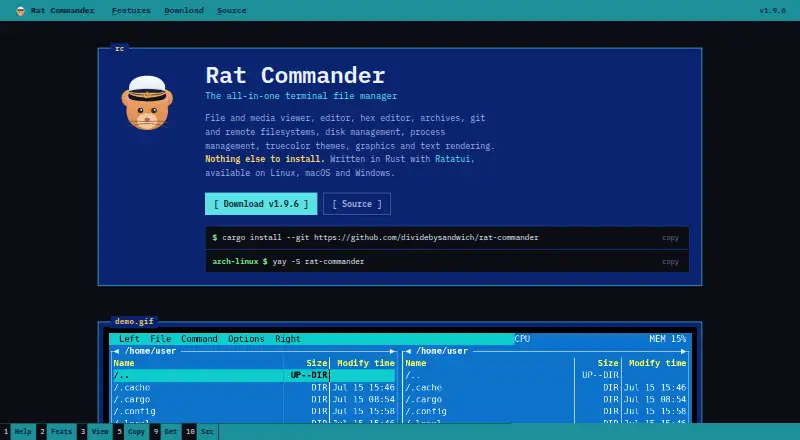
What Rat Commander is
Rat Commander is a free two-panel terminal file manager for Linux, macOS, and Windows. It combines file browsing and editing with media viewing, archive handling, Git features, remote filesystems, and system tools. Panels can use layouts such as tree, details, thumbnail grid, and 3D, and can split horizontally or vertically. The built-in viewer and editor support syntax highlighting, search and replace, Markdown rendering, tables, images, and in-place hex editing. Git features include staging, commits, branches, diffs, and history. Remote connections over SFTP, SCP, FTP, and FTPS present remote filesystems much like local disks. Rat Commander can browse and edit ZIP, TAR variants, 7z, and other archives; RAR is read-only. QR codes support transferring files over a local network. Linux disk tools can mount, format, flash, and image disks and USB devices, while Windows support excludes Drive Manager and Network Connections. The software is written in Rust with Ratatui and is licensed under GNU GPL-2.0-only.
Good
- Two-panel layout with multiple file views.
- Includes Git tools and remote filesystem access.
- Built-in viewer and editor support hex editing.
- Transfers files over a local network using QR codes.
- Free, with no paid tiers stated.
Watch out
- RAR archives are read-only.
- Windows lacks Drive Manager and Network Connections.
- Linux disk management tools are limited to Linux.
Who it suits
Rat Commander may suit terminal users who want file management alongside editing, Git, remote filesystems, and system utilities. It is available on Linux, macOS, and Windows, with some disk and network tools limited to Linux.
Verdict
Rat Commander combines a terminal file manager with editing, Git, archive, remote-file, and system utilities. Check the platform-specific limitations first, particularly if you need RAR editing or Windows disk and network tools.
Plans and prices
From Rat Commander's own pricing page, checked 29 Sep 2026.
| Plan | Price | What it gives you |
|---|---|---|
| Rat Commander | Free | Self-contained terminal file manager; no paid tiers or usage limits stated |
The facts
Each one read from Rat Commander's own pages, with the date it was checked.
What it does
- Architecture
- It is written in Rust with Ratatui and is designed to provide its core features without external tools.checked 28 Sep 2026
- Archives
- ZIP, TAR and several compressed TAR formats, 7z, and RAR archives can be browsed, with RAR read-only.checked 29 Sep 2026
- Archive support
- Yeschecked 21 Sep 2026
- Binary Tools
- Includes a hex editor, executable analysis, byte maps, and binary comparisonchecked 27 Sep 2026
- Certificate Inspection
- Inspects SSL/TLS certificate details, validity, expiration, and certificate chainschecked 27 Sep 2026
- Connection security
- For FTPS, certificates trusted by the system are accepted, while self-signed certificates are shown by SHA-256 and can be pinned after trust; SSH hosts can use known_hosts and SSH config settings.checked 28 Sep 2026
- Core Capabilities
- File and media viewing, editing, hex editing, archives, Git, remote filesystems, disk and process managementchecked 27 Sep 2026
- Disk Management
- Linux disk tools can mount, format, flash, and image disks and USB deviceschecked 27 Sep 2026
- Documentation
- A full user manual is available from the repository and in the application through F1.checked 28 Sep 2026
- Dual-pane layout
- Yeschecked 21 Sep 2026
- Editor and viewer
- The built-in viewer and editor support syntax highlighting, search and replace, Markdown rendering, CSV/TSV tables, images, and in-place hex editing.checked 28 Sep 2026
- Editor Features
- Includes syntax highlighting, block operations, search and replace, and media tag editingchecked 27 Sep 2026
- File operations
- It supports file copy, move, delete, permissions, ownership, symlinks, and directory creation.checked 29 Sep 2026
- File transfer
- Files can be sent to or received from a nearby phone or laptop over the local network using a QR code.checked 29 Sep 2026
- Git
- Git features include status, diffs, staging, commits, branches, push and pull, and browsing repository history.checked 29 Sep 2026
- Git Integration
- Supports Git status, commits, pushes, pulls, diffs, branches, history, and blamechecked 27 Sep 2026
- Implementation Stack
- Written in Rust with Ratatuichecked 27 Sep 2026
- Installation Requirement
- Nothing else is required to installchecked 27 Sep 2026
- Language Support
- Supports English, French, German, and user-added languageschecked 27 Sep 2026
- LAN transfer
- The application can serve files over a one-shot local HTTP server using a QR code, and receive files through a QR-opened page with a random URL token.checked 28 Sep 2026
- License
- The project is licensed under GNU General Public License version 2, GPL-2.0-only.checked 29 Sep 2026
The company
- Company Affiliation
- The project states that it is not affiliated with Symantecchecked 27 Sep 2026
Money
- Free plan
- Yeschecked 21 Sep 2026
Where it runs
- Linux support
- Yeschecked 21 Sep 2026
The full review of Rat Commander
Overview
Rat Commander is a two-panel file manager for people who prefer to work in a terminal but need more than basic file operations. Its breadth is unusual for a free tool, though readers who only want a focused directory browser may find its system and development utilities unnecessary.
Built with Rust and Ratatui, it is designed to provide its core features without requiring external tools. The two panels support vertical or horizontal splits, multi-file selection, and full, brief, details, tree, thumbnail-grid, and interactive 3D views of file structures and models. In compatible terminals, graphics, progress bars, and graphs can render at full resolution; image and audio files can also be viewed graphically or as ASCII.
The interface has 18 built-in languages, including right-to-left support, and users can add languages. A manual is available in the application through F1. The project is licensed under GNU GPL-2.0-only.
Key features
Editing, media, and binary files
The built-in viewer and editor handle syntax-highlighted text, Markdown, and CSV or TSV tables. Block operations, search and replace, and media tag editing make it useful beyond browsing, while the in-place hex editor, executable analysis, byte maps, and binary comparison add tools for readers who work directly with binary files. These capabilities make Rat Commander a more capable workspace than a file manager alone, but they may be more than a casual user needs.
Common image and audio formats can be viewed with graphical or ASCII rendering. Thumbnail grids provide a visual scan of files, while the interactive 3D view offers another way to inspect file structures and models.
Git and archives
Git support covers status, staging, commits, stash, fetch, pull, push, sync, checkout, reset, clone, diffs, branches, logs, history, and blame. That range suits users who want file operations and routine repository work together in the terminal. Rat Commander can browse and edit ZIP, TAR variants, 7z, and other archive formats; RAR is read-only, so users who need to modify RAR contents should choose another tool.
Remote access and system utilities
FTP, FTPS, SFTP, and SCP connections present remote filesystems much like local disks. SFTP and SCP also support remote shell access over the same SSH connection. SSH can use known_hosts and SSH configuration; FTPS accepts system-trusted certificates and lets users inspect and pin self-signed certificates by SHA-256. This is a broad set of connection options, but the security details matter when working with servers that use certificates outside the system trust store.
A one-shot local HTTP server can send files to a phone through a QR code; receiving files uses a QR-opened page with a random URL token. System tools include disk and process explorers, CPU load and battery information, process termination, and certificate inspection. Linux users also get tools to mount, format, flash, and image disks and USB devices, plus a network-connection monitor.
Pricing
Rat Commander: free. The free plan includes a self-contained terminal file manager, with no paid tiers or usage limits stated. It is a straightforward fit for individuals who want the full toolset without a subscription or trial deadline; there are no cheaper feature-reduced plans to weigh against it.
Platforms
Rat Commander supports Linux, macOS, and Windows. Windows includes the product's features except Drive Manager and Network Connections, so readers who need disk management or network-connection monitoring should use Linux or look elsewhere. Linux has the broadest documented system-tool set, including disk operations; macOS is supported, though the Linux-only tools do not apply there.
Who it's for
Rat Commander is best for terminal-oriented users who want one application for file management, editing, Git, archives, remote files, and system inspection. Developers can keep repository tasks near their files, while users moving between local and remote directories get several common transfer protocols in the same interface. It is a less suitable choice for Windows users who rely on the omitted drive and network tools, or anyone who needs to edit RAR archives.
Pros and cons
- Pros: The free plan combines file browsing, editing, Git, archives, remote connections, and system utilities without stated usage limits.
- Pros: Remote access covers FTP, FTPS, SFTP, and SCP, with SSH configuration support and certificate inspection for FTPS.
- Pros: Multiple panel layouts and views, including thumbnail grids and interactive 3D, give users several ways to navigate files.
- Cons: RAR archives can be browsed but not edited.
- Cons: Windows omits Drive Manager and Network Connections, while disk-management tools are Linux-specific.
- Cons: The wide feature set may be unnecessary for users who want only a simple terminal file browser.
Alternatives
For a broader comparison, see Terminal File Managers.
- FileManagerTUI is another free, open-source option for Linux, macOS, and Windows; choose it if its MIT-licensed software better fits your needs.
- Broot is free on Linux, macOS, and Windows, with source and precompiled binaries available; it may suit readers who want that MIT-licensed option.
- Newt is a free, open-source option for Linux, macOS, and Windows.
- pointer is a free single-binary option for Linux and macOS, credited to Geir Isene and released as public-domain software.
- Runa is a free option for Linux, macOS, and Windows, with no paid plans stated.
- superfile is a free, MIT-licensed terminal application for Linux, macOS, and Windows that is self-installed.
- Zeta is a free, MIT-licensed terminal file manager with Linux and Windows binaries.
- far2l is a free GNU/GPLv2 option for Linux and macOS; its beta status and use-at-your-own-risk warning may rule it out for readers seeking a non-beta choice.
Verdict
Choose Rat Commander if you want a free terminal file manager that brings editing, Git, archive handling, remote filesystems, and system tools into one application. Its main advantage is that breadth without a paid tier; look elsewhere if you need to edit RAR files or depend on Windows disk and network tools.
Getting started
- Visit the Rat Commander website.
- Choose a build for Linux, macOS, or Windows.
- Install the application; no additional installation requirement is needed.
- Open the application and use its built-in manual through F1 for guidance.
Limits worth knowing
The free plan is listed as free, with no paid tiers or usage limits stated. RAR is read-only, and Windows does not include Drive Manager or Network Connections.
Questions
How much does Rat Commander cost?
The Rat Commander plan is free. No paid tiers are stated.
Is there a free trial?
No. Rat Commander is listed as free, with no free trial.
Which operating systems does it support?
It supports Linux, macOS, and Windows. On Windows, Drive Manager and Network Connections are unavailable.
Can it work with remote files?
Yes. It supports FTP, FTPS, SFTP, and SCP remote filesystems.
What license does Rat Commander use?
Its repository is licensed under GNU GPL-2.0-only.
Can it browse archives?
It can browse and edit ZIP, TAR variants, 7z, and other archive formats. RAR is read-only.
Alternatives to Rat Commander
- 1
FileManagerTUI
Free planOpen sourceLinuxmacOSWindows7.9Free plan - 2
Newt
Free planOpen sourceLinuxmacOSWindows7.8Free plan - 3
nnn
Free planAndroidLinuxmacOSWindows7.8Free plan - 4
TUIFIManager
Free planOpen sourceAndroidLinuxmacOSWindows7.6Free plan - 5
far2l
Free planLinuxmacOS7.4Free plan - 6
RTFM
Free planLinuxmacOS7.3Free plan