Broot
Broot is a free directory navigator for Linux, macOS, and Windows that helps users browse folders, find files, and launch commands.
What Broot is
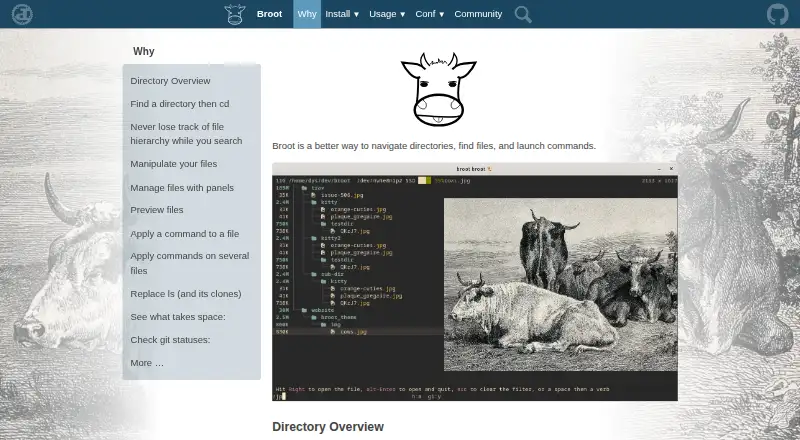
Broot is a free directory navigator for Linux, macOS, and Windows that helps users browse folders, find files, and launch commands. Its directory views account for `.gitignore` and `.ignore` files, while search can rank results by relevance, match regular expressions, inspect file contents, and combine terms with logical operators. Users can choose a directory and return to the shell with that location active. Built-in file operations include moving, copying, removing, and creating directories. Multiple panels support navigation and moving or copying items between locations, with customizable colors. Synchronized previews can show documents through transformers, including PDF and Office files; high-resolution images can be displayed through Kitty's graphics protocol in Kitty and WezTerm. A staging area groups files for commands. Storage tools sort by size or date and include whale-spotting mode, with sizes, dates, and counts calculated in the background. Git views show file states, branch, upstream divergence, and change statistics. Client-server control over Unix sockets is limited to Unix-like systems.
Good
- Runs on Linux, macOS, and Windows.
- Search includes regular expressions and file contents.
- Built-in operations move, copy, remove, and create directories.
- Git views show branch and change statistics.
- Free and released under the MIT License.
Watch out
- Archive support is not available.
- Client-server mode uses Unix sockets on Unix-like systems only.
- PDF and Office previews require transformers.
Who it suits
Broot suits people who want a terminal-based way to navigate directories, search file contents, and perform file operations. Its previews and Git status views may also help users managing documents or repositories from the file navigator.
Verdict
Broot brings directory navigation, search, file operations, previews, and Git status into one tool. Note that archive handling is absent, and client-server mode is restricted to Unix-like systems.
Plans and prices
From Broot's own pricing page, checked 28 Sep 2026.
| Plan | Price | What it gives you |
|---|---|---|
| Broot | Free | MIT-licensed · source and precompiled binaries available |
The facts
Each one read from Broot's own pages, with the date it was checked.
What it does
- Archive support
- Nochecked 21 Sep 2026
- Client-server mode
- Broot can act as a client or server so another process can control it or query its state; this feature currently uses Unix sockets and is available only on Unix-like systems.checked 28 Sep 2026
- Directory overview
- It provides directory overviews and handles .gitignore and .ignore files.checked 28 Sep 2026
- Document preview
- With transformers, it can preview PDF and Office files.checked 28 Sep 2026
- Dual-pane layout
- Yeschecked 21 Sep 2026
- File operations
- Move, copy, remove, and mkdir operations are built in, and users can add shortcuts.checked 28 Sep 2026
- Git integration
- Git status views show file states, branch name, upstream divergence, and change statistics.checked 28 Sep 2026
- License
- The repository is released under the MIT License, with permission to use, copy, modify, publish, distribute, sublicense, and sell the software subject to the license conditions.checked 28 Sep 2026
- Navigation
- Users can select a directory and return to the shell with that directory as the current location.checked 28 Sep 2026
- Panels
- Multiple panels can be opened for navigation and copying or moving elements between panels, with customizable colors.checked 28 Sep 2026
- Preview
- It provides synchronized file preview panels and can display high-resolution images through Kitty's graphics protocol in Kitty and WezTerm.checked 28 Sep 2026
- Preview pane
- Yeschecked 21 Sep 2026
- Purpose
- Broot is a way to navigate directories, find files, and launch commands.checked 28 Sep 2026
- Search
- It supports relevance-based search, regular expressions, content search, and logical search operators.checked 28 Sep 2026
- Staging area
- Its staging area lets users execute commands on several files in one go.checked 28 Sep 2026
- Storage analysis
- Sorting by size or date and whale-spotting mode help identify files or folders taking space, while sizes, dates, and file counts are computed in the background.checked 28 Sep 2026
- Support
- The maker provides contact by email and invites users to chat through Miaou.checked 28 Sep 2026
Money
- Free plan
- Yeschecked 21 Sep 2026
Where it runs
- Linux support
- Yeschecked 21 Sep 2026
- macOS support
- Yeschecked 21 Sep 2026
- Windows support
- Yeschecked 21 Sep 2026
The full review of Broot
Broot is a terminal directory browser that combines file search and operations with previews and Git status. It is best suited to people who do regular file work from the command line and want more context than a basic tree or file list provides. Its range is a strong fit for active project folders, though it stops short of archive handling.
Overview
Broot brings directory navigation, search, file operations, previews, and Git status into one terminal tool. It can return you to the shell with a selected directory as the current location, making it useful when browsing is just one step in a command-line task. The trade-off is a terminal-centered workflow that will not suit readers seeking a graphical file manager.
Key features
Directory overviews account for .gitignore and .ignore files, while search combines relevance ranking, regular expressions, content matching, and logical operators. That makes Broot more capable than name-only lookup when working through large or unfamiliar directories.
Move, copy, remove, and mkdir operations are built in, and users can add shortcuts. Multiple panels support navigation and transfers between locations, with customizable colors. A staging area can apply commands to several files together, reducing repetitive work when handling batches.
Synchronized preview panels keep file context alongside navigation. Transformers can display PDF and Office files, and high-resolution images can be shown through Kitty's graphics protocol in Kitty and WezTerm. These previews make browsing more informative, but Broot does not support archives.
Sorting by size or date and whale-spotting mode help locate space-consuming files and folders; sizes, dates, and file counts are calculated in the background. Git views add file states, branch name, upstream divergence, and change statistics, which is particularly useful in repositories. Client-server mode lets another process control Broot or query its state, but relies on Unix sockets and is limited to Unix-like systems.
Pricing
Broot is free: its MIT-licensed plan costs nothing and includes source code and precompiled binaries. There are no paid tiers to weigh against that plan. The MIT License permits use, modification, distribution, and commercial use subject to its conditions.
Platforms
Broot supports Linux, macOS, and Windows. Its client-server mode is the notable platform caveat: that feature is available only on Unix-like systems, so Windows users do not get the same process-control option.
Who it's for
Choose Broot if you work in a terminal and want search, file management, previews, storage clues, and Git context in the same directory workflow. It is especially compelling for people who move between browsing and shell commands or routinely manage project files. Look elsewhere if archive browsing is essential or if you need client-server control on Windows.
Pros and cons
- Pro: Search supports content, relevance, regular expressions, and logical operators, giving users several ways to narrow large directories.
- Pro: Multi-panel operations, staging, and built-in file actions support batch work without leaving the tool.
- Pro: Git status and storage-analysis views add useful project and disk context while browsing.
- Con: Archive support is absent, leaving archive-based workflows outside its scope.
- Con: Client-server mode is restricted to Unix-like systems, excluding Windows from that capability.
Alternatives
For a wider comparison, browse the Terminal File Managers category.
- Rat Commander is a free, self-contained terminal file manager with no paid tiers or usage limits stated; consider it if that simpler profile is a better fit.
- nnn is a free, open-source terminal file manager for Android as well as desktop platforms, making it an option if Android support matters.
- FileManagerTUI is free, MIT-licensed software offered as-is without warranty; consider it if those terms suit your priorities.
- Clifm is a free terminal file manager under GPL version 2 or later, and supports Android alongside Linux and macOS.
- elio is a free option that supports self-hosted setups as well as Linux, macOS, and Windows.
- Newt is free software for Linux, macOS, and Windows.
- pointer is a free single-binary option for Linux and macOS, released into the public domain under the Unlicense.
- Runa is a free terminal file manager for Linux, macOS, and Windows.
Verdict
Broot is a strong choice for command-line users who want directory navigation to include serious search, file operations, previews, and Git context without adding a software cost. Its broad toolkit is the main reason to choose it; absent archive support and Unix-only client-server mode are the clearest reasons to look elsewhere.
Alternatives to Broot
- 1
TUIFIManager
Free planOpen sourceAndroidLinuxmacOSWindows7.5Free plan - 2
Alfa
Free planWebAPILinuxmacOS7.2Free plan - 3
FileManagerTUI
Free planOpen sourceLinuxmacOSWindows7.2Free plan - 4
nnn
Free planAndroidLinuxmacOSWindows7.2Free plan - 5
Newt
Free planOpen sourceLinuxmacOSWindows7.0Free plan - 6

Rat Commander
Free planLinuxmacOSWindows6.8Free plan