
RaiDrive
RaiDrive mounts cloud storage as a drive on a Windows or Linux computer, so users can open, edit, and save cloud files from their computer.
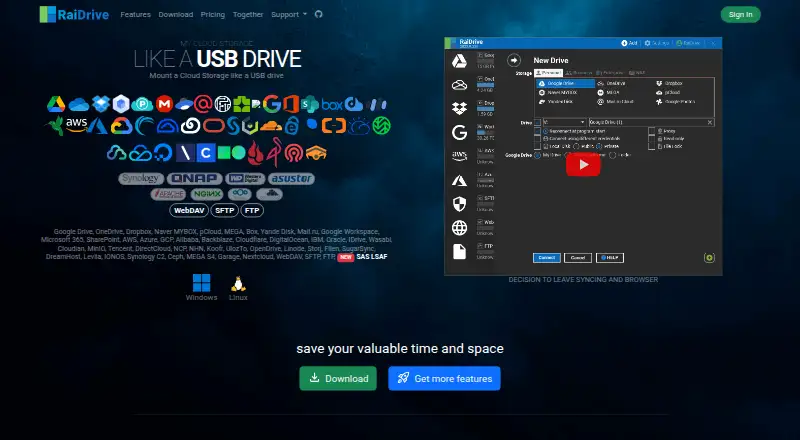
What RaiDrive is
RaiDrive mounts cloud storage as a drive on a Windows or Linux computer, so users can open, edit, and save cloud files from their computer. It can stream videos directly from cloud storage, allowing playback to jump along the timeline without downloading the whole file. Listed connections include Google Drive, OneDrive, Dropbox, MEGA, pCloud, SharePoint, AWS, Azure, Google Cloud, WebDAV, SFTP, and FTP. The Standard free plan includes 8 Drives, advertisements, and write access to Google Drive, OneDrive, Dropbox, WebDAV, SFTP, and FTP. Paid plans list unlimited drives, license sharing, no advertisements, and email support; Team also lists File Lock and Local Disk. File Lock can restrict other users from editing a file in use, while Local Disk controls access for other accounts or PCs on the network. RaiDrive says it uses TLS/SSL for transmission, connects directly to cloud services, and supports encryption for temporary local cache files. Its privacy policy says personal information and usage data may be collected and that data is encrypted at rest and in transit.
Good
- Mounts cloud storage as a computer drive
- Streams videos without downloading the entire file
- Lists connections across major cloud and transfer services
- Supports encryption for temporary local cache files
Watch out
- Standard free plan is limited to 8 Drives
- Free plan includes advertisements
- Folder synchronisation is not supported
- Privacy policy says personal and usage data may be collected
Who it suits
RaiDrive suits Windows and Linux users who want to work with cloud files through a mounted drive. Video viewers may value its direct streaming and timeline navigation.
Verdict
RaiDrive brings cloud files into a drive-based desktop workflow and can stream stored videos. The free Standard plan has drive, advertising, and writable-service limits; paid plan features vary.
Plans and prices
From RaiDrive's own pricing page, checked 5 Oct 2026.
| Plan | Price | What it gives you |
|---|---|---|
| Education 2024 | Free | For accredited educational institutions · 8 Drives · advertisement · forum support · Annual Update |
| Standard | Free | 8 drives · advertisements · network drive · forum support · writing for Google Drive, OneDrive, Dropbox, WebDAV, SFTP and FTP · other listed services read-only |
| Starter | $1.84 a month | 14-day trial · unlimited drives · license sharing · no advertisements · network drive · fast copy/move/delete · bandwidth control · process-access monitor · email support · per month on a 3-year commitment |
| Essential | $2.17 a month | 14-day trial · unlimited drives · license sharing · no advertisements · network drive · fast copy/move/delete · bandwidth control · process-access monitor · email support · paid writable add-ons for business and object storage · per month on a 3-year commitment |
| Individual | $2.84 a month | 14-day trial · unlimited drives · license sharing · no advertisements · network drive · fast copy/move/delete · bandwidth control · process-access monitor · email support · local-disk mounting · per month on a 3-year commitment |
| Nonprofit 2024 | $4.35 a year | For nonprofit organizations · unlimited Drives · license sharing · 14 Days Trial · email support |
| Team | $4.84 a month | 14-day trial · unlimited drives · license sharing · no advertisements · network drive · fast copy/move/delete · bandwidth control · process-access monitor · email support · local-disk mounting · file lock · per month on a 3-year commitment |
| Academic 2024 | $14.50 a year | For accredited educational institutions · unlimited Drives · license sharing · 14 Days Trial · email support |
The facts
Each one read from RaiDrive's own pages, with the date it was checked.
What it does
- AI integrations
- RaiDrive documents use with Claude, ChatGPT/Codex, Gemini, Antigravity, Microsoft Copilot and GitHub Copilot by exposing mounted folders to those tools.checked 14 Oct 2026
- AI safety control
- Mounted drives can be set read-only so an AI tool cannot modify or delete originals, and process-access monitoring can show which files are opened.checked 14 Oct 2026
- CLI authentication
- The CLI sign-in command can use browser authorization or terminal prompts, supports two-factor codes and lets users choose among active subscriptions.checked 14 Oct 2026
- CLI commands
- The Linux CLI provides commands to add, list, show, edit, remove, mount, unmount, sign in, sign out and inspect status of virtual filesystems.checked 14 Oct 2026
- CLI extensibility
- The documented CLI has provider-specific add commands for Google Drive, OneDrive, Dropbox, S3, Azure, Box, WebDAV, SFTP, FTP and many other backends.checked 14 Oct 2026
- Cloud integrations
- Supported personal and business services include Google Drive, OneDrive, Dropbox, Google Workspace, SharePoint, Box, MEGA, pCloud, Yandex Disk and many others.checked 14 Oct 2026
- Documentation depth
- Official documentation covers getting started, storage-specific connection guides, options, settings, account and licensing, troubleshooting, CLI usage and AI-tool compatibility.checked 14 Oct 2026
- Drive mounting
- A connected service appears in Windows File Explorer with a chosen drive letter, and files download only when opened.checked 14 Oct 2026
- File lock
- File Lock prevents other users from overwriting a file being edited and is documented for WebDAV and cloud storage, with compatibility references for Office, LibreOffice and OpenOffice.checked 14 Oct 2026
- File Lock
- File Lock can restrict other users from editing a file being worked on and is listed as compatible with Microsoft 365, Hancom Office, Adobe InDesign, AutoCAD, LibreOffice, and Apache OpenOffice.checked 5 Oct 2026
- Google API data
- RaiDrive states that data obtained from certain Google OAuth sensitive and restricted scopes is not transferred outside the user's computer or stored in external services, including the RaiDrive web service.checked 5 Oct 2026
- Integrations
- The feature page lists services including Google Drive, OneDrive, Dropbox, MEGA, pCloud, SharePoint, AWS, Azure, Google Cloud, WebDAV, SFTP, and FTP.checked 5 Oct 2026
- Licence model
- The product uses subscription licenses and the CLI requires signing in to take a license; the official pages do not present RaiDrive itself as open-source software.checked 14 Oct 2026
- Limit: advertisements
- A G2 reviewer says the free plan's pop-up advertisements are intrusive and should be confined to the main program.checked 14 Oct 2026
- Limit: disconnects and resource use
- A G2 reviewer reports unexpected disconnections that stop uploads and says the program can consume substantial processor resources.checked 14 Oct 2026
- Limit: performance dependence
- A G2 reviewer reports that slow internet can make Windows hang while reading or downloading because there is no caching feature.checked 14 Oct 2026
- Limit: reconnection behavior
- A Capterra reviewer says loss of internet connectivity generates repeated notifications and can force another login after reconnection.checked 14 Oct 2026
The company
- Company founded and size
- LinkedIn lists OpenBoxLab Inc. as founded in 2015 with 2–10 employees.checked 14 Oct 2026
- Company headquarters
- LinkedIn lists headquarters in Gimpo-si, Gyeonggi-do, South Korea, at 765 Taejang-ro.checked 14 Oct 2026
- Company legal name
- The maker identifies itself as OpenBoxLab Inc.checked 14 Oct 2026
- Company ownership
- LinkedIn describes OpenBoxLab Inc. as privately held.checked 14 Oct 2026
Money
- Free-plan limit
- The Standard plan includes 8 Drives and advertisements, and lists Google Drive, OneDrive, Dropbox, WebDAV, SFTP, and FTP as writable services.checked 5 Oct 2026
- Limit: free-version storage count
- A Capterra reviewer identifies the number of storages that can be added in the free version as a limitation.checked 14 Oct 2026
Where it runs
- GetApp feature ratings
- GetApp shows 5.0/5 for multi-cloud management, 4.0/5 for access controls and 4.3/5 for features.checked 14 Oct 2026
The full review of RaiDrive
Overview
RaiDrive turns cloud and network storage into drives that desktop applications can use, and it runs on Windows and Linux. It is best for people who want to work directly with online files or stream cloud-hosted video; its free plan is useful for modest needs but brings ads, an eight-drive ceiling and restrictions on writable services.
The central trade-off is between direct access and local synchronisation: RaiDrive mounts storage rather than keeping a synced folder, so it suits an on-demand workflow, not users who need an up-to-date local copy.
Key features
RaiDrive supports Google Drive, OneDrive, Dropbox, MEGA, pCloud, SharePoint, AWS, Azure, Google Cloud, WebDAV, SFTP and FTP. Mounting these services as drives lets users open, edit and save cloud files from their computer. That breadth is valuable when files span consumer clouds and other storage protocols, but the Standard plan lists only Google Drive, OneDrive, Dropbox, WebDAV, SFTP and FTP as writable. Anyone intending to edit files on the other supported services should account for that limitation.
Video streaming plays files from cloud storage without first downloading the entire file, and lets users jump to a point in the timeline. That can save local disk space and avoid waiting for a full download. RaiDrive does not synchronise folders, however, so streaming and mounted access are not substitutes for a maintained offline copy.
File Lock can restrict other users from editing a file while it is in use. It is listed as compatible with Microsoft 365, Hancom Office, Adobe InDesign, AutoCAD, LibreOffice and Apache OpenOffice, making it relevant to shared office and design workflows. Local Disk’s Public and Private attributes control whether a drive is accessible to other accounts or PCs on the network. Both features are listed among paid-plan capabilities, so they are not reasons to choose the free Standard plan.
RaiDrive says it uses TLS/SSL for data transmission, communicates directly with cloud services without third parties, and supports encryption for temporary cached files. It also says data obtained through certain Google OAuth sensitive and restricted scopes stays on the user’s computer rather than being transferred to external services, including RaiDrive’s web service. Its privacy policy says personal and usage data may be collected and that data is encrypted at rest and in transit.
Pricing
Standard costs nothing and includes eight drives, advertisements, forum support and limited writable storage services. It is the sensible starting point for light use, but the drive cap, ads and write restrictions make it a poor fit for heavier or broader workflows. Education 2024 is also free, with eight drives, advertisements and forum support, for accredited educational institutions.
Starter is $1.84 a month, Essential is $2.17 a month, and Individual is $2.84 a month; each is billed monthly on a 3-year commitment. These plans include unlimited drives, license sharing, no advertisements and email support. They suit individuals seeking to remove Standard’s main limits, but the three-year commitment is a substantial trade-off for a monthly-priced subscription. The listed features do not distinguish these three plans.
Team costs $4.84 a month, billed monthly on a 3-year commitment. It adds File Lock and Local Disk to unlimited drives, license sharing and email support, making it the more relevant tier for shared workflows that need those controls.
Nonprofit 2024 costs $4.35 a year for nonprofit organizations and includes unlimited drives, license sharing, a 14-day trial and email support. Academic 2024 costs $14.50 a year for accredited educational institutions, with the same listed inclusions. These organization-specific plans offer a lower-cost route for eligible groups, but are not general-purpose individual tiers. The pricing page says subscription fees are charged automatically when the free trial ends; users can cancel before billing.
Platforms
RaiDrive supports Windows and Linux. Drive mounting is supported; folder synchronisation is not. The distinction matters for anyone choosing between streaming or opening files on demand and keeping files available locally.
Who it's for
RaiDrive is a strong fit for people who use desktop applications with cloud or network files, need access to several storage services, or want to stream video without a complete download. Standard can serve lighter use when its writable-service list covers the workflow. Users who need more drives, no advertisements, or broader paid capabilities should compare the paid tiers; people who depend on folder sync should choose a different kind of tool.
Pros and cons
- Pro: Broad support across cloud, network and transfer services makes RaiDrive useful when storage is spread across multiple providers.
- Pro: Streaming with timeline seeking avoids downloading an entire video first.
- Pro: File Lock and Local Disk offer relevant controls for team and network-drive use on the Team plan.
- Con: Standard is limited to eight drives, includes advertisements and restricts writable services.
- Con: There is no folder synchronisation, so RaiDrive does not provide a maintained local mirror.
- Con: The individual paid tiers require a 3-year commitment, despite their monthly billing.
Alternatives
For a broader category comparison, see Virtual Drive Software or WebDAV Client Software. Arsenal Image Mounter is worth considering for disk-image mounting, with a free mode that includes temporary write support, BitLocker tools and command-line and PowerShell support. libguestfs is a free, open-source library and toolset for readers who want that approach across Linux, macOS, Windows, API and self-hosted environments.
ExpanDrive may suit readers seeking a cloud-service and protocol option with a free personal plan for up to 10 users or devices per year. Alcohol 52%, DAEMON Tools Lite, OSFClone, VHD Attach and CDEmu are other options in the directory.
Verdict
Choose RaiDrive if you want cloud files to behave like desktop-accessible drives, especially when streaming video or working across several storage services matters more than keeping a synced local copy. Its breadth and on-demand access are compelling; the free tier’s caps and write restrictions, plus the three-year commitment on individual monthly plans, are reasons to look elsewhere if those limits do not fit your workflow.
Getting started
- Visit the RaiDrive website.
- Choose a plan; Standard is listed as free.
- Install RaiDrive on Windows or Linux.
- Connect a supported cloud storage service.
- Cancel before the free trial ends if you do not want the subscription fee charged.
Limits worth knowing
Standard includes 8 Drives and advertisements, with writable services listed as Google Drive, OneDrive, Dropbox, WebDAV, SFTP, and FTP. The pricing page says the subscription fee is automatically charged after the 14-day free trial ends unless cancelled beforehand.
Questions
Is RaiDrive free?
Yes. Standard is listed as free and includes 8 Drives and advertisements.
What platforms does RaiDrive support?
Windows and Linux are listed as supported platforms.
Which services can RaiDrive connect to?
Listed services include Google Drive, OneDrive, Dropbox, MEGA, pCloud, SharePoint, AWS, Azure, Google Cloud, WebDAV, SFTP, and FTP.
Does RaiDrive have a free trial?
Yes. The pricing note lists a 14-day trial. The subscription fee is automatically charged after the trial unless cancelled before billing.
What does Team add?
Team lists unlimited drives, license sharing, File Lock, Local Disk, and email support. It is listed at $4.84 a month, billed per month on a 3-year commitment.
Alternatives to RaiDrive
- 1

DAEMON Tools Lite
Free planAndroidiOSmacOSWindows8.0$3 one-time - 2
Alcohol 52%
Free planWindows7.3$27 one-time - 3
libguestfs
Free planOpen sourceAPILinuxmacOSSelf-hosted7.3Free plan - 4
NetDrive
AndroidiOSmacOSWindows7.0From $29.90 a year - 5

ExpanDrive
Free planLinuxmacOSWindows6.8From $29 a month - 6
Arsenal Image Mounter
Free planLinuxWindows6.7Free plan