VHD Attach
VHD Attach is a free Windows utility for mounting and detaching virtual disks.
What VHD Attach is
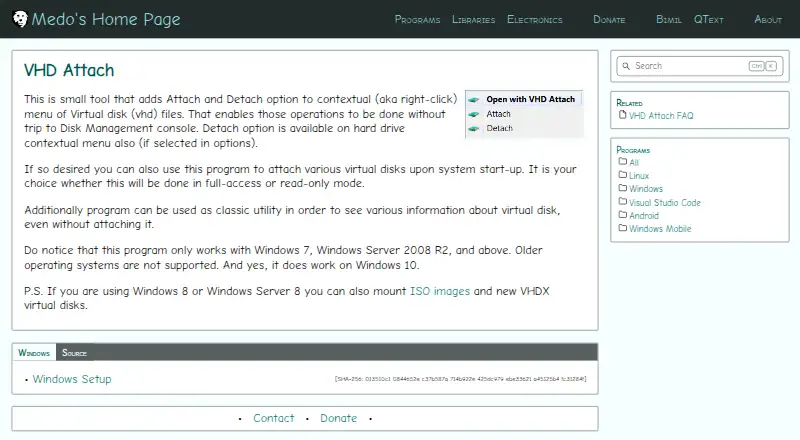
VHD Attach is a free Windows utility for mounting and detaching virtual disks. It adds Attach and Detach choices to the context menu for VHD files, and its options can add a Detach choice to the hard-drive menu as well. It can mount virtual disks automatically when Windows starts, using either full-access or read-only mode, and display virtual-disk information without mounting the disk. It supports Windows 7, Windows Server 2008 R2, and later, including Windows 10; older systems such as Windows Vista are not supported. On Windows 8 and Windows Server 8, it can also work with ISO images and VHDX disks. Command-line options include /attach, /detach, and /detachdrive. The source repository is available under the MIT License. A network-hosted VHD may require changing the service account to grant access. Automatic mounting of a BitLocker-enabled drive does not display its password prompt, since mounting begins before the user interface appears.
Good
- Adds VHD attach and detach context-menu commands
- Supports read-only or full-access startup mounting
- Displays virtual-disk information without mounting
- Supports ISO and VHDX on Windows 8 and Server 8
- Source repository is published under the MIT License
Watch out
- Does not support Windows Vista or older systems
- BitLocker auto-mounting does not show the password prompt
- Network-hosted disks may require a service-account change
Who it suits
VHD Attach suits Windows users who need context-menu or startup mounting for virtual disks. It also offers command-line controls and read-only startup mounting.
Verdict
VHD Attach provides several ways to mount virtual disks on supported Windows systems, including context-menu, startup, and command-line options. Check its older-Windows and BitLocker limitations if either applies to your setup.
Plans and prices
From VHD Attach's own pricing page, checked 30 Sep 2026.
| Plan | Price | What it gives you |
|---|---|---|
| Free | Free | Windows 7, Windows Server 2008 R2 and above |
The facts
Each one read from VHD Attach's own pages, with the date it was checked.
What it does
- Access modes
- Startup attachments can use full-access or read-only mode.checked 30 Sep 2026
- BitLocker limitation
- Auto-attaching a BitLocker-enabled drive does not show its password prompt because mounting occurs before the user interface appears.checked 30 Sep 2026
- Command line
- Supports /attach, /detach, and /detachdrive command-line parameters.checked 30 Sep 2026
- Disk information
- Can show virtual-disk information without attaching the disk.checked 30 Sep 2026
- Hard-drive detach
- A Detach option can also be added to the hard-drive context menu through the options.checked 30 Sep 2026
- Image formats
- Windows 8 and Windows Server 8 can use the program with ISO images and VHDX virtual disks.checked 30 Sep 2026
- Network locations
- Attaching a VHD from a network location may require changing the VHD Attach service account so it has access to that location.checked 30 Sep 2026
- Open source license
- The source repository is published under the MIT License.checked 30 Sep 2026
- Silent installation
- The installer supports the /VERYSILENT parameter for unattended installation.checked 30 Sep 2026
- Startup mounting
- Can automatically attach virtual disks when the system starts.checked 30 Sep 2026
- Support contact
- The maker provides a contact form for messages and replies.checked 30 Sep 2026
- Unsupported systems
- Older Windows operating systems, including Windows Vista, are not supported.checked 30 Sep 2026
- Virtual disk menu
- Adds Attach and Detach options to the right-click menu for VHD files.checked 30 Sep 2026
The company
- Founded
- 2009checked 28 Sep 2026
- Maker description
- Josip Medved describes the site as a personal page containing hobby projects and notes.checked 30 Sep 2026
Where it runs
- Supported Windows
- Works on Windows 7, Windows Server 2008 R2, and later, including Windows 10.checked 30 Sep 2026
Alternatives to VHD Attach
- 1
DAEMON Tools Lite
Free planAndroidiOSmacOSWindows8.0$3 one-time - 2

RaiDrive
Free planLinuxWindows7.4Free plan - 3
Alcohol 52%
Free planWindows7.3$27 one-time - 4
libguestfs
Free planOpen sourceAPILinuxmacOSSelf-hosted7.3Free plan - 5
NetDrive
AndroidiOSmacOSWindows7.0From $29.90 a year - 6

ExpanDrive
Free planLinuxmacOSWindows6.8From $29 a month