OSFClone
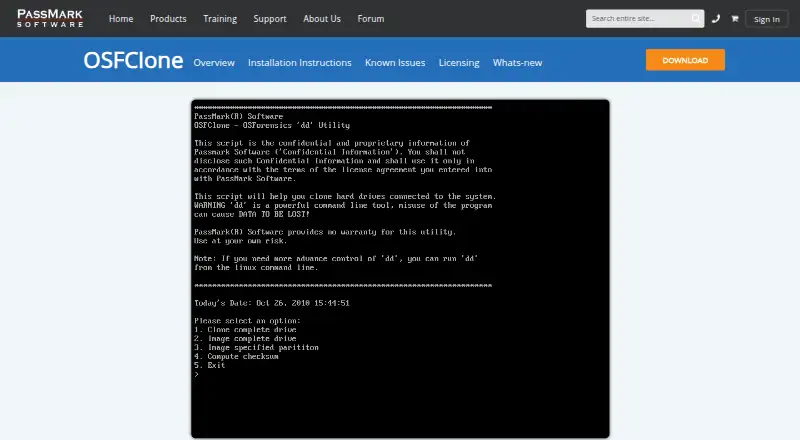
OSFClone is a free disk-imaging utility that boots independently of the installed operating system and creates or clones raw disk images.
What OSFClone is
OSFClone is a free disk-imaging utility that boots independently of the installed operating system and creates or clones raw disk images. It can also write images in AFF, EWF, and dc3dd formats. The maker says images retain unused sectors, slack space, file fragmentation, and undeleted file records. Users can compare a clone with its source using MD5 or SHA1 hashes, compress images, and save case details and checksums as forensic metadata. The product page describes cloning FAT, NTFS, and USB-connected drives. OSFClone can boot from CD/DVD or USB flash media; the current listed download is a 373 MB ZIP for version 1.4.1000, and USB installation requires a drive of at least 2 GB. Some UEFI systems may not boot it, and connecting ext2/3/4 evidence drives during startup may alter filesystem superblock values. The maker recommends a write blocker when integrity is critical, or attaching those drives after boot. The software is licensed under GPL v3.0.
Good
- Free self-booting disk imaging utility
- Supports raw, AFF, EWF, and dc3dd images
- Can compare source and clone hashes
- Image compression and forensic metadata options
- Boots from CD/DVD or USB
Watch out
- May not boot on some UEFI systems
- Startup can alter ext2/3/4 superblock values
- USB installation needs a drive of at least 2 GB
Who it suits
OSFClone suits users who need to create or clone disk images outside an installed operating system, including workflows that record forensic metadata. Users should review its boot and filesystem cautions before imaging.
Verdict
OSFClone provides bootable disk imaging, hash comparison, compression, and forensic metadata options at no cost. Its documented UEFI and ext2/3/4 cautions matter when planning an imaging workflow.
Plans and prices
From OSFClone's own pricing page, checked 4 Oct 2026.
| Plan | Price | What it gives you |
|---|---|---|
| OSFClone | Free | Free self-booting disk imaging utility · current version v1.4.1000 · USB installation requires a drive of at least 2 GB |
The facts
Each one read from OSFClone's own pages, with the date it was checked.
What it does
- Boot limitation
- OSFClone may fail to boot on some UEFI systems; the maker suggests switching the system boot mode to CSM.checked 4 Oct 2026
- Boot media
- OSFClone can boot from CD/DVD or USB flash drives; the listed current download is a 373 MB ZIP for version 1.4.1000.checked 4 Oct 2026
- Compatible drive types
- The product page describes cloning FAT, NTFS, and USB-connected drives.checked 4 Oct 2026
- Compression and metadata
- It offers image compression and can save case number, evidence number, examiner name, description, and checksum as forensic metadata.checked 4 Oct 2026
- Disk imaging
- OSFClone creates or clones exact raw disk images independently of the installed operating system.checked 4 Oct 2026
- Hash verification
- OSFClone can compare MD5 or SHA1 hashes of a clone and its source drive.checked 4 Oct 2026
- Image formats
- It supports raw images and imaging to AFF, EWF, and dc3dd formats.checked 4 Oct 2026
- Integrity caveat
- The maker warns that hardware, driver, and disk-state variations can cause a small chance of evidence contamination and recommends using a write blocker when integrity is critical.checked 4 Oct 2026
- Known filesystem issue
- The maker reports that imaging ext2/3/4 drives may alter filesystem superblock values if the evidence drive is connected during startup, and recommends a write blocker or hot-plugging after boot.checked 4 Oct 2026
- Licensing
- The maker states that OSFClone software is licensed under GPL v3.0.checked 4 Oct 2026
- Preserved data
- The maker says images preserve unused sectors, slack space, file fragmentation, and undeleted file records.checked 4 Oct 2026
- Related tools
- The maker says created images can be mounted with PassMark OSFMount and analyzed with PassMark OSForensics.checked 4 Oct 2026
The company
- Founded
- 1998checked 28 Sep 2026
- Headquarters
- Sydney, Australiachecked 28 Sep 2026
- Maker headquarters
- PassMark Software Pty Ltd lists its Australian head office at Level 5, 63 Foveaux St, Surry Hills, NSW 2010, Australia.checked 4 Oct 2026
Alternatives to OSFClone
- 1

FOG Project
Free planOpen sourceWebAPILinuxmacOS7.7Free plan - 2
Lazesoft Recovery Suite
Free planLinuxWindows7.0$27.95 one-time - 3

Clonezilla
Free planLinuxmacOSSelf-hostedWindows6.7Free plan - 4

HDClone
Free planLinuxSelf-hostedWindows6.7€19.90 one-time - 5
Lazesoft Disk Image & Clone
Free planWindows6.6$17.95 one-time - 6
OpenSuperClone
Free planLinux6.5Free plan