
CloudDrive2
CloudDrive2 connects cloud accounts, mounts them as local disks, and provides backup, encryption, and WebDAV.
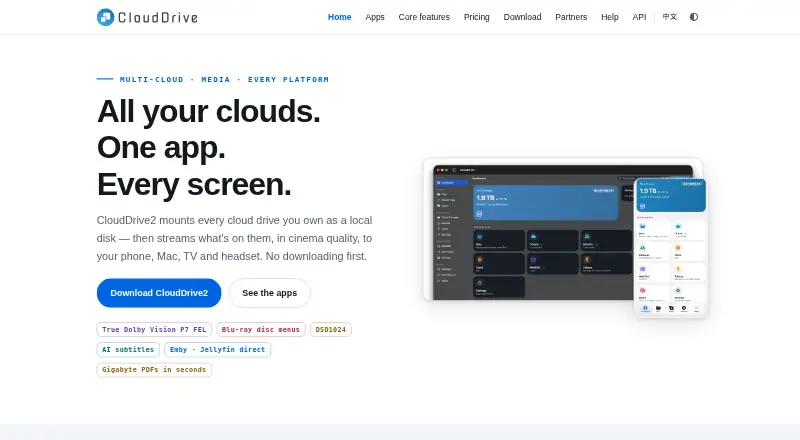
What CloudDrive2 is
CloudDrive2 connects cloud accounts, mounts them as local disks, and provides backup, encryption, and WebDAV. Listed sources include Aliyun Drive, Baidu, 115, Tianyi, 123 Pan, OneDrive, Google Drive, Xunlei, WebDAV, and local folders. Mounts support POSIX semantics on Linux and macOS and Windows security descriptors; random writes do not require downloading the whole file first. Its free Basic tier allows up to two cloud drives and one local mount, without Core Pro features. Core paid plans offer unlimited clouds and local mounts, while App Pro unlocks HDR and Dolby Vision, DSD, ISO disc playback, AI subtitle translation, Emby and Jellyfin client features, and VR video. The app connects to Emby and Jellyfin, with a companion plugin offered for each. CloudDrive2 includes a WebDAV server; paid membership enables separate WebDAV users with individual root directories and read-only settings. Its gRPC API has over 200 RPC methods, and tokens can be scoped by permissions and expiry. The maker says cloud-account details are encrypted with the user's password, with only a password hash stored on the server.
Good
- Mounts support POSIX semantics on Linux and macOS.
- Random writes do not require a full file download.
- Includes a WebDAV server and gRPC API.
- Connects with Emby and Jellyfin.
- Free Basic tier is available.
Watch out
- Basic is limited to two cloud drives and one local mount.
- Basic excludes Core Pro features.
- Encrypted cloud uploads are limited to 200 MB per file for monthly and yearly members.
Who it suits
It suits people who want to mount cloud storage as local disks or connect cloud accounts with media servers. The Basic tier may fit users with no more than two cloud drives and one local mount.
Verdict
CloudDrive2 combines cloud mounting, WebDAV, and media-server connections, with a free tier for limited use. Check the Basic limits and the separate paid features before choosing a plan.
Plans and prices
From CloudDrive2's own pricing page, checked 30 Sep 2026.
| Plan | Price | What it gives you |
|---|---|---|
| Basic | Free | Up to 2 cloud drives · 1 local mount · up to 2 devices online at once (not enforced yet) · no Core Pro features |
| Core Monthly | CN¥4.99 a month | Unlimited clouds and local mounts · up to 5 devices online at once (not enforced yet) · Core Pro features · ¥4.99 / month |
| App Pro | $19.99, paid once | Unlocks HDR and Dolby Vision · DSD · ISO discs · AI subtitle translation · Emby/Jellyfin client · VR video · USD $19.99 in every store · one-time |
| Core Yearly | CN¥49.99 a year | Unlimited clouds and local mounts · up to 5 devices online at once (not enforced yet) · Core Pro features · ¥49.99 / year |
| Ultimate Bundle | $79.99, paid once | Core Lifetime plus App Pro · USD $79.99 in every store |
| Core Lifetime Lite | CN¥199, paid once | Unlimited clouds and local mounts · up to 5 devices online at once (not enforced yet) · no Core Pro features · upgradeable to full Lifetime · ¥199 once |
| Core Lifetime | CN¥499, paid once | Unlimited clouds and local mounts · up to 5 devices online at once (not enforced yet) · Core Pro features · exempt from 200 MB encrypted cloud upload limit · ¥499 once |
| Accessibility Lifetime | — | Identical to Core Lifetime · request code using visual-disability certificate details · ¥499¥299 once |
The facts
Each one read from CloudDrive2's own pages, with the date it was checked.
What it does
- API
- The core exposes a gRPC API with over 200 RPC methods, and API tokens can be scoped by permissions and expiry.checked 30 Sep 2026
- Cloud integrations
- The maker lists Aliyun Drive, Baidu, 115, Tianyi, 123 Pan, OneDrive, Google Drive, Xunlei, WebDAV and local folders among supported sources.checked 30 Sep 2026
- Encrypted storage
- The encrypted filesystem encrypts filenames with AES and contents with chacha20-poly1305 before writing to cloud storage; cloud uploads are limited to 200 MB per file for monthly and yearly members.checked 30 Sep 2026
- Media integrations
- The app can connect to Emby and Jellyfin, and the maker offers a companion plugin for both media servers.checked 30 Sep 2026
- Mounting
- Its mounts support POSIX semantics on Linux and macOS and Windows security descriptors, and allow random writes without downloading the whole file first.checked 30 Sep 2026
- NAS and Docker
- The maker lists Synology, QNAP, Unraid and fnOS NAS support and a Docker image covering amd64, arm64 and armv7.checked 30 Sep 2026
- Playback
- App Pro unlocks HDR and Dolby Vision, DSD, ISO disc playback, AI subtitle translation, Emby/Jellyfin client features and VR video.checked 30 Sep 2026
- Product
- CloudDrive2 connects cloud accounts, mounts clouds as local disks, and provides backup, encryption and WebDAV.checked 30 Sep 2026
- Security
- The maker says cloud-account details are encrypted with the user's password and that only a password hash is stored on the server.checked 30 Sep 2026
- Support
- The maker provides a help and setup guide, Telegram group and GitHub Issues link.checked 30 Sep 2026
- WebDAV
- CloudDrive2 includes a WebDAV server, and paid membership enables separate WebDAV users with individual root directories and read-only settings.checked 30 Sep 2026
Money
- Plan limit
- The free Basic tier allows up to two cloud drives and one local mount; Core Pro features are excluded.checked 30 Sep 2026
Where it runs
- Platforms
- The maker lists apps for iPhone, iPad, Mac, Apple TV, Vision Pro, Android and Meta Quest, plus a core service for Windows, Linux, macOS, NAS and Docker.checked 30 Sep 2026
The full review of CloudDrive2
Overview
CloudDrive2 is a cloud-storage connector that brings supported accounts into one app and can mount them as local disks. It suits users who want cloud storage to work with desktop software, WebDAV clients or media servers rather than only through a browser. Its breadth is compelling, but the free tier is deliberately narrow and some playback features require a separate purchase.
Key features
Cloud mounts, WebDAV and API
CloudDrive2 supports sources including Aliyun Drive, Baidu, 115, Tianyi, 123 Pan, OneDrive, Google Drive, Xunlei, WebDAV and local folders. Mounts support POSIX semantics on Linux and macOS, Windows security descriptors, and random writes without first downloading an entire file. That makes the mounting approach useful when applications need to work with remote files as if they were local, though the free tier's single-mount cap limits how much of that convenience can be used at once.
The included WebDAV server extends access to compatible clients. Paid membership can create separate WebDAV users with individual root directories and read-only settings, a useful distinction for shared or restricted access. Readers looking specifically for compatible clients can browse WebDAV Client Software.
For automation, the core exposes a gRPC API with more than 200 RPC methods, and tokens can be limited by permissions and expiry. The maker says cloud-account details are encrypted with the user's password and that only a password hash is stored on the server. Its encrypted filesystem encrypts filenames with AES and file contents with chacha20-poly1305 before writing them to cloud storage. Monthly and yearly members face a 200 MB per-file cloud-upload limit for encrypted uploads; Core Lifetime is exempt.
Media and device support
CloudDrive2 connects to Emby and Jellyfin, with a companion plugin for both. App Pro adds HDR and Dolby Vision, DSD and ISO disc playback, AI subtitle translation, Emby/Jellyfin client features and VR video. These are a separate purchase from Core membership, so media users should check which playback functions they actually need before choosing a plan.
Supported platforms include Windows, Linux, macOS, Android, iOS and a web UI, as well as NAS and Docker. The maker lists Synology, QNAP, Unraid and fnOS support; its Docker image covers amd64, arm64 and armv7. Folder synchronisation and mobile apps are also supported. Setup help is available through a guide, Telegram group and GitHub Issues.
Pricing
Basic is free: it allows up to two cloud drives and one local mount, with no Core Pro features. Its two-device online allowance is not enforced yet, so it should not be treated as a dependable multi-device limit. This tier is a reasonable way to try a small setup, but users needing more mounts or Core Pro features must pay.
Core Monthly costs CN¥4.99 a month, while Core Yearly costs CN¥49.99 a year. Both provide unlimited clouds and local mounts, up to five devices online at once (not enforced yet), and Core Pro features. The yearly plan costs less than twelve monthly payments at the stated rates, but commits the user for a year; neither plan removes the 200 MB per-file encrypted-upload limit.
Core Lifetime Lite costs 199.00 CNY once and provides unlimited clouds and local mounts for up to five devices, but excludes Core Pro features. It can be upgraded to full Lifetime. Core Lifetime costs 499.00 CNY once and adds Core Pro features while removing the encrypted-upload cap. These one-time options suit users who prefer not to renew, with Lite trading away Pro features and the upload exemption.
App Pro costs 19.99 USD once in every store and unlocks the listed playback features. Ultimate Bundle costs 79.99 USD once and combines Core Lifetime with App Pro, making it the broadest stated package for users who need both the core service and those playback extras. Accessibility Lifetime costs 499299.00 CNY once, is identical to Core Lifetime, and requires a request code using visual-disability certificate details.
Platforms
CloudDrive2 spans Windows, Linux, macOS, Android, iOS and web, with NAS and Docker support. That range makes it a candidate for mixed desktop, mobile and home-server setups; the Basic tier's single local mount remains the main constraint for free users.
Who it's for
CloudDrive2 is best suited to people consolidating several supported cloud accounts, mounting them for other software, or connecting storage to WebDAV clients and Emby or Jellyfin. Its API and NAS/Docker support also make it relevant to users building integrations or running a home server. It is less suitable for someone who only needs straightforward cloud-to-cloud transfers, or who wants App Pro playback features without a separate purchase.
Pros and cons
- Pro: Broad cloud-source support and local-disk mounting bring multiple storage services into workflows that expect mounted files.
- Pro: Random writes avoid downloading a whole file first, while platform-specific filesystem support broadens desktop use.
- Pro: A gRPC API, permission-scoped tokens and configurable WebDAV users offer useful control for integrations and shared access.
- Con: Basic stops at two cloud drives and one local mount, and excludes Core Pro features.
- Con: App Pro's media capabilities cost extra, and monthly and yearly members retain a 200 MB per-file encrypted-upload cap.
Alternatives
Choose rclone instead if a free, open-source project across platforms including Linux, macOS, Windows, Android and self-hosted environments better matches your needs. FolderSync is another freemium option for Android, Linux, macOS and Windows, with an Android free app that includes ads. GoodSync may fit users seeking a freemium alternative with workstation and server plans; its Workstation plan is $49.95 a year for one workstation.
Air Explorer is worth considering for its free BASIC tier, which allows one account per cloud and read-only cloud-to-cloud transfers, with two simultaneous downloads and uploads. Cyberduck is a macOS and Windows option licensed under the GPL, with source available on GitHub. ExpanDrive offers a free tier for personal use, supporting up to 10 users or devices per year across 15 cloud services and protocols.
WebDAV Navigator is a freemium choice for Android and iOS users focused on WebDAV. Commander One is a macOS-only freemium alternative for readers who want software limited to that platform.
Verdict
Choose CloudDrive2 if you want cloud accounts mounted as disks alongside WebDAV, API and media-server connections, especially on a NAS or Docker setup. Its strongest case is the breadth of those roles in one product. Look elsewhere if a small transfer-focused tool is enough, or weigh the separate App Pro purchase and encrypted-upload limit carefully before committing to a paid Core plan.
Getting started
- Visit the CloudDrive2 website.
- Choose a platform: Windows, Linux, macOS, Android, iOS, web UI, NAS or Docker.
- Start with the free Basic plan, or select a paid plan for its listed features.
- Connect a supported cloud source or local folder.
- Use the help and setup guide if you need installation or configuration support.
Limits worth knowing
The free Basic tier allows up to two cloud drives and one local mount, and excludes Core Pro features. Monthly and yearly members are limited to 200 MB per encrypted cloud upload; Core Lifetime is exempt from that limit.
Questions
Is there a free plan?
Yes. Basic is free and allows up to two cloud drives and one local mount. It excludes Core Pro features.
What do paid Core plans cost?
Core Monthly costs CN¥4.99 a month, and Core Yearly costs CN¥49.99 a year. Both include unlimited clouds and local mounts, up to five devices online at once (not enforced yet), and Core Pro features.
What platforms does CloudDrive2 support?
Supported platforms include Windows, Linux, macOS, Android, iOS, web UI, NAS and Docker.
What does App Pro unlock?
App Pro costs 19.99 USD once. It unlocks HDR and Dolby Vision, DSD, ISO discs, AI subtitle translation, Emby/Jellyfin client features and VR video.
Does it include WebDAV?
Yes. CloudDrive2 includes a WebDAV server. Paid membership enables separate WebDAV users with individual root directories and read-only settings.
What is the encrypted upload limit?
Monthly and yearly members have a 200 MB per-file limit for encrypted cloud uploads. Core Lifetime is exempt.
Alternatives to CloudDrive2
- 1

Owlfiles
Free planAndroidiOSExtensionmacOS8.0From $12.99 a year - 2

FolderSync
Free planAndroidLinuxmacOSWindows7.7$6.99 one-time - 3
rclone
Free planAndroidWebAPILinux7.6Free plan - 4

RaiDrive
Free planLinuxWindows7.4Free plan - 5

Air Live Drive
Free planmacOSWindows7.2From $17 a year - 6

CloudMounter
macOSWindows7.1