
Maxdesk
Maxdesk is a web-based help desk for teams that handle customer support through email.
What Maxdesk is
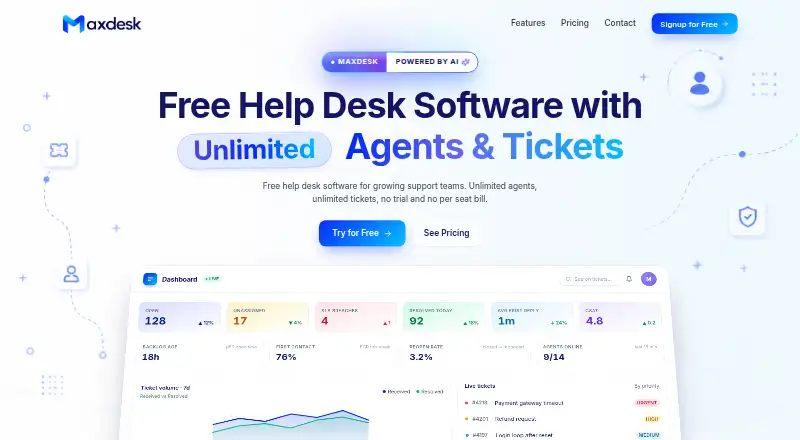
Maxdesk is a web-based help desk for teams that handle customer support through email. It provides email-to-ticket, assignment automation, internal comments, and one shared mailbox. Its Free plan costs nothing and includes unlimited agents and tickets within fair usage, basic SLA policies and business hours, no-code automations with limited active rules, templates, and a knowledge base. Pro costs $20 a month and adds custom branding, advanced reports and export, higher storage and attachment limits, twelve-month rolling data retention, and removal of ads and the Maxdesk footer. Elite costs $99 a month and includes Pro features plus two AI agents, up to 5,000 AI responses per month, context-aware conversations, an AI Copilot and response assistant, and live translations. Plans are billed monthly. Maxdesk is based in Bengaluru, India, and its mail platform is standalone.
Good
- Free plan includes unlimited agents
- Email-to-ticket and assignment automation
- Includes templates and a knowledge base
- Paid tiers add reports and AI tools
Watch out
- Free tickets are subject to fair usage
- Free automations have limited active rules
- Supports one shared mailbox
Who it suits
Maxdesk suits teams managing email-based customer support that want ticket assignment and internal comments. The free tier may suit teams starting with basic ticketing, while paid tiers add branding, reporting, storage, retention, or AI features.
Verdict
Maxdesk covers basic email ticketing on its free tier, with monthly paid plans adding broader administration and AI features. Teams should note the fair-usage condition and single shared mailbox.
Plans and prices
From Maxdesk's own pricing page, checked 19 Sep 2026.
| Plan | Price | What it gives you |
|---|---|---|
| Free | Free | Unlimited agents · Unlimited tickets within fair usage · Email-to-ticket · Basic SLA policies and business hours · No-code automations with limited active rules · Templates and knowledge base · billed monthly |
| Pro | $20 a month | Everything in Free · Custom logo and brand colors · Advanced reports and export · Higher storage and attachment limits · Twelve-month rolling data retention · No ads or Maxdesk footer · billed monthly |
| Elite | $99 a month | Everything in Pro · Two AI agents · Up to 5,000 AI responses per month · Context-aware conversations · AI Copilot and response assistant · Live translations · billed monthly |
| Free plan | Free | Unlimited agents · unlimited tickets (fair usage) · 3-month rolling ticket, report & audit history · standard attachment/storage limits · ads and Maxdesk email branding · $0 forever |
| Pro plan | $20 a month | Per workspace · 12-month rolling data retention · higher storage/attachment limits · $20/ workspace / month |
| Elite plan | $99 a month | Per workspace · 24-month rolling data retention · 2 AI agents · up to 5,000 AI responses / month · $99/ workspace / month |
| Enterprise plan | Priced on request | For enterprise-scale needs · reliability, security review, procurement paths and dedicated support · Talk to sales |
The facts
Each one read from Maxdesk's own pages, with the date it was checked.
What it does
- AI
- Elite includes AI response assistance, translations, troubleshooting, ticket summaries and sentiment and urgency detection.checked 8 Oct 2026
- Analytics
- The dashboard includes ticket counts, SLA breaches, CSAT, response time, trends and a live activity feed.checked 8 Oct 2026
- Audience
- Maxdesk says it is for teams of all sizes, including startups, growing support teams and larger organizations; it also says it can be used for internal IT.checked 8 Oct 2026
- Automation
- No-code rules use triggers, conditions and actions, and can route, tag, escalate or auto-reply to tickets.checked 8 Oct 2026
- Each workspace gets a support address that converts incoming mail into threaded tickets.checked 8 Oct 2026
- Integrations
- The pages reviewed describe email-to-ticket but do not name third-party integrations.checked 8 Oct 2026
- Notable scope
- Maxdesk says it is not a full ITSM suite.checked 8 Oct 2026
- Permissions
- Maxdesk lists custom roles, groups, a permission matrix and ticket scope controls.checked 8 Oct 2026
- Product
- Maxdesk describes itself as a hosted help desk and ticketing system.checked 8 Oct 2026
- Security records
- The Free plan includes an audit trail and 3-month rolling ticket, report and audit history; Pro lists 12 months and Elite 24 months.checked 8 Oct 2026
- SLAs
- SLA targets can vary by priority and account for business hours, with ticket countdowns and breach alerts.checked 8 Oct 2026
- Support
- The Free plan includes email support, while Pro includes priority email support; the contact page says replies usually arrive within a working day.checked 8 Oct 2026
- Ticketing
- The ticket view combines conversations, priorities, statuses, assignments, internal notes and attachments.checked 8 Oct 2026
Money
- Free-plan limits
- The Free plan has fair-use ticket limits, limited active automations, standard storage and attachment limits, and Maxdesk branding on outbound email.checked 8 Oct 2026
The company
- Headquarters
- Bengaluru, Indiachecked 28 Sep 2026
The full review of Maxdesk
Maxdesk is a hosted help desk that turns support email into coordinated ticket work. It suits startups, growing support teams and internal IT groups that want structured handling without adopting a full ITSM suite. The main trade-off is a single shared mailbox and fair-use limits on the free tier.
Overview
Each workspace receives a support address that converts incoming messages into threaded tickets. The ticket view keeps conversations, priorities, statuses, assignments, internal comments and attachments together, giving agents a shared record for replies and handoffs. One shared mailbox is supported, so teams separating several brands, products or departments may find the setup too narrow.
Maxdesk also supports internal IT requests, but it is not a full ITSM suite. It is better suited to help-desk coordination than to organizations seeking a broader service-management platform.
Key features
Ticketing, SLAs and automation
SLA targets can vary by priority and account for business hours. Countdown timers and breach alerts make approaching deadlines visible, which is useful when response commitments need active monitoring. No-code rules use triggers, conditions and actions to route, tag, escalate or auto-reply to tickets. Assignment automation can reduce manual triage, although the Free plan limits active rules.
Reporting and permissions
The dashboard covers ticket counts, SLA breaches, CSAT, response time, trends and a live activity feed. That gives managers operational signals beyond an inbox, while advanced reports and export are reserved for Pro. Custom roles, groups, a permission matrix and ticket-scope controls support more deliberate access management than a basic shared mailbox.
AI and history
Elite adds AI response assistance, translations, troubleshooting, ticket summaries, and sentiment and urgency detection. It includes two AI agents and up to 5,000 AI responses per month, making the tier relevant to teams with substantial repetitive correspondence rather than occasional AI use. Retention is three months on Free, 12 months on Pro and 24 months on Elite for ticket, report and audit history.
Pricing
Free
The Free plan costs nothing, billed $0 forever. It allows unlimited agents and unlimited tickets within fair usage, with email-to-ticket, basic SLA policies and business hours, templates, a knowledge base and no-code automation with limited active rules. Standard storage and attachment limits apply, and outbound email carries ads and Maxdesk branding. Email support is included; replies usually arrive within a working day. This is a sensible starting point for a small operation that can accept one mailbox and modest usage, but fair-use ticket limits and branding make it less suitable for a high-volume or customer-facing service.
Pro
Pro costs $20 a month, billed $20 per workspace per month. It adds a custom logo and brand colors, advanced reports and export, higher storage and attachment limits, 12-month rolling retention, no ads or Maxdesk footer, and priority email support. Choose it when presentation, reporting and longer history matter; it still remains a single-workspace, single-mailbox model.
Elite and Enterprise
Elite costs $99 a month, billed $99 per workspace per month. It includes everything in Pro, two AI agents, up to 5,000 AI responses per month, context-aware conversations, an AI Copilot and response assistant, and live translations, plus 24-month rolling retention. Enterprise uses custom pricing and is aimed at enterprise-scale reliability, security review, procurement paths and dedicated support. There is no free trial.
Platforms
Maxdesk is delivered on the web as a standalone mail platform. Teams wanting native mobile or desktop applications should consider a different fit.
Who it's for
Startups and growing support teams get a low-cost path from shared email to tickets, SLAs, automation and reporting. Internal IT groups can use it for request coordination when full ITSM capabilities are unnecessary. Larger organizations may appreciate custom permissions and Enterprise support, but the one-mailbox structure and the product's stated scope limit its role in complex service-management environments.
Pros and cons
- Pros: Free access includes unlimited agents, email-to-ticket and basic SLA controls.
- Pros: No-code routing, escalation and auto-replies reduce repetitive triage.
- Pros: Priority-based SLAs, breach alerts and operational dashboards support accountable response handling.
- Pros: Pro removes branding and extends retention; Elite adds substantial AI capacity.
- Cons: Only one shared mailbox is supported, limiting multi-brand or multi-department setups.
- Cons: Free usage is subject to fair-use ticket limits, restricted active automations, standard storage and outbound branding.
- Cons: Maxdesk is not a full ITSM suite, and there is no free trial.
Alternatives
For a broader shared-inbox comparison, see Shared Inbox Software. Choose Serif instead if you need iOS, macOS, Windows and web access plus meeting recording, task management, knowledge-base tools and Serif AI; its Lite plan costs $30 a month. Zoho TeamInbox is a better fit when Android and iOS apps, multiple shared incoming channels and extensive rules are priorities. Coherence suits teams seeking shared AI credits and record-based limits, including a free tier for three users. Help Scout offers a free plan for five users, one Inbox and one Docs site. Pick open-source, self-hosted UnInbox when local deployment matters. Zavu Inbox is aimed at teams handling WhatsApp, Telegram, Instagram and Messenger messages. Sharebox focuses on shared inboxes with a browser extension, while Trengo targets larger multichannel operations at substantially higher paid-plan prices.
Verdict
Choose Maxdesk for an email-centered help desk that can start free and grow into stronger retention, reporting and AI. Its clearest advantages are structured ticket handling, SLA visibility and no-code automation at a low entry price. Look elsewhere if you need multiple shared mailboxes, a full ITSM suite, native mobile or desktop apps, or more generous and predictable high-volume limits.