
Drag
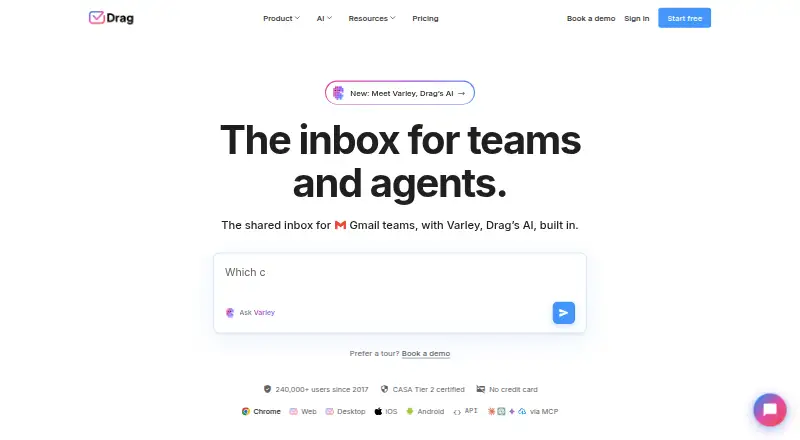
Drag is a shared inbox for teams that handle customer email in Gmail or the Drag web app.
What Drag is
Drag is a shared inbox for teams that handle customer email in Gmail or the Drag web app. Teams can organize work with boards, assign messages, add notes and shared drafts, and use collision detection to coordinate replies. The inbox can bring email, WhatsApp, a live-chat channel in early access, and a help center into one queue. Varley provides Copilot, Agents, Intelligence, and email assists. AI features are included in Plus and Pro; Starter can add AI credits. Drag connects with Google Workspace and WhatsApp, supports more than 5,000 apps through Zapier, and offers a REST API and MCP server. Plans have no seat minimum and allow unlimited users. Starter has up to 10 automation rules and a three-month reporting window; Plus and Pro include unlimited rules and longer reporting windows.
Good
- Boards, assignments, notes, and shared drafts support team workflows.
- Collision detection helps coordinate email responses.
- One queue supports email, WhatsApp, early-access live chat, and help center.
- Unlimited users with no seat minimum.
- Seven-day trial includes Pro features without a credit card.
Watch out
- No free plan.
- Starter limits automation rules to 10.
- Live chat is in early access.
- AI features are included in Plus and Pro; Starter needs AI credits.
Who it suits
Drag suits support, sales, operations, IT, or HR teams of up to 200 people working in Gmail and Google Workspace. It may fit teams that want shared email workflows alongside other customer channels.
Verdict
Drag combines shared Gmail work with team assignments and multiple customer channels. Compare plan limits and the annual-billing price with the features your team needs.
Plans and prices
From Drag's own pricing page, checked 15 Oct 2026.
| Plan | Price | What it gives you |
|---|---|---|
| Starter | $12 a month | Shared inboxes · Kanban/list/preview boards · assignments and @mentions · templates, notes, subtasks · Chrome, web, desktop and mobile apps · 10 automation rules · 3-month reporting · billed yearly; $16 billed monthly |
| Plus | $18 a month | Everything in Starter · six AI assists · Copilot · Intelligence · AI help-center search · advanced live chat · onboarding help · unlimited automation · email sequences · custom views · 6-month reporting · billed yearly; $22 billed monthly |
| Pro | $24 a month | Everything in Plus · WhatsApp · Drag Agent · API and MCP access · AI knowledge links, FAQs and files · business hours and SLA rules · round-robin assignment · custom fields and roles · priority support · 12-month reporting · billed yearly; $30 billed monthly |
The facts
Each one read from Drag's own pages, with the date it was checked.
What it does
- AI
- Varley provides Copilot, Agents, Intelligence, and email assists; AI features are included in Plus and Pro, while Starter can add AI credits.checked 2 Oct 2026
- AI agents
- Drag Agent can classify incoming email, retrieve context, take actions and resolve or escalate conversations.checked 15 Oct 2026
- AI assists
- Varley provides drafting, compose assistance, thread summaries, classification, sentiment detection and knowledge-base answers.checked 15 Oct 2026
- AI Copilot
- Copilot answers plain-language questions over inbox data and can propose actions that require confirmation.checked 15 Oct 2026
- API
- The public REST API uses API keys and JSON over https://app.dragapp.com/v2/ to access boards, columns, cards, tags and email sequences.checked 15 Oct 2026
- Automation
- Automation rules support routing, tagging, autoresponders and SLA-related workflows.checked 15 Oct 2026
- Board views
- Workspaces provide Kanban, list and preview-pane views, with saved filtered views.checked 15 Oct 2026
- Channels
- The product combines email, WhatsApp, live chat, help-center conversations and Google Groups on shared boards.checked 15 Oct 2026
- Collaboration
- Teams get assignments, internal notes, shared drafts, mentions, shared tags and collision detection.checked 15 Oct 2026
- Documentation and support
- Drag provides API and MCP references, a Help Center, Drag Academy tutorials and support by chat or email.checked 15 Oct 2026
- Integrations
- Drag connects natively with Google Workspace services and WhatsApp, supports 5,000+ apps through Zapier, and offers a REST API and MCP server.checked 2 Oct 2026
- Legal name and funding profile
- Crunchbase identifies the legal name as DragApp.com Ltd, classifies it as private seed-stage and lists three funding rounds with amounts hidden.checked 15 Oct 2026
- Limit: integration coverage
- A Software Advice reviewer wanted integrations that Drag did not yet provide.checked 15 Oct 2026
- Limit: Outlook support
- A Software Advice reviewer said Drag did not support their Outlook accounts.checked 15 Oct 2026
- Limit: subscription renewal
- A Software Advice reviewer complained about an automatic annual renewal and refusal of a refund.checked 15 Oct 2026
- MCP licence
- The MCP server source is open source under the MIT licence and is distributed through GitHub and npm as @dragapp/mcp-server.checked 15 Oct 2026
- MCP server
- Drag publishes an MCP server with 47 read/write tools across 12 categories for compatible AI clients.checked 15 Oct 2026
- Native integrations
- Gmail, Google Groups, Google Calendar, Google Drive and WhatsApp connect natively.checked 15 Oct 2026
- Notable product update
- The changelog records the March 21, 2023 release of a Zapier integration connecting Drag to more than 5,000 apps.checked 15 Oct 2026
Where it runs
- Apple requirements
- The iOS app requires iOS 12 or later, while the Mac version requires macOS 11 or later and an Apple M1-or-newer Mac.checked 15 Oct 2026
- Limit: mobile app
- Apple reviewers reported crashes, limited bulk deletion and missing attachment actions in the mobile app.checked 15 Oct 2026
The company
- Company size
- LinkedIn lists DragApp as a privately held software company with 11–50 employees and a London headquarters.checked 15 Oct 2026
- Founded
- Drag states that it was founded in 2017 by Nick Timms and Duda Bardavid.checked 15 Oct 2026
Money
- Plan limits
- All plans allow unlimited users with no seat minimum; Starter has up to 10 automation rules and a 3-month reporting window, compared with unlimited rules and 6 months on Plus and 12 months on Pro.checked 2 Oct 2026
The full review of Drag
Overview
Drag is a shared inbox for teams that manage customer email in Gmail, with a separate web app for the same work. It suits Google Workspace teams that need shared ownership across support, sales, operations, IT, or HR. Its strongest case is turning a common inbox into a coordinated workflow; the cost rises if you need WhatsApp or its advanced AI tools.
Key features
Boards, assignments, notes, shared drafts, and collision detection give teams ways to divide and coordinate email rather than relying on a single shared mailbox. Kanban, list, and preview views let teams organize work in different formats; templates and subtasks add structure to handoffs. This is useful when several people handle the same customer queue, but Starter’s 10-rule automation cap may constrain teams with more involved routing.
Varley provides Copilot, Agents, Intelligence, and email assists. Plus includes six AI assists, Copilot, and Intelligence, while Starter can add AI credits. Pro adds Drag Agent and AI knowledge based on links, FAQs, and files, making it the plan to consider when teams want that layer of assistance rather than basic shared-inbox coordination.
Drag brings email, WhatsApp, early-access live chat, and a help center into one queue. WhatsApp is reserved for Pro, so teams that need it must budget for the top tier. Google Workspace integrations are native; Zapier connects to more than 5,000 apps. Pro also includes REST API and MCP access, which gives teams more integration options than the lower plans.
Drag says it is GDPR compliant and CASA Tier 2 certified, uses TLS 1.2 for application communications and AES-256 for stored data, and does not store email content. It also says shared inbox emails are not copied into individual inboxes and that access can be revoked when a teammate leaves. Those policies may matter to teams assessing access and data handling.
Pricing
All plans allow unlimited users with no seat minimum, an unusual practical advantage for teams that need to include occasional collaborators. Prices below are per user per month, billed annually. The seven-day free trial includes every Pro feature and requires no credit card.
| Plan | Price | What it includes |
|---|---|---|
| Starter | $12 a month (billed annually) | Shared inboxes in Gmail; Kanban, list, and preview board views; assignments and @mentions; templates, notes, and subtasks; Chrome extension, web, desktop, and mobile apps; 10 automation rules. |
| Plus | $18 a month (billed annually) | Everything in Starter, six AI assists, Copilot and Intelligence, unlimited automation rules, email sequences, custom views, and AI-powered help center search. |
| Pro | $24 a month (billed annually) | Everything in Plus, WhatsApp, Drag Agent, REST API and MCP access, AI knowledge from links, FAQs, and files, and round-robin assignment. |
Starter is the economical choice for teams that mainly need shared Gmail work and can stay within 10 automation rules; its reporting window is three months. Plus doubles the price per user but removes the rule cap, extends reporting to six months, and adds AI and sequence features. Pro extends reporting to 12 months and is the only tier with WhatsApp, Drag Agent, and API and MCP access. The annual billing term matters when comparing the monthly figures, and there is no free plan.
Every plan includes a help center and live chat support. Plus adds onboarding and setup help, while Pro adds priority support. These additions make the higher tiers more attractive to teams that want assistance during rollout or a higher support priority.
Platforms
Drag supports Android, iOS, macOS, Windows, web, a browser extension, and an API. Gmail is its mail platform, so it is a natural fit for teams already using Gmail rather than those seeking a mailbox-neutral shared inbox.
Who it's for
Drag targets teams of up to 200 people working in Gmail and Google Workspace, including customer support, sales, operations, IT, and HR. It is strongest where several people need to assign, discuss, and complete work from shared customer email. Teams that need a free starting tier, or need WhatsApp without paying for Pro, should look elsewhere.
Pros and cons
- Pros: Unlimited users with no seat minimum makes it easier to bring more colleagues into shared work without a plan seat cap.
- Pros: Assignments, notes, shared drafts, and collision detection support clearer ownership when multiple people handle Gmail conversations.
- Pros: Native Google Workspace connections plus Zapier support across 5,000+ apps offer broad integration routes.
- Cons: No free plan, and the trial lasts only seven days, so teams must move to a paid plan to keep using Drag.
- Cons: Starter limits automation to 10 rules and reporting to three months; more extensive workflows and longer reporting require a higher tier.
- Cons: WhatsApp, Drag Agent, and REST API and MCP access are exclusive to Pro, the most expensive plan.
Alternatives
Zoho TeamInbox is worth comparing if a free plan matters: it offers three shared incoming channels, 25 rules, 10 shared outgoing email channels, internal discussions, and draft sharing on Starter.
Help Scout may suit a small team looking to begin at no cost: its Free plan includes five users, one Inbox, one Docs site, 100 contacts per month, 10 saved replies, and 10 tags.
Zavu Inbox is a free option for teams focused on messaging channels, with two connections and 2,000 shared WhatsApp, Telegram, Instagram, and Messenger messages per month, plus $2 usage credit.
Coherence has a free plan for three users with 2,500 records and 50 shared AI credits per month, but Shared Inbox is not included in that tier.
Loop Email is another paid option with a free trial and support for Android, iOS, macOS, web, and Windows.
MailStack is a free, self-hosted option with a single-node reference deployment.
Maxdesk offers a free plan with unlimited agents and tickets within fair usage, email-to-ticket, basic SLA policies and business hours, and limited no-code automations.
Missive is a paid alternative with web, desktop, and mobile apps; its Starter plan is $14 a month billed yearly for up to five users and five shared accounts per user.
Browse Shared Inbox Software, HR Workflow Automation Software, or AI Email Assistants for more options by category.
Verdict
Choose Drag if your team works in Gmail and needs shared assignments, conversation context, and room to add colleagues without a seat minimum. Its combination of board-based email work and multiple channels is the draw; the main reason to look elsewhere is the lack of a free plan and the fact that WhatsApp and the most advanced AI capabilities require Pro.
Alternatives to Drag
- 1

Mailbutler Smart Assistant
Free planAndroidiOSWebExtension8.2Free plan - 2

Perplexity
Free planAndroidiOSWebAPI8.2From $20 a month - 3

Fyxer
Free planiOSWebAPImacOS8.1Free plan - 4

Serif
Free planiOSWebmacOSWindows8.1From $30 a month - 5
Spark +AI
Free planAndroidiOSmacOSWindows7.9From $10 a month - 6
Metis Mail
Free planOpen sourceWebAPISelf-hosted7.8From $115 a year