Spark +AI
Spark +AI adds an AI assistant to Spark’s email app for Android, iOS, macOS, and Windows.
What Spark +AI is
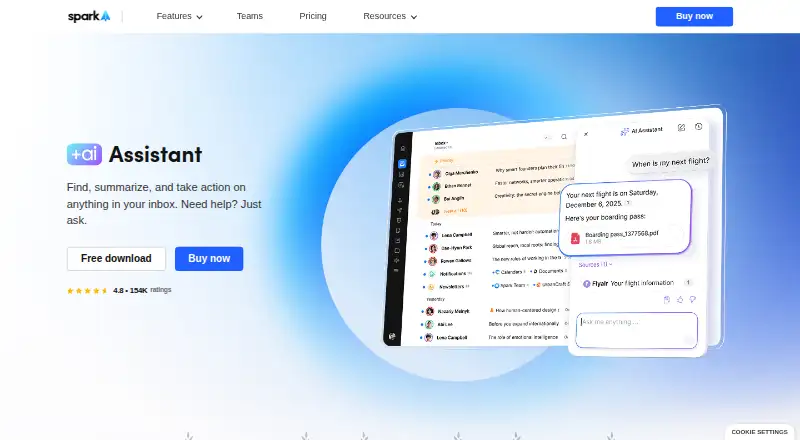
Spark +AI adds an AI assistant to Spark’s email app for Android, iOS, macOS, and Windows. It searches email, attachments, calendar items, and meeting notes for relevant information. The assistant can draft and rephrase emails, check grammar and clarity, translate messages, check colleagues’ availability, schedule meetings, draft and send emails, and organize the inbox. It works with Gmail and Google Workspace, Outlook and Office 365 including Exchange Online, iCloud, Yahoo, and standard IMAP accounts; its attachment support covers PDF and TXT files. Spark says email and request history are processed locally, while a few query-related emails are sent to its AI provider. Provider copies may be retained for up to 30 days for abuse monitoring. Spark says providers do not use user data to train AI models, and AI features can be switched off in settings. The Free plan is available; Plus costs $10 a month per user and Pro costs $20 a month per user. Meeting Notes allowances vary by plan, and AI features also use a monthly quota. Spark lists integrations including Notion, Asana, Slack, Todoist, Zoom, Microsoft Teams, and HubSpot.
Good
- Searches email, attachments, calendars, and meeting notes.
- Can draft, proofread, and translate emails.
- Supports PDF and TXT attachments.
- AI features can be disabled in settings.
Watch out
- AI providers may retain copies for up to 30 days.
- AI features use a monthly quota.
- Meeting Notes allowances vary by plan.
Who it suits
Spark +AI suits people who want email search, writing help, and inbox actions across supported email accounts. Its plan descriptions also address individuals, small teams, professionals, client-facing teams, and larger teams.
Verdict
Spark +AI combines email search and writing assistance with scheduling and inbox actions across several account types. Review the per-user paid plans, quota, and email-processing details if those affect your choice.
Plans and prices
From Spark +AI's own pricing page, checked 15 Oct 2026.
| Plan | Price | What it gives you |
|---|---|---|
| Free | Free | Smart Inbox · unlimited email accounts · smart notifications · calendar · $0 |
| Plus | $10 a month | Spark +AI · AI Assistant · 40 AI Meeting Notes · integrations · team collaboration · $10 / month per user; $120 / year |
| Pro | $20 a month | Unlimited AI Meeting Notes · full AI Assistant history · read statuses · shared inboxes · HubSpot · Spark CLI triage · $20 / month per user; $240 / year |
| Enterprise | Priced on request | security controls · dedicated success manager · productivity coaching · Let's Talk; Contact Sales |
The facts
Each one read from Spark +AI's own pages, with the date it was checked.
What it does
- AI actions
- Spark says the assistant can schedule meetings, draft and send emails, and organize the inbox.checked 15 Oct 2026
- AI Assistant search
- AI Assistant searches email, attachments, calendars, and meeting notes through natural-language conversation.checked 15 Oct 2026
- AI attachment limits
- AI Assistant currently extracts attachment text only from PDF and TXT files.checked 15 Oct 2026
- AI data handling
- Spark says email and request history are processed locally, while only a few emails related to a query are sent to its AI provider; provider copies may be retained for up to 30 days for abuse monitoring.checked 30 Sep 2026
- AI privacy
- Spark says AI providers do not use user data to train AI models, and AI features can be disabled in settings.checked 30 Sep 2026
- AI provider processing
- Spark indexes mail locally and sends only query-related messages and the query to its AI provider; provider copies may remain up to 30 days for abuse monitoring.checked 15 Oct 2026
- AI training policy
- Spark states that personal data used by Spark +AI is not used to train AI models.checked 15 Oct 2026
- AI writing
- AI Assistant drafts and rephrases email, proofreads grammar and clarity, and translates messages.checked 15 Oct 2026
- API and SDK availability
- Spark publishes CLI agent documentation and skills but no general public REST API or SDK documentation was found on its developer-facing pages.checked 15 Oct 2026
- Attachment limits
- AI Assistant can use attachments in PDF and TXT formats.checked 30 Sep 2026
- CLI permissions
- Spark CLI provides Read access across plans and Triage capabilities for drafting, organizing, delegating, and bulk inbox operations.checked 15 Oct 2026
- CLI skills licence
- Spark's public spark-cli-skills repository is released under the MIT License.checked 15 Oct 2026
- Collaboration
- Team functions include shared inboxes, shared drafts, assignments, private comments, shared threads, and shared templates.checked 15 Oct 2026
- Core inbox features
- The product includes Smart Inbox, unified inboxes, natural-language Smart Search, newsletter grouping, and push notifications.checked 15 Oct 2026
- Documentation and support
- The help center covers tutorials, Spark +AI, teams, troubleshooting, billing, privacy, calendars, integrations, and CLI setup.checked 15 Oct 2026
- Email providers
- Spark supports Gmail, Google Workspace, Outlook, Office 365, Exchange Online, iCloud, Yahoo, and standard IMAP accounts.checked 15 Oct 2026
- Inbox actions
- AI Assistant can check colleagues’ availability, schedule meetings, draft and send emails, and organize the inbox.checked 30 Sep 2026
- Inbox search
- AI Assistant searches emails, attachments, calendar, and meeting notes to find relevant information.checked 30 Sep 2026
Money
- AI plan limits
- The pricing comparison lists five lifetime Meeting Notes on Free, 40 per month on Plus, and unlimited on Pro and Enterprise; AI features also use monthly Spark +AI quota.checked 30 Sep 2026
The company
- Company
- Spark is part of Readdle, which describes itself as a privately held productivity software company.checked 30 Sep 2026
- Company facts
- LinkedIn lists Readdle as privately held, founded in 2007, headquartered in Berlin, and in the 201–500 employee range.checked 15 Oct 2026
- Company legal identity
- Google Play identifies the developer as SPARK MAIL LIMITED, with an Ireland address in Dalkey.checked 15 Oct 2026
- Company ownership and funding
- Crunchbase describes Readdle as privately held, bootstrapped since the App Store launched, with legal name Readdle Limited.checked 15 Oct 2026
- Founded
- 2007checked 23 Sep 2026
The full review of Spark +AI
Overview
Spark +AI adds an AI Assistant to Spark’s email app for people who want help finding information, drafting messages, and handling scheduling and inbox tasks across multiple accounts. Its breadth is useful, but the paid plans, monthly AI quota, and provider-retention window are worth weighing before you move a work inbox onto it.
The assistant works with Gmail and Google Workspace, Outlook and Office 365 including Exchange Online, iCloud, Yahoo, and standard IMAP accounts. It searches email, attachments, calendar information, and meeting notes, though attachment support is limited to PDF and TXT. Spark, part of privately held productivity software company Readdle, was founded in 2007.
For other options in the category, see AI Email Assistants.
Key features
Search and follow up
AI Assistant searches across messages and meeting information, summarizes threads, and supports follow-up actions. That makes it more than a writing aid for users who need to retrieve context from a busy inbox. It can use PDF and TXT attachments, but readers who rely on other file formats should not expect those to be covered.
Writing and inbox actions
The assistant can draft and rephrase email, proofread for grammar and clarity, translate messages, check colleagues’ availability, schedule meetings, and organize the inbox. It can draft and send emails, while automatic sending is not a capability; the user remains in the sending loop. That distinction suits people who want help with routine work without handing over unattended dispatch.
Integrations and privacy
Spark lists integrations with Notion, Asana, Slack, Todoist, Zoom, Microsoft Teams, and HubSpot. Salesforce and Pipedrive support is coming soon. For AI processing, Spark says email and request history stay local and only a few emails relevant to a query go to its AI provider. Provider copies may be kept for up to 30 days for abuse monitoring. Spark says providers do not train models on user data, and AI features can be turned off in settings. That is a meaningful privacy control, but the retention period may not suit every organization.
Pricing
Spark uses a freemium model, with paid plans starting at $10 a month per user, and a 7-day trial. The Free plan costs nothing and includes Smart Inbox, unlimited email accounts, Smart Notifications, and Calendar. It has five lifetime Meeting Notes and no Spark +AI quota details in the plan comparison; it is best for users who want Spark’s core email features rather than sustained AI assistance.
Plus costs $10 a month, billed $10 / month per user or $120 / year. It adds Spark +AI, AI Assistant, 40 AI Meeting Notes per month, and essential team collaboration. Spark +AI also uses a monthly quota, so the meeting-note allowance is not the only usage constraint. Plus suits individuals and small teams that want regular AI help at the entry paid price.
Pro costs $20 a month, billed $20 / month per user or $240 / year. It includes everything in Plus, unlimited AI Meeting Notes, advanced team collaboration, and HubSpot integration. Professionals and client-facing teams who need the higher meeting-note allowance and added collaboration tools are the clearest fit; the doubled per-user price is harder to justify for occasional AI use.
Enterprise has custom pricing. It includes everything in Pro plus security and controls, a dedicated success manager, and 1:1 productivity coaching. Spark positions it for larger teams needing advanced security and support. The Free plan gives up the ongoing meeting-note allowance and paid AI access; Plus gives up unlimited Meeting Notes, advanced collaboration, and HubSpot; Pro gives up Enterprise’s additional security and support services.
Platforms
Spark is available for Android, iOS, macOS, and Windows, giving users a choice of mobile and desktop platforms.
Who it's for
Spark +AI is a good fit for individuals and teams already working across supported email accounts who want search, writing help, scheduling, and inbox organization in one app. Plus is the sensible starting point for lighter individual or small-team use; Pro better matches professionals and client-facing teams using meeting notes and collaboration heavily. Larger teams needing dedicated support and security controls should consider Enterprise. It is a weaker fit for people who need unattended automatic sending, broader attachment-format support, or AI use without a monthly quota.
Pros and cons
- Pros: Search spans email, calendar, meeting notes, and supported attachments, making it useful for finding context rather than just composing replies.
- Pros: Writing, scheduling, and inbox actions cover several common email tasks, while sending still requires user involvement.
- Pros: Broad provider support and four device platforms make it practical for people with mixed accounts and devices.
- Cons: Attachment use is limited to PDF and TXT, which narrows its value for file-heavy workflows.
- Cons: Paid access is per user, AI features consume monthly quota, and meeting-note limits vary by plan.
- Cons: Provider copies may be retained for up to 30 days, a consideration for privacy-sensitive teams.
Alternatives
For focused email assistance, Mailbutler Smart Assistant has a free Starter plan, a free trial, and support across Android, iOS, desktop, web, and browser extension. Its Starter emails include a visible Mailbutler signature, so weigh that trade-off if choosing its free tier.
Perplexity is a freemium option with limited daily use on its Free plan and a $20 a month Pro plan for expanded use. Pick it when that broader assistant’s stated daily-use tiers suit you better than Spark’s per-user email plans.
Spike offers a free Starter plan for up to 3 members and one teamspace, with 60 days of search history and 15 GB storage per member; its Team plan costs $4 a month. Consider it if those team and storage limits are a closer fit, though it has no free trial.
Superhuman Go has a free plan with basic inline suggestions, chat with tabs and apps, editable shareable documents, and synced conversations, plus a free trial. It is worth considering when those free assistant features better match the task.
OpenMailBot has a free Community plan with all AI features, ChromaDB and Ollama, unlimited users and inboxes, and GitHub community support.
EmailOps is a free option with all features included and no account requirement.
Kerna offers a free Starter tier with 30,000 tokens, GPT-5.6, all features, and a single-user license, alongside a €12 a month Standard plan with 500,000 tokens. Its token-based tiers may suit someone comparing against those stated allowances.
Mailtwine is a paid product with free beta access to all features and no plan limits during beta; its paid-plan pricing will be announced before launch.
Verdict
Choose Spark +AI if you want one multi-platform email app that combines broad account support with search, writing, scheduling, and inbox assistance. Its strongest case is the range of email work it brings together; look elsewhere if you need automatic sending, more attachment formats, or a clearer path to unrestricted AI use without per-user paid plans and quota.
Alternatives to Spark +AI
- 1

Mailbutler Smart Assistant
Free planAndroidiOSWebExtension8.2Free plan - 2

Perplexity
Free planAndroidiOSWebAPI8.2From $20 a month - 3

Fyxer
Free planiOSWebAPImacOS8.1Free plan - 4

Serif
Free planiOSWebmacOSWindows8.1From $30 a month - 5

Drag
AndroidiOSWebAPI7.8From $12 a month - 6
Metis Mail
Free planOpen sourceWebAPISelf-hosted7.8From $115 a year